I'd have made a gif out of that bug but i can't.
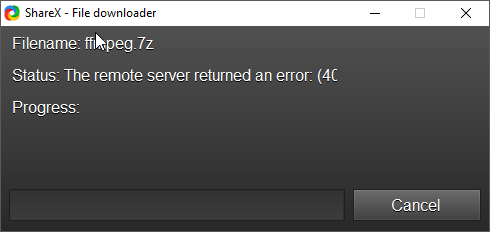
log :
System.IO.IOException: The process cannot access the file 'C:\Users\f-rog\AppData\Local\Temp\ShareX\ffmpeg.7z' because it is being used by another process.
at System.IO.__Error.WinIOError(Int32 errorCode, String maybeFullPath)
at System.IO.FileStream.Init(String path, FileMode mode, FileAccess access, Int32 rights, Boolean useRights, FileShare share, Int32 bufferSize, FileOptions options, SECURITY_ATTRIBUTES secAttrs, String msgPath, Boolean bFromProxy, Boolean useLongPath, Boolean checkHost)
at System.IO.FileStream..ctor(String path, FileMode mode, FileAccess access, FileShare share)
at ShareX.HelpersLib.DownloaderForm.StartDownload()
at ShareX.HelpersLib.DownloaderForm.DownloaderForm_Shown(Object sender, EventArgs e)
at System.Windows.Forms.Form.OnShown(EventArgs e)
at System.Windows.Forms.Control.InvokeMarshaledCallbackHelper(Object obj)
at System.Threading.ExecutionContext.RunInternal(ExecutionContext executionContext, ContextCallback callback, Object state, Boolean preserveSyncCtx)
at System.Threading.ExecutionContext.Run(ExecutionContext executionContext, ContextCallback callback, Object state, Boolean preserveSyncCtx)
at System.Threading.ExecutionContext.Run(ExecutionContext executionContext, ContextCallback callback, Object state)
at System.Windows.Forms.Control.InvokeMarshaledCallback(ThreadMethodEntry tme)
at System.Windows.Forms.Control.InvokeMarshaledCallbacks()
ShareX 12.0 (Release)
 lostallmymoney
All 6 comments
Looks like the 7z version is no longer hosted. Need a fast patch pls.
lostallmymoney
on 11 Mar 2018
Downloading the file and putting it myself into the tools folder fixed it for now. I also had to change my username in my config files because i recently reinstalled windows. The issue is still there tho.
lostallmymoney
on 12 Mar 2018
This has been fixed, but the update has not been published
https://github.com/ShareX/ShareX/blob/71c357ed489d8b0a69720cacf73d5428b3c097a1/ShareX.MediaLib/FFmpegDownloader.cs
See below regarding dev builds
 Scrxtchy
on 12 Mar 2018
Scrxtchy
on 12 Mar 2018
You can download dev build like this for now: https://getsharex.com/docs/dev-builds~~
You can download pre release build:
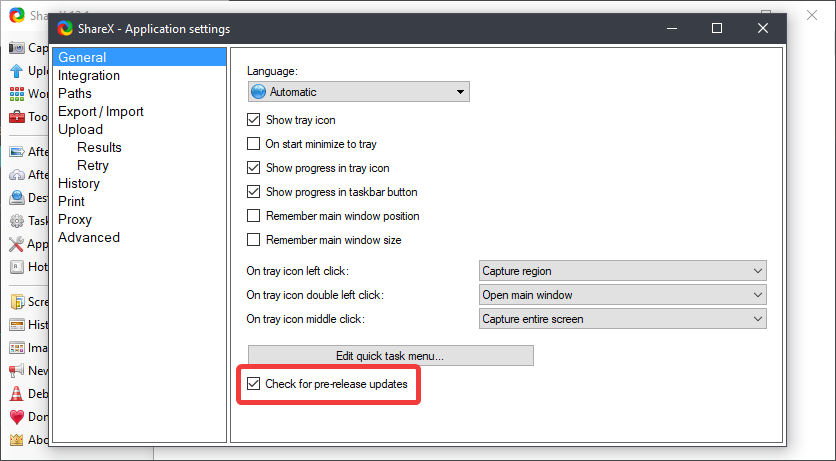
Or download FFmpeg manually from: https://ffmpeg.zeranoe.com/builds/
and extract ffmpeg.exe file to Documents\ShareX\Tools folder.
 Jaex
on 12 Mar 2018
Jaex
on 12 Mar 2018
Thanks!
It should download a ZIP file instead of .7z now.
 PeterWxin
on 29 Mar 2018
PeterWxin
on 29 Mar 2018
I had comodo Firewall installed. Unblockin ffmpeg seems solved the problem.
 seocliffdev
on 15 Jan 2020
seocliffdev
on 15 Jan 2020
Related issues
 aph3rson
·
24Comments
aph3rson
·
24Comments
 shavitush
·
30Comments
shavitush
·
30Comments
 Freekers
·
68Comments
Freekers
·
68Comments
 TNTUP
·
34Comments
TNTUP
·
34Comments
 coggy9
·
29Comments
coggy9
·
29Comments
Most helpful comment
You can download dev build like this for now: https://getsharex.com/docs/dev-builds~~You can download pre release build:
Or download FFmpeg manually from: https://ffmpeg.zeranoe.com/builds/
and extract
ffmpeg.exefile toDocuments\ShareX\Toolsfolder.