Sharex: Images appear corrupted on upload
Hi, I've updated ShareX today and when I take a screenshot the image is corrupted, Is it due to my ISP or computer? I've tried rebooting another PC and it still happens. Would uninstalling/reinstalling will fix it?
Here's a proof like this one: http://i.qcfb.ca/20160819023320.png In FireFox the image wont load due it contains errors but chrome loads it but incomplete. I've downloaded the file from my webserver and it appears corrupted. It cannot be my webserver, nothing has changed since :/
Tried downgrading, didn't work... I guess my installation of ShareX is now corrupted?
Tried uninstalling, no luck
EDIT: Changed buffer setting and it appears solved huh.. I've left it to 512KB and I had no issues since today.... Still happens with larger png images, I guess setting at 1KB Buffer size would solve my issue... Why uploading uses 256kb/s upload? Thats why I've increased the buffer size :/
EDIT2: Still buggy, idk why it does that... never happened
 TNTUP
TNTUP
All 34 comments
Is local saved image corrupt too?
 Jaex
on 19 Aug 2016
Jaex
on 19 Aug 2016
Nevermind, setting back to 32kb buffer appears to be fixed.... That's strange, it never happened in the past.... Was always at 512Kb....
The local file isn't, while uploading is. Probably either the buffer size idk not supported by the SFTP protocol?
TNTUP
on 19 Aug 2016
Setting to 32kb buffer size does not happen (I hope!, it does upload at 800kb+/s so thats fine), but if higher/lower it happens (I tested 1, 4, 8, 512, 1MB, 2MB etc..)
TNTUP
on 19 Aug 2016
How buffer size can be causing corrupt upload?
Jaex
on 19 Aug 2016
at 32kb: http://i.qcfb.ca/20160819033021.png
at 64kb: http://i.qcfb.ca/20160819033042.png
and... I guess even if I go higher would be the same, leeme try 128kb http://i.qcfb.ca/20160819033118.png
It happens with the FTP uploader set (SFTP), I tested with imgur with no issues
TNTUP
on 19 Aug 2016
this also happened to me at higher buffer sizes, setting it down to 32kb fixed it.
 Techbot121
on 19 Aug 2016
Techbot121
on 19 Aug 2016
Was this issue always exist and nobody reported it before or new SFTP library update caused it?
Jaex
on 19 Aug 2016
nope it just happened after the recent update.
Techbot121
on 19 Aug 2016
@Jaex Same as Techbot, Probably the SFTP lib you say (that's I use since 2012) and its the first time I see that issue xD
TNTUP
on 19 Aug 2016
Try downloading previous version portable (https://github.com/ShareX/ShareX/releases/download/v11.1.0/ShareX-portable.zip) and copy Renci.SshNet.dll file from it to your ShareX folder to replace new one. That way you can test is new library causing it.
Jaex
on 19 Aug 2016
Permission Issue? I've replaced the file with the portable one
System.IO.FileLoadException: Impossible de charger le fichier ou l'assembly 'Renci.SshNet, Version=2016.0.0.0, Culture=neutral, PublicKeyToken=1cee9f8bde3db106' ou une de ses dépendances. La définition trouvée du manifeste de l'assembly ne correspond pas à la référence de l'assembly. (Exception de HRESULT : 0x80131040)
Nom de fichier : 'Renci.SshNet, Version=2016.0.0.0, Culture=neutral, PublicKeyToken=1cee9f8bde3db106'
à ShareX.UploadersLib.FileUploaders.SFTP.Dispose()
à ShareX.UploadersLib.FileUploaders.SFTP.Upload(Stream stream, String fileName)
à ShareX.WorkerTask.UploadData(IGenericUploaderService service, Stream stream, String fileName)
à ShareX.WorkerTask.DoUpload(Int32 retry)
TNTUP
on 19 Aug 2016
Replacing with old library dll not always works :(
Jaex
on 19 Aug 2016
I've replaced the file (I was lazy to reinstall and didn't do a backup dll) within the recent portable zip file and buffer size was at 64 and still buggy, Reverting to 32kb fixes it. Is it Renci.SshNet's side then?
TNTUP
on 19 Aug 2016
If it were to do with ShareX then normal uploads would corrupt too because using same transfer method.
Jaex
on 19 Aug 2016
Atleast the workaround is setting the buffer size to 32 :)
TNTUP
on 19 Aug 2016
Same problem with SFTP on my side, and I confirm about the workaround, it works fine with 32kb.
 Nathanael-Mtd
on 19 Aug 2016
Nathanael-Mtd
on 19 Aug 2016
Nothing changed in ShareX SFTP codes and only SFTP library updated which means problem can't be to do with ShareX.
So problem must be reported in: https://github.com/sshnet/SSH.NET
I don't have SFTP account, so I can't report it myself without be able to reproduce it myself.
Jaex
on 20 Aug 2016
If you have a linux serveur with SFTP/SSH server you can, setting your webserver to point a directory. Though this is not my application (ShareX) Idk if they would fix on their side.
TNTUP
on 20 Aug 2016
I don't have any server. I always implement FTP, SFTP stuffs blindly without be able to test them. But of course I ask few friends to test it.
Jaex
on 20 Aug 2016
I confirm, after building latest ShareX version with old SSH.NET, the problem is linked to SSH.NET. The only one solution for now if going back to the old version or/and make a report in SSH.NET GitHub.
Nathanael-Mtd
on 20 Aug 2016
@Nathanael-Mtd I did a report, but if tecky dev stuff I cannot answer xD
TNTUP
on 20 Aug 2016
@TNTUP Nice, btw if you want the new version without the problem of buffer > http://l.i4g.me/ShareX-11.2.1-setup.exe
Nathanael-Mtd
on 20 Aug 2016
@Nathanael-Mtd Thanks! Although I've set the buffer to 32kb and i dont remember why its use XD (too lazy to read the docs)
@Jaex I've opened up an issue on their bug tracker what they can do XD if they say tricky stuff I couldn't answer since thats not my software :)
TNTUP
on 20 Aug 2016
@TNTUP GitHub automatically linked that issue with this issue so I will receive emails when there is new messages in that issue too.
Jaex
on 20 Aug 2016
Ahh nice, didn't knew that. Like if I mention your name it automatically notify you? Sweet XD Sorry for those "double mention" xD
TNTUP
on 20 Aug 2016
Yes.
Jaex
on 20 Aug 2016
The dev responded he will probably fix it this weekend, bugfix next weekend :D
TNTUP
on 20 Aug 2016
Where can I set the buffer size?
Running Windows 7 with ShareX 11.2.1
UPDATE
Nevermind I think I found it.... BTW changing to 32 seems to have resolved my FTP image issue, thanks!
Application Settings >> Upload >> Buffer Size >> 32kb

 jasondavis
on 7 Sep 2016
jasondavis
on 7 Sep 2016
@jasondavis In application parameters I think. But you can use my build instead if you want (7 posts before)
Nathanael-Mtd
on 7 Sep 2016
@Nathanael-Mtd Thanks. BTW does your version simple change that 1 buffer setting value or it does other things too? Thanks
jasondavis
on 7 Sep 2016
No, just I just made a version without the problem on old SSH.NET build. There are also a build with the new SSH.NET build, but I didn't uploaded yet.
Nathanael-Mtd
on 7 Sep 2016
I just confirm that this bug exists on a preinstalled Windows 10 64bits machine.
Changing the buffer to 32kb solves the issue.
 RenanGBarreto
on 14 Sep 2016
RenanGBarreto
on 14 Sep 2016
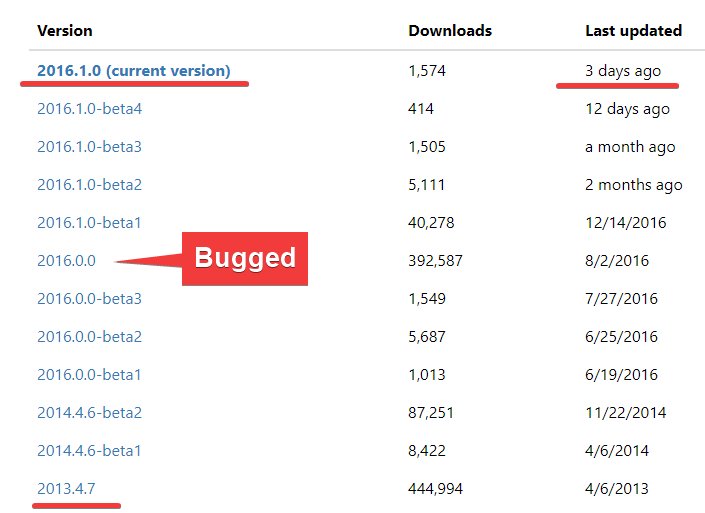
Returning to SSH.NET.2014.4.6-beta2 until new build release.
Jaex
on 19 Sep 2016
After 3 years finally non beta build which don't have this bug released!
Jaex
on 19 Oct 2017
Related issues
 kuyagic
·
21Comments
kuyagic
·
21Comments
 SKILLEDxKILLAH
·
19Comments
SKILLEDxKILLAH
·
19Comments
 TrazzyDev
·
62Comments
TrazzyDev
·
62Comments
 DBJDBJ
·
25Comments
DBJDBJ
·
25Comments
 ghost
·
27Comments
ghost
·
27Comments
Most helpful comment
nope it just happened after the recent update.