Sharex: Mouse cursor on video recordings is mis-aligned
This might be a problem with W10x64, or FFmpeg, but the mouse cursor is very off-alignment in the final output when recording a GIF of an area.
For example, check out this GIFV, a bug report I was trying to capture. I was originally clicking on the green arrow, and right around the "l" in "Explanation."
 aph3rson
All 24 comments
Look like your issue fixed 23 hours ago:
http://trac.ffmpeg.org/ticket/5008
Not sure is it released in daily build, can you try downloading latest ffmpeg and test it?
 Jaex
on 15 Feb 2016
Jaex
on 15 Feb 2016
Would this have been applied to the most recent release?
I just downloaded FFmpeg through ShareX this morning before capturing this, hence why I ask.
aph3rson
on 15 Feb 2016
I don't know, I don't work in ffmpeg project.
Jaex
on 15 Feb 2016
Just checked, looks like the patches haven't been put in to a new build, so I can't check it just yet.
I'll check in a few days when the newest build posts.
aph3rson
on 15 Feb 2016
Yes new build not released yet:
Latest Zeranoe FFmpeg Build Version: git-588e2e3 (2016-02-13)
Jaex
on 16 Feb 2016
New FFmpeg build released can you try it?
Jaex
on 17 Feb 2016
Don't works for me with the last FFmpeg version.
 XavierBoubert
on 19 Feb 2016
XavierBoubert
on 19 Feb 2016
The problem happends because your Windows UI size is bigger in your parameters. For example, in a Surface Pro 3, Windows 10 is by default configured to use 150% bigger UI. (Right click on your desktop, "Display parameters")
XavierBoubert
on 19 Feb 2016
Is the bug concerning ui size with ffmpeg or ShareX?
aph3rson
on 1 Mar 2016
This is still happening with the latest FFmpeg.
 mohd-akram
on 29 Apr 2016
mohd-akram
on 29 Apr 2016
This is still occurring on latest ffmpeg. Win10x64
 varadins
on 1 Aug 2016
varadins
on 1 Aug 2016
I can't fix ffmpeg related issue. You can report it to ffmpeg issue tracker.
Jaex
on 1 Aug 2016
https://github.com/FFmpeg/FFmpeg/commit/43e510d66887fe665b2c736be6ff842418f411c6
Maybe this time it is fixed in latest FFmpeg build?
Jaex
on 26 Jan 2018
I was able to correct this in Windows 10 on my Surface Pro 4 by changing the compatibility settings on the ffmpeg executable -- see the instructions here: https://github.com/rdp/screen-capture-recorder-to-video-windows-free/issues/56
I used this successfully to record at 175% scaling without any issues in mouse alignment.
 hafeild
on 21 Feb 2018
hafeild
on 21 Feb 2018
We were using 7z latest release link of FFmpeg and it was not updated for long months. Now latest ShareX version using zip latest release link to download it. So is anyone who had this issue can download FFmpeg using ShareX 12.1.1 and check is cursor issue was fixed by that commit?
Jaex
on 27 Mar 2018
I solved problem on Windows 10 by changing the pointer settings (color and size) to default.
 RowanG1
on 28 Mar 2018
RowanG1
on 28 Mar 2018
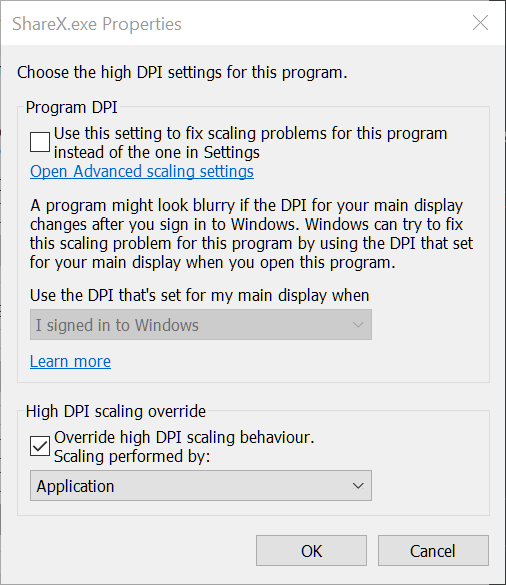
If you use screen-capture-recorder as your video source, you need to turn on "override high DPI scaling" and choose "Application" mode for ShareX.exe not for ffmpeg. I recorded a GIF to show how it's done (don't forget to restart ShareX after changing the setting): https://i.imgur.com/ew0vXho.gifv
 Goshik92
on 3 Apr 2018
Goshik92
on 3 Apr 2018
Option does not exist for me.
Win10 1803 17134.677
 Quailsnap
on 10 Apr 2019
Quailsnap
on 10 Apr 2019
If you use screen-capture-recorder as your video source, you need to turn on "override high DPI scaling" and choose "Application" mode for ShareX.exe not for ffmpeg. I recorded a GIF to show how it's done (don't forget to restart ShareX after changing the setting): https://i.imgur.com/ew0vXho.gifv
Thank you! That fixed the issue for me.
Win10 1903 18362.657
 lasselauch
on 25 Feb 2020
lasselauch
on 25 Feb 2020
Option does not exist for me.
Win10 1803 17134.677
@Quailsnap It's not in the same place but I was able to find it finally. My Windows is in Polish :confused:

 JakubKoralewski
on 22 May 2020
JakubKoralewski
on 22 May 2020
🤔 Hmm, this is still an issue... or is this pending a new update? When would the next update possibly be released?
 dylanh724
on 21 Jun 2020
dylanh724
on 21 Jun 2020
This issue is still here - I use Acer aspire v, full HD, 15.6-inch screen
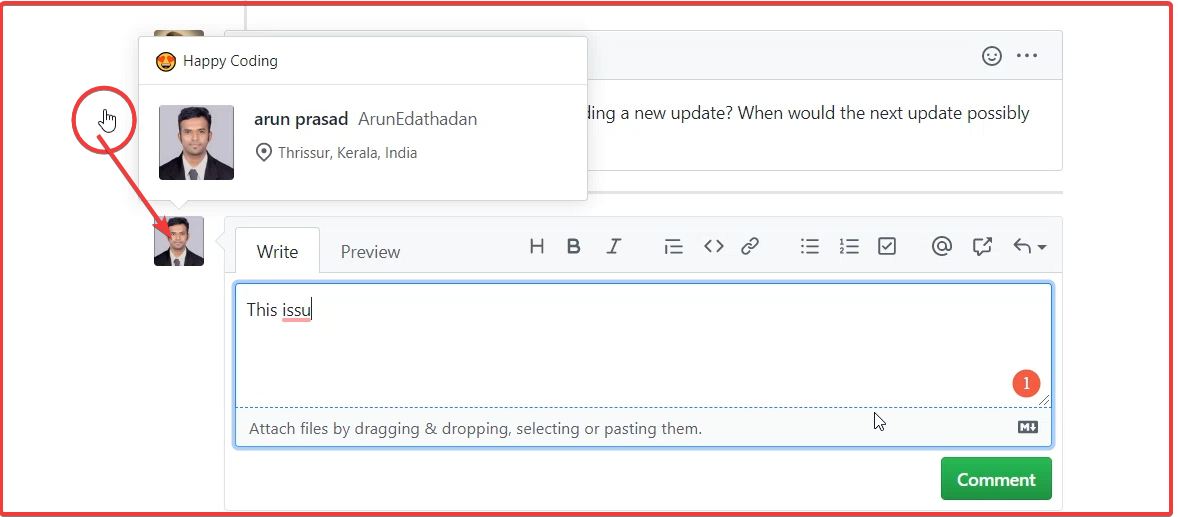
The mouse should have been here
 ArunEdathadan
on 22 Jun 2020
ArunEdathadan
on 22 Jun 2020
Option does not exist for me.
Win10 1803 17134.677@Quailsnap It's not in the same place but I was able to find it finally. My Windows is in Polish 😕
Thanks for this! This fixed the issue for me.
For English steps,
- Right click ShareX.exe > Properties
- Compatibility > Change settings for all users
- Change high DPI settings
 mruac
on 1 Jul 2020
mruac
on 1 Jul 2020
For English steps,
Right click ShareX.exe > Properties
Compatibility > Change settings for all users
Change high DPI settings
All you need to edit is ffmpeg.exe, as it is not a ShareX problem. You can find ffmpeg.exe in your ShareX folder\Tools\ffmpeg.exe. If you follow the above steps from the post above this one, it fixes the cursor issue.
 araRina
on 17 Jul 2020
araRina
on 17 Jul 2020
Related issues
 nitrocode
·
4Comments
nitrocode
·
4Comments
 Not-Kris
·
3Comments
Not-Kris
·
3Comments
 notesplaymyheart
·
3Comments
notesplaymyheart
·
3Comments
 monirulalom
·
3Comments
monirulalom
·
3Comments
 wilandlane
·
3Comments
wilandlane
·
3Comments
Most helpful comment
If you use screen-capture-recorder as your video source, you need to turn on "override high DPI scaling" and choose "Application" mode for ShareX.exe not for ffmpeg. I recorded a GIF to show how it's done (don't forget to restart ShareX after changing the setting): https://i.imgur.com/ew0vXho.gifv