Sharex: Add screenshot border automatically
After I captured a picture,is it possible to add the border for the screenshot automatically?
The reason why I need this is when I insert a picture,people can not recognize the border of the picture.
I have searched by Google and also searched the issues in this repository,I did not find information about this.
I wonder if you have already implemented this function. If the software supported this already,could you please tell me how to config this function.
the screenshot border is showed below,the red rectangle

 chucklu
All 5 comments
You can use image effects:
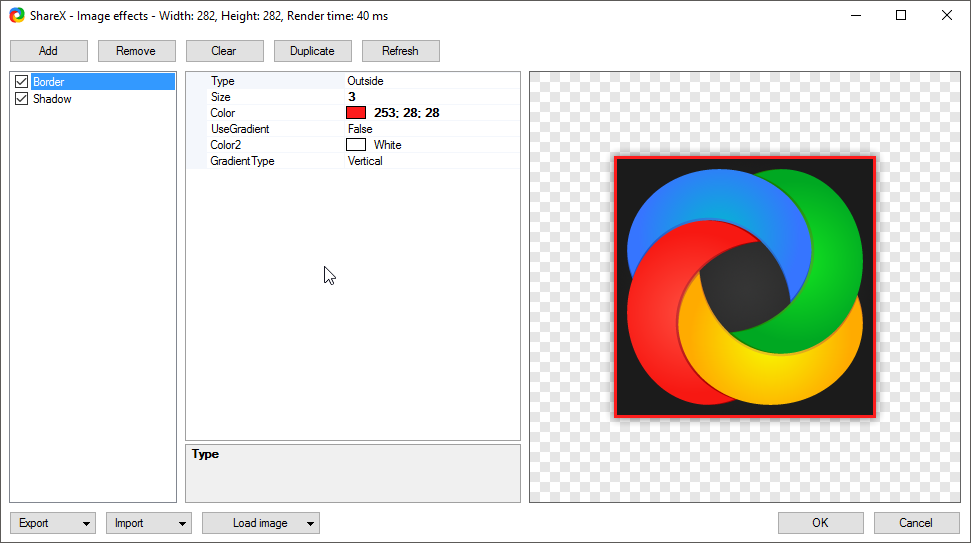
Which automatically applied to image when selected in after capture tasks.
 Jaex
on 11 May 2017
Jaex
on 11 May 2017
@Jaex Could you tell me how to add a border image effect?
I click the tools menu,then image effects. Then I get a dialog to select a picture,why?
I hope to create a border image effect for all screenshot I get,not manually set for the particular.
I did not choose a picture,just click cancel button on the dialog.
Then I get the image effects editor,I add a border image effect.
But I have no idea how to save it,and I do not understand the usage of combobox under the bottom.
So,did you have a tutorial about how to create an image effect?
chucklu
on 11 May 2017
I have found the location of image effects editor.
TaskSettings-->Image-->Effects-->image effects configuration
I will try it again
chucklu
on 11 May 2017
I have solved this,thanks a lot.
chucklu
on 11 May 2017


- Click cancel

- Make sure the border box is checked
 ooker777
on 26 Dec 2017
ooker777
on 26 Dec 2017
Related issues
 makingbillions
·
28Comments
makingbillions
·
28Comments
 maciozo
·
24Comments
maciozo
·
24Comments
 TNTUP
·
34Comments
TNTUP
·
34Comments
 TrazzyDev
·
62Comments
TrazzyDev
·
62Comments
 aph3rson
·
24Comments
aph3rson
·
24Comments
Most helpful comment
You can use image effects:
Which automatically applied to image when selected in after capture tasks.