Shadowsocks-windows: windows版4.0.6突然无法使用,日志上没有进出站数据。
Please read Wiki carefully, especially https://github.com/shadowsocks/shadowsocks-windows/wiki/Troubleshooting.
Please answer these questions before submitting your issue. Thanks!
Version(release version or AppVeyor link)
Environment(Operating system, .NET Framework, etc)
Steps you have tried
同一电脑使用SSR可以使用,同样的vps手机端也可以使用,没有用其他电脑尝试。
What did you expect to see?
What did you see instead?
Config and error log in detail (with all sensitive info masked)
[2017-12-01 19:30:25] Shadowsocks started
[2017-12-01 19:30:33] System.Reflection.TargetInvocationException: 操作过程中出现异常,结果无效。 有关异常的详细信息,请查看 InnerException。 ---> System.Net.WebException: 无法连接到远程服务器 ---> System.Net.Sockets.SocketException: 由于连接方在一段时间后没有正确答复或连接的主机没有反应,连接尝试失败。 127.0.0.1:1080
在 System.Net.Sockets.Socket.EndConnect(IAsyncResult asyncResult)
在 System.Net.ServicePoint.ConnectSocketInternal(Boolean connectFailure, Socket s4, Socket s6, Socket& socket, IPAddress& address, ConnectSocketState state, IAsyncResult asyncResult, Exception& exception)
--- 内部异常堆栈跟踪的结尾 ---
在 System.Net.HttpWebRequest.EndGetResponse(IAsyncResult asyncResult)
在 System.Net.WebClient.GetWebResponse(WebRequest request, IAsyncResult result)
在 System.Net.WebClient.DownloadBitsResponseCallback(IAsyncResult result)
--- 内部异常堆栈跟踪的结尾 ---
在 System.ComponentModel.AsyncCompletedEventArgs.RaiseExceptionIfNecessary()
在 Shadowsocks.Controller.UpdateChecker.http_DownloadStringCompleted(Object sender, DownloadStringCompletedEventArgs e)
不知到如何解决== 百度上没有找到答案,冒昧问一下~谢谢回复
 gooppo
All 15 comments
没看懂
你用的是ss还是ssr?
 ghost
on 1 Dec 2017
ghost
on 1 Dec 2017
ss-python跟ssr,不能同时安装,只能安装一个,因为都是python。但是ss-libev可以跟ss-python或SSR同时安装,因为ss-libev基于c。
 leitaoxman
on 1 Dec 2017
leitaoxman
on 1 Dec 2017
抱歉没说清楚 ~
我用的是ss
服务器是懒人的一键安装的ss的脚本,然后现在电脑ss用不了,昨天晚上可以正常使用,今天开电脑就不行了,报错如上。然后因为ss用不了我尝试ssr是可以正常使用的。不知到ss哪里出了问题。
刚才试了一下在其他电脑也是可以的。应该是电脑哪里的设置的问题,但是不知到哪里的问题==
gooppo
on 1 Dec 2017
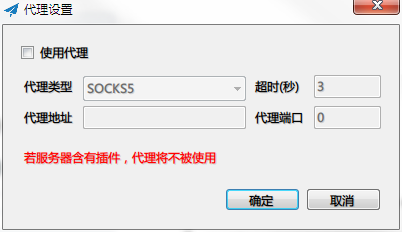
你是不是启用了正向代理?如果是,去取消看看。
在启动SS后,右击托盘区的小图标,选择“正向代理设置”,并保证复选框是取消状态。
 chenshaoju
on 1 Dec 2017
chenshaoju
on 1 Dec 2017
没有启用正向代理
gooppo
on 1 Dec 2017
现在打开一会就会报错:
[2017-12-02 01:46:27] Shadowsocks started
[2017-12-02 01:47:54] System.Reflection.TargetInvocationException: 操作过程中出现异常,结果无效。 有关异常的详细信息,请查看 InnerException。 ---> System.Net.WebException: 基础连接已经关闭: 连接被意外关闭。
在 System.Net.HttpWebRequest.EndGetResponse(IAsyncResult asyncResult)
在 System.Net.WebClient.GetWebResponse(WebRequest request, IAsyncResult result)
在 System.Net.WebClient.DownloadBitsResponseCallback(IAsyncResult result)
--- 内部异常堆栈跟踪的结尾 ---
在 System.ComponentModel.AsyncCompletedEventArgs.RaiseExceptionIfNecessary()
在 Shadowsocks.Controller.UpdateChecker.http_DownloadStringCompleted(Object sender, DownloadStringCompletedEventArgs e)
打开需要代理的网站也不会出现connect to 之类的信息
gooppo
on 1 Dec 2017
一般是被360干扰了,你的缓存目录问题,卸载重启?
 joviqiao
on 2 Dec 2017
joviqiao
on 2 Dec 2017
请尝试以管理员身份启动命令提示符,执行:
netsh interface ipv4 reset
netsh interface ipv6 reset
netsh winsock reset
一行一个,然后重启看看。如果有安全软件拦截,请允许。
chenshaoju
on 2 Dec 2017
@joviqiao 请问需要卸载什么?我用的是腾讯安全管家,是指这个吗?ss_temp删除没用,缓存目录是指哪一个?
@chenshaoju 运行之后重启,问题依旧==
gooppo
on 2 Dec 2017
[2017-12-01 19:30:33] System.Reflection.TargetInvocationException: 操作过程中出现异常,结果无效。 有关异常的详细信息,请查看 InnerException。 ---> System.Net.WebException: 无法连接到远程服务器 ---> System.Net.Sockets.SocketException: 由于连接方在一段时间后没有正确答复或连接的主机没有反应,连接尝试失败。 127.0.0.1:1080
这一行最奇怪,为什么结尾是 127.0.0.1:1080 ?
chenshaoju
on 2 Dec 2017
@chenshaoju 抱歉== 当时的日志文件因为清空缓存被删掉了,现在打开的话都是提示
[2017-12-03 00:34:59] System.Reflection.TargetInvocationException: 操作过程中出现异常,结果无效。 有关异常的详细信息,请查看 InnerException。 ---> System.Net.WebException: 基础连接已经关闭: 连接被意外关闭。
在 System.Net.HttpWebRequest.EndGetResponse(IAsyncResult asyncResult)
在 System.Net.WebClient.GetWebResponse(WebRequest request, IAsyncResult result)
在 System.Net.WebClient.DownloadBitsResponseCallback(IAsyncResult result)
--- 内部异常堆栈跟踪的结尾 ---
在 System.ComponentModel.AsyncCompletedEventArgs.RaiseExceptionIfNecessary()
在 Shadowsocks.Controller.UpdateChecker.http_DownloadStringCompleted(Object sender, DownloadStringCompletedEventArgs e)
没办法确认当时是什么情况== 怀疑那个127.0.0.1:1080 是手抖复制错了==
gooppo
on 2 Dec 2017
本地SOCKS端口你换一个看看?比如 12345 ?
chenshaoju
on 2 Dec 2017
不行== 尴尬了==
gooppo
on 3 Dec 2017
遇到同样问题,我将所有文件删除后从新配置就好了
 765643729
on 4 Dec 2017
765643729
on 4 Dec 2017
电脑ping 127.0.0.1 一般故障,aria2连接不到服务器(127.0.0.1:6801),关防火墙能ping通,但是其他的软件还是不能用。感觉应该是所有需要127.0.0.1端口的软件都无法使用了,不知到哪里的问题。最后电脑还原解决了。
谢谢大家的回复~
gooppo
on 5 Dec 2017
Related issues
 happybear88
·
3Comments
happybear88
·
3Comments
 WildBlizzard
·
4Comments
WildBlizzard
·
4Comments
 xieyang784
·
3Comments
xieyang784
·
3Comments
 spectereye
·
4Comments
spectereye
·
4Comments
 Galaxy0419
·
3Comments
Galaxy0419
·
3Comments
Most helpful comment
这一行最奇怪,为什么结尾是 127.0.0.1:1080 ?