Shadowsocks-windows: Client doesn't respect Windows 10 language preferences, no proper way to switch UI to English
Describe the bug
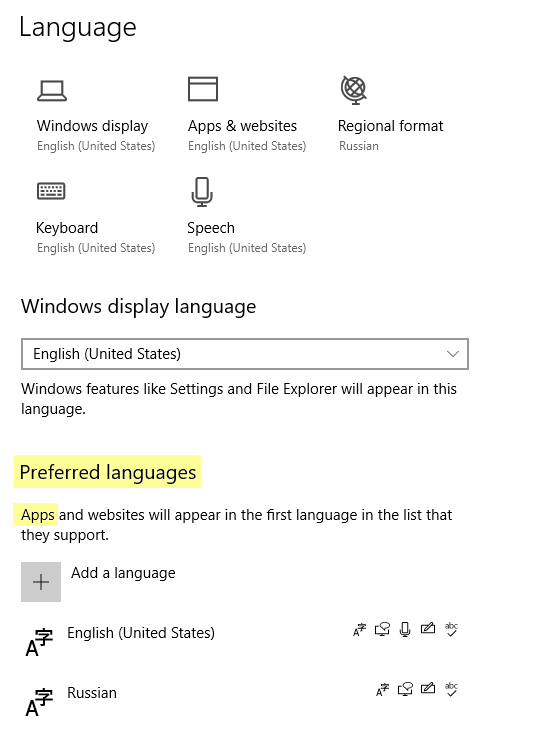
The client displays the UI in the language defined by regional formats. In my case, I have English as the preferred language and Russian as the regional format language. The result is that the UI is in Russian, while I expect English.
The client should rely on the preferred user language (see more below).
Environment
- Shadowsocks client version: 4.1.10.0
- OS version: Windows 10 20H1 (2004)
- .NET version: 4.8
Steps you have tried
I don't need to try anything, as my Windows is configured correctly according to my preferences.
What did you expect to see?
The UI language should match the preferred (top) language defined in Settings - Time & Language - Language - Preferred languages.
What did you see instead?
The UI language matches the language defined in Settings - Time & Language - Language - Regional format.
Notes
Changing the Regional format language to English is not an acceptable solution, because it affects user-wide format settings. I should not be changing the regional formats for the purpose of changing the UI language for a single app.
Either code the client properly, or provide an option to fall back the UI to English.
 happybear88
All 3 comments
Temporary solution:
When Shadowsocks is started, Right the Shadowsocks icon at icon tray area, Select
帮助(or help), And click写入翻译模板(or Write translation template).Open the directory where shadowsocks.exe is located, there is a new file name
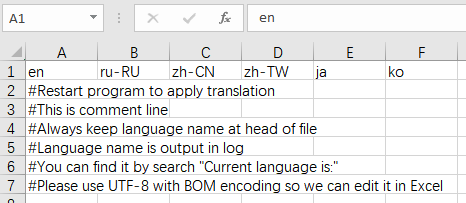
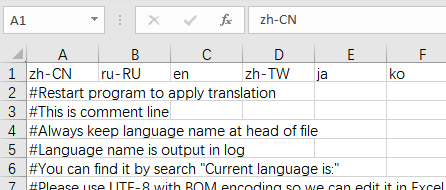
i18n.csv, Open it with any Table Editor (eg. Excel).What is your shadowsocks current language? Assume current is simplified Chinese and you want English, Then exchange first-row
enandzh-CN, Save and exit.
Before:
After:
- Restart Shadowsocks, Then should using the language you wanted.
 chenshaoju
on 28 Jul 2020
chenshaoju
on 28 Jul 2020
This worked, thanks a lot. But it's not the way you want end users to change the language. Like I said, either rely on user preferred lang, or add a user language option to the client.
happybear88
on 28 Jul 2020
We should implement this in the new WPF GUI.
 database64128
on 1 Oct 2020
database64128
on 1 Oct 2020
Related issues
 lmshao
·
4Comments
lmshao
·
4Comments
 zxam
·
4Comments
zxam
·
4Comments
 imba-tjd
·
3Comments
imba-tjd
·
3Comments
 ugksoft
·
3Comments
ugksoft
·
3Comments
 xieyang784
·
3Comments
xieyang784
·
3Comments
Most helpful comment
We should implement this in the new WPF GUI.