Shadowsocks-windows: A new problem about Auto-downloading of the new version 4.0.9
I using the version of 4.0.5 and i don't want to download the 4.0.9(cause of Windows defender‘s warned).
But i found a problem recently, that the software of shadowsocks(4.0.5) always download the latest version(4.0.9) to my laptop automatically.
And i really don't like the behavior.
Do you all have the same problem with me?
Please tell me here,thank you.
 WildBlizzard
All 4 comments
By the way,the update notice will showing on the screen when you do the reboot every time ...
WildBlizzard
on 27 Mar 2018
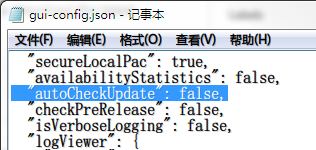
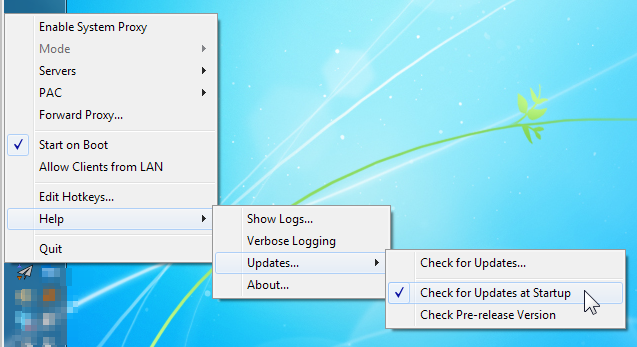
Hi, You can use Windows Notepad open gui-config.json in Shadowsocks.exe folder, Find a parameter name "autoCheckUpdate" , Change the variate to false, And save & exit.
Should look like this:
About fix Windows Defender false positive alert, Please follow these steps:
1.Start Command line ( CMD ) or PowerShell in Administrators.
2.Go to Windows Defender folder:
cd %ProgramFiles%\Windows Defender\
3.Use this command to clean Windows Defender AntiVirus Signature:
MpCmdRun.exe -RemoveDefinitions -All
4.Update Windows Defender AnitVirus Signature:
MpCmdRun.exe -SignatureUpdate
After these steps should fix Windows Defender false positive alert.
 chenshaoju
on 27 Mar 2018
chenshaoju
on 27 Mar 2018
First of all, I would like to thank you for your long-standing contributions to this forum.
Yes,I always see you replying to another users here,it's not your own thing but you doing that and well done,it's great.
And I have successfully settled the problem on the basis of the above,.
Thank you again!
WildBlizzard
on 28 Mar 2018
 celeron533
on 28 Mar 2018
celeron533
on 28 Mar 2018
Related issues
 venusbahar
·
3Comments
venusbahar
·
3Comments
 spectereye
·
4Comments
spectereye
·
4Comments
 zjylx
·
3Comments
zjylx
·
3Comments
 happybear88
·
3Comments
happybear88
·
3Comments
 LisonFan
·
3Comments
LisonFan
·
3Comments
Most helpful comment
First of all, I would like to thank you for your long-standing contributions to this forum.
Yes,I always see you replying to another users here,it's not your own thing but you doing that and well done,it's great.
And I have successfully settled the problem on the basis of the above,.
Thank you again!