Hi, I'm just trying to get my app ready for production.
The app is hosted by Aws and is built like this:
Route53 -> CloudFront -> ELB (no cluster, only SingleApp)
CloudFront is used to make the app accessible via SSL. The Nodejs app listens on an HTTP port.
Unfortunately the SessionCookie is not set.
Here is my config:
session({
            genid: (req) => {
                return uuid() // use UUIDs for session IDs
            },
            secret: process.env.SESSION_SECRET,
            resave: false,
            saveUninitialized: false,
            proxy:!dev,
            store: new MongoStore({ mongooseConnection: mongoose.connection }),
            rolling: true,
            cookie:{
                secure:!dev,
                httpOnly:true,
                domain:hostName,
                expires: expiryDate
            }
        })
What am I doing wrong?
Thanks for your work :smiley: .
 renehauck
All 16 comments
What are the values of all those variables when it is in the non working condition?
 dougwilson
on 18 Apr 2019
dougwilson
on 18 Apr 2019
hi, I have written the values to the variables:
const dev = process.env.NODE_ENV !== 'production';
const expiryDate = new Date( Date.now() + 60 * 60 * 1000 ); // 1 hour
session({
genid: (req) => {
return uuid() // use UUIDs for session IDs
},
secret: process.env.SESSION_SECRET, // fdsa83nfs83...........232dasdas
resave: false,
saveUninitialized: false,
proxy:!dev, // false
store: new MongoStore({ mongooseConnection: mongoose.connection }),
rolling: true,
cookie:{
secure:!dev, // false
httpOnly:true,
domain:hostName, // https://app.***.de
expires: expiryDate
}
})
Thank you. The only thing that jumps out at me from that is the cookie domain cannot have the https:// part on it.
dougwilson
on 19 Apr 2019
No, I'm afraid not. :disappointed:
I have just tried 2 variants:
this works:
secure:false,
httpOnly:true,
// domain:hostName,
expires: expiryDate
this not:
secure:true,
httpOnly:true,
// domain:hostName,
expires: expiryDate
Did you set up trust proxy? https://github.com/expressjs/session/blob/master/README.md#cookiesecure
dougwilson
on 20 Apr 2019
yes:
server.enable('trust proxy');
server.set("trust proxy", (ip)=>{
return true;
});
still the same :disappointed:
renehauck
on 21 Apr 2019
Is your server getting a x-forwarded-proto header with the value "https"?
dougwilson
on 21 Apr 2019
No, but a x-forwarded-for, maybe this helps. The full list:
`{
"host":"mysite.eu-central-1.elasticbeanstalk.com",
"x-amz-cf-id":"abddasdas22321-3223131dads==",
"connection":"Keep-Alive",
"cookie":"_csrf=Ph1kmGT6uzslEabZ31qfuzGV; csrfToken=UxH3eyVi-EoPgnq6z4xEukc8odQhaGaKMEl4",
"user-agent":"Amazon CloudFront",
"via":"2.0 123456789abcde.cloudfront.net (CloudFront)",
"x-forwarded-for":"178.4..",
"accept-encoding":"gzip"
}`
renehauck
on 21 Apr 2019
Ah. That would prevent s secure cookie from getting set, which is the setting you have.
dougwilson
on 21 Apr 2019
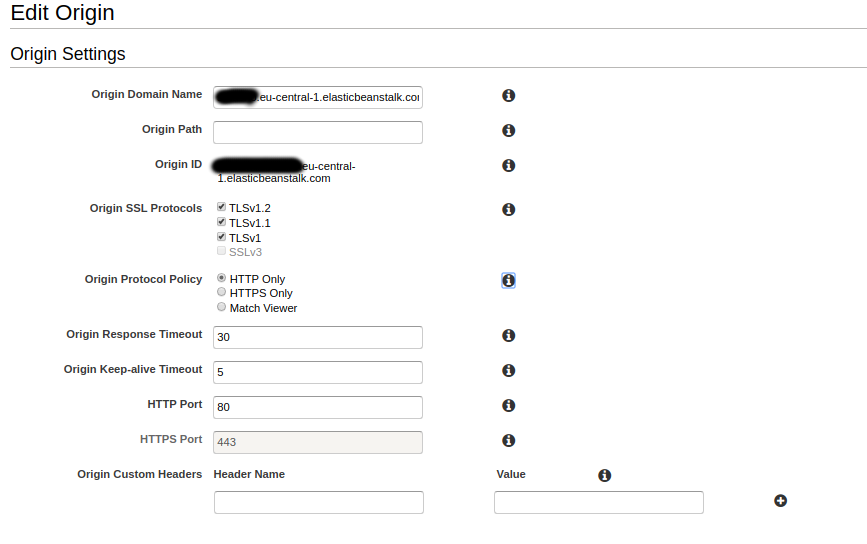
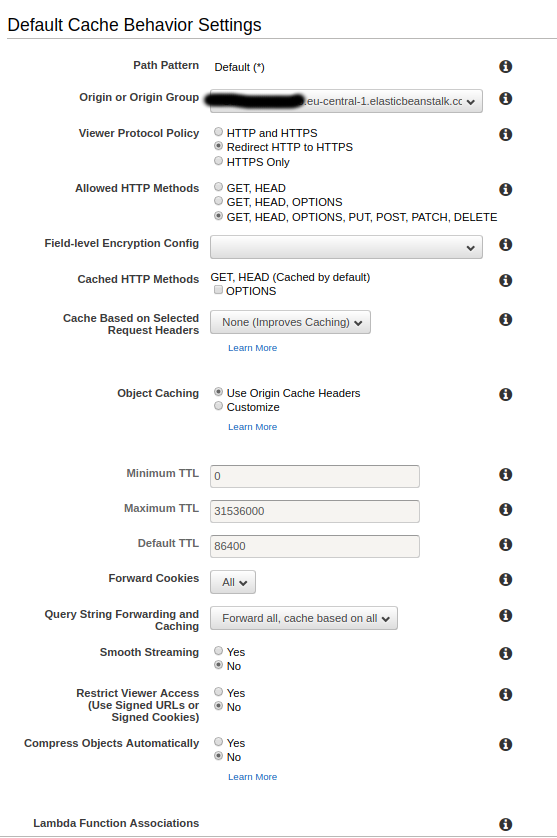
These are my settings :smiley: :


renehauck
on 21 Apr 2019
I'm not familiar with those settings panels, so no idea what it means.
dougwilson
on 21 Apr 2019
Sorry, a misunderstanding, I thought I should send the settings. These are the cloutfront settings, maybe someone sees an error in these settings.
renehauck
on 21 Apr 2019
It's no problem. Yea, there could be one. Ultimately to set a secure cookie the connection either needs to be secure to express or reverse proxies indicate that the connection is secure with x-forwarded-proto header.
dougwilson
on 21 Apr 2019
Okay, that helps a lot, thanks for your time. If I find a solution, I will post you here directly.
renehauck
on 21 Apr 2019
Finally it works! :tada:
The solution is to select "whitelist" instead of "all" under "Cache Based on Selected Request Headers". No idea why "all" is not "all".
Under "WhiteList-Headers" the header "cloudfront-forwarded-proto" must be in the whitelist.

Now the following middleware must be created in the Express App before the session and cookie middleware:
server.use([(req, res, next) => {
    if (req.headers['cloudfront-forwarded-proto']) {
      req.headers['x-forwarded-proto'] = req.headers['cloudfront-forwarded-proto'];
    }
    next();
  },
Many thanks for the great help @dougwilson
renehauck
on 22 Apr 2019
Please open a new issue with your information. If you believe this is a similar issue you can link to it.
dougwilson
on 3 Oct 2019
Related issues
 exapsy
·
23Comments
exapsy
·
23Comments
 alex55132
·
22Comments
alex55132
·
22Comments
 fibo
·
22Comments
fibo
·
22Comments
 Matthew-Christopher
·
27Comments
Matthew-Christopher
·
27Comments
 skoranga
·
30Comments
skoranga
·
30Comments
Most helpful comment
Finally it works! :tada:
The solution is to select "whitelist" instead of "all" under "Cache Based on Selected Request Headers". No idea why "all" is not "all".
Under "WhiteList-Headers" the header "cloudfront-forwarded-proto" must be in the whitelist.

Now the following middleware must be created in the Express App before the session and cookie middleware:
Many thanks for the great help @dougwilson