Session: `connect-sid` not sent while on cors heroku production - normally working on localhost
_This is the simplest title I could think because CORS has been a real hell for me the last week in all aspects._
Setup
I'm using a Cross-Origin (heroku subdomain host divided) Frontend and Backend. So, both servers are not on the same subdomain, but I'm using them as different entities. So like:
- api.herokuapp.com
- reactjs.herokuapp.com
The Setup is React + Express, Express Session, Passport (+cors module)
Issue
In localhost, the session is kept without issues. I can get the req.user without it being undefined and the cookies are sent smoothly.
In heroku subdomain production, it seems like cookies are not sent or like ... some other issue? Tried checking req.user on /profile which returns that same object, but req.user was undefined.
Well, the issue more or less in production is that the session is not kept. It's lost. You can't regain user's profile after logging in.
But you CAN log in, although the session will be lost even though the server sends a connect-sid cookie to the frontend after logging in.
Expected Behavior
Session shouldn't be lost in production mode. Why does this happen?
Code
In this code I'm also commenting some other issues I have that are related with express-session
// LIBS & APIS
import express        from 'express';
import passport       from 'passport';
import session        from 'express-session';
import bodyParser     from 'body-parser';
import secure         from 'express-force-https';
import morgan         from 'morgan';
import cors           from 'cors';
import connectMongo   from 'connect-mongo';
import mongoose       from 'mongoose';
import "babel-polyfill";
import "babel-core/register";

// LOCAL IMPORTS
import './etc/mongodb';       // DATABASE
import './services/passport'; // PASSPORT AUTHORIZATION
import routes   from './routes';

// EXPRESS SERVER
const app = express();

// SECURE / HTTPS SESSION ONLY
app.use(secure);

// ENABLING COR REQUESTS
const origins = [
  'http://localhost:3000', // Development
  'http://localhost:5000', // Production Build
  'http://reactjs.herokuapp.com', // Just for debugging reasons
  'https://reactjs.herokuapp.com'
];
app.use(cors({credentials: true, origin: origins}));

// SESSION STORE
const MongoStore = connectMongo(session);
let store = new MongoStore({
  mongooseConnection: mongoose.connection
});

// COOKIES
app.set('trust proxy', 1) // Didn't make any difference for me either using it or not
app.use(session({
  cookie: {
    maxAge: 1000 * 60 * 60 * 60,
    // secure: true
  },
  // store: store, // For some reason it stores the sessions but doesn't work properly
  proxy: true,
  httpOnly: true,
  secret: 'keyboard cat',
  resave: false,
  saveUninitialized: true
}));

// PASSPORT
app.use(passport.initialize());
app.use(passport.session());

...
 exapsy
All 23 comments
Experiencing a similar issue. The cookie isn't set on heroku, and req.session is sometimes losing values between the requests, even though req.session.id stays the same. Here's the session setup:
app.use(session({
  store: new RedisStore({
    client,
    host: REDIS_HOST,
    port: REDIS_PORT,
    url: REDIS_CONNECTION_URL
  }),
  secret: 'session-key',
  cookie: { maxAge: 60000, secure: false },
  resave: false,
  saveUninitialized: false // setting saveUninitialized: true doesn't change a thing
}))
 mklimkin0190
on 17 Jul 2018
mklimkin0190
on 17 Jul 2018
Found the issue
If you have an API sending to you and getting from you cookies, these cookies are signed by the domain of the API.
(you can probably see that in the Chrome browser by clicking at the "Secure" button near the URL Bar, and then seeing the cookies in this webpage, e.g.)
https://i.imgur.com/8G8L1fY.png
So, if your Frontend's domain is different from the API's domain, these cookies are considered 3rd Party cookies.
Well, if you store your session to a 3rd party cookie, this cookie isn't trusted if you have the browser settings or an extension that disables 3rd party cookies.
So, while the cookie might be saved to your browser by a set-cookie header, this cookie is never sent back to the API.
The session in the API still exists though, the problem is that the Frontend never sends the cookie with the sessionID back.
Resulting Issue
I don't know how to get around this legitimately without using localStorage or without disabling httpOnly which would immediately cause a CSRF security issue. So, basically, now Express Session is useless when it comes to cookie-getting/setting when it's comes and goes from/to a 3rd party domain.
Although, I will probably just use localStorage with JWT tokens along with passport.
Disclaimer
These are what I understood so far. Correct me please if I'm wrong somewhere. Although, enabling the 3rd Party Cookies worked for me.
exapsy
on 18 Jul 2018
I came here to open an issue and found this one in the process.
I'm experiencing the exact same issue, the above description describes my situation perfectly. The session cookie is never sent to the API, but requests to the API go through perfectly fine otherwise.
However, I have 3rd party cookies enabled in my browser and tried setting httpOnly to false, but the problem persists. @Eksapsy Have you tried setting httpOnly to false to test if this solve the issue on your end? What about enabling 3rd party cookies? Did that actually solve the issue for you?
To elaborate on what happens on my end:
In development mode, the connect-sid is in sent back to my Node.js backend as part of the header. When I log req.headers to the console on my backend, connect-sid is in there like this.
cookie: 'connect-sid=SESSIONID'
In production mode, the connect-sid cookie is NOT sent back to my Node.js backend. When I log req.headers, the other cookies I set (unrelated to express-session) are still there, it's just connect-sid that's missing.
I can access the req.session object on my backend and send it back to the frontend without a problem. I can also access req.user and send it back to my frontend.
 RobertB4
on 3 Aug 2018
RobertB4
on 3 Aug 2018
@RobertB4 LocalStorage and httpsOnly is a Resulting issue. It's not a Solution to the problem, it's just another issue that I encountered because of the previous issue that I've described.
However, whatever I say, I would please you to take it with a grain of salt. Because I may have encountered the issues and solved 'em till now, but I hadn't had the time to search what the real issue was 100%. I just by experience think what the issue may be. Do not trust every word I say, because I may be wrong at something. It's just the fast experiments I do just to solve and deliver the product to my client fast. Then I will search the real issue to find what was really wrong.
Firstly, I've encountered that using the express-force-https middleware in your express app causes an issue because of the redirection issues of the middleware.
What I basically do right now when I'm deploying on a domain name, is to have an SSL LetsEncryption (which is free btw). That solves some issues with HTTPS domain requests.
Also, I use Nginx on my deployment and staging server which I set it up to replace HTTP to HTTPS. So, basically, you're forced to used HTTPS anyways. No need for secure
Secondly, use the cors package library to set your origins and to prevent cors issues. Which you can see it being used in my code as well.
Thirdly, do not use https.createServer(). At least for me that caused an issue and I couldn't connect to my API server. I hadn't had the time to see exactly why, maybe it was because I had an options with SSL keys that I've already deployed via my NGINX server. Hopefully, I'll investigate further when I'll have the time if I remember it.
Lastly, httpsOnly doesn't have anything to do with the whole issue in particular. It's a Resulting Issue as I said in the header.
I mentioned httpsOnly because of the localStorage & mongoStorage issue that I've had because of the previous problems. Now that I've solved the issue it's all fine and the sessions get stored in my mongo database.
What httpsOnly does is just to prevent any Javascript code on the frontEnd to have any kind of access to the session cookies that the API gives as a response to a request. I repeat, it has nothing to do with the main issue.
I hope I helped. Just try modifying any code that has anything to do with HTTPS and search for SSL Encryption as well. You may find something I didn't.
exapsy
on 4 Aug 2018
Sorry guys, but I don't really get it. I have the same problem could you please elaborate on the workflow around the problem? :)
I also can successfully login. But I can't fetch the data for the table from the api. I get the error 403 as seen in the picture. When I have a look at my cookies, they are empty. The front-end is not on the same server as the api from the back-end.
CORS right now allows all urls...
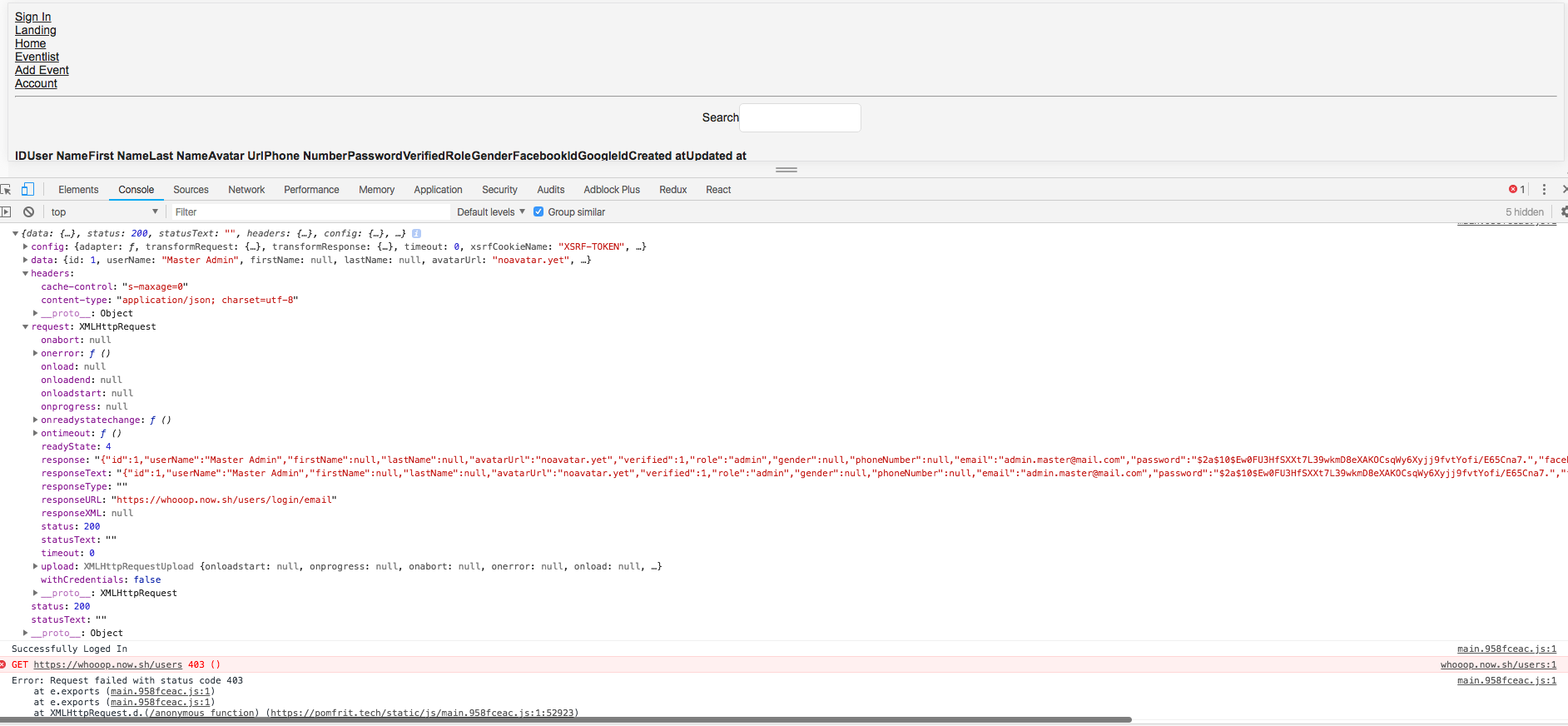
Would really appreciate any help, as I am already struggling a couple of days with it.
 Manubi
on 13 Aug 2018
Manubi
on 13 Aug 2018
@Manubi Yours is probably a different issue. One thing I noticed is you mentioned you have CORS enabled for all URLs, that's a potential problem.
Express session requires you to send credentials with the request, and enabling credentials for CORS does not work with a wildcard, so you have to specify your URL.
Here is an example code that you can use:
import cors from 'cors';

const corsOptions = {
  origin: http://localhost:3000, // This is where you put the URL of your frontend
  credentials: true,
};

app.use(cors(corsOptions));
Also, don't forget to include the credentials in your HTTP request. An example using fetch looks like this:
fetch('http://localhost:5000/login', {
  method: 'POST',
  credentials: 'include',
  body: JSON.stringify(this.state),
  headers: {
    'Content-Type': 'application/json',
  },
})
.then((res) => {
  [...]
Not sure if this is the problem in your case though.
Regarding the original issue, I solved it by creating custom authorization middleware and using cookies (not using local storage because I use ssr on the frontend) to verify if a user is authorized or not. I'm still working on it though so I haven't fully solved the problem yet. Getting close though.
RobertB4
on 13 Aug 2018
I have encountered similar problem so I guess I shouldn't open new issue.
MY CASE
I have frontend client running on custom Next.js server that is fetching data with apollo client. I am handling routes authentication on SSR with express.
Stack:
Backend: Express, Express-session, Prisma, Graphql-Yoga
Frontend: React, Next (with custom server), ApolloClient
_I think_ I have a problem with picking correct CORS settings for my client and backend so cookie would be properly set in the browser. Also as OP stated, on localhost it works just fine.
FRONTEND
ApolloClient config for client-side:
const httpLink = new HttpLink({
  credentials: "include",
  uri: BACKEND_ENDPOINT,
});
Getting cookie while on SSR (works for localhost):
function parseCookies(req, options = {}) {
  return cookie.parse(
    req ? req.headers.cookie || "" : document.cookie,
    options
  );
}
Route auth:
async function isAuthorized(req, res, next) {
  const cookie = getToken(req);
  await client
    .mutate({
      mutation: _grabCredentials,
      context: { headers: { cookie }}})
    .then(data => {
      console.log(data);
      //do something with this
    })
    .catch(err => console.error(err)); next();
}

server.get("/", isAuthorized, (req, res) => {
          renderAndCache(req, res, "/");
        })
BACKEND
server.express.set('trust proxy', 1) // Also didn't make any difference for me either using it or not
server.express
  .use(
    session({
      store: store,
      genid: () => uuidv1(),
      name: process.env.SESSION_NAME,
      secret: process.env.SESSION_SECRET,
      resave: true,
      rolling: true,
      saveUninitialized: false,
      sameSite: false,
      proxy: STAGE,
      unset: "destroy",
      cookie: {
        httpOnly: true,
        path: "/",
        secure: STAGE,
        maxAge: STAGE ? TTL_PROD : TTL_DEV
      }
    })
  )
CORS settings (backend only)
const cors = {
  credentials: true,
  origin: [process.env.CLIENT_URL_DEV, process.env.CLIENT_URL_PROD],
  allowedHeaders: ["Content-Type","Authorization","X-Requested-With","X-Forwarded-Proto", "Cookie","Set-Cookie"],
  exposedHeaders: ["Content-Type","Authorization","X-Requested-With","X-Forwarded-Proto","Cookie","Set-Cookie"]
};
server.start(
  {
    port,
    cors
  },
  () => console.log(`Server is running on port ${port}`)
);
Intended outcome:
- Session cookie should be set on the client in browser after sucessful authentication,
- this cookie should be accessible to undelying SSR route authentication query for cookie to be send along with request and present credentials
Actual outcome:
Currently I am sending gql request from client with apollo-client having option
credentials: "include" and on the client-side in devTools I can see:
- cookie is present in response from my backend in
Set-Cookieheader, - cookie is present in storage.
- cookie is present in storage after refresh (not in chrome)
- requests via ApolloClient are authenticated. It seems that ApolloClient is somehow able to send this cookie along with request.
- document.cookie returns
"".
IDEAS
I also tried to use afterware with apollo client as apolloLink that would intercept cookie from response.headers but headers are missing cookie when I am logging them in console and also somehow this afterware prevents actual response to be recieved on client (I don't recieve queried data when using afterware).
My atempt to get headers from response in apolloClient(but headers are empty and data is not fetched afterwards):
const middlewareLink = new ApolloLink((operation, forward) => {
   return forward(operation).map(response => {
     const context = operation.getContext();

     const {response: {headers}} = context;
     if (headers) {
       const cookie = response.headers.get("set-cookie");
       if (cookie) {
         console.log(cookie)
       }
     }
     return response;
   });

 });
 pawelkrystkiewicz
on 19 Jan 2019
pawelkrystkiewicz
on 19 Jan 2019
The way I've handled this is by using axios.
 static async login(credentials: Credentials) {
    const response = await axios.post(
      `${BACKEND_URL}/auth/login`,
      credentials,
      {
        withCredentials: true
      }
    );

    return response;
  }
The withCredentials: true option is important.
 fr3fou
on 5 Feb 2019
fr3fou
on 5 Feb 2019
Also having similar issues, however desktop sessions are working as expected, only mobile users sessions arent being saved, none of the recommended approaches above seem to fix for mobile, is there some special mobile config required?
Just to clarify Mobile Safari and Chrome both not working, desktop works perfectly fine
 JClackett
on 16 Feb 2019
JClackett
on 16 Feb 2019
Has Anyone Found Anything? I have a Vue JS Client App and Node backend,session is working fine while testing with POSTMAN, but its not working on CORS.
 prkhrv
on 13 Jun 2019
prkhrv
on 13 Jun 2019
make sure that the url for api is on the same domain as the client..
so if client is on -> mydomain.com
api -> api.mydomain.com (or similar)
so setup custom domain on heroku (https://your-app.herokuapp.com) -> api.mydomain.com
otherwise the cookie is being created on a different domain to the client, and that doesnt play well
JClackett
on 13 Jun 2019
Just read related heroku documentation:
https://devcenter.heroku.com/articles/cookies-and-herokuapp-com
I hope to be helpful!
 fkoner
on 27 Jun 2019
fkoner
on 27 Jun 2019
The way I've handled this is by using
axios.static async login(credentials: Credentials) { const response = await axios.post( `${BACKEND_URL}/auth/login`, credentials, { withCredentials: true } ); return response; }The
withCredentials: trueoption is important.
Thanks a lot ! It worked for me <3
 agrawal-d
on 2 Jul 2019
agrawal-d
on 2 Jul 2019
Still looking for any update....
 cadenzah
on 30 Oct 2019
cadenzah
on 30 Oct 2019
Another area to check that worked me for me:
https://github.com/expressjs/session/issues/633
Which references the following snipped of documentation:

 sethgoodluck
on 10 Nov 2019
sethgoodluck
on 10 Nov 2019
I have almost same issue - I have my frontend and backend hosted on Heroku, but on different domains (frontend.heroku-app.com and backend.heroku-app.com).
When I send cookies as a response, they are asociated with the backend.heroku-app.com and they wont set on frontend.heroku-app.com at all.
I tried to set cookies domain to .heroku-app.com, but didnt work. So I dont know if there is any other way for sharing these cookies between two domains or if I may just use localStorage to store JWT. (Problem is - where to store refresh token...) :D
 TenPetr
on 3 Dec 2019
TenPetr
on 3 Dec 2019
@TenPetr if use setup custom domains with heroku it will work i.e:
backend.myapp.com
frontend.myapp.com
JClackett
on 3 Dec 2019
@TenPetr if use setup custom domains with heroku it will work i.e:
backend.myapp.com
frontend.myapp.com
But how? Do you have any resource?
TenPetr
on 3 Dec 2019
herokuapp.com is registered as a public suffix and browsers will reject setting a cookie directly on that domain, which is why you have to use a custom domain. https://devcenter.heroku.com/articles/cookies-and-herokuapp-com
 dougwilson
on 4 Dec 2019
dougwilson
on 4 Dec 2019
I had a same issue.
But I found that the default sameSite value is "Lax" on Chrome browser.
So you need to add sameSite option to "none" probably.
app.use(
  session({
    secret: process.env.COOKIE_SECRET,
    resave: true,
    saveUninitialized: false,
    store: new CookieStore({ mongooseConnection: mongoose.connection }),
    cookie: {
      httpOnly: true,
      secure: true,
      sameSite: "none",
    },
  })
);
sameSite is what I added option for cookie.
And I solved this issues in my case.
 hshine1226
on 26 Aug 2020
hshine1226
on 26 Aug 2020
I had a same issue.
But I found that the default sameSite value is "Lax" on Chrome browser.
So you need to add sameSite option to "none" probably.
app.use(
  session({
    secret: process.env.COOKIE_SECRET,
    resave: true,
    saveUninitialized: false,
    store: new CookieStore({ mongooseConnection: mongoose.connection }),
    cookie: {
      httpOnly: true,
      secure: true,
      sameSite: "none",
    },
  })
);
sameSiteis what I added option for cookie.And I solved this issues in my case.
OMG! I love u, now you are my hero. It's working to me. Thank you so much!!!!
 Fradomati
on 13 Sep 2020
Fradomati
on 13 Sep 2020
@JClackett - did you end up finding a way to fix it for mobile browsers?
 davidwparker
on 26 Dec 2020
davidwparker
on 26 Dec 2020
Haven't used cookies in a while but im fairly sure if you use a custom domain on Heroku, i.e not the herokuapp.com domain, and it is the same as the client domain, then it should work
client = myapp.com
api (heroku) = api.myapp.com
JClackett
on 28 Dec 2020
Related issues
 G-Adams
·
16Comments
G-Adams
·
16Comments
 scaryguy
·
16Comments
scaryguy
·
16Comments
 azfar
·
14Comments
azfar
·
14Comments
 rukshn
·
20Comments
rukshn
·
20Comments
 shaunwarman
·
17Comments
shaunwarman
·
17Comments
Most helpful comment
Found the issue
If you have an API sending to you and getting from you cookies, these cookies are signed by the domain of the API.
(you can probably see that in the Chrome browser by clicking at the "Secure" button near the URL Bar, and then seeing the cookies in this webpage, e.g.)
https://i.imgur.com/8G8L1fY.png
So, if your Frontend's domain is different from the API's domain, these cookies are considered 3rd Party cookies.
Well, if you store your session to a 3rd party cookie, this cookie isn't trusted if you have the browser settings or an extension that disables 3rd party cookies.
So, while the cookie might be saved to your browser by a
set-cookieheader, this cookie is never sent back to the API.The session in the API still exists though, the problem is that the Frontend never sends the cookie with the sessionID back.
Resulting Issue
I don't know how to get around this legitimately without using
localStorageor without disablinghttpOnlywhich would immediately cause a CSRF security issue. So, basically, now Express Session is useless when it comes to cookie-getting/setting when it's comes and goes from/to a 3rd party domain.Although, I will probably just use localStorage with JWT tokens along with passport.
Disclaimer
These are what I understood so far. Correct me please if I'm wrong somewhere. Although, enabling the 3rd Party Cookies worked for me.