Sequel-ace: High CPU Usage when editing/scroll large query windows
- Sequel Ace Version: 2.1.4
- macOS Version: 10.15.5
- MySQL Version: 5.7
Description
When scrolling or editing within a query window with lots of SQL, Sequel Ace uses a very large amount of CPU, and lags on scrolling and input. -- This happened in Sequel Pro as well.
Steps To Reproduce
- Open query editor
- Provide large query - either a large number of queries or a single large query
- Scroll, and see both lag and CPU usage rise to ~25% or higher
- Editing the query can cause CPU usage > 80%
Expected Behaviour
Editing and scrolling the query window doesn't cause Sequel Ace to lag.
Is Issue Present in Latest Beta?
Unsure, will attempt, but most likely.
 gms8994
All 24 comments
This is CPU usage after scrolling a query window where the text is selected

gms8994
on 24 Jul 2020
After typing a comment in the query window

gms8994
on 24 Jul 2020
Could this be the autocorrect and spelling options enabled by default ?
I've seen that Sequel Ace always has this enabled by default where if I disable it, next time I open Sequel Ace it gets always enabled and is really painful.
 salvor-hardin
on 25 Jul 2020
salvor-hardin
on 25 Jul 2020
@Kaspik More ARC stuff? I get the feeling this might be a bigger issue than just ARC. Maybe we're trying to update too frequently on scroll or something?
 Jason-Morcos
on 25 Jul 2020
Jason-Morcos
on 25 Jul 2020
I don't think this is ARC related...
 Kaspik
on 25 Jul 2020
Kaspik
on 25 Jul 2020
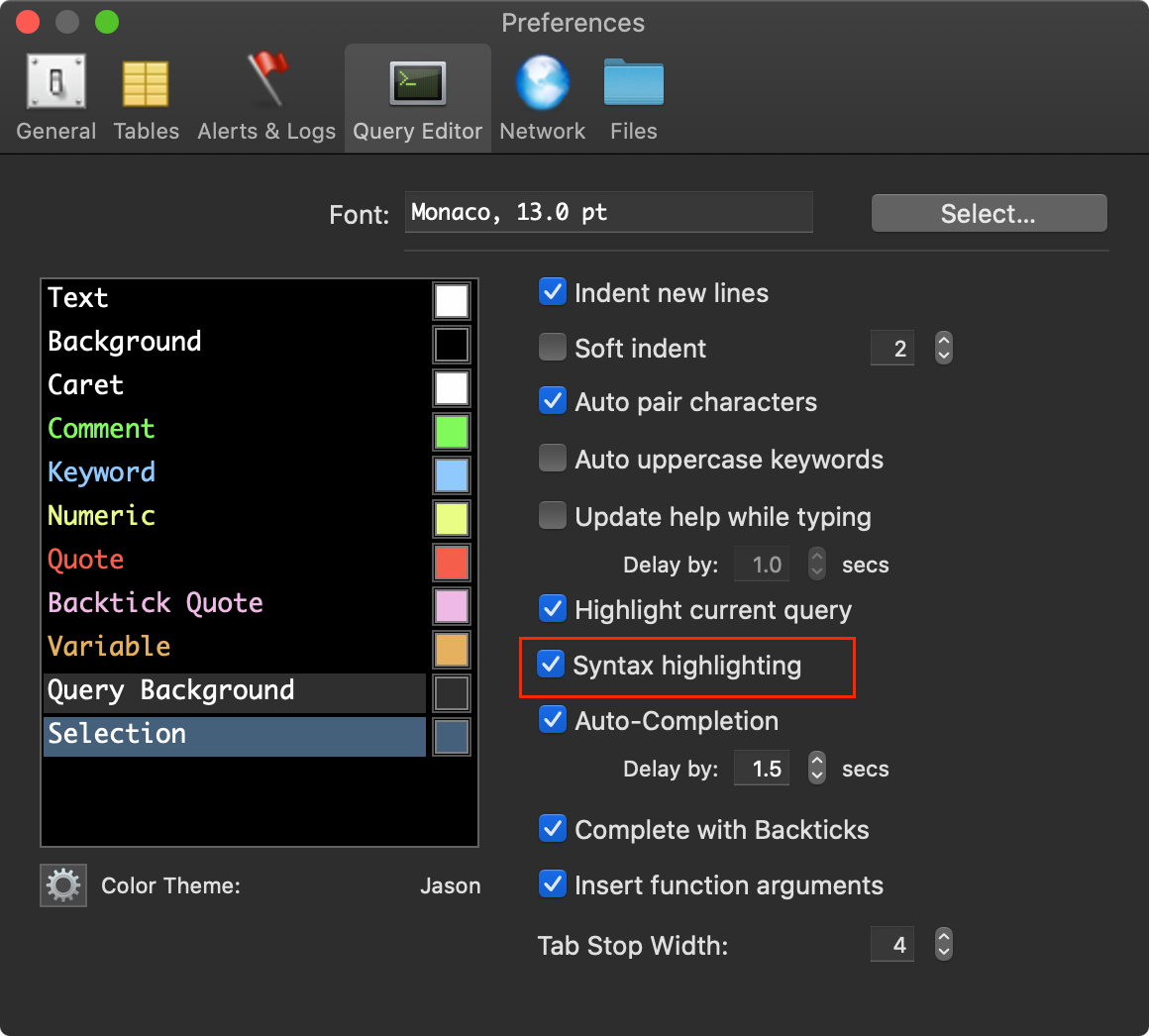
@gms8994 In the latest version of Sequel Ace, there's a new option to disable syntax highlighting. Does the issue go away if you disable syntax highlighting? Perhaps that's the place where we're getting some significant churn
Jason-Morcos
on 25 Jul 2020
A few things I've noticed:
- Without syntax highlighting: 30-40% CPU usage when scrolling.
- With highlighting: 70–100% with noticable lag spikes
- It matters whether or not the window is key. If you have preferences open and in front the lag spikes are much less noticable or absent. Going down to 30–40%.
- If you scroll down in a long query and the syntax highlighting hasn't caught up yet and click the UI will sometimes freeze for a few seconds.
 thecrypticace
on 25 Jul 2020
thecrypticace
on 25 Jul 2020
@Sequel-Ace/all
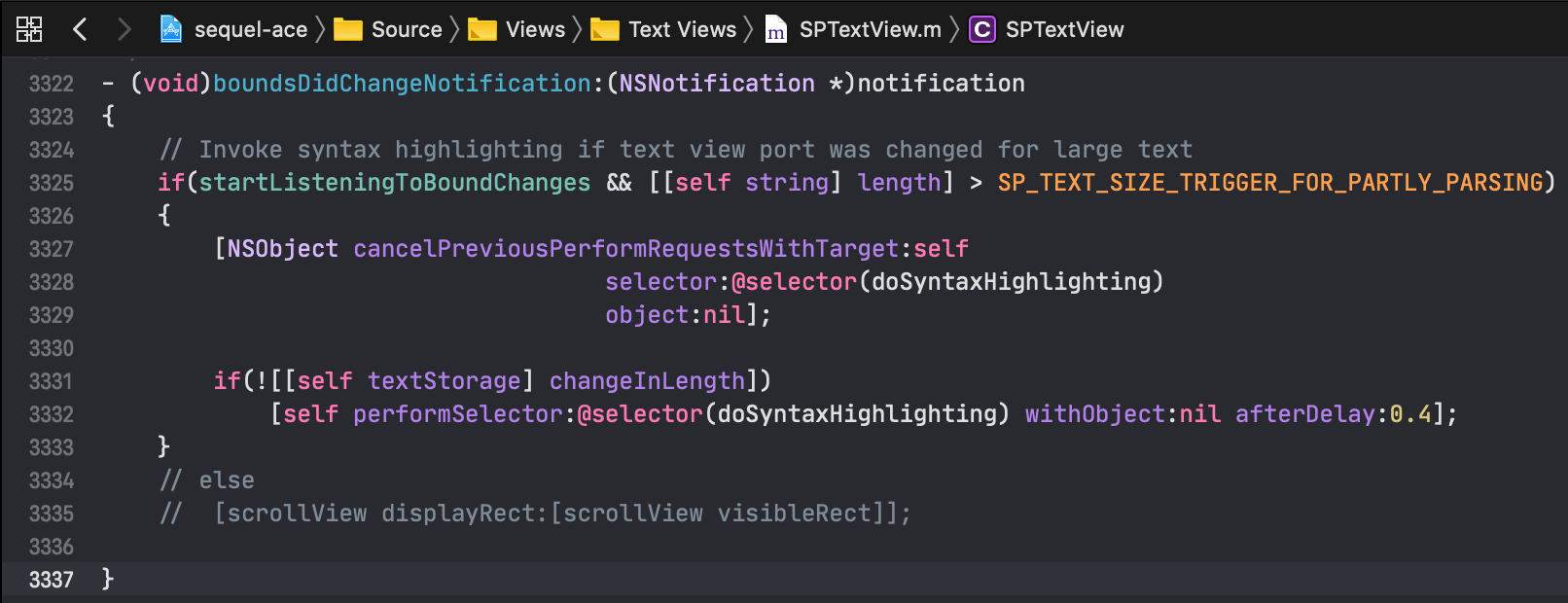
Looks like on line 3322 of SPTextView.m we call doSyntaxHighlighting on all scroll changes (if we're only doing partial syntax highlighting due to really long query). That's probably the extra 40-60% of CPU that @thecrypticace mentioned above. Perhaps we should try to delay syntax highlighting until scrolling has finished as opposed to highlighting every time the bounds changed event is dispatched? Although if the delay/cancel logic was working as expected, I would expect that to already be the case?
Jason-Morcos
on 25 Jul 2020
What about breaking the string into chunks and highlight them in the background instead of doing this on scroll? Or is there other reason to need partial highlighting on scroll? I've always found it kinda strange that I can scroll though a long query and the syntax highlighting disappears for a small time frame.
thecrypticace
on 25 Jul 2020
@gms8994 In the latest version of Sequel Ace, there's a new option to disable syntax highlighting. Does the issue go away if you disable syntax highlighting? Perhaps that's the place where we're getting some significant churn
Apologies, I was away for the weekend. I tried this, and experienced the same issue that @thecrypticace mentioned. CPU usage is still "high," though not as high. The application did still lock and lag, as well. Is Sequel Ace still perform highlighting (as in the above screenshot posted in https://github.com/Sequel-Ace/Sequel-Ace/issues/269#issuecomment-663885482, even when Syntax Highlighting is disabled?
gms8994
on 27 Jul 2020
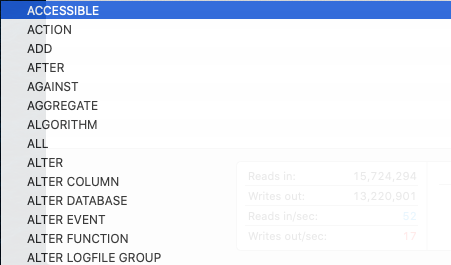
So, something "related", possibly: I was typing random characters in to a SQL comment, and got the below screenshot, which made me wonder if "Auto-Completion" had anything to do with it. Disabled Auto-Completion, and CPU usage while scrolling dropped to about 15% and had no lagging or locking. Typing a bunch of characters still caused CPU to 40% or more, but a definite improvement without Auto-Completion.
gms8994
on 27 Jul 2020
Not sure if this will help, but this issue was also prominent in SequelPro, and based on some discussions I had in the past, the issue was connected with the MacBook touch strip. I don't know any technical details about it, but perhaps related to spell check.
 carkar7
on 4 Sep 2020
carkar7
on 4 Sep 2020
Perhaps we should try to delay syntax highlighting until scrolling has finished as opposed to highlighting every time the bounds changed event is dispatched
I've made a branch with some changes, it responds to scrollViewDidEndLiveScrollNotification rather than boundsChanged. It calls doSyntaxHighlighting a lot less, but the CPU usage is still high.
If you have a large query, [[self textStorage] words] is huge. It's 1MB max, we can reduce that to 500k? This is when the code scans for autocomplete words. Does the list have to have every single word in the query?
Also every call to add or remove attributes on the textStore calls textStorageDidProcessEditing, the add/remove attribute on NSAttributedString is the hog here too. I've tried to short circuit this if there has been no editing.
I've got syntax highlighting reasonable good wrt CPU, but the autocomplete ... spikes straight to 100%.
Do you know a nice way to track the CPU usage of a specific PID?
I've been using:
```bash
function cpuuu (){
declare pids=($(ps aux | grep "Sequel Ace.app" | grep -v grep | awk '{print $3}'));
pidCount=${#pids[@]};
while [ "$pidCount" -gt 0 ];
do
    let timeSpent=0;

    for index in ${!pids[*]};
    do
        tmp=${pids[$index]};
        tmp=${tmp/\.*};
        let timeSpent+=$tmp ;
    done;

    echo "CPU Utilisation: $timeSpent%";
    sleep 1;
    pids=($(ps aux | grep "Sequel Ace.app" | grep -v grep | awk '{print $3}'));
    pidCount=${#pids[@]};
done;
}
```bash
 jamesstout
on 9 Nov 2020
jamesstout
on 9 Nov 2020
I've done some research and looked over the code as well. I think it fundamentally needs to be reworked, although I'm not sure how best to go about it yet. At the high level, it makes no sense to re-run the highlighter after every scroll event. Ideally, it would run once and keep the data until an edit is made, and then only reprocess the changed range. We could use a sort of debouncer to delay reprocessing until no changes have been made for some amount of time. It would also be great if the highlighter could run on a background thread. I don't know if all the parts involved are thread safe though.
 robinkunde
on 9 Nov 2020
robinkunde
on 9 Nov 2020
I tried, running in the background .. some of it can.
jamesstout
on 9 Nov 2020
I've done some research and looked over the code as well. I think it fundamentally needs to be reworked, although I'm not sure how best to go about it yet. At the high level, it makes no sense to re-run the highlighter after every scroll event. Ideally, it would run once and keep the data until an edit is made, and then only reprocess the changed range. We could use a sort of debouncer to delay reprocessing until no changes have been made for some amount of time. It would also be great if the highlighter could run on a background thread. I don't know if all the parts involved are thread safe though.
From my (not a Sequel Ace developer) perspective, only running the highlight code whenever the text changes is probably the "best" way to do this; scrolling doesn't change the query and shouldn't change the highlight.
The only reason I can think that this would be used is if you're loading up a query that extends past the end of the visible window: there's not necessarily a reason to highlight past that if it won't be seen.
However, in my experience, it feels like that would make the code extra-kludgy and convoluted to try and work out... unless you're loading up a multi-MB query file, highlighting should probably be done separate from scroll logic.
gms8994
on 9 Nov 2020
Mentioned in sequelpro/sequelpro#2783, for whatever reason switching the font in the query editor from Monaco to Menlo does seem to help in both Sequel Pro and Sequel Ace but doesn't fix all slowness.
 mrdziuban
on 17 Nov 2020
mrdziuban
on 17 Nov 2020
I spent couple of hours playing with and testing SPTextView itself with everything enabled. Found few terrible things that were happening there. Completely changed how it behaves.
PR: https://github.com/Sequel-Ace/Sequel-Ace/pull/563
TLDR:
- when inserting content of file / pasting text, we will now process everything at once, and highlight whole query editor (tested with 40 000 lines, it takes couple of seconds, but who really imports 40 000 lines there?)
- then when writing, we are processing JUST AND ONLY changes in the text
- when scrolling or moving the cursor - nothing is happening anymore
- we put all attributes to the dictionary and then assign them for given word once instead of 4 assigns separately
No more lags or freeze when scrolling or moving with cursor (as there is no processing), the only downside is frozen app when importing big files or pasting huge text (again, thousands of lines) - but user is informed about that by alert. Next step is to move all this processing to separate NSTextStorage on background thread and then re-setting the storage back to SPTextView. But for version 3.0.0 I believe this will be drastic improvement.
Kaspik
on 27 Nov 2020
@Kaspik this looks awesome! Such a small code change for something potentially so massive 😀 Are there build instructions (I'd love to test this, but don't have Big Sur installed currently) that I could follow? I've got it cloned and opened in Xcode, but am not sure what to do from there.
gms8994
on 28 Nov 2020
@Kaspik this looks awesome! Such a small code change for something potentially so massive 😀 Are there build instructions (I'd love to test this, but don't have Big Sur installed currently) that I could follow? I've got it cloned and opened in Xcode, but am not sure what to do from there.
We'll have a first beta for 3.0.0 soon (the next couple days), but if you want to build locally the key is to install cocoapods and run pod install in the directory. Then you should be able to build locally from the .xcworkspace file!
Jason-Morcos
on 28 Nov 2020
@gms8994 Merged in the branch, and also added info how to run locally into Readme.md. Try it out and let me know :)
We would be super happy to get this tested on older macOS as well!
Kaspik
on 28 Nov 2020
@Kaspik see the above newly created issue; I probably just don't have something set up properly. Thanks again!
gms8994
on 28 Nov 2020
@Kaspik Downloaded and tested 3.0.0 - it looks like the scroll issue is absolutely squashed (and works on 10.15.7)! Thank you so much for your effort on this!
There is an issue that might be related (though exists in 2.3.2 as well) - that is adding a SQL comment midway through a query also experiences high CPU utilization. Would you prefer a new issue for that?
gms8994
on 30 Nov 2020
@Kaspik Downloaded and tested 3.0.0 - it looks like the scroll issue is absolutely squashed (and works on 10.15.7)! Thank you so much for your effort on this!
There is an issue that might be related (though exists in 2.3.2 as well) - that is adding a SQL comment midway through a query also experiences high CPU utilization. Would you prefer a new issue for that?
As this issue is closed, yes, please make a new issue for that comment issue you described! :)
*correction, now it's closed. I prefer very clear and isolated issues for bug tracking purposes. Since the comment issue isn't _quite_ what this issue describes, it's best to make it a new issue.
Jason-Morcos
on 30 Nov 2020
Related issues
 ChrisGitIt
·
5Comments
ChrisGitIt
·
5Comments
 lphilps
·
7Comments
lphilps
·
7Comments
 lipatovroman
·
4Comments
lipatovroman
·
4Comments
 matthewrk
·
4Comments
Jason-Morcos
·
7Comments
matthewrk
·
4Comments
Jason-Morcos
·
7Comments