Sequel-ace: Cannot change QUERY EDITOR font / font size on Big Sur
- Sequel Ace Version: 2.3.0 Build 2111 (via app store)
- macOS Version: 11.0.1 Big Sur
Steps To Reproduce
- Go to Sequel Ace > Preferences, Click Query Editor
- Click Select to open the font dialog
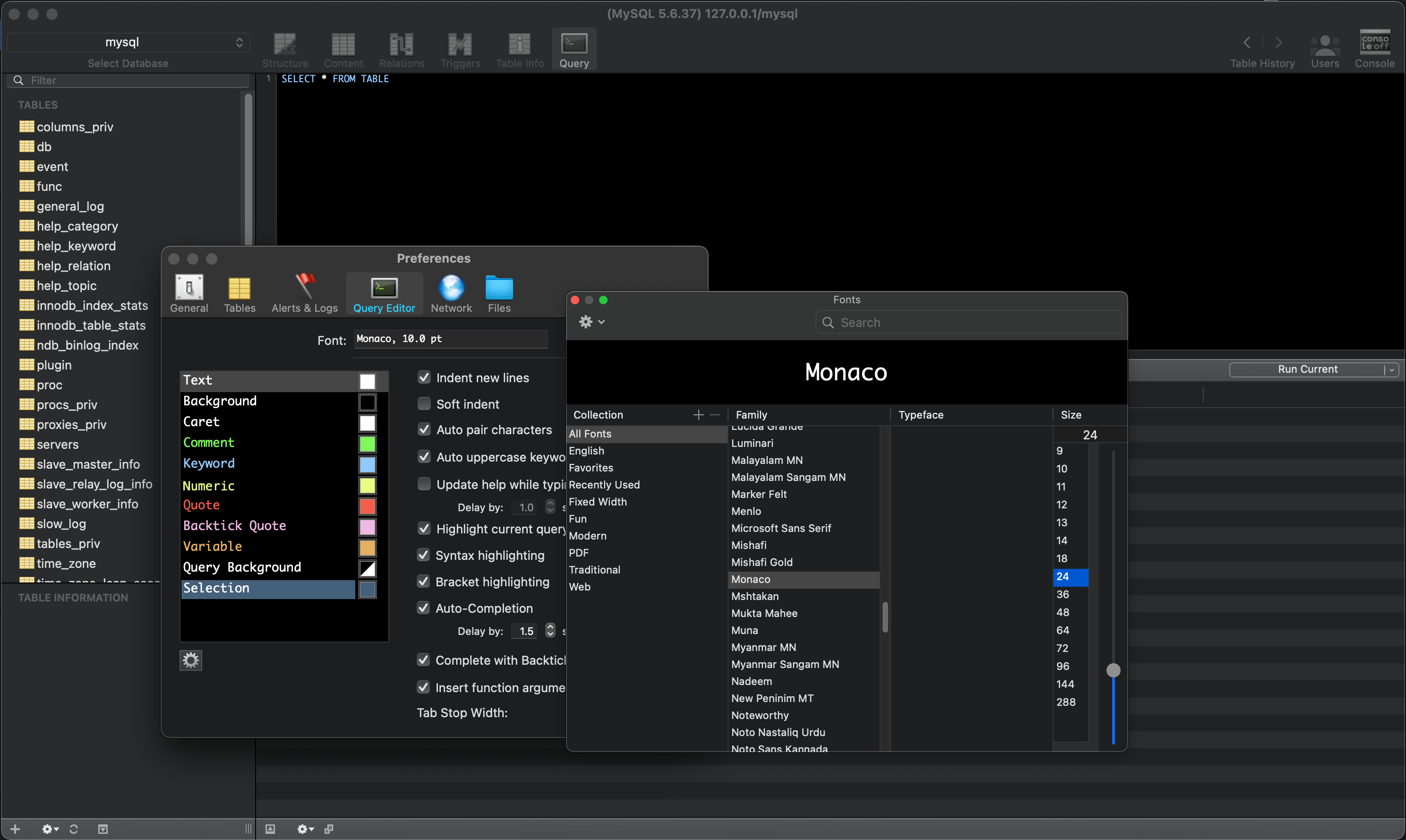
- Change font and font size, observe change not persisted in Font textbox on Sequel Ace and no changes to font in main query editor window
Is Issue Present in Latest Beta?
Present in latest release, 2.3.0, 11th Nov 2020 - https://github.com/Sequel-Ace/Sequel-Ace/tree/2.3.0
Additional Context
Have also tested in Sequel Pro to make sure my expectations on when the font should change (or how to correctly use the dialog) are correct. In Sequel Pro when changing the font in the font dialog the textbox labelled Font in preferences immediately changes, as does the font from the main query editor window.
Screenshot of the issue in Sequel Ace:
 matthewrk
All 4 comments
We see some issue where if you close the text selector then open it again (maybe even close the preferences itself) fixes this issue, and I'm not able to find why it's happening (though I was trying the font in "General" tab - not the Query one).
One thing we know is that Apple deprecated (and maybe even removed already) changeFont delegate method, so it doesn't really inform the app realtime, and I had to find a workaround for the main general font settings.... https://developer.apple.com/documentation/objectivec/nsobject/1462311-changefont
I'll take a look on the query editor, in the meantime try couple of times closing / reopening the settings window, or double tapping on the font size.
 Kaspik
on 13 Nov 2020
Kaspik
on 13 Nov 2020
I couldn't get around it by opening/closing preferences or restarting the app. I can confirm this works though and is reproducible for me:
- Open app
- Go to Preferences > Query Editor
- Attempt to change font - observe not working
- Go to General tab
- Attempt to change font - observe working
- Go back to Query Editor tab
- Attempt to change font - observe working
I don't know much about programming mac desktop apps but id assume some kind of delegate/event issue overlap with the main font editor dialog, so that's why doing that one first activates the query editor one... that would be a total uneducated guess though.
matthewrk
on 13 Nov 2020
Yeah the change by Apple is somehow confusing on Big Sur... we will investigate, I'm happy the new font change on General tab worked! :)
Kaspik
on 13 Nov 2020
Happens also in Catalina 10.15.7 - workaround works
 CodeBrauer
on 16 Nov 2020
CodeBrauer
on 16 Nov 2020
Related issues
 lipatovroman
·
4Comments
lipatovroman
·
4Comments
 augusl
·
6Comments
augusl
·
6Comments
 ChrisGitIt
·
5Comments
ChrisGitIt
·
5Comments
 rafmst
·
4Comments
rafmst
·
4Comments
 ashatrov-realforce
·
4Comments
ashatrov-realforce
·
4Comments
Most helpful comment
I couldn't get around it by opening/closing preferences or restarting the app. I can confirm this works though and is reproducible for me:
I don't know much about programming mac desktop apps but id assume some kind of delegate/event issue overlap with the main font editor dialog, so that's why doing that one first activates the query editor one... that would be a total uneducated guess though.