Sequel-ace: Password for ssh keyfile is being saved in the keychain even when it is told not to do so
- Sequel Ace Version: 2.1.5
- macOS Version: 10.15.6
- MySQL Version: 5.7.30 & 8.0.17
Description
When I create a connection to a db that requires going through an ssh tunnel, I use the ssh tab on the connection screen and enter the ssh host & user, then browse to the appropriate ssh key for the bastion host. All good.
I always ensure all my ssh keys are encrypted to implement a form of 2-factor authentication. Even if somebody steals the key or manages to get access to my laptop, the .pem file is useless unless you know the password used to encrypt it. Still all good.
So when I use Sequel Ace to connect to such a server, it pops up a dialogue asking me for the password for the .pem file. Included in that dialogue is a checkbox saying "Remember password in my keychain" (see attached screenshot). Even if I leave that box unchecked, the password I enter is stored in the keychain and is then automatically used in the future by Sequel Ace, even across reboots, removing the "2-factor" protection.
What the old Sequel Pro used to do in this situation was to use the MacOS ssh-agent to store the key in memory, allowing reuse during the current login session, without ever storing it to disk, and thus requiring one to re-enter the key on every new login (or after a reboot). Do apps in the MAS Sandbox have access to the ssh-agent? If so, can Sequel Agent be changed to use that interface to store ssh keys?
Just to be clear, I feel it is fine for Sequel Ace to store the db passwords in the keychain, just not the ssh keys that give access to the bastion hosts that allow connections to be made to the db in the first place.
Thanks.
Steps To Reproduce
- Set up database that requires an ssh tunnel to connect to it
- Encrypt the ssh key used for the tunnel (ssh-keygen -p -f private-key.pem)
- Connect via Sequel Ace - it will prompt for the password (passphrase). Ensure the "Remember password in my keychain" box is unchecked.
- Open the MacOS keychain app and search for SSH. The password you entered will have been saved.
Is Issue Present in Latest Beta?
2.1.5 is the latest release available at the moment.

 lphilps
All 7 comments
OK, I can replicate this. Weird one. It correctly skips the saving of the password when you click OK with the checkbox off:
- (IBAction)closeSSHPasswordSheet:(id)sender
{
//<snip code>
NSString *thePassword = [NSString stringWithString:[sshPasswordField stringValue]];
// Add to keychain if appropriate
// IT DOESN"T GO INTO THIS BLOCK
if (currentKeyName && [sshPasswordKeychainCheckbox state] == NSOnState) {
SPKeychain *keychain = [[SPKeychain alloc] init];
[keychain addPassword:thePassword forName:@"SSH" account:currentKeyName withLabel:[NSString stringWithFormat:@"SSH: %@", currentKeyName]];
[keychain release];
SPClear(currentKeyName);
}
}
if (!requestedPassphrase) passwordPromptCancelled = YES;
[[answerAvailableLock onMainThread] unlock];
}
But it does store it in memory. Need to track down where it's saving...
 jamesstout
on 15 Aug 2020
jamesstout
on 15 Aug 2020
Ah. I noticed the password was added to the keychain by "OpenSSH", not Sequel Ace:
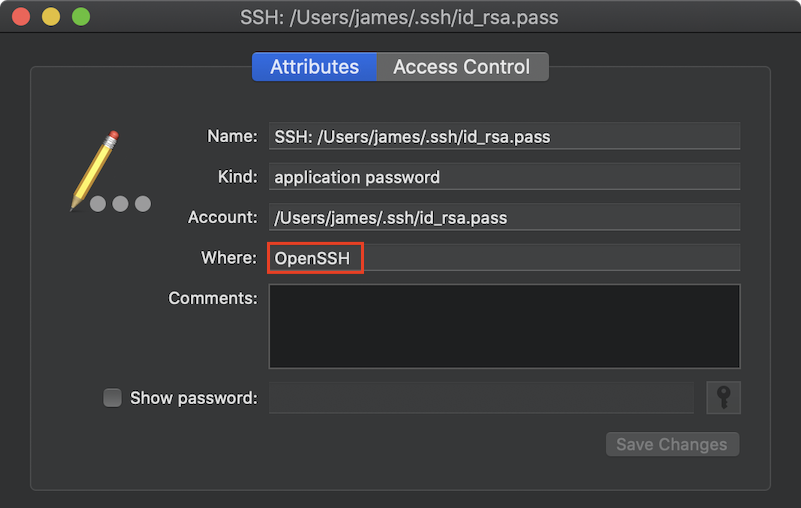
Did some googling and found this tech note:
To store passphrases in the keychain, set this option in your ssh configuration file:
UseKeychain yes
From the man page(x-man-page://5/ssh_config) for ssh_config
UseKeychain
On macOS, specifies whether the system should search for
passphrases in the user's keychain when attempting to use a par-
ticular key. When the passphrase is provided by the user, this
option also specifies whether the passphrase should be stored
into the keychain once it has been verified to be correct. The
argument must beyes'' orno''. The default is ``no''.
When constructing the ssh command to connect to a server, Sequel Ace looks for a custom config file, else uses the default:
// Use a custom ssh config file
NSString *sshConfigFile = [[NSUserDefaults standardUserDefaults] stringForKey:SPSSHConfigFile];
// If the config is not set, use the default one
if (sshConfigFile == nil) {
sshConfigFile = [[NSBundle mainBundle] pathForResource:SPSSHConfigFile ofType:@""];
}
So, unless you have specified a custom ssh_config file in Preferences, it uses the Sequel Ace default:
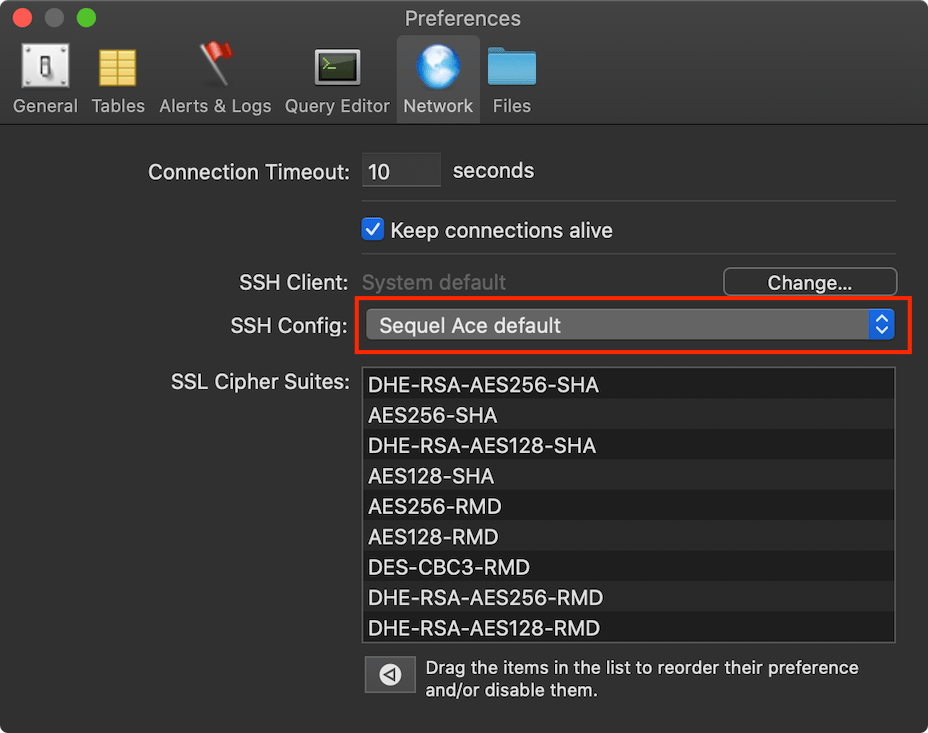
Which contains UseKeychain yes:
host *
IgnoreUnknown AddKeysToAgent,UseKeychain
AddKeysToAgent yes
UseKeychain yes
IdentitiesOnly yes
So, @lphilps for a quick fix, use a custom ssh_config file with
host *
IgnoreUnknown AddKeysToAgent,UseKeychain
AddKeysToAgent yes
UseKeychain no
IdentitiesOnly yes
Or edit the file at: /Applications/Sequel Ace.app/Contents/Resources/ssh_config
For @Sequel-Ace/all - macOS default for UseKeychain is no, should we be using yes in our default file? I think it should probably be no, and let the user choose on the password prompt dialog.
jamesstout
on 15 Aug 2020
Ah ha! That workaround solved the problem. Many thanks! I had a custom ssh config file I use for command line access, so I added UseKeychain no to it, pointed Sequel Ace at it, and voila.
Oddly, both my existing config file, and the default Sequel Ace config file, contain the line:
AddKeysToAgent yes
but it appears this isn't working, which is a bit surprising because openSSH, which I believe implements the ssh* command line utilities, does work with that setting and stores keys into and reads keys from the ssh-agent. Even if I manually add the key to the ssh-agent before running Sequel Ace, it still doesn't find it? Perhaps another Mac App Store Sandbox issue?
If there is a way to make that work, like it did in the old Sequel Pro, that would be perfect for me. I'd only have to type my .pem file passphrase once per session, while ensuring that passphrase was never saved anywhere in permanent storage on my Mac.
BTW, on a related note, I do not set
IdentitiesOnly yes
in my ssh config file because it seems to totally break the ssh-agent. Keys get stored in the agent, but are never found when a subsequent attempt is made to access the same system. I'll confess I never figured out why.
lphilps
on 15 Aug 2020
For @Sequel-Ace/all - macOS default for
UseKeychainisno, should we be usingyesin our default file? I think it should probably be no, and let the user choose on the password prompt dialog.
Good catch, @jamesstout! Yeah,I think we should set UseKeychain to no in our default ssh config file. Perhaps even we want to remove the option from our default config file and set it to no in our ssh connection setup manually like some of the other config options like retry are (so it's set to no regardless of the user's ssh config file, if we're going to handle sequel Ace storing passwords for key files it seems confusing if they sometimes are saved by openssh regardless of what that checkbox says).
 Jason-Morcos
on 15 Aug 2020
Jason-Morcos
on 15 Aug 2020
I was curious as to why the Sequel Ace / Openssh combo was not communicating with the ssh-agent on my Mac, so I (finally) investigated a little. Turns out the problem is, once again, related to a Unix Domain socket, similar to the problem in issue #113. Launchd on the Mac is creating a Unix Domain Socket for the ssh-agent at
/private/tmp/com.apple.launchd.{RandomString}/Listeners
then it sets the SSH_AUTH_SOCK environment variable in all shells to point to that file. The ssh command uses the environment variable to find the socket and communicate with the ssh-agent, but of course that won’t work for apps running in the Mac App Store Sandbox that can’t open the socket.
Sadly, it is not even workable to add an option to launch a file selector to select the socket and store it as a bookmark because the _RandomString_ part of the socket path changes on every system restart.
I did figure out a workaround that works for me though. I created a launchd script (adapted from /System/Library/LaunchAgents/com.openssh.ssh-agent.plist) and dropped it into
~/Library/LaunchAgents/com.sequel-ace.ssh-agent.plist
<?xml version="1.0" encoding="UTF-8"?>
<!DOCTYPE plist PUBLIC "-//Apple//DTD PLIST 1.0//EN" "http://www.apple.com/DTDs/PropertyList-1.0.dtd">
<plist version="1.0">
<dict>
    <key>Label</key>
    <string>com.sequel-ace.ssh-agent</string>
    <key>KeepAlive</key>
    <true/>
    <key>ProgramArguments</key>
    <array>
        <string>/usr/bin/ssh-agent</string>
        <string>-a</string>
        <string>/Users/MY_USER_NAME/Library/Containers/com.sequel-ace.sequel-ace/Data/ssh-agent.sock</string>
    </array>
    <key>Sockets</key>
    <dict>
        <key>Listeners</key>
        <dict>
            <key>SecureSocketWithKey</key>
            <string>SSH_AUTH_SOCK</string>
        </dict>
    </dict>
    <key>EnableTransactions</key>
    <true/>
    <key>RunAtLoad</key>
    <true/>
    <key>WorkingDirectory</key>
    <string>/</string>
</dict>
</plist>
This runs another copy of ssh-agent (you can run more than one of these on the system at one time) forcing the Unix Domain socket for this instance to be in the Sequel Ace Sandbox, i.e.
/Users/MY_USER_NAME/Library/Containers/com.sequel-ace.sequel-ace/Data/ssh-agent.sock
Then I created a simple Automator “Run Shell Script” application that contains:
SSH_AUTH_SOCK=/Users/MY_USER_NAME/Library/Containers/com.sequel-ace.sequel-ace/Data/ssh-agent.sock; export SSH_AUTH_SOCK;

/Applications/Sequel\ Ace.app/Contents/MacOS/Sequel\ Ace
Clicking that automator icon will launch of copy of Sequel Ace (without a controlling terminal, which is necessary to get ssh to work properly) that communicates with the second ssh-agent instance and everything functions the way it is supposed to.
Using the Automator script has some drawbacks, in particular you can’t launch more than one copy of Sequel Ace, and I am now storing 2 completely separate copies of keys in memory, but …
Sure seems like the Sandbox restriction on opening Unix Domain Sockets is a huge limitation.
lphilps
on 18 Sep 2020
I was curious as to why the Sequel Ace / Openssh combo was not communicating with the ssh-agent on my Mac, so I (finally) investigated a little. Turns out the problem is, once again, related to a Unix Domain socket, similar to the problem in issue #113. Launchd on the Mac is creating a Unix Domain Socket for the ssh-agent at
/private/tmp/com.apple.launchd.{RandomString}/Listenersthen it sets the SSH_AUTH_SOCK environment variable in all shells to point to that file. The ssh command uses the environment variable to find the socket and communicate with the ssh-agent, but of course that won’t work for apps running in the Mac App Store Sandbox that can’t open the socket.
Sadly, it is not even workable to add an option to launch a file selector to select the socket and store it as a bookmark because the _RandomString_ part of the socket path changes on every system restart.
I did figure out a workaround that works for me though. I created a launchd script (adapted from
/System/Library/LaunchAgents/com.openssh.ssh-agent.plist) and dropped it into
~/Library/LaunchAgents/com.sequel-ace.ssh-agent.plist<?xml version="1.0" encoding="UTF-8"?> <!DOCTYPE plist PUBLIC "-//Apple//DTD PLIST 1.0//EN" "http://www.apple.com/DTDs/PropertyList-1.0.dtd"> <plist version="1.0"> <dict> <key>Label</key> <string>com.sequel-ace.ssh-agent</string> <key>KeepAlive</key> <true/> <key>ProgramArguments</key> <array> <string>/usr/bin/ssh-agent</string> <string>-a</string> <string>/Users/MY_USER_NAME/Library/Containers/com.sequel-ace.sequel-ace/Data/ssh-agent.sock</string> </array> <key>Sockets</key> <dict> <key>Listeners</key> <dict> <key>SecureSocketWithKey</key> <string>SSH_AUTH_SOCK</string> </dict> </dict> <key>EnableTransactions</key> <true/> <key>RunAtLoad</key> <true/> <key>WorkingDirectory</key> <string>/</string> </dict> </plist>This runs another copy of ssh-agent (you can run more than one of these on the system at one time) forcing the Unix Domain socket for this instance to be in the Sequel Ace Sandbox, i.e.
/Users/MY_USER_NAME/Library/Containers/com.sequel-ace.sequel-ace/Data/ssh-agent.sockThen I created a simple Automator “Run Shell Script” application that contains:
SSH_AUTH_SOCK=/Users/MY_USER_NAME/Library/Containers/com.sequel-ace.sequel-ace/Data/ssh-agent.sock; export SSH_AUTH_SOCK;

/Applications/Sequel\ Ace.app/Contents/MacOS/Sequel\ Ace
Clicking that automator icon will launch of copy of Sequel Ace (without a controlling terminal, which is necessary to get ssh to work properly) that communicates with the second ssh-agent instance and everything functions the way it is supposed to.
Using the Automator script has some drawbacks, in particular you can’t launch more than one copy of Sequel Ace, and I am now storing 2 completely separate copies of keys in memory, but …
Sure seems like the Sandbox restriction on opening Unix Domain Sockets is a huge limitation.
I think this should belong on a different issue? May be useful info for #346 and #113 however.
Jason-Morcos
on 20 Sep 2020
Reopening until 2.2.0 is actually released
Jason-Morcos
on 6 Oct 2020
Related issues
 salvor-hardin
·
8Comments
salvor-hardin
·
8Comments
 rafmst
·
4Comments
rafmst
·
4Comments
 SanderVanLeeuwen
·
3Comments
SanderVanLeeuwen
·
3Comments
 gms8994
·
6Comments
gms8994
·
6Comments
 vuon9
·
4Comments
vuon9
·
4Comments
Most helpful comment
I was curious as to why the Sequel Ace / Openssh combo was not communicating with the ssh-agent on my Mac, so I (finally) investigated a little. Turns out the problem is, once again, related to a Unix Domain socket, similar to the problem in issue #113. Launchd on the Mac is creating a Unix Domain Socket for the ssh-agent at
/private/tmp/com.apple.launchd.{RandomString}/Listenersthen it sets the SSH_AUTH_SOCK environment variable in all shells to point to that file. The ssh command uses the environment variable to find the socket and communicate with the ssh-agent, but of course that won’t work for apps running in the Mac App Store Sandbox that can’t open the socket.
Sadly, it is not even workable to add an option to launch a file selector to select the socket and store it as a bookmark because the _RandomString_ part of the socket path changes on every system restart.
I did figure out a workaround that works for me though. I created a launchd script (adapted from
/System/Library/LaunchAgents/com.openssh.ssh-agent.plist) and dropped it into~/Library/LaunchAgents/com.sequel-ace.ssh-agent.plistThis runs another copy of ssh-agent (you can run more than one of these on the system at one time) forcing the Unix Domain socket for this instance to be in the Sequel Ace Sandbox, i.e.
/Users/MY_USER_NAME/Library/Containers/com.sequel-ace.sequel-ace/Data/ssh-agent.sockThen I created a simple Automator “Run Shell Script” application that contains:
Clicking that automator icon will launch of copy of Sequel Ace (without a controlling terminal, which is necessary to get ssh to work properly) that communicates with the second ssh-agent instance and everything functions the way it is supposed to.
Using the Automator script has some drawbacks, in particular you can’t launch more than one copy of Sequel Ace, and I am now storing 2 completely separate copies of keys in memory, but …
Sure seems like the Sandbox restriction on opening Unix Domain Sockets is a huge limitation.