Sensei: Sorting does not work for lessons on the Analysis page
Steps to Reproduce
- Navigate to _Sensei_ > _Analysis_ and click on _Lessons_.
- Sort by _Course_, _Learners_, _Completed_ or _Average Grade_.
What I Expected
The rows to sort in ascending order by that column.
What Happened Instead
Nothing.
 donnapep
All 5 comments
@donnapep Hi, I test this issue and sort by course, learners, completed and average Grade work now.
WordPress ver: 5.0.3
Sensei ver: 1.12.2
 mostafaabd
on 11 Feb 2019
mostafaabd
on 11 Feb 2019
Hello @mostafaabd. Thank you for all your PRs! I plan to review them this week. 🙂
For this one, they do sort but they do not sort correctly. For example, when I sorted _Course_ I got the following, which is in neither ascending nor descending order:
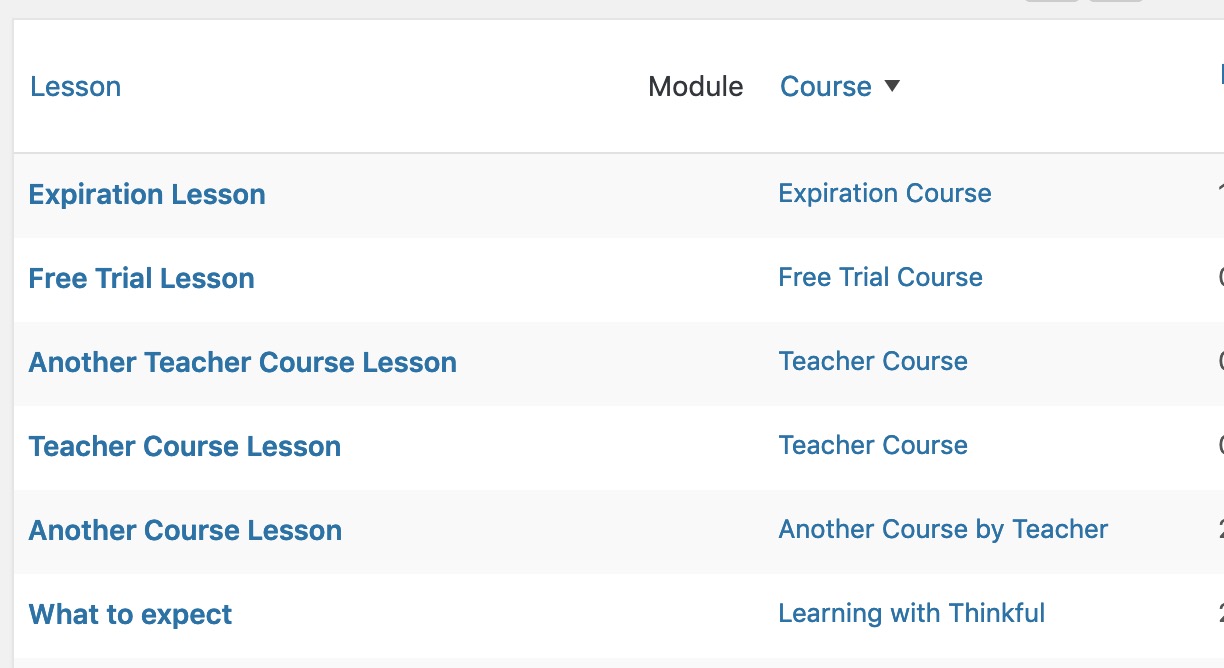
It's a similar situation for _Learners_, _Completed_ and _Average Grade_.
donnapep
on 18 Feb 2019
👍2
Thanks, i understand now.
mostafaabd
on 19 Feb 2019
Is there any update on this issue? I have a client on Sensei LMS v2.1.2 who is reporting this bug.
 wpsmort
on 20 Aug 2019
wpsmort
on 20 Aug 2019
Hi @wpsmort. There's nothing new to report at this time.
donnapep
on 10 Sep 2019
Was this page helpful?
0 / 5 - 0 ratings
Related issues
 jeichorn
·
6Comments
jeichorn
·
6Comments
 jenhooks
·
6Comments
jenhooks
·
6Comments
 richardmtl
·
5Comments
richardmtl
·
5Comments
 danjjohnson
·
7Comments
danjjohnson
·
7Comments
 kraftbj
·
4Comments
kraftbj
·
4Comments
Most helpful comment
Hello @mostafaabd. Thank you for all your PRs! I plan to review them this week. 🙂
For this one, they do sort but they do not sort correctly. For example, when I sorted _Course_ I got the following, which is in neither ascending nor descending order:
It's a similar situation for _Learners_, _Completed_ and _Average Grade_.