Sensei: Memberships and courses issue
Test case:
- Sensei > Settings - Access permissions disabled.
- create a course
- add a membership rule for the course
- view the course as a logged out user
I expected to see a message telling me I needed to purchase the membership to view the course. Instead I just see no content.
Could use a second set of eyes on this to confirm. @unfulvio maybe you could take a look?
 danjjohnson
All 30 comments
hi @danjjohnson how is your current restriction mode setup?
https://docs.woothemes.com/document/woocommerce-memberships-settings/
 unfulvio
on 1 Jul 2016
unfulvio
on 1 Jul 2016
This issue is being reported in #436294. Only the courses have been added to "Restrict Content". We'd like to avoid adding every lesson, quiz, and message as well because there are hundreds of them. Is it a requirement to add all the lessons for each course or should the course be sufficient?
And just to clarify, the issue is that users who are logged in can take courses they haven't paid for. They can see the content.
 rachelsquirrel
on 2 Jul 2016
rachelsquirrel
on 2 Jul 2016
Rachel is correct. We are currently experiencing this issue. @enfulvio, we are using Woocommerce, subscriptions and memberships. We have the courses restricted at the membership level (first screenshot).
If a user is not logged in all the restrictions seem to work.
However, if a registered user -- who has NOT purchased a course -- logs IN they can view the course home page. They are presented with BOTH the restricted content message as well as the "Start Taking this Course" option. If this users clicks on "start taking this course" they are granted access to the course (second screen shot).
@enfulvio... to answer your question, we were told that since we're using Memberships to control access to bundles of courses we should disable the "Use WooCommerce to sell courses" option, which we have, and rely on Memberships to control access.


 dano23
on 3 Jul 2016
dano23
on 3 Jul 2016
I DON'T have this issue using Sensei, WooCommerce, and WooCommerce Memberships, however I think the WooCommerce Membership docs can use some improvement as it is not easy/intuitive to set up correctly.
All content restriction is working as it should to protect both unpurchased and expired content.
The actual course page is visible (this is where you can provide intro or sales copy about the course if you wish), but all course content (lessons and quizzes) is protected. Clicking on any product required to purchase correctly takes me to the product.


Takes me back to the course page, click on any product required to purchase:
To access this content, you must purchase NCIDQ Multiple Choice Exam VIP, NCIDQ Exam Complete Prep Course + Practice Tests or NCIDQ IDFX Study Course + Practice Test.
and get the product, not the content

 lisaleague
on 3 Jul 2016
lisaleague
on 3 Jul 2016
Hi Lisa,
Thanks for all the detail. I have a question for you. I noticed in all of your screenshots that the user is not logged in. Is that correct? Have you tried testing this with an account that’s logged in?
In our case we have reasons a user may register to create an account and log in (such as to participate in forums) but not purchase a course. This is where we’re having trouble protecting the course content.
Dan
On Jul 3, 2016, at 5:35 AM, Lisa League [email protected] wrote:
I DON'T have this issue using Sensei, WooCommerce, and WooCommerce Memberships, however I think the WooCommerce Membership docs can use some improvement as it is not easy/intuitive to set up correctly.
All content restriction is working as it should to protect both unpurchased and expired content.
The actual course page is visible (this is where you can provide intro or sales copy about the course if you wish), but all course content (lessons and quizzes) is protected. Clicking on any product required to purchase correctly takes me to the product.
https://cloud.githubusercontent.com/assets/3607365/16545393/b7fedd82-40f7-11e6-8442-26b3ee2cf882.png
https://cloud.githubusercontent.com/assets/3607365/16545395/bbf91380-40f7-11e6-813f-ebbfaef79998.png
https://cloud.githubusercontent.com/assets/3607365/16545397/c03c1078-40f7-11e6-8b92-bf8442296a0b.png
Takes me back to the course page, click on any product required to purchase:To access this content, you must purchase NCIDQ Multiple Choice Exam VIP, NCIDQ Exam Complete Prep Course + Practice Tests or NCIDQ IDFX Study Course + Practice Test.
and get the product, not the content
https://cloud.githubusercontent.com/assets/3607365/16545399/c9e6a160-40f7-11e6-955b-ddcf738aad04.png
—
You are receiving this because you commented.
Reply to this email directly, view it on GitHub https://github.com/Automattic/sensei/issues/1501#issuecomment-230151289, or mute the thread https://github.com/notifications/unsubscribe/AMkXXQn3oHD19vfXjoAEm7WNqDo0HpsGks5qR6yAgaJpZM4JCPIH.
dano23
on 3 Jul 2016
We'd like to avoid adding every lesson, quiz, and message as well because there are hundreds of them. Is it a requirement to add all the lessons for each course or should the course be sufficient?
@danjjohnson @rachelsquirrel Memberships doesn't support hierarchies outside of taxonomies - this would require a specific integration between Memberships and Sensei which we can build - content needs to be restricted individually for the time being -- I'll bring it up to my team and see if we can squeeze this into some upcoming release
quick q: can a lesson be part of different courses (A and B)? what if one customer has a membership that grants access to course A but not B? are there other aspects of Sensei that are in need of more seamless integration?
unfulvio
on 4 Jul 2016
Yes @danjjohnson , when logged in course content is still protected if I have not purchased access to it.
Logged in as anther user using User Switching.
Dropped in several protected page and lesson URLs
Get a message that I must login to the course or purchase.


lisaleague
on 4 Jul 2016
@unfulvio to protect all the contents of a course, protect at the course level and the lessons and quizzes will be protected. If you wish to include any other content, like a standalone page, you'll have to include that separately in the rules.
If you protect content by protecting a course, you cannot create another course that is unprotected at the course level then protect just a lesson. In that case, you'll inadvertently cause all other lessons in other courses to be inaccessible by those who should have access.
lisaleague
on 4 Jul 2016
If you protect content by protecting a course, you cannot create another course that is unprotected at the course level then protect just a lesson. In that case, you'll inadvertently cause all other lessons in other courses to be inaccessible by those who should have access.
yeah thanks @lisaleague that's what I thought too -- must figure out if there's a way where this can work in different setups (those who want conveniently restrict all lessons under a course and those who have shared lessons between courses that are being restricted by different plans)
unfulvio
on 5 Jul 2016
@unfulvio if I want a lesson to appear in more than one course that are sold separately, I just duplicate the lesson or quiz. This is also how it's handled in other LMS systems. I don't think shared lessons is how Sensei is designed to work.
lisaleague
on 5 Jul 2016
@unfulvio
quick q: can a lesson be part of different courses (A and B)?
No. Lessons can only be added to one course.
rachelsquirrel
on 6 Jul 2016
@danjjohnson I have an update for you on this one, though I think we've veered quite far from your initial bug report I think I have stumbled across a very specific bug. Hopefully this additional information helps.
Test number 1:
First, I added all the lessons in a course to the Membership>restriction rules. This did block the lesson content. However, it did not block the "Start taking this course" button, so users could still click that and would, in fact "start" the course. They just couldn't see the content when clicked on, which is pretty confusing, to say the least. It also did not block the "Mark lesson complete" button and all the content in the Course Progress sidebar (a separate plugin, I know).
I was also able to replicate all the above using Restrict Content Pro. Same problems. We thought about just switching plugins but given this test it seems the problem is really with Sensei, not Memberships.
In fact, I think the core of the problem is the "Start taking this course" button and function. I _think_ if that didn't show up then none of the other problems would surface. (Clicking on any course content would give you the content restricted message.) And, on an important related note, If purchasing a membership automatically started all the courses involved, then the "Start taking this course" button wouldn't be required and the whole thing would work swimmingly.
Test number 2:
It's important to note that in Test number 1 I did not have the "Use WooCommerce to sell courses" checkbox enabled. Earlier I had been told by support to disable that option in Sensei > Settings. They suggested this since I was managing all content access through the Membership plugin.
So for Test number 2 I tried deleting all the restrictions in Memberships, enabling the "Use WooCommerce to sell courses" setting and assigned a course to our Subscription product and... that worked! The "Start taking this course" button disappeared! And in its place is a button to purchase the subscription.
So this bypasses memberships. It also bypasses the requirement to click "Start taking this course," as the course was "started" upon purchase -- good! It also displays a confirmation on purchase, "You have purchased the following course..." which is ok, but not really what we're selling.
But here are the problems with this approach: we sell access to all 15 courses for a single subscription fee. If we enable this on all of our courses then under EACH course description it would say it's $79/mo -- despite the fact that it's actually ALL courses for one fee. Might be able to solve with some adjusted wording somewhere, not sure.
We also still need to use Memberships to restrict access to other course-related content (such as course-specific forums). So now we've got a jumble of approaches which looks confusing in a user's account (might also be able to solve with wording).
Sorry -- this ended up being a lot longer than I thought it would. But we've been struggling with this one for weeks now. I haven't tested both approaches together to see what happens, but will try that tonight if I get time.
dano23
on 12 Jul 2016
@lisaleague @dano23 @rachelsquirrel and @danjjohnson thanks! "Start taking this course" should not be shown when a non-member views the course page. I added some commits that address this.
 pgk
on 23 Sep 2016
pgk
on 23 Sep 2016
@pgk That seems to work. It hides the "Start taking this course" button and the "Complete lesson" buttons.
However, it also seems to remove some of the styles for some reason:

@dano23 would you be able to test this branch on a test site (ignoring the missing styles for now) and confirm whether it works as intended?
I think we can greatly improve the UX here in future, but fixing this issue will be a good start! :)
danjjohnson
on 24 Sep 2016
@pgk The other problem with this approach is that when a user buys a membership, they don't receive anything with a link to the course(s) it includes. And the course doesn't appear in My Courses until they click "Start taking this course"
So unless they can easily find the course page again, they are kind of lost.
@lisaleague @dano23 how do you get around this issue?
@pgk is there any way that when a user buys a membership, we could automatically enroll them in any courses protected by that membership, so that the course will at least appear in My Courses?
danjjohnson
on 24 Sep 2016
@danjohnson you nailed it. We got around this by bypassing memberships entirely. (We still use memberships to protect a CPT on our site.) So we currently have the courses linked to a product using that drop-down on the course settings page. The only reason we did this was to solve for the problem you mention. We would rather use memberships to control access so we can test different prices, offers, combinations of courses etc. Right now we cannot do that because a course can only be associated with a single product.
@pgk I can test this on our staging server but not until Monday.
On Sep 24, 2016, at 7:29 AM, Dan Johnson [email protected] wrote:
@pgk The other problem with this approach is that when a user buys a membership, they don't receive anything with a link to the course(s) it includes. And the course doesn't appear in My Courses until they click "Start taking this course"
So unless they can easily find the course page again, they are kind of lost.
@lisaleague @dano23 how do you get around this issue?
@pgk is there any way that when a user buys a membership, we could automatically enroll them in any courses protected by that membership, so that the course will at least appear in My Courses?
—
You are receiving this because you were mentioned.
Reply to this email directly, view it on GitHub, or mute the thread.
dano23
on 24 Sep 2016
@danjjohnson I set the course page as the login, but have instructions at the top for the member to activate the course through the "My Account" page first.
Many members still have trouble with this and contact customer support. In that case I usually just switch to their user and start it - not very scalable, and I don't necessarily want everyone I have working support logging into the site.
I've planned on adding this for my next course season https://shopplugins.com/plugins/woocommerce-redirect-thank-you/ but really should be part of WooCommerce Memberships Sensei integration. That's how it works in other LMS/membership integrations I've worked with, even if multiple courses are part of 1 membership.
lisaleague
on 26 Sep 2016
@lisaleague @dano23 thanks for the feedback! We'll work on improving this for people using Sensei and Memberships.
danjjohnson
on 26 Sep 2016
is there any way that when a user buys a membership, we could automatically enroll them in any courses protected by that membership, so that the course will at least appear in My Courses?
@danjjohnson good idea! Added in 6cd6509, hooking into wc_memberships_user_membership_status_changed to start courses associated with an active membership.
pgk
on 28 Sep 2016
apart from status changes you might also test the following action hooks
wc_memberships_user_membership_created and wc_memberships_user_membership_created -- the first is fired when a new membership is created upon user action (e.g. purchase of product that grants access) -- the latter when a membership is saved or updated in admin
unfulvio
on 28 Sep 2016
@pgk just checking you saw that last comment ^ :)
danjjohnson
on 29 Sep 2016
Similar problem reported here: 497146-zd-woothemes
Protecting a course in membership plan doesn't protect all of its lessons.
 madeincosmos
on 23 Nov 2016
madeincosmos
on 23 Nov 2016
Closed on #1545
pgk
on 13 Dec 2016
@pgk as discussed, the membership message now displays on the single course page when the course is protected by a membership, but only if "Single course page displays" is set to "Course Excerpt" in Sensei Settings:

If it's set to "Full course content" then the message doesn't display:

danjjohnson
on 16 Dec 2016
Also, the message shows under each lesson on the course page:

Maybe we should only display the message for lessons on the single lesson page?
danjjohnson
on 16 Dec 2016
Auto-assigning a learner to a course when they buy the right membership is now working.
However, if the membership is cancelled, the course still appears in My Courses, and still shows as in progress, because the user is still enrolled in the course, even though they can't access the content.

Should we automatically remove a learner from a course if their membership is cancelled? (Could be complicated if they could potentially have more than one membership that gives access to the course.)
danjjohnson
on 16 Dec 2016
However, if the membership is cancelled, the course still appears in My Courses, and still shows as in progress, because the user is still enrolled in the course, even though they can't access the content
@danjjohnson I think this makes sense, as their progress would still be there if they repurchase a membership and thus unlock access again.
lisaleague
on 17 Dec 2016
@danjjohnson @lisaleague thanks! With the commits above, users can never register for a membership-restricted course (even when "Anyone Can Register" is enabled in Settings -> General).
Additionally, the message displays when courses are set to show "Full course content".
In light of the several slightly-different-but-related issues with memberships and to avoid this becoming a huge feature thread, I am going to close this but feel free to open new related issues to this one for easier tracking.
pgk
on 18 Dec 2016
@pgk 76b1e53 may have a "double message display" regression w/ woocommerce-memberships 1.9.0+, see screenshot
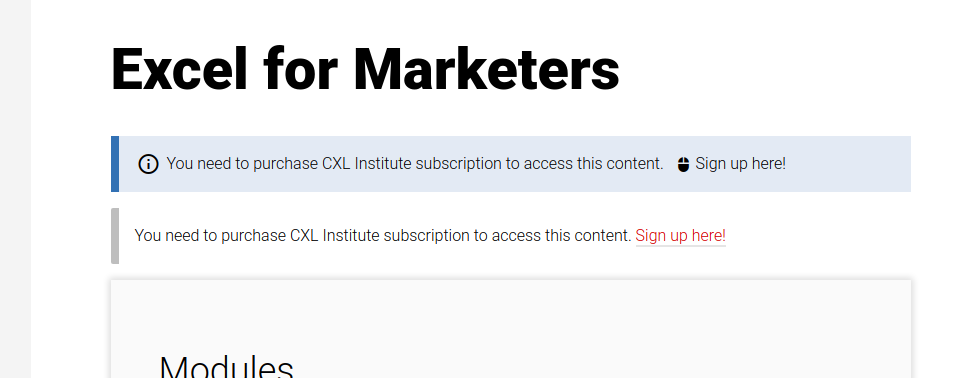
I'm not sure about the purpose of Should Sensei_WC_Memberships::add_wc_memberships_notice()... why is it trying to take over message display from Memberships in the first place?
 lkraav
on 12 Nov 2017
lkraav
on 12 Nov 2017
FIY, in 1.9.0 the main changes concerning restrictions and messages are:
Instead of filtering
the_contentMemberships replaces the post object very early withthe_post; the content of the new post object that replaces the original usually consists of an excerpt (if applicable) and a pertinent non-member message. Other plugins can further filterthe_contentafter this. This change in part is to avoid bumping into potential filter loops or filtering issues withthe_contentand enhance compatibility with certain page builders.Handling of the messages system has been centralized into a static class
WC_Memberships_User_Messages. Before the messages logic was scattered across classes. There's a few new filters introduced too.
unfulvio
on 13 Nov 2017
Related issues
rachelsquirrel
·
5Comments
danjjohnson
·
6Comments
 richardmtl
·
5Comments
richardmtl
·
5Comments
 merkushin
·
3Comments
richardmtl
·
5Comments
merkushin
·
3Comments
richardmtl
·
5Comments
Most helpful comment
@lisaleague @dano23 thanks for the feedback! We'll work on improving this for people using Sensei and Memberships.