Scratch-gui: Weird behavior when clicking a stacked translate blocks.
Expected Behavior
It pops a text and stop.
Actual Behavior
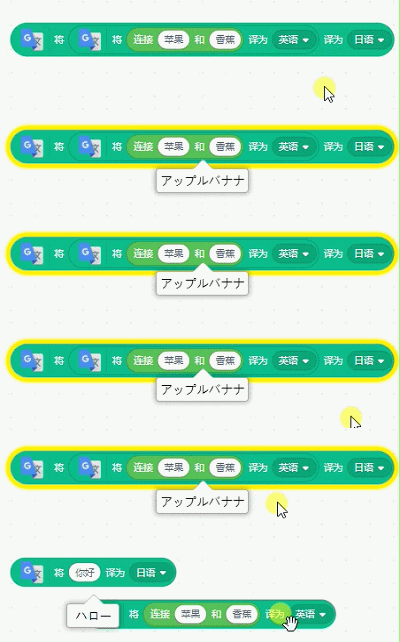
Steps to Reproduce
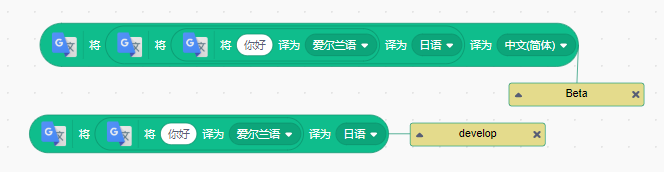
Stack blocks like this
Operating System and Browser
Win 8, Google Chrome 68
 cyx2015s
All 4 comments
Can reproduce on develop with Chrome 68 Windows 10.
Note: Steps to reproduce in issue description did NOT work, only the configuration in the "Actual behavior" section showed this problem.
Actual Steps to Reproduce
- Stack blocks like so:

- Click on any block in the stack.
Important part is that there MUST be a reporter block in the input.
OS, Branch, and Browser
Windows 10, develop, Chrome 68
I noticed that the language is irrelevant to the issue, setting the language to Simplified Chinese or English made no difference.
 Kenny2github
on 14 Aug 2018
Kenny2github
on 14 Aug 2018
This stack trace that seems to happen when clicking an individual translate block is perhaps related?
raven.js:429 Uncaught TypeError: Cannot set property 'null' of null
at e.exports (lib.min.js:114)
at e.value (lib.min.js:114)
at e.value (lib.min.js:114)
at A.value (lib.min.js:47)
at lib.min.js:47
at d (raven.js:425)
e.exports @ lib.min.js:114
value @ lib.min.js:114
value @ lib.min.js:114
value @ lib.min.js:47
(anonymous) @ lib.min.js:47
d @ raven.js:425
 picklesrus
on 26 Sep 2018
picklesrus
on 26 Sep 2018
I think this actually happens every time you run a translate block with a new word/language pair. (The most recent word/language pair value is cached in the extension code itself).
There's a js error with this stack trace:
execute.js:457 Uncaught TypeError: Cannot set property 'null' of null
at execute (execute.js:457)
at Sequencer.stepThread (sequencer.js:207)
at Sequencer.stepThreads (sequencer.js:123)
at Runtime._step (runtime.js:1752)
at runtime.js:2261
That is coming from the following line where both the argValues and the inputValue are null.
https://github.com/LLK/scratch-vm/blob/develop/src/engine/execute.js#L457
The opCached object exists, but the _parentKey and parentValue properties on it are null. I'm not sure what they're supposed to be though.
picklesrus
on 12 Dec 2018
picklesrus
on 18 Dec 2018
Related issues
 luchotc
·
4Comments
luchotc
·
4Comments
 chrisgarrity
·
4Comments
chrisgarrity
·
4Comments
 rschamp
·
3Comments
rschamp
·
4Comments
rschamp
·
3Comments
rschamp
·
4Comments
 thisandagain
·
3Comments
thisandagain
·
3Comments
Most helpful comment
Can reproduce on develop with Chrome 68 Windows 10.
Note: Steps to reproduce in issue description did NOT work, only the configuration in the "Actual behavior" section showed this problem.
Actual Steps to Reproduce
Important part is that there MUST be a reporter block in the input.
OS, Branch, and Browser
Windows 10, develop, Chrome 68
I noticed that the language is irrelevant to the issue, setting the language to Simplified Chinese or English made no difference.