salesforcedx-vscode-core.push-or-deploy-on-save.enabled Stop working
I've notice recently that the settings salesforcedx-vscode-core.push-or-deploy-on-save.enabled have stop working.
It was working in the past but now I need to right click and deploy to org to have the code pushed to the org.
 Kxa422
All 22 comments
@ntotten I'm having the same issue. Should I setup my workspace from scratch again? I updated my extension and CLI and still the push or save is not kicking off the deploy.
As per this issue, it has been taken care but it has unfortunately broken the functionality for some users. https://github.com/forcedotcom/salesforcedx-vscode/issues/1155#issuecomment-508249942
 arunmitteam
on 5 Jul 2019
arunmitteam
on 5 Jul 2019
Hi @arunmitteam & @Kxa422, could you provide the following info so we can try and replicate this on our end.
- VS Code version
- OS version
- Salesforce extensions version
- Salesforce CLI version
 lcampos
on 5 Jul 2019
lcampos
on 5 Jul 2019
OS Version - macOS 10.14.5
VS Code version - Version 1.36.0 (1.36.0)
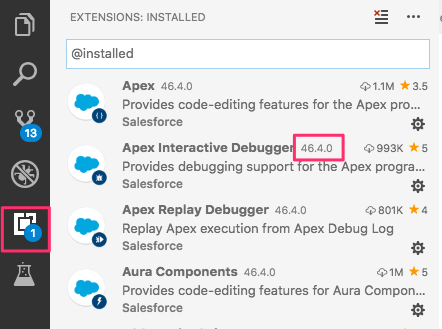
Salesforce extensions - 46.4.0
Salesforce CLI - sfdx-cli/7.13.0-27dbcb37d3 darwin-x64 node-v10.15.3
arunmitteam
on 5 Jul 2019
OS Version - Windows 10 Pro 1709 (Os Build 16299 1087)
VS code version - 1.36.0
Salesforce CLI - sfdx-cli/7.13.0-27dbcb37d3 win32-x64 node-v10.15.3
salesforcedx 46.3.0 (core)
├─ force-language-services 46.8.0 (core)
└─ salesforce-alm 46.7.0 (core)
Kxa422
on 5 Jul 2019
@arunmitteam I have a similar config now, can you tell me whether you're setting the "salesforcedx-vscode-core.push-or-deploy-on-save.enabled": true flag in your project's .vscode/settings.json file or on the User settings.json file (Open Command Palette > Preferences: Open Settings) that applies to all VS Code ?
lcampos
on 5 Jul 2019
@Kxa422 what about your Salesforce extensions for vs code ? You can see their version by clicking on the extensions icon in VS Code's left side bar.
lcampos
on 5 Jul 2019
@lcampos
yes, I have it enabled. See below.
"salesforcedx-vscode-core.push-or-deploy-on-save.enabled": true
It takes a very long time to kick off or doesn't kick off at all. I also checked the pushOrDeployOnSave.js and it has DeployQueue.ENQUEUE_DELAY = 500; // milliseconds
arunmitteam
on 5 Jul 2019
46.4.0
As I've said, it was working but now it have completely stop working.
Inside my settings.json, the following line is present
"salesforcedx-vscode-core.push-or-deploy-on-save.enabled": true,
Kxa422
on 5 Jul 2019
@lcampos @ntotten any update on this issue?
arunmitteam
on 8 Jul 2019
Not sure if it helps but even test runs are kicked off immediately. It takes its own time and kicks off randomly.
arunmitteam
on 8 Jul 2019
Not yet, I haven't been able to replicate this in Windows or Mac. Do you get any errors in the Dev Tools (Help > Toggle Developer Tools > Console) when running the command ?
lcampos
on 8 Jul 2019
Nothing in the console, even after a couple of hours.
It's simply not doing the deployment to the org.
Kxa422
on 8 Jul 2019
Just tried with version 45.9.0 and it's working fine
Update to version 46.4.0 and it's not working anymore.
Kxa422
on 8 Jul 2019
Hi all. Just to rule out any possibilities:
- Verify that your workspace settings are not overwriting your user settings in VS Code. For example, i could have
"salesforcedx-vscode-core.push-or-deploy-on-save.enabled": truein user settings, and"salesforcedx-vscode-core.push-or-deploy-on-save.enabled": falsein my workspace settings. - Reload/Restart VS Code after updating the extensions to 46.4.0
- Verify a default org is set by looking at the org picker in the status bar and seeing your username or alias there
- Files will only deploy on save if it is dirty now (a change is actually made when you hit save).
Did the deploy work at all in the new version when you saved and then stopped working? Or right after the new update and reload of VS Code you have not seen a single deploy kick off?
 brpowell
on 8 Jul 2019
brpowell
on 8 Jul 2019
"salesforcedx-vscode-core.push-or-deploy-on-save.enabled": true is in the json file
Reload , restart computer have already been done
Default org is set or it won't work for previous version
Change is done in the file but deployment to the org don't start at all even after a couple of hours (2+).
When using previous release like 45.9.0, all is working fine.
When using curent version, it's simply not working at all.
Only option is to use previous version.
Kxa422
on 8 Jul 2019
@Kxa422 how did you revert to older version?
arunmitteam
on 8 Jul 2019
When you in the extension, there is a small wheel at the bottom right corner of each extension.
click on it, in the menu that appear there is Install Another Version ..
and you can select an previous version
Kxa422
on 8 Jul 2019
@Kxa422 Thank you!
arunmitteam
on 9 Jul 2019
Hi guys,
while this issue is open I need to add that, actually, I can't turn off Push-or-deploy-on-save at all. In my User and Workspace settings I have this settings:
"salesforcedx-vscode-core.push-or-deploy-on-save.enabled": false
it was True, but now I want disable it, and settings never applied.
I'm using mac os Mojave (10.14.5) and Vs code + SF CLI integration (46.4.0).
I was Uninstalling Salesforce Extension Pack and installing again, but didn't help.
Am I doing it correct / should I open new issue?
Thanks in advance,
Roman
UPD: deployment on save currently working fine, I saw no issue with it.
 Dovbush
on 10 Jul 2019
Dovbush
on 10 Jul 2019
@Dovbush there are potentially 2 settings.json files. A global VSCode settings file (run Preferences: Open Settings in command palette) and you could also have one specific to your project if you create it under a .vscode folder. If you have both files, the settings file under your .vscode project's folder will override the global one.
Please verify that you've disabled the salesforcedx-vscode-core.push-or-deploy-on-save.enabled in both settings files. If you keep running into that issue after having the setting off in both files please open a new issue for it.
lcampos
on 11 Jul 2019
Closing this issue since we've addressed it in version 46.5.0 of the extensions.
lcampos
on 11 Jul 2019
I just wanted to add that it works for me when I edit the actual .css file manually and then save, but doesn't work when my css files are compiled by node-sass from .scss files that live outside my salesforce project directory.
This is really too bad, since writing vanilla CSS surely is not a good option nowadays. The vast majority of frontend developer are using some kind of preprocessor.
Any fix possible?
 paddelboot
on 17 Dec 2019
paddelboot
on 17 Dec 2019
Related issues
 Shokhan
·
6Comments
Shokhan
·
6Comments
 vtandon-wiley
·
3Comments
vtandon-wiley
·
3Comments
 ntotten
·
4Comments
ntotten
·
4Comments
 frackham
·
6Comments
frackham
·
6Comments
 pranaymistry
·
4Comments
pranaymistry
·
4Comments
Most helpful comment
@Dovbush there are potentially 2
settings.jsonfiles. A global VSCode settings file (runPreferences: Open Settingsin command palette) and you could also have one specific to your project if you create it under a.vscodefolder. If you have both files, the settings file under your.vscodeproject's folder will override the global one.Please verify that you've disabled the
salesforcedx-vscode-core.push-or-deploy-on-save.enabledin both settings files. If you keep running into that issue after having the setting off in both files please open a new issue for it.