Salesforcedx-vscode: Searchbar and sorting is absent for Apex Tests menu
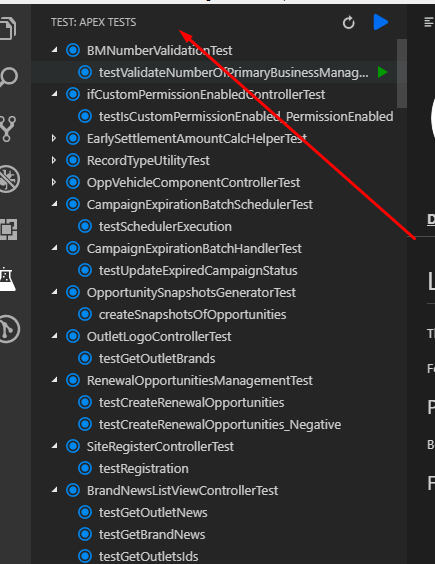
Searchbar and sorting is absent for Apex Tests menu and it's uncomfortable to look for needed test in project with a lot of classes
 Shokhan
All 6 comments
I _think_ this feature makes sense.
- A search bar is currently not possible with what is exposed in VS Code. See https://code.visualstudio.com/docs/extensionAPI/extension-points#_contributesviews. It only allows for contributions as a tree and some icons on top. VS Code Issue: https://github.com/Microsoft/vscode/issues/50062
- Some sorting/filtering mechanism could be added - so that we can only filter out failing/passing tests.
 vazexqi
on 29 Aug 2018
vazexqi
on 29 Aug 2018
I _think_ this feature makes sense.
- A search bar is currently not possible with what is exposed in VS Code. See https://code.visualstudio.com/docs/extensionAPI/extension-points#_contributesviews. It only allows for contributions as a tree and some icons on top. VS Code Issue: Microsoft/vscode#50062
- Some sorting/filtering mechanism could be added - so that we can only filter out failing/passing tests.
I think it definitely makes sense. Especially for organizations with lots of code customization.
It would be great to just type in "workorder" and get all tests that contain this string on their names. Would completely improve the usability of this tab.
Another thing that could be considered is to show test suites, like this:
Test suites [run all]
    - WorkOrder tests [run]
        - WorkOrderFutureWorkerTest
        - WorkOrderTriggerHandlerTest
    - Cases tests [run]
        - CaseFutureWorkerTest
        - CaseTriggerHandlerTest
    - Opportunity tests [run]
        - OpportunityClosingLogicTest
        - OpportunityGenerationFromAccountTest
        - OpportunityTriggerHandlerTest
    - Integration with that legacy system [run]
        - ThatWebServiceCalloutTest
        - ThatWebServiceBatchInsertTest
        - ThatWebServiceBehaviorFutureTest

Test classes [run all]
    - CaseFutureWorkerTest [run test]
        - testMethod1 [run method]
        - testMethod2 [run method]
    - CaseTriggerHandlerTest [run test]
        - testMethod1 [run method]
        - testMethod2 [run method]
    - OpportunityClosingLogicTest [run test]
    - OpportunityGenerationFromAccountTest [run test]
    - OpportunityTriggerHandlerTest [run test]
    - ThatWebServiceBatchInsertTest [run test]
    - ThatWebServiceBehaviorFutureTest [run test]
    - ThatWebServiceCalloutTest [run test]
    - WorkOrderFutureWorkerTest [run test]
    - WorkOrderTriggerHandlerTest [run test]
Note: [run <something>] is representing that green arrow to run the test.
 renatoliveira
on 18 Sep 2018
renatoliveira
on 18 Sep 2018
Completely agree, this would be good to add. I am going to bring this up with the VS Code team next time I chat with them. We may contribute the feature to VSC as well if they aren't planning it.
 ntotten
on 18 Sep 2018
ntotten
on 18 Sep 2018
@lcampos I do not see any way to search/sort tests on the sidebar in v44.4.0.
It is still the same as it was before installing the latest version.
 venkatpolisetti
on 25 Oct 2018
venkatpolisetti
on 25 Oct 2018
@venkatpolisetti This feature hasn't been added. @lcampos comment was on a different issue: https://github.com/forcedotcom/salesforcedx-vscode/issues/645#issuecomment-433122553
ntotten
on 25 Oct 2018
The sidebar now supports filtering starting with the July VS Code update.
ntotten
on 27 Aug 2019
Related issues
 jpoonam4
·
5Comments
jpoonam4
·
5Comments
 quangxvu
·
5Comments
quangxvu
·
5Comments
 aheber
·
4Comments
aheber
·
4Comments
 sc5148
·
4Comments
sc5148
·
4Comments
 vtandon-wiley
·
3Comments
vtandon-wiley
·
3Comments
Most helpful comment
Completely agree, this would be good to add. I am going to bring this up with the VS Code team next time I chat with them. We may contribute the feature to VSC as well if they aren't planning it.