Salesforcedx-vscode: Getting error "EISDIR: illegal operation on a directory, read." while Retrieve Source from Org.
Summary
Getting error "EISDIR: illegal operation on a directory, read." while Retrieve Source from Org.
Steps To Reproduce:
- Create the Project with Manifest.
- Auth the Org.
- Run command "Retrieve Source from Org.".
Expected result
It should sync the ORG components.
Actual result
EISDIR: illegal operation on a directory, read.
Additional information
_Feel free to attach a screenshot_.
VS Code Version:
SFDX CLI Version:
OS and version:
 ankit2405
All 24 comments
@ankit2405 Could you provide more information about your setup. Specifically:
- VS Code Version
- SFDX CLI Version
- OS and version
 ntotten
on 15 Oct 2018
ntotten
on 15 Oct 2018
VS Code Version - 1.28.1
SFDX CLI Version - 6.35.1
OS and version - Mac - 10.13.4
ankit2405
on 15 Oct 2018

Tried also on Windows. Got same error.
ankit2405
on 15 Oct 2018
@ankit2405 could you try executing the retrieve command specifically by right-clicking the package.xml file. Looking at the output you posted seems you are right-clicking the manifest folder.
@ntotten I'm almost certain this and #680 are the same but I want to first confirm.
 lcampos
on 16 Oct 2018
lcampos
on 16 Oct 2018
This error is Node error seems to come from when trying to retrieve information from multilevel directories in for instance Dashboards.
In the example, the dashboard is under folder structure: KPIs/Sales/
Used with VS Code --> SFDX: Retrieve This Source from Org
or by CLI: sfdx force:source:retrieve -x manifest/package.xml
This examples of package.xml file vil give you a "ERROR: EISDIR: illegal operation on a directory, read.":
<?xml version="1.0" encoding="UTF-8"?>
<Package xmlns="http://soap.sforce.com/2006/04/metadata">
  <types>
    <members>KPIs</members>
    <members>Sales</members>
    <members>Sales/gIYNRmAuUHjMQTRSMIYbAOWZhrDwOK</members>
    <name>Dashboard</name>
  </types>
  <version>43.0</version>
</Package>
This examples of package.xml file vil give you a "ERROR: Cannot read property 'getWorkspaceElements' of undefined.":
<?xml version="1.0" encoding="UTF-8"?>
<Package xmlns="http://soap.sforce.com/2006/04/metadata">
  <types>
    <members>KPIs/Sales/gIYNRmAuUHjMQTRSMIYbAOWZhrDwOK</members>
    <name>Dashboard</name>
  </types>
  <version>43.0</version>
</Package>
I have so far not found any good way of retrieving this information with the use of manifest and package.xml.
 Triopticon
on 16 Oct 2018
Triopticon
on 16 Oct 2018
@lcampos, Yes it works if I right click the package.xml file & retrieve the Source.
Is this the expected behaviour ?
ankit2405
on 17 Oct 2018
Thanks for confirming @ankit2405. Yes it's expected behavior in that deploying a folder with no valid metadata should error but I'll log a work item on our side to address the usability and error messages. We'll look at only showing the options for "valid" folders/files.
lcampos
on 18 Oct 2018
Related to #690
ntotten
on 22 Oct 2018
I found a work around by Retrieve Source from Org from each folder one by one from the Manifest
 hbwilly54
on 22 Oct 2018
hbwilly54
on 22 Oct 2018
This is also impacting work with scratch orgs.
Steps To Reproduce:
1) create fresh scratch org
2) create Parent and Child Folder along with Sample Report

3) sfdx force:source:pull
Expected result
Create metadata entries for the folders and then another for the report itself
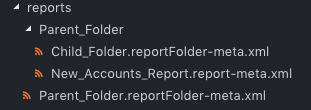
Actual Result
It creates this structure

The Child Folder is actually pulled as a report (when it should be a report folder)

sfdx --version
sfdx-cli/6.40.0-384e0c6cf2 (darwin-x64) node-v8.9.4

sfdx plugins --core
@salesforce/plugin-generator 0.0.13 (core)
@salesforce/sfdx-trust 1.0.8 (core)
builtins 1.0.0 (core)
salesforcedx 44.7.0
sfdx-collate 0.5.1
 mikesimps
on 18 Nov 2018
mikesimps
on 18 Nov 2018
I experienced the same error when performing the initial retrieve of entities when I included the following metadata in the initial retrieve:
    <types>
        <members>*</members>
        <name>AuraDefinitionBundle</name>
    </types>
I eliminated the AuraDefinitionBundle from my package file and just retrieved simpler entities such as ApexClass, ApexPage, ApexComponent, and ApexTrigger. These retrieved just fine.
After the initial retrieve, I added AuraDefinitionBundle back into the package.xml and performed retrieve again and the retrieve proceeded without any errors.
I am guessing that the error was caused because Aura components are stored within individual sub-folders (per Aura component) and that the sub-folders were not created as quickly as they needed to be. Adding the AuraDefinitionBundle separately after the initial retrieve seems to avoid the race condition of trying to read the aura folders before they are created.
Hope this helps someone.
Mike
 mikepaisner
on 22 Dec 2018
mikepaisner
on 22 Dec 2018
Hi @Triopticon and @mikesimps, thanks for reporting the issues with Reports and Dashboards. The issues that you have reported with ReportFolders and DashboardFolders are a result of this change, which added support for subfolders for the Report and Dashboard metadata types. A new bug (W-5805323) has been filed to update our sfdx tooling to support the new subfolder directory structure as well.
 allileong
on 28 Jan 2019
allileong
on 28 Jan 2019
Hi @mikepaisner, I was unfortunately unable to reproduce your error when attempting to retrieve AuraDefinitionBundle entities. Could you confirm that you are still seeing this issue?
allileong
on 28 Jan 2019
This issue has been automatically closed because there has been no response to our request for more information from the original author. Currently, there is not enough information provided for us to take action. Please reply and reopen this issue if you need additional assistance.
![no-response[bot] picture](https://avatars.githubusercontent.com/u/26350515?v=4&s=40) no-response[bot]
on 4 Feb 2019
no-response[bot]
on 4 Feb 2019
Hi guys,
I can see this bug is closed, but it is still affecting our team.
Is there another issue I should be looking at in github? I can see reference to bug W-5805323 but that doesn't look like a github ticket number, so I just want to make sure this hasn't been auto-closed without being resolved?
 sunnymatharuuk
on 21 Feb 2019
sunnymatharuuk
on 21 Feb 2019
@sunnymatharuuk The issue is that we were not able to reproduce this exact issue. If you can provide full repro steps we can investigate further. We need as many details as possible. Full steps to reproduce in addition to OrgId, time of the error, logs, OS version, CLI Version, VS Code Version, Extension Versions. See this doc for help gathering info: https://github.com/forcedotcom/salesforcedx-vscode/wiki/How-to-Collect-Performance-Information-for-Support
ntotten
on 21 Feb 2019
Ok that makes sense. I'll get one of the team to respond with what you need.
Thanks for getting back to me so quickly
sunnymatharuuk
on 21 Feb 2019
@ntotten find below steps to reproduce the issue (similar to @mikesimps commented above):
Steps To Reproduce:
- Create a Parent Report Folder, a Child Report Folder and a Sample Report on the Child Folder
- Open XML package from your SFDX project
- Add the report folder and the child report folder nested
- Add the sample report which is inside the child report folder
- Save XML package
- Execute “SFDX: Retrieve Source from org” command
Expected result
A notification pop up informs in Visual Studio:
_SFDX: Retrieve Source from Org successfully ran_.
_"Reports" folder metadata is created_.
_"Parent Report Folder" , "Child Report Folder" and "Sample Report" metadata were retrieved_.
Actual result
Console log displays the following error message in Visual Studio:
_ERROR: EISDIR: illegal operation on a directory, read_.
Additional information
VS Code Version: 1.31.1 (system setup)
SFDX CLI Version: 6.53.67a9cbb60c
OS and version: Windows 7 64-bit
 NataGonzalez
on 22 Feb 2019
NataGonzalez
on 22 Feb 2019
@ntotten was Natalia's post above enough detail to reopen and take a look at this?
(Apologies if you already have looked at it or have it on the to-do list. Just following up as it is still marked as Closed)
sunnymatharuuk
on 27 Feb 2019
bump
Cross-reference: https://developer.salesforce.com/forums/?id=9062I000000IHNVQA4
 jon-freed
on 20 May 2019
jon-freed
on 20 May 2019
I have just run into this issue. I previously had this working but reinstalled windows. I moved my repo to a different drive and now I am getting the EISDIR: illegal operation on a directory, read error. I looked at this post of SFSE and they mentioned it might be a permissions issue? I changed the owner of the folders and subfolders and it did not make a difference.
 HazenFley
on 23 Jun 2020
HazenFley
on 23 Jun 2020
Getting this issue on a brand new installation of VSCode-->SF CLI
Can someone do a fresh install and confirm your build works.
 qwikag
on 3 Feb 2021
qwikag
on 3 Feb 2021
Yes. Getting this issue post sfdx plugins upgrade.
Additional information: sfdx-cli/7.84.2-a2868a68d5 win32-x64 node-v12.18.3
 harsheshshah
on 3 Feb 2021
harsheshshah
on 3 Feb 2021
This issue is still occurring. I have created a new bug as 961 is closed. https://github.com/forcedotcom/salesforcedx-vscode/issues/2928
 dave-sfdc
on 9 Feb 2021
dave-sfdc
on 9 Feb 2021
Related issues
 ChuckJonas
·
4Comments
ChuckJonas
·
4Comments
 ddodson3
·
6Comments
ddodson3
·
6Comments
 pranaymistry
·
4Comments
pranaymistry
·
4Comments
 saramorgan
·
3Comments
saramorgan
·
3Comments
 Shokhan
·
6Comments
Shokhan
·
6Comments
Most helpful comment
@ntotten find below steps to reproduce the issue (similar to @mikesimps commented above):
Steps To Reproduce:
Expected result
A notification pop up informs in Visual Studio:
_SFDX: Retrieve Source from Org successfully ran_.
_"Reports" folder metadata is created_.
_"Parent Report Folder" , "Child Report Folder" and "Sample Report" metadata were retrieved_.
Actual result
Console log displays the following error message in Visual Studio:
_ERROR: EISDIR: illegal operation on a directory, read_.
Additional information
VS Code Version: 1.31.1 (system setup)
SFDX CLI Version: 6.53.67a9cbb60c
OS and version: Windows 7 64-bit