Runelite: Disable custom chrome on MacOS by default
I have read a lot of threads about this feature, but I don't find anything related to it, so I don't know if you are going to develop it in the future or not. I think that it would be nice to be able to run Runelite with fullscreen mode on Mac
 LullaAI
All 38 comments
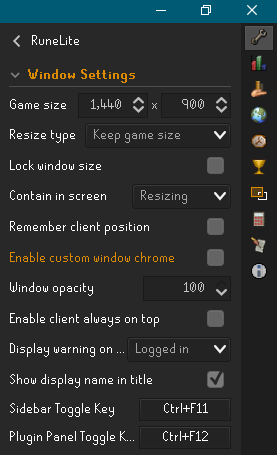
This is achievable by disabling "Enable custom window chrome" under RuneLites' configuration plugin. It restores the OS's native titlebar, thus allowing fullscreening on macOS. This screenshot is obviously from Windows, but it works as expected on Mac as I was utilizing it yesterday.
 lukegg
on 7 Nov 2020
lukegg
on 7 Nov 2020
It worked like a charm.
I think it could be a good idea to put it like default option.
Thanks!
LullaAI
on 7 Nov 2020
Agreed, can this please be the default option for macs? @Adam-
 Optumasfx
on 27 Dec 2020
Optumasfx
on 27 Dec 2020
Definitely don't make custom chrome disabled by default. The button to toggle the sidebar that's added near the minimap with custom chrome disabled is not obvious.
 makingcomment
on 12 Jan 2021
makingcomment
on 12 Jan 2021
Definitely don't make custom chrome the default. The button to toggle the sidebar that's added near the minimap with custom chrome disabled is not obvious.
I'm not sure what you are talking about? can you please show us a screenshot?
I personally think disable chrome should be default on mac because it breaks the full screen feature and the ability to use password managers such as 1password. It looks better too 👍
https://1password.community/discussion/94251/cant-autotype-password-to-specific-application
Optumasfx
on 12 Jan 2021
Definitely don't make custom chrome disabled by default. The button to toggle the sidebar that's added near the minimap with custom chrome disabled is not obvious.
I'm not sure what you are talking about? can you please show us a screenshot?
With custom chrome disabled, the toggle for the sidebar is moved to the pictured button, which is only visible on hover.

makingcomment
on 13 Jan 2021
I think that is a separate but related concern. It seems worthwhile to investigate a better UX for toggling the sidebar with custom chrome disabled whether or not we choose to disable custom chrome on MacOS by default. I didn't see any open issues for this, one should be created so that can be discussed there.
 Nightfirecat
on 13 Jan 2021
Nightfirecat
on 13 Jan 2021
Maybe a more sensible solution is to display a dialog/message asking mac users if they'd like to turn it off, with a quick explanation on why they might want to.
Nothing too intrusive that would delay their gameplay.
 psikoi
on 13 Jan 2021
psikoi
on 13 Jan 2021
Maybe a more sensible solution is to display a dialog/message asking mac users if they'd like to turn it off, with a quick explanation on why they might want to.
Nothing too intrusive that would delay their gameplay.
It should be off by default. It literally breaks mac features
https://1password.community/discussion/94251/cant-autotype-password-to-specific-application
Unless I am missing something what are the benefits of keeping it on for a mac user?
 kslop
on 13 Jan 2021
kslop
on 13 Jan 2021
Unless I am missing something what are the benefits of keeping it on for a mac user?
Better sidebar UX, as I mentioned in my post.
makingcomment
on 13 Jan 2021
Unless I am missing something what are the benefits of keeping it on for a mac user?
Better sidebar UX, as I mentioned in my post.
That is subjective but what is not is that it is breaking built in mac features which includes security.
kslop
on 13 Jan 2021
breaking built in mac features which includes security
1Password is not a built-in mac feature.
makingcomment
on 13 Jan 2021
breaking built in mac features which includes security
1Password is not a built-in mac feature.
Copy and paste is which does not work when it is enabled
kslop
on 13 Jan 2021
breaking built in mac features which includes security
1Password is not a built-in mac feature.
Copy and paste is which does not work when it is enabled.
Copy and paste still works with custom chrome though... I just tested it.
Can you describe the steps you're taking for it to fail? Are you sure you have the login screen plugin's Ctrl-V setting enabled?
makingcomment
on 13 Jan 2021
breaking built in mac features which includes security
1Password is not a built-in mac feature.
Copy and paste is which does not work when it is enabled.
Copy and paste still works with custom chrome though... I just tested it.
Can you describe the steps you're taking for it to fail? Are you sure you have the login screen plugin'sCtrl-Vsetting enabled?
Thank you that fixed it. Do you know why Ctrl-V setting is not enabled by default?
kslop
on 13 Jan 2021
So you want to break features for OSX because you don't like the UX? Even the official client does not have a custom chrome window. Everything on OSX/Linux is unified for a reason.
Optumasfx
on 13 Jan 2021
The official client does not have a custom window because it's simply a wrapper around the game itself so it can run outside of the browser, not providing any UI to the player like RL's UI does. If you want the unified UI, you can already disable Custom Chrome; this issue isn't about its existence
 Hydrox6
on 13 Jan 2021
Hydrox6
on 13 Jan 2021
The official client does not have a custom window because it's simply a wrapper around the game itself so it can run outside of the browser, not providing any UI to the player like RL's UI does. If you want the unified UI, you can already disable Custom Chrome; this issue isn't about its existence
Shouldn't it be the other way round? if you don't want a unified UI you can enable the custom chrome feature but let the users know that it is breaking osx features for a cosmetic look.
Optumasfx
on 13 Jan 2021
It's on by default since RL is unified across all versions. This is not unique to this; a lot of programs do it to have a consistent brand.
Hydrox6
on 13 Jan 2021
Adam is open to changing that for linux so surely that would apply for osx? He isn't concerned about a consistent brand. He is for the users.
Screenshot:

Optumasfx
on 13 Jan 2021
So you want to break features for OSX because you don't like the UX?
Absolutely yes
(ideally, everything would work with custom chrome. But when I'm using RuneLite, my priority is having RuneLite work in the way I want)
makingcomment
on 13 Jan 2021
So you want to break features for OSX because you don't like the UX?
Absolutely yes
(ideally, everything would work with custom chrome. But when I'm using RuneLite, my priority is having RuneLite work in the way I want)
That is why there is an option to enable it? it should be off by default to give the best experience for the user per the operating system.
Optumasfx
on 13 Jan 2021
So you want to break features for OSX because you don't like the UX?
Absolutely yes
(ideally, everything would work with custom chrome. But when I'm using RuneLite, my priority is having RuneLite work in the way I want)That is why there is an option to enable it? it should be off by default to give the best experience for the user per the operating system.
Agreed +1
kslop
on 13 Jan 2021
So you want to break features for OSX because you don't like the UX?
Absolutely yes
(ideally, everything would work with custom chrome. But when I'm using RuneLite, my priority is having RuneLite work in the way I want)That is why there is an option to enable it? it should be off by default to give the best experience for the user per the operating system.
I think it should be on by default to give the best experience for the user per the program that they have actively decided to use.
makingcomment
on 13 Jan 2021
Adam and many respected members like dkvl are not opposed to changing it to being disabled by default.
Optumasfx
on 13 Jan 2021
Adam and many respected members like dkvl are not opposed to changing it to being disabled by default.
There's a difference between "not opposed to" and "in favor of"
makingcomment
on 13 Jan 2021
Okay. I just personally think it should be disabled due to breaking critical features for osx and can cause performance issues. Brooklyn can attest to this.
I am happy to let anyone view this on teamviewer. having it enabled does not make sense for osx but for people like you there should be an option to enable it.
Optumasfx
on 13 Jan 2021
Okay. I just personally think it should be disabled due to breaking critical features for osx
Fullscreen and password managers are not critical features imo, and based on @kslop's comments, the later may not even be broken. Are there other critical features you're referring to?
and can cause performance issues
What performance issues does it cause? That hasn't been brought up in this thread before.
for people like you there should be an option to enable it.
I think there are more people like me than there are people like you (based on absolutely no evidence 🙃). If that's the case, it would be better to keep it opt-out than to switch to opt-in.
makingcomment
on 13 Jan 2021
People who are in the Apple ecosystem tend to be professionals so fullscreen is important if you value multiple desktops to multi task
kslop
on 13 Jan 2021
Password managers are actually really important especially when most people reuse passwords which are leaked in database breaches. Good passwords should not be remembered.
please refer to https://haveibeenpwned.com/Passwords
even Jagex themselves recommend their users to use a Password Manager? https://support.runescape.com/hc/en-gb/articles/206558669-Password-creation-advice
Optumasfx
on 13 Jan 2021
I think there are more people like me than there are people like you
There are people even complaining on https://1password.community/discussion/94251/cant-autotype-password-to-specific-application
kslop
on 13 Jan 2021
I think there are more people like me than there are people like you
There are people even complaining on https://1password.community/discussion/94251/cant-autotype-password-to-specific-application
If anything, this shows that it's more of a 1Password problem than a RuneLite problem imo
 LlemonDuck
on 13 Jan 2021
LlemonDuck
on 13 Jan 2021
If anything, this shows that it's more of a 1Password problem than a RuneLite problem imo
Maybe if that was the only problem but it breaks full screen and multiple desktops.
Optumasfx
on 13 Jan 2021
Password managers are actually really important especially when most people reuse passwords which are leaked in database breaches. Good passwords should not be remembered.
please refer to https://haveibeenpwned.com/Passwords
even Jagex themselves recommend their users to use a Password Manager? https://support.runescape.com/hc/en-gb/articles/206558669-Password-creation-advice
Does custom chrome _actually_ break password managers? Like I said, kslop's comments make it seem like it might be an issue with the login plugin rather than the custom chrome
I think there are more people like me than there are people like you
There are people even complaining on https://1password.community/discussion/94251/cant-autotype-password-to-specific-application
This is a textbook example of selection bias.
Maybe if that was the only problem but it breaks full screen and multiple desktops.
You can use multiple desktops on a mac without putting an app in fullscreen...
makingcomment
on 13 Jan 2021
Does custom chrome _actually_ break password managers? Like I said, kslop's comments make it seem like it might be an issue with the login plugin rather than the custom chrome
Yes Password Managers can't detect the window and require auto typing for it to work.
You can use multiple desktops on a mac without putting an app in fullscreen...
But not with the best experience.
Optumasfx
on 13 Jan 2021
Yes Password Managers can't detect the window and require auto typing for it to work.
Except KeePass apparently works fine
Hydrox6
on 13 Jan 2021
Resolved by 8cc7448f58f62c28d752d4717af840499405f6f5
 dekvall
on 13 Jan 2021
dekvall
on 13 Jan 2021
Resolved by 8cc7448
If its on keep game size instead of keep windows size with custom chrome disabled its a bit funky when fullscreen

I spoke about it here https://github.com/runelite/runelite/issues/13017
Optumasfx
on 13 Jan 2021
Related issues
 PixelPacker
·
43Comments
PixelPacker
·
43Comments
 Trevor159
·
124Comments
Trevor159
·
124Comments
 chadbdurham
·
26Comments
chadbdurham
·
26Comments
 TBBRKCK
·
21Comments
TBBRKCK
·
21Comments
 Popedigoz
·
21Comments
Popedigoz
·
21Comments
Most helpful comment
Resolved by 8cc7448f58f62c28d752d4717af840499405f6f5