Runelite: Side Bar Artifact (Even when Hardware Acceleration is disabled)
When interacting with the side bar it will artifact making it unusable until relaunching the client. However disabling hardware acceleration as covered at https://github.com/runelite/runelite/wiki/Disable-Hardware-Acceleration does not solve the issue.
Steps to reproduce the behavior
- Open side bar.
- Interact with the side bar by either moving the mouse around or clicking around.
Expected Behavior
For the side bar to function without artifacts.
Screenshots


Enviroment
- OS: Windows 10
- RuneLite version: 1.6.16
- Launcher version: 2.1.3
Additional context
- The time is inconsistent when the bug happens and seems to take longer with hardware acceleration disabled.
- Testing for the bug with the GPU plugin both enabled and disabled does not change the results.
- Reinstalling the client and wiping the client cache and settings does not fix the issue.
- Resizing the client can fix the issue for a small amount of time.
Temp Workaround
This issue is caused by having programs like Riva Tuner Statistics Server open.
 PixelPacker
All 43 comments
I have the exact same problem, tried the same fixes you've mentioned.
 Zaaraflaf
on 28 May 2020
Zaaraflaf
on 28 May 2020
For what it's worth, disabling hardware acceleration has historically resolved this issue for players. It is only as of about a month ago that we started seeing reports that this fix no longer worked, so it's likely that some external update (driver or Windows update perhaps) caused this.
 Nightfirecat
on 28 May 2020
Nightfirecat
on 28 May 2020
If there is anything that I could supply to help you guys solve this let me know!
PixelPacker
on 28 May 2020
Are there more things that I could try to fix the problem? Happy to try several things.
Zaaraflaf
on 28 May 2020
As of now we do not know any commonalities between people's setups who encounter this, or what differentiates them from people who do not. If we are able to cause it to happen on one of our computers, we could likely debug this further. For now, it would help for each person encountering this issue to post full environment details of their computers so we have records of that:
- Operating system and version
- RuneLite installation method (32- or 64-bit Windows installer, MacOS installer, Linux AppImage, Linux snap, or all-platform JAR)
- Launcher and client version
- GPU make/model and GPU driver version
Nightfirecat
on 28 May 2020
As of now we do not know any commonalities between people's setups who encounter this, or what differentiates them from people who do not. If we are able to cause it to happen on one of our computers, we could likely debug this further. For now, it would help for each person encountering this issue to post full environment details of their computers so we have records of that:
- Operating system and version
- RuneLite installation method (32- or 64-bit Windows installer, MacOS installer, Linux AppImage, Linux snap, or all-platform JAR)
- Launcher and client version
- GPU make/model and GPU driver version
Operating system and version
Windows 10 Pro version 1909 (Build 18363.836)RuneLite installation method (32- or 64-bit Windows installer, MacOS installer, Linux AppImage, Linux snap, or all-platform JAR)
64-bit installation method (default settings) on SSDLauncher and client version
Runelite version: 1.6.17
Launcher version: 2.1.3GPU make/model and GPU driver version
NVIDIA GeForce GTX 760
Driver version: 446.14
Hope this helps
Zaaraflaf
on 28 May 2020
I've managed to solve the problem for me.
I was fooling around a bit with some settings to see if I could find anything.
When I turn off RivaTuner Statistics (I think it starts automatically with MSI Afterburner ) and I disable it. I don't get the sidebar artifacts anymore.
I don't have enough understanding of PC's to figure out what causes the interference, but it worked for me!
Zaaraflaf
on 28 May 2020
My MSI GS66 does the same thing. However, I have noticed it occurs way more often when I have more than one client open on one monitor (triple monitor setup)
Operating system and version
Windows 10 Pro version 1909 (Build 18363.418)
RuneLite installation method (32- or 64-bit Windows installer, MacOS installer, Linux AppImage, Linux snap, or all-platform JAR)
64-bit installation method (default settings) on SSD
Launcher and client version
Runelite version: 1.6.17
Launcher version: 2.1.3
GPU make/model and GPU driver version
NVIDIA GeForce RTX 2070 with Max-Q Design
Driver version: 26.21.14.4223
 annamarie0408
on 29 May 2020
annamarie0408
on 29 May 2020
I can confirm closing riva turner statistics server fixed the issue. Even with hardware acceleration enabled.
PixelPacker
on 29 May 2020
As of now we do not know any commonalities between people's setups who encounter this, or what differentiates them from people who do not. If we are able to cause it to happen on one of our computers, we could likely debug this further. For now, it would help for each person encountering this issue to post full environment details of their computers so we have records of that:
- Operating system and version
- RuneLite installation method (32- or 64-bit Windows installer, MacOS installer, Linux AppImage, Linux snap, or all-platform JAR)
- Launcher and client version
- GPU make/model and GPU driver version
Windows 10 Home 64-bit Version 1903 OS Build 18362.778
Runelite 64-bit installer
Dont know how to check Runelite launcher and client version
Nvidia GeForce GTX 1070 with Max-Q Design, Driver version 26.21.14.4614
I dont have RivaTuner statistics server so cant try that.
 fridaym
on 29 May 2020
fridaym
on 29 May 2020
RivaTuner statistics
I don't have that on my system either.
annamarie0408
on 29 May 2020
Windows 10 Home / Version 1909 / Build 18363.836
Windows 64-Bit Installer
Runelite Version : 1.6.17
Runelite Installer: 2.1.3

GPU : RTX 2080 Super
 Driver : 445.87
 osrsAnnexin
on 29 May 2020
osrsAnnexin
on 29 May 2020
Same problem, this really needs to be fixed:......(
 Simpgod999
on 30 May 2020
Simpgod999
on 30 May 2020
Hi same issue
Windows 10 Home Ver 10.0.18362
Windows 64-Bit Installer
Runelite Version 1.6.13
Launcher 2.1.3
Graphics NVIDIA GeForce GTX 1080
Driver 446.14
Processor i7-7700
Hey everyone I fixed the issue, I have a program pre installed on my computer called sonic suite. I disabled it and it worked. I'd check apps that you have running and try closing something after you've disabled hardware acc. I have that enabled now and it doesn't affect the menu anymore.
 VizierofChaos
on 31 May 2020
VizierofChaos
on 31 May 2020
Numerous programs which try to draw graphical overlays have reportedly caused this issue--they are listed on the wiki.
If none of those are installed, or removing them and restarting RuneLite still does not resolve the issue, you can try running the following command (in a command prompt window):
%localappdata%/runelite/jre/bin/java.exe -jar %localappdata%/runelite/runelite.jar --mode=OFF
@Nightfirecat The %localappdata%/runelite/jre/bin/java.exe -jar %localappdata%/runelite/runelite.jar --mode=OFF command FIXED the problem for me! thanks alot <3
Simpgod999
on 1 Jun 2020
I will try this tonight and I will report back to see if this fixes my issue.
annamarie0408
on 1 Jun 2020
System info for good measure
Windows 10 Home 64-bit, version 1903 (Build 18362.836)
Graphics NVIDIA GeForce GTX 1070, Driver version 446.14
Processor i5-2500K
Runelite Version 1.6.17
Launcher 2.1.3
RivaTuner seems to have been the cause for me too. Didn't have to close the program though, just turn off the on-screen display.
Hardware acceleration doesn't change this. Works with or without the "--mode=OFF" fix as long of RivaTuner's on-screen display is off.
 lceCubed
on 1 Jun 2020
lceCubed
on 1 Jun 2020
Can confirm, disabling on "On-Screen Display Support" in Riva Tuner Statistics Server fixes the issue. This issue may be related to third party overlays.
PixelPacker
on 1 Jun 2020
As an update to earlier comments, the following programs have been reported to cause this issue:
- rivatuner
- sonic suite
- cFosSpeed
If none of those are installed, or removing them and restarting RuneLite still does not resolve the issue, you can try running the following command (in a command prompt window):
%localappdata%/runelite/jre/bin/java.exe -jar %localappdata%/runelite/runelite.jar --mode=OFF
So I did this on my computer and it has seemed to be working, ran it for 2 days and did not encounter the lag issue once. Though I swear the texture looks different
annamarie0408
on 3 Jun 2020
I tested this issue with my new hardware (Asus Prime x570-P and Ryzen 5 3600) and the issue is still there when having the riva tuner overlay on. So I can only assume this isn't a hardware specific issue.
PixelPacker
on 7 Jun 2020
I don't have rivatuner, sonic suite, or cFosSpeed.
Opening runlite with:
%localappdata%/runelite/jre/bin/java.exe -jar %localappdata%/runelite/runelite.jar --mode=OFF
appears to fix it but I would really prefer not to have to open runelite from the cmd prompt forever.
System Info:
Alienware Aurora R10
Windows 10 Home Version 10.0.18363
Processor: AMD Ryzen 5 3500
GPU: AMD Radeon RX 5700 XT 8GB GDDR6
 jlapine
on 7 Jun 2020
jlapine
on 7 Jun 2020
Same as above ^
I tried opening runelite the same way you mentioned through command prompt and it's working for now for whatever reason.
Sys info:
Windows 10 Home 64-bit
Intel Core i7-8700
GeForce RTX 2080
 haloboyvash
on 13 Jun 2020
haloboyvash
on 13 Jun 2020
This fixes the issue but it's a little complicated for streaming because the streaming software doesn't detect the window as a game, or at all. I have to use display capture which is kind of buggy at times and the window needs to be a certain size. If it's possible to fix this bug, it would be much help.
 gasmar
on 27 Jun 2020
gasmar
on 27 Jun 2020
**IMPORTANT DISCOVERY **
If you have an alienware computer it is the alienware command center that is causing the issue. You can save you light colour then uninstall it and it will stay that way. Finally after 4 months I read this then said I'm uninstalling it and boom fixed!
@jlapine
 PotentGemini
on 4 Jul 2020
PotentGemini
on 4 Jul 2020
**IMPORTANT DISCOVERY **
If you have an alienware computer it is the alienware command center that is causing the issue. You can save you light colour then uninstall it and it will stay that way. Finally after 4 months I read this then said I'm uninstalling it and boom fixed!
@jlapine
I find this ironic since I had this issue on my MSI GS66 and GS65 so I ended up switching to an Alienware M17 R2 and the issue is completely gone away and I have the AlienWare Command Center on my PC running at full force. This error is just an odd bug in general
annamarie0408
on 7 Jul 2020
**IMPORTANT DISCOVERY **
If you have an alienware computer it is the alienware command center that is causing the issue. You can save you light colour then uninstall it and it will stay that way. Finally after 4 months I read this then said I'm uninstalling it and boom fixed!
@jlapineI find this ironic since I had this issue on my MSI GS66 and GS65 so I ended up switching to an Alienware M17 R2 and the issue is completely gone away and I have the AlienWare Command Center on my PC running at full force. This error is just an odd bug in general
It’s all hardware and OS dependent. I agree it’s an odd bug. Just like some people will have other programs listed on this thread but yet it works fine. I’ve had my Alienware for about a year and disabled command centre from the beginning as I never used it. Later on down the road I formatted the PC to clear out junk and a bad driver mix.
Downloaded runelite then started having this issue. I tried everything. Lowered my monitor from 240hz to 59. Nothing. Disabled G Sync nothing. Then I realized I didn’t have command centre on when reading this thread so I uninstalled it. BOOM gone and hasn’t come back since. It’s a very odd bug. Also another odd thing is when the menu glitched I would drag it to my secondary monitor and it would go back to normal for a moment then start again.
Personally I believe it’s with newer GPUs, Something to do with any software that tries to prioritize it, And windows focus assist. But who knows. I think if they knew what the exact problem was it would be fixed. I’m just very happy it works again, It was a nightmare dealing with it.
PotentGemini
on 7 Jul 2020
Hi same issue
Windows 10 Home Ver 10.0.18362
Windows 64-Bit Installer
Runelite Version 1.6.13
Launcher 2.1.3
Graphics NVIDIA GeForce GTX 1080
Driver 446.14
Processor i7-7700Hey everyone I fixed the issue, I have a program pre installed on my computer called sonic suite. I disabled it and it worked. I'd check apps that you have running and try closing something after you've disabled hardware acc. I have that enabled now and it doesn't affect the menu anymore.
was wondering if this sonic stuido 3 hes refering to or sonic radar? only two that "sonic" related programs that came with my z390-E mobo
 jalexander93
on 9 Jul 2020
jalexander93
on 9 Jul 2020
Hi same issue
Windows 10 Home Ver 10.0.18362
Windows 64-Bit Installer
Runelite Version 1.6.13
Launcher 2.1.3
Graphics NVIDIA GeForce GTX 1080
Driver 446.14
Processor i7-7700
Hey everyone I fixed the issue, I have a program pre installed on my computer called sonic suite. I disabled it and it worked. I'd check apps that you have running and try closing something after you've disabled hardware acc. I have that enabled now and it doesn't affect the menu anymore.was wondering if this sonic stuido 3 hes refering to or sonic radar? only two that "sonic" related programs that came with my z390-E mobo
It could for sure be sonic radar as it’s a overlay program. Basically what I’m finding is any overlay, Game control, game enhancing programs are what’s causing the menu glitch. Not for everyone but for some. I’m not sure if this is hardware related, Or luck of the draw. I do notice a lot of people with 2060s and above are seeing this.
If you have this issue uninstall radar. If it goes away perfect. If it doesn’t just reinstall it from your Mobos website.
PotentGemini
on 9 Jul 2020
Hi same issue
Windows 10 Home Ver 10.0.18362
Windows 64-Bit Installer
Runelite Version 1.6.13
Launcher 2.1.3
Graphics NVIDIA GeForce GTX 1080
Driver 446.14
Processor i7-7700
Hey everyone I fixed the issue, I have a program pre installed on my computer called sonic suite. I disabled it and it worked. I'd check apps that you have running and try closing something after you've disabled hardware acc. I have that enabled now and it doesn't affect the menu anymore.was wondering if this sonic stuido 3 hes refering to or sonic radar? only two that "sonic" related programs that came with my z390-E mobo
It could for sure be sonic radar as it’s a overlay program. Basically what I’m finding is any overlay, Game control, game enhancing programs are what’s causing the menu glitch. Not for everyone but for some. I’m not sure if this is hardware related, Or luck of the draw. I do notice a lot of people with 2060s and above are seeing this.
If you have this issue uninstall radar. If it goes away perfect. If it doesn’t just reinstall it from your Mobos website.
Yea thought this was the fix helped a little then happened again unfortunately. I’ll just keep them uninstalled as they were messing with my work vpn (took it as a game) as well. Not sure if it’s a 2060 issue tho I’m running a 1660 super and this still occurs. Strangely enough when I use my laptop that just has the basic intel graphics everything runs smooth hope it gets resolved soon
jalexander93
on 9 Jul 2020
I don't have rivatuner, sonic suite, or cFosSpeed.
Opening runlite with:
%localappdata%/runelite/jre/bin/java.exe -jar %localappdata%/runelite/runelite.jar --mode=OFF
appears to fix it but I would really prefer not to have to open runelite from the cmd prompt forever.System Info:
Alienware Aurora R10
Windows 10 Home Version 10.0.18363
Processor: AMD Ryzen 5 3500
GPU: AMD Radeon RX 5700 XT 8GB GDDR6
This seems to work the best for me. Even when trying to run it in a batch script it doesn't seem to work but manually so far has been working well which really confuses me :|
 lordsherman
on 10 Jul 2020
lordsherman
on 10 Jul 2020
It's weird cause if I launch the jar, it works just fine. However, if I do it that way it literally takes twice, sometimes more resources than the regular client, which still has the artefacts. This is a problem because if I'm streaming, the cpu gets super iverloaded and a lot of it comes from the batch file.
Another problem I'm running into is that the GPU plugin is freezing both versions and I have to close and reopen them, but if it's not toggled off before running it again, it simply doesn't load. This makes it impossible to have better performance.
gasmar
on 10 Jul 2020
This issue has been driving me insane for months.
Based on what people have been saying in this post (regarding Overlays) I found that Logitech Options was the cause on my machine. It has a process running called 'LogiOverlay' that is used to notify of things (e.g Low Battery)
This is still clearly a fault with RuneLite, but disabling this allowed RuneLite to at least be useable.
 Joshposh70
on 11 Jul 2020
Joshposh70
on 11 Jul 2020
Honestly I ended up reinstalling Windows completely with no junkware. That fixed it, so apparently some of the programs that come out of the box (at least in gaming pc's) screw with it :/ it works like a dream now
gasmar
on 11 Jul 2020
%localappdata%/runelite/jre/bin/java.exe -jar %localappdata%/runelite/runelite.jar --mode=OFF
guys create a shortcut
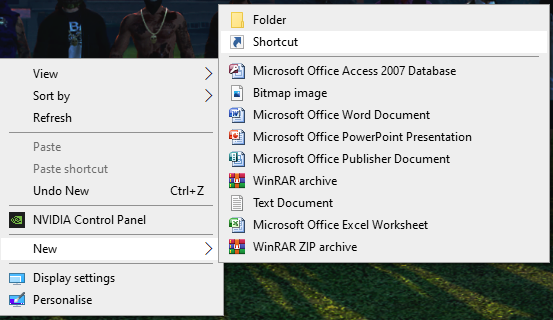
put the above statement in the box like so
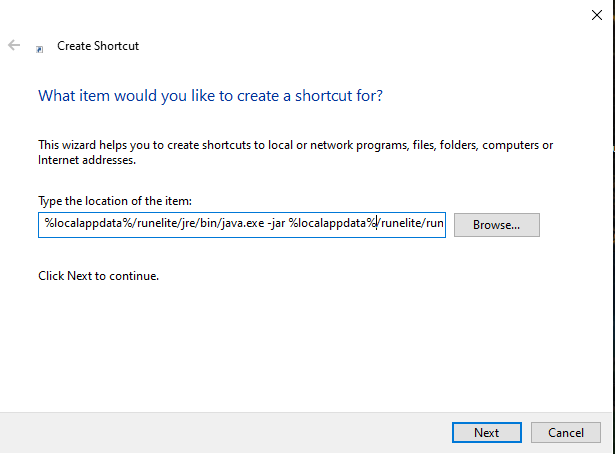
name it runelite, and you have a fully working application, and if you're really bothered you can change the icon. This will also close cmd down for you so its literally just a Runelite application
 Danny9865
on 24 Jul 2020
Danny9865
on 24 Jul 2020
I have tried a fresh install and all
Here is my computer specs
Processor : Intel Core i7-6820hk CPu 2.70GHz
Ram : 64GB
System Type : Window 10 64 bit
Graphic Card: Geforce 980
I am also having the same problem.
 DarkRaGaming
on 17 Sep 2020
DarkRaGaming
on 17 Sep 2020
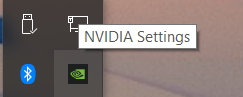
This little thing was the culprit for me. Exiting that allowed me to start with GPU plugin enabled (this was causing hanging on startup before) and fixed --mode=OFF not working (sidebar was still artifacting).
 jasepellerin
on 3 Oct 2020
jasepellerin
on 3 Oct 2020
@jasepellerin Thats right! As I mentioned before which for some odd reason people wanted to challenge because they weren’t having the same issue. But anyways I’ll say it again.
The error seems to come from programs that have anytype of game enhancing overlay, Game finder, Game graphic setter etc etc etc.
GeForce
Alienware Commend Centre
Rivatuner
Sonic suite
The list goes on. If you’re going to reply back stating “well that’s weird because I have that program and it doesn’t do this.” I don’t care. Straight and simple.
Myself it’s my Alienware command Centre that did it. But yet I can have my GeForce running and have no issues.
Jase here is the opposite. He has Alienware command Centre but GeForce is causing the issue.
I can confirm mine as I went to change my light colours so had to redownload AC and the moment I did it came back. Changed my colours uninstalled it boom gone again.
Plan and very simple folks. If you have this issue look for any game enhancing, game library holding, programs wether it’s one you download or one that’s came with OEM manufacturers/MOBO’s and delete it or close it.
PotentGemini
on 3 Oct 2020
@PotentGemini I don't actually have Alienware Command Centre, just the GeForce program. Another weird thing is I have my in-game overlay setting turned off in GeForce experience.
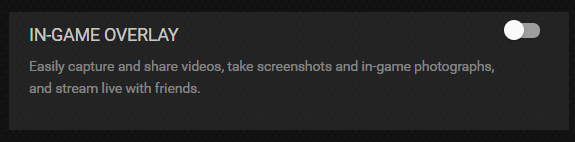
jasepellerin
on 3 Oct 2020
This is total crap. I never thought in 2020 with all of this computing power that I'd be spending so much time getting pretty much ancient tech to cooperate. I'm having the same issue, and I've jumped through every single troubleshooting hoop. This is my last gasp for help before I throw this client in the trash.
 runeliteisbroken
on 8 Oct 2020
runeliteisbroken
on 8 Oct 2020
I am having the same issue, however my issue seems to only be happening when I have an external monitor plugged in.
Runelite version: 1.6.28 (Launcher: 2.1.3)
Processor: Intel i7-1750H
RAM: 32GB
OS: Windows 10
Graphics: NVIDIA GeForce RTX 2070 Super with Max-Q Design
~I don't seem to have any overlay programs running on my machine when the issue is occurring.~
Edit: I read Nightfirecat's comment which listed the known programs that can cause this issue and realized that I had Nahimic installed. I uninstalled Nahimic and my issue seems to be resolved for now.
 ttimmons
on 9 Oct 2020
ttimmons
on 9 Oct 2020
I was able to fix artifacting by maximizing the window then returning it to the regular size. I don't play on full screen though (1000x705).
 Skxpath
on 23 Oct 2020
Skxpath
on 23 Oct 2020
I encountered this issue, and did a bit of testing that may be helpful to some. I have three monitors @1440p, two 60hz and one 144hz. For convenience, I will refer to these as monitors 1, 2, and 3:
Monitor 1: HP Pavilion 1440p 60hz
Monitor 2: Acer Predator 1440p 144hz
Monitor 3: HP Pavilion 1440p 60hz
Monitors 1 and 2 are connected to my GPU, monitor 1 via an HDMI 2 cable, Monitor 2 via Displayport. Monitor 3 is connected directly to my motherboard via an HDMI 2 cable. See below for PC hardware/software specs.
I installed via the Windows x64 installer, and launched via the automatically added desktop shortcut. I was able to consistently reproduce the issue after launching and clicking on an item in the add-ons menu. Notably, however, this issue was only able to be reproduced on monitors 1 and 2, not 3 - i.e. the monitors that use the GPU as a graphics adapter. I was not able to reproduce the issue on monitor 3, unless I triggered the effect on a different monitor then moved the screen over to monitor 3, in which case the issue would persist, only solvable by restarting the program. I then tested each monitor in direct connection with the motherboard, and saw the same results: that when connected to the GPU, the issue was replicable; when connected to the motherboard, it was not.
Other solutions attempted with no results:
Exit RamCache III
Exit Nvidia Overlay
Disable GSync
Reduce monitor refresh rate
Disable Hardware Acceleration
Hope this info helps someone out
Specs:
Motherboard: ASUS ROG STRIX Z390-E BIOS 2401
CPU: Intel 17-9700K
MGA: Intel UHD Graphics 630
GPU: EVGA GTX 1080 SC Driver 456.71
RAM: 2x Corsair Vengeance LPX DDR4 8GB
HD: WD_BLACK SN750 NVMe 1TB
PSU: EVGA SN 850 G2
 skadooba
on 31 Oct 2020
skadooba
on 31 Oct 2020
Related issues
 abra238
·
3Comments
abra238
·
3Comments
 JustinSpedding
·
3Comments
JustinSpedding
·
3Comments
 therealmattshady
·
3Comments
therealmattshady
·
3Comments
 Runeliteisgud
·
3Comments
Runeliteisgud
·
3Comments
 deathbeam
·
3Comments
deathbeam
·
3Comments
Most helpful comment
I've managed to solve the problem for me.
I was fooling around a bit with some settings to see if I could find anything.
When I turn off RivaTuner Statistics (I think it starts automatically with MSI Afterburner ) and I disable it. I don't get the sidebar artifacts anymore.
I don't have enough understanding of PC's to figure out what causes the interference, but it worked for me!