Runelite: GPU Plugin causes glitches since 1.6.12
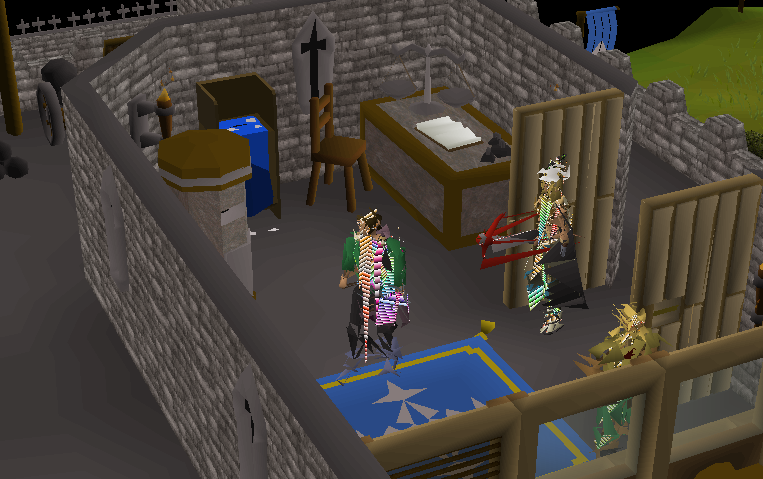
After updating to 1.6.12 today, an enabled GPU Plugin causes graphic glitches of the NPC and other Player models. Disabling the GPU Plugin removes the glitches

Environment (please complete the following information):
- OS: Ubuntu 19.10
- RuneLite version: 1.6.12
- Launcher version: 2.1.0
- GPU: AMD Vega 56
- Driver: amdgpu
 MScharnagl
All 30 comments
I'm having the same exact issue with Radeon RX580 on Arch Linux since updating today
 ferreiramx
on 23 Apr 2020
ferreiramx
on 23 Apr 2020
Same. Reverting 3b0bb050923b12a44e28febe77cfcf3b464d3eb7 fixes the issue.
/e: also RX580 on Arch
 gonX
on 23 Apr 2020
gonX
on 23 Apr 2020
@Hydrox6 has been looking into this some since he can reproduce it, we are pretty sure it is a llvm bug (which is a mesa dependency), but are trying to isolate what it is.
 Adam-
on 23 Apr 2020
Adam-
on 23 Apr 2020
Can someone else try to look into the root cause of this? Hydrox has given up trying to find the cause and we don't even know for sure it is an llvm bug anymore.
Adam-
on 27 Apr 2020
I'm experiencing the same issue. Disabling Compute Shaders in the GPU plugin works as a temporary fix. Just restart the plugin afterwards.
OS: Ubuntu 18.04
RuneLite version: 1.6.12
Launcher version: 2.0.0
GPU: AMD RX 580 8GB
Driver: Mesa 20.1 git builds from Oibaf PPA
 AlexanderBlaine
on 27 Apr 2020
AlexanderBlaine
on 27 Apr 2020
After these changes came in, my client would occasionally crash (would take about a minute before crashing) only if Compute Shaders is enabled. With disabled - everything is fine.
With enabled, I would also see visual glitching as do other people, but I'd also experiance client crashes.
OS: Windows 10
RuneLite version: 1.6.12
Launcher version: (not sure where to find, default version I guess)
GPU: GeForce GTX 650
Driver: GeForce Game Ready Driver version 445.87
Until this is resolved, is there any easy way I could manually revert the client to not include this portion of code? I'd appreciate that greatly! (no programming background)
Also, if I could download the previous client version somewhere, a link would be very nice!
Thanks.
 sourceles
on 27 Apr 2020
sourceles
on 27 Apr 2020
Disabling "compute shaders" and restarting the plugin does remove the visual glitching/stretching from Player/NPC models, but then other parts of the GPU plugin seem to bug out (i.e. Draw Distance no longer functions).
This glitch appears to affect NPC Models, Player Models, and some World Models (i.e. fountains with animations). Static models w/o anims. don't _appear_ to be affected.
I'm having the same issues, Arch Linux, RX 480, Mesa 19.3.4-139, llvm 9.0.1-72
Also note: Reverting 3b0bb05 and rebuilding the client fixed the issue... just like gonX mentioned.
 dtashlykov
on 27 Apr 2020
dtashlykov
on 27 Apr 2020
Had some time to play around based on dtashlykov's comment.
Deactivating shaders indeed fixes the issue, however, that basically deactivates the draw distance option, too.
Looked into the code, Draw distance is dependent on the shaders option:
Changed https://github.com/runelite/runelite/blob/8eee9d12f66a0f1358ccaefcd7ad127c0c0ba42a/runelite-client/src/main/java/net/runelite/client/plugins/gpu/GpuPlugin.java#L1537-L1541
changed line 1539 to
final int limit = MAX_DISTANCE;
Prevents the glitches, but only renders some of the objects a certain x-level. However, there is no problem on the y-level, even for the same objects that weren't rendered before.
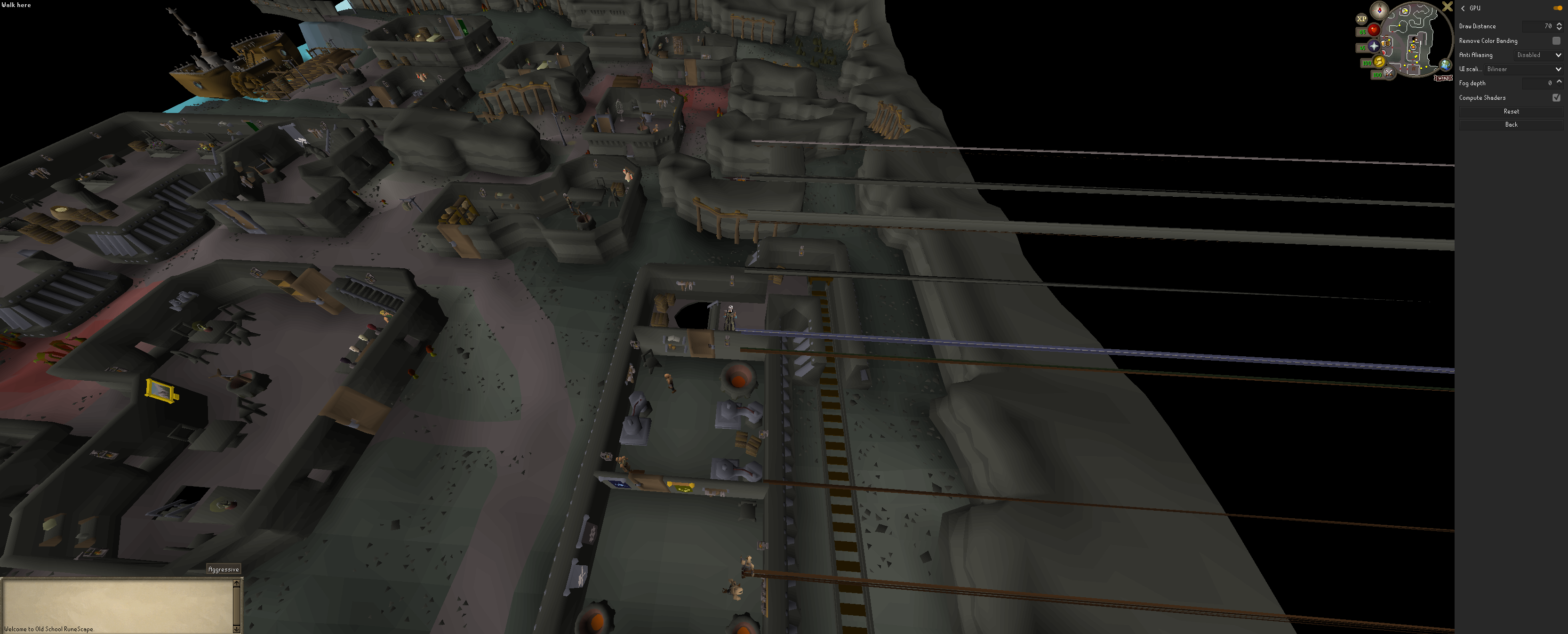
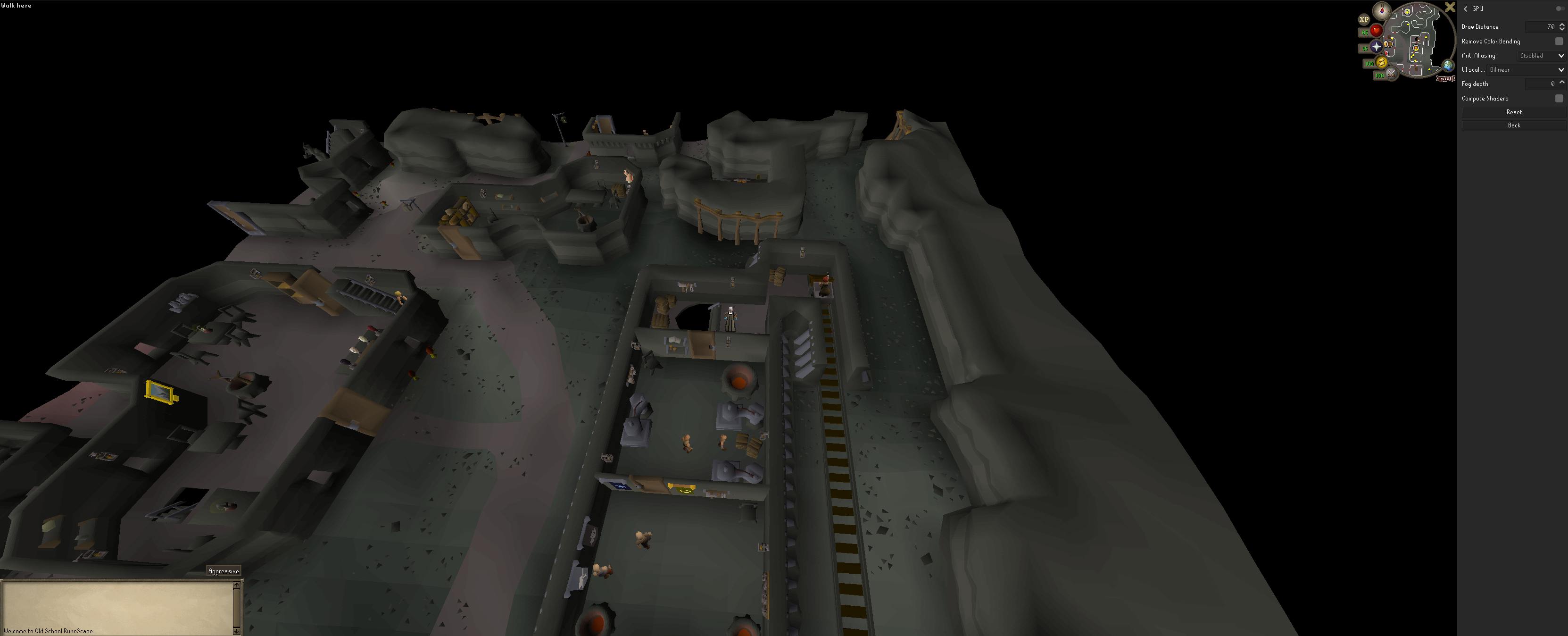
See these screenshots, the ship is a good indicator.
Here is with compute shaders activated:
Here with the plugin disabled which is the same as disabled shaders in the current client:
Here the activated plugin with my slight change and shaders deactivated:

Changed viewing angle for rendering:

Unfortunately I don't have the time to check https://github.com/runelite/runelite/commit/3b0bb050923b12a44e28febe77cfcf3b464d3eb7 for the exact culprit.
MScharnagl
on 27 Apr 2020
The culprit is shown in #11389. Why that causes it is what we don't know
 Hydrox6
on 27 Apr 2020
Hydrox6
on 27 Apr 2020
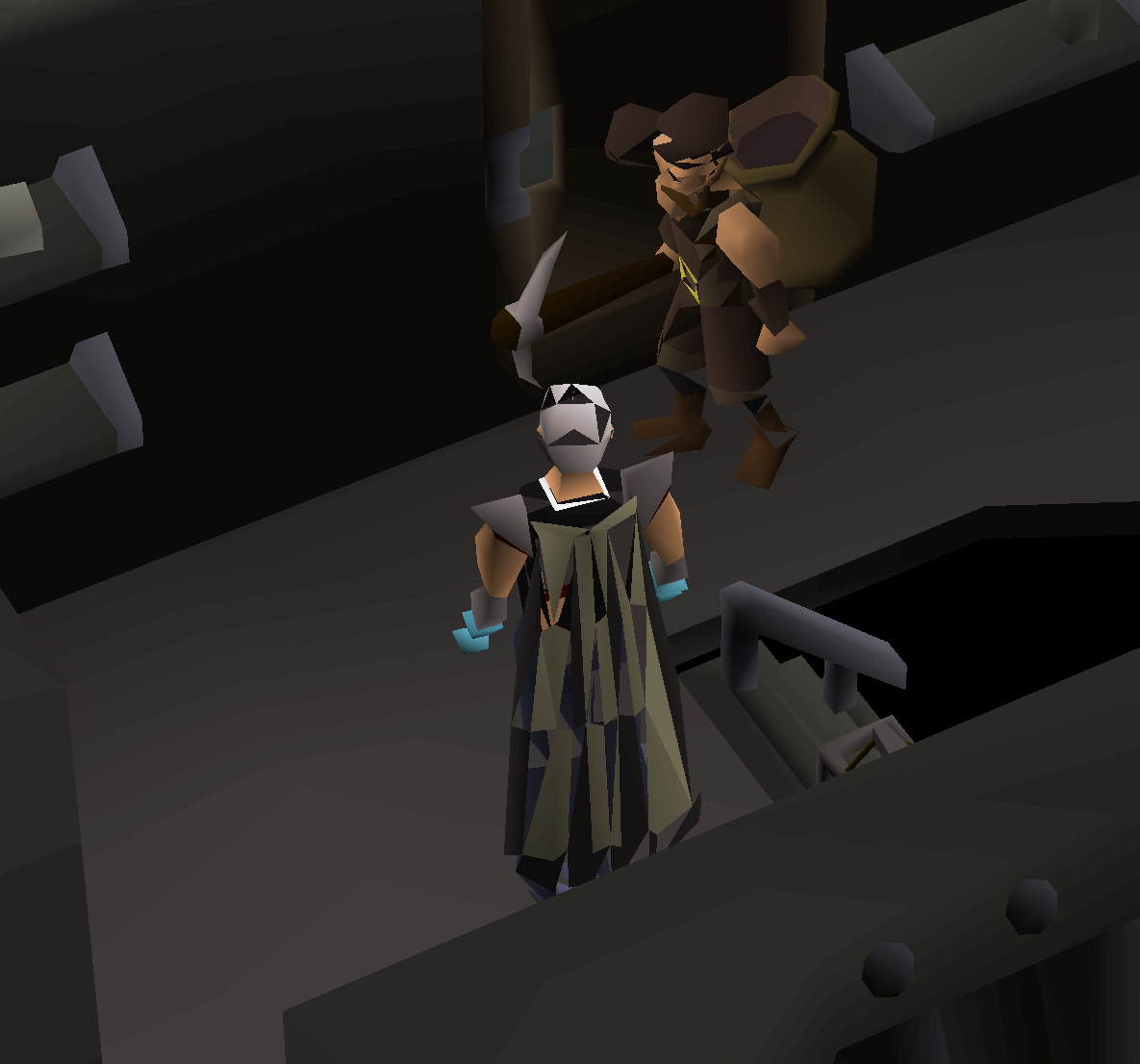
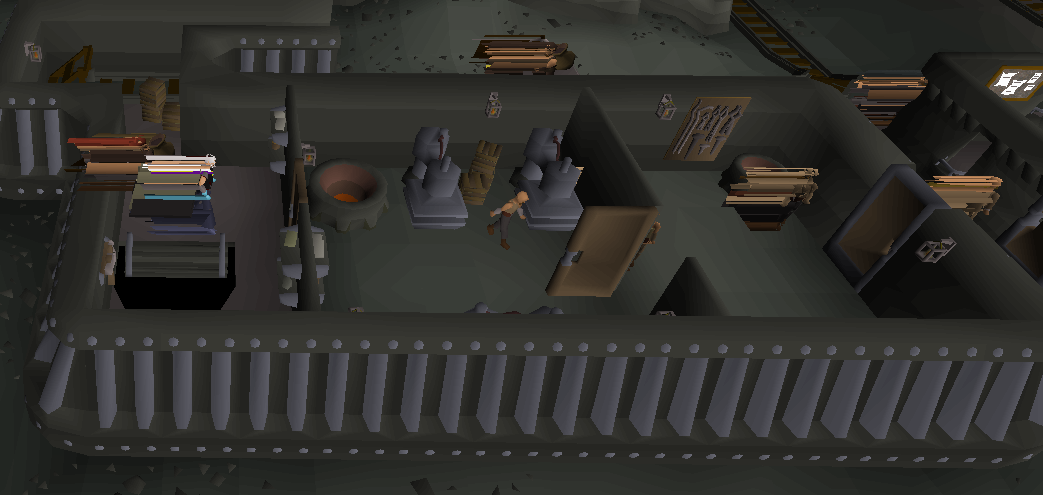
@Hydrox6 I found your commit in that regard, however, it just lessens the impact, it doesn't resolve it. It depends on the angle as can be seen here after I applied your changes:
MScharnagl
on 27 Apr 2020
That's really annoying to hear
Hydrox6
on 27 Apr 2020
Been having these issues myself lately. This is with the latest Flatpak version installed. To me the glitch happens whenever I have the GPU plugin enabled, regardless of what settings I use. No setting seems to lessen the glitch. Except for turning the GPU-plugin off, of course.
OS: Arch Linux 5.6
WM/DE: i3 (picom for compositing)
GPU: AMD RX480 (Mesa 20/LLVM 10)
CPU: Ryzen 5 1600
Java: Openjdk 13, also saw same issue with 8.
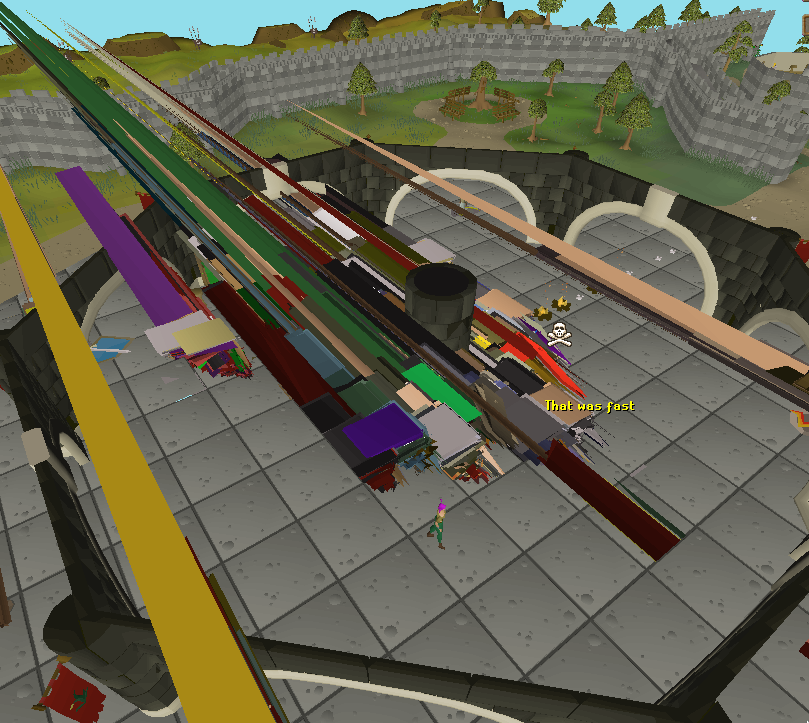
 tabbeber
on 27 Apr 2020
tabbeber
on 27 Apr 2020
Why was this issue closed?
It is still current in 1.6.15

MScharnagl
on 17 May 2020
This wasn't closed, that was a linked issue which was closed as a duplicate :)
I also have this issue, on Majaro (based on Arch Linux), but I don't see quite the same issue as other posters. I can also confirm disabling compute shaders seems to fix the problem.
Extended renderer info (GLX_MESA_query_renderer):
    Vendor: X.Org (0x1002)
    Device: AMD Radeon R7 200 Series (BONAIRE, DRM 3.35.0, 5.4.36-1-MANJARO, LLVM 10.0.0) (0x6658)
    Version: 20.0.6
    Accelerated: yes
    Video memory: 2048MB
    Unified memory: no
    Preferred profile: core (0x1)
    Max core profile version: 4.6
    Max compat profile version: 4.6
    Max GLES1 profile version: 1.1
    Max GLES[23] profile version: 3.2

$ uname -a
Linux phoenix 5.4.36-1-MANJARO #1 SMP PREEMPT Wed Apr 29 18:47:01 UTC 2020 x86_64 GNU/Linux
 tmewett
on 17 May 2020
tmewett
on 17 May 2020
If I'm reading this correctly and the problem is with Mesa/Mesa stack being too high, a temporary solution for impacted users could be to adopt the Snap package; which will locally override the Mesa stack to Mesa 18 for RuneLite specifically, matching the versions in Ubuntu's 18.04 release.
 MrCarroll
on 19 May 2020
MrCarroll
on 19 May 2020
a temporary solution for impacted users could be to adopt the Snap package; which will locally override the Mesa stack to Mesa 18 for RuneLite specifically, matching the versions in Ubuntu's 18.04 release.
@MrCarroll This did not work for me.
I'm running Runelite from source right now, reverting https://github.com/runelite/runelite/commit/3b0bb050923b12a44e28febe77cfcf3b464d3eb7 makes everything work fine.
What's necessary for this to be worked on? How do we help?
 Swabster
on 3 Jun 2020
Swabster
on 3 Jun 2020
It's unfortunate that hasn't helped, the impression I'd have gotten above is that the older stack should have faired better, but perhaps things just aren't always that simple.
I don't have the graphics knowledge to answer what would be beneficial in diagnosing the issue here, you'd possibly get a better answer in the development channel in Discord. All I could potentially suggest is that there might be something in https://www.mesa3d.org/envvars.html that can be enabled/disabled that might help, but anything in particular is beyond my understanding of the problem.
MrCarroll
on 3 Jun 2020
Hello, I have been experiencing this issue since 1.6.12 as well. (Manjaro Linux RX580)
I build Runelite with IntelliJ locally and can confirm that the graphical issues are present on master and that reverting commit https://github.com/runelite/runelite/commit/3b0bb050923b12a44e28febe77cfcf3b464d3eb7 does remove the GPU rendering issues.
 davidgauch
on 6 Jun 2020
davidgauch
on 6 Jun 2020
Hello, I have been experiencing this issue since 1.6.12 as well. (Manjaro Linux RX580)
I build Runelite with IntelliJ locally and can confirm that the graphical issues are present on master and that reverting commit 3b0bb05 does remove the GPU rendering issues.
Can confirm that this works. Thank you!
 ohlaurea
on 9 Jun 2020
ohlaurea
on 9 Jun 2020
If the https://github.com/runelite/runelite/commit/3b0bb050923b12a44e28febe77cfcf3b464d3eb7 commit and that commit only caused regression, why is it not being rolled back?
It says it's a small refactor of compute shaders, and reverting it makes everything work fine for everyone. Have you considered reverting it in a release?
Swabster
on 9 Jun 2020
We could I suppose, I just don't like changing things without understanding why and was hoping someone would be able to look into why it is broken.
Adam-
on 9 Jun 2020
The only thing I can suggest, is that the shader is reading garbage/uninitialised data for the vertex data--specifically only one vertex, as the majority of screenshots seem to show triangles with one vertex at an extreme distance away. (My screenshot is a weird exception; it shows vertex data mangled in a different way, but also garbage texture/fragment data.)
I have only a very shallow understanding of shaders, and scanning the diff hasn't revealed anything to me yet.
tmewett
on 9 Jun 2020
The only thing I can suggest, is that the shader is reading garbage/uninitialised data for the vertex data--specifically only one vertex, as the majority of screenshots seem to show triangles with one vertex at an extreme distance away. (My screenshot is a weird exception; it shows vertex data mangled in a different way, but also garbage texture/fragment data.)
I have only a very shallow understanding of shaders, and scanning the diff hasn't revealed anything to me yet.
Nice job! I was wondering if this has something to do with Arch Linux, as I see so many people mentioning it on this thread.
ohlaurea
on 9 Jun 2020
There is very little chance this is not a compiler/optimizer bug somewhere in the gl stack, instead of being something wrong with the commit. I'd be okay adding #11389 if some more people can verify it works as a workaround?
Adam-
on 9 Jun 2020
11389 was merged to try and address this,
Adam-
on 10 Jun 2020
11389 was merged to try and address this,
Thanks! How do I apply this? I tried already to open the client, and it should've automatically updated right?
ohlaurea
on 10 Jun 2020
It's merged to master, which means it will be part of the next release version. So if we put an update out this Thursday it'll be included in that.
 loldudester
on 10 Jun 2020
loldudester
on 10 Jun 2020
11389 fixes the issue for me
gonX
on 10 Jun 2020
Can confirm the latest release fixes the issue for me.
Swabster
on 12 Jun 2020
Can confirm, release 1.6.19 fixed the problem.
Big thanks to the Runelite team, for both, the fix and the client in general.
MScharnagl
on 12 Jun 2020
Related issues
 chadbdurham
·
26Comments
chadbdurham
·
26Comments
 Chillouh
·
32Comments
Chillouh
·
32Comments
 SomeZer0
·
28Comments
SomeZer0
·
28Comments
 sadegr
·
52Comments
sadegr
·
52Comments
 Popedigoz
·
21Comments
Popedigoz
·
21Comments
Most helpful comment
@Hydrox6 has been looking into this some since he can reproduce it, we are pretty sure it is a llvm bug (which is a mesa dependency), but are trying to isolate what it is.