Rubberduck: High DPI causes severe IDE (and app running from IDE) graphics glitches
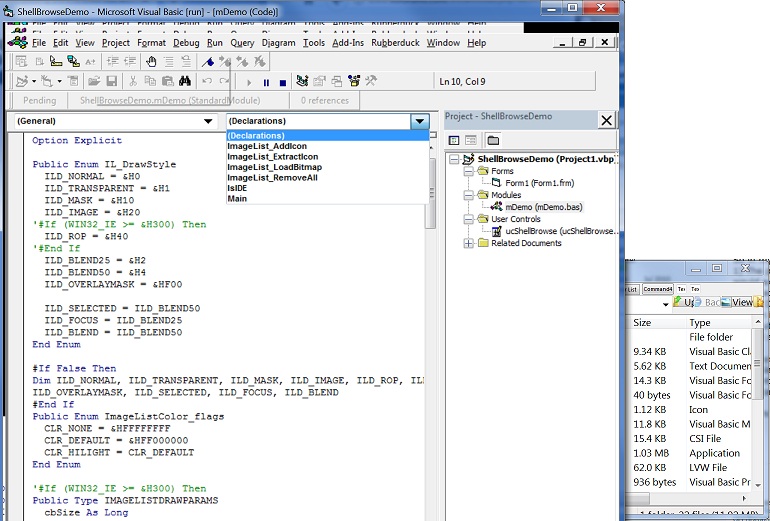
Notice the menu bar, oversize combobox dropdown arrow, combobox 'shadow' that appears when its open, and scaling issues in the app (the one running supports high-DPI normally).
If you use the 'Disable DPI scaling' option on the Compatibility tab, things appear normal for that mode, but obviously that's got its own issues; the IDE doesn't support high-DPI and apps running from the IDE would have to implement their own scaling.
V2.3.0.4221 in VB6 SP6 on Win7x64 150% scaling.
PS- I've encountered this glitch before. If an app running from the IDE uses the TrackPopupMenu[Ex] APIs, it will randomly trigger these distortions in both app and IDE. It's possible Rubberduck as part of its load process calls that or another API that causes the bug. Other similarly complex add-ins I've used do not have this bug however (CodeSMART and MZ-Tools).
 fafalone
All 12 comments
This seems to be the same issue as #4230, or at least closely related.
 Vogel612
on 26 Nov 2018
Vogel612
on 26 Nov 2018
Been doing some testing on this. Seems that something odd is occurring at IoC registration. In particular, any registrations that reflect over entire assemblies cause VB6 to fall off the High-DPI bus.
Incorrect conclusion, see below
 mansellan
on 26 Nov 2018
mansellan
on 26 Nov 2018
If merely loading WPF assemblies is what's causing this, we might have a case to submit a bug report to Microsoft?
 retailcoder
on 26 Nov 2018
retailcoder
on 26 Nov 2018
VB6 is not DPI-aware, thus Windows therefore uses DPI Virtualization to scale it. However, WPF by default is DPI-aware, therefore when RD loads WPF, it sets the whole process as DPI-aware. Solution is therefore to prevent this from happening by explicitly marking the process as DPI-unaware before WPF loads. As DPI-awareness is one-time, the first call wins.
There are two ways to set DPI awareness:
- using a manifest file
- via an API call
Option 1 is not ideal, as the manifest file would need to be alongside the VB6 executable. It's possible that a user may already have such a manifest file in place for other purposes.
Option 2 is not ideal, as the required API (SetProcessDpiAwareness) is only available from Windows 8.1 onwards. (the previous API SetProcessDpiAware only allows awareness to be switched on, not off)
mansellan
on 27 Nov 2018
We have to also consider that we might encounter this issue even in older Office hosts or a different VBA host, not just VB6.
This won't be pretty but it seems to me that the most robust solution would involve the following:
1) within the Extension or App classes, perform a check for an existence of a manifest file for the given application. If it exists, check if it already has set the DPI awareness in there. Regardless of what value it has set, do nothing.
2) if the manifest file is missing or does not contain any explicit settings for the DPI awareness, then we will check if it's Windows 8.1 or newer. If it's older, we do nothing.
3) If it's a newer Windows OS, we will check if we have a setting that tells us to explicitly set the DPI awareness.
4) If we do have such settings, we will check if it's less than Windows 10 and thus switch between calling the SetProcessApiAwareness vs. SetProcessDpiAwarenessContext.
And finally call that API. Then cross our fingers. 😕
We can provide this via a setting pane. Because manifest files are XML files, in principle, it's possible to edit it and just add a new node at the end so we'd be able to support both options, with a encouragement toward manifest as per documentation's recommendations. The setting will have to be a per-host setting. That means the hypothetical setting pane would have to be a list of all possible host with a DPI setting (e.g. a dropdown between Let Windows handle it, Not DPI Aware (manifest file), Not DPI Aware (set via startup)). For each different host loaded that RD gets loaded by, RD could create an entry for that host with Let Windows handle it as the default.
Not pretty as I said but this is most complete solution we can offer to manage that issue.
 bclothier
on 27 Nov 2018
bclothier
on 27 Nov 2018
Looks good, but I wonder how practical the "all possible hosts" bit is. AFAIK there is no absolute list of hosts. We could maybe populate the ones we know about, but allow the list to extend if RD starts in a not-in-the-list host?
mansellan
on 27 Nov 2018
I had edited the original comment about that - I was thinking of the latter option. I don't think I would ship any default hosts because they can do crazy things with the installation and put their favorite host in C:\foo just because. So it'd necessarily have to be a autoextending list that adds a new entry for every new host that RD gets loaded by.
bclothier
on 27 Nov 2018
bclothier
on 27 Nov 2018
There are a couple of workarounds available, depending on OS:
For Windows 7 (and presumably Vista and 8, untested)
- Ensure DPI scaling mode is set to use Windows XP-style DPI scaling
For Windows 10 (and presumably 8.1, untested)
- Open Regedit, go to HKLM\Software\Microsoft\Windows\CurrentVersion\SideBySide. Add a DWORD of PreferExternalManifest with value 1.
- Go to location of VB6.exe, add the following into a new file called VB6.exe.manifest:
xml <?xml version="1.0" encoding="UTF-8" standalone="yes"?>
<assembly xmlns="urn:schemas-microsoft-com:asm.v1" manifestVersion="1.0" xmlns:asmv3="urn:schemas-microsoft-com:asm.v3">
    <asmv3:application>
      <asmv3:windowsSettings xmlns="http://schemas.microsoft.com/SMI/2005/WindowsSettings">
        <dpiAware xmlns:ms_windowsSettings="http://schemas.microsoft.com/SMI/2005/WindowsSettings">false</dpiAware>
      </asmv3:windowsSettings>
    </asmv3:application>
</assembly>
mansellan
on 1 Dec 2018
Confirmed issue affects older versions of Office - removing vb6-specific tag
mansellan
on 1 Dec 2018
If we're going to go with per-host settings, should we consider allowing all settings to be defined per-host? Maybe some kind of drop-down on the Settings dialog to specify settings applied to:
- All projects
- All {Host name} projects
Just thinking this could be used as a basis for settings hierachies, a la R#... Later on, if #4306 gets implemented, we could add
- This project
as per #940. Thoughts?
mansellan
on 4 Dec 2018
Also, although manifests are Microsoft's recommended approach, I'm not sure they're the best fit here. Microsoft's advice seems to be targetting standalone unmanaged applications, whereas RD is an addin with both managed and interop code. Given that we can't assume the user has write access to the host's install path, going the API route appears to be less problematic. Manifests don't seem to work in all circumstances either (at least I couldn't get them working for VB6 on Windows 7). The general advice in Windows < 8.1 seems to be to set the global DPI scaling mode to XP-style.
I'd also suggest we don't need the newer SetProcessDpiAwarenessContext API, even under Windows 10. It seems to differ in its ability to target specific windows or threads, neither of which capabilities we need. The older API doesn't seem to be at risk of deprecation given that the even-older API is still suported.
mansellan
on 4 Dec 2018
Related issues
 DecimalTurn
·
3Comments
DecimalTurn
·
3Comments
 connerk
·
3Comments
connerk
·
3Comments
 ChrisBrackett
·
3Comments
ChrisBrackett
·
3Comments
 Hosch250
·
3Comments
retailcoder
·
3Comments
Hosch250
·
3Comments
retailcoder
·
3Comments
Most helpful comment
VB6 is not DPI-aware, thus Windows therefore uses DPI Virtualization to scale it. However, WPF by default is DPI-aware, therefore when RD loads WPF, it sets the whole process as DPI-aware. Solution is therefore to prevent this from happening by explicitly marking the process as DPI-unaware before WPF loads. As DPI-awareness is one-time, the first call wins.
There are two ways to set DPI awareness:
Option 1 is not ideal, as the manifest file would need to be alongside the VB6 executable. It's possible that a user may already have such a manifest file in place for other purposes.
Option 2 is not ideal, as the required API (SetProcessDpiAwareness) is only available from Windows 8.1 onwards. (the previous API SetProcessDpiAware only allows awareness to be switched on, not off)