Rubberduck: Changed search functionality
Sry for posting the third item today but its seems like in 2.4.0 you changed my most used feature - the code explorer - massivly.
I'm not sure what is the reason but with the new version my search results got really messy.
In the version before there was a way to keep the modul nodes collapsed even if there was a function found. This was the goto way for me. e.g. when I searched for "person" the Form_Example was visible (because it had a function "mypersonfunction" but the node of "Form_Example" was not expanded.
Now it seems not do be a way to do it like that. It seems to automaticly expand all nodes of modules where a function was found.
As mentioned, I dont know the reason why this changed but for me it would be fine if I had the possibility to do it like befor (or even like in visual studio where there is the search option "Search within the file"...
 Gener4tor
All 3 comments
The original issue that prompted the change is #3707, which was merged in the PR #4661. Just for the references, the blog post on 2.4.0 goes over the highlights of what changed.
Note that the Visual Studio has a similar behavior. When searching, it seems more logical to want to find the items without having to open/close folders. Note further that if selection isn't changed, clearing the search will restore the original expanded/collapsed state of the folders. If you make a selection in search mode, though, that will remain selected (and its containing folder, if any, expanded). That was supposed to cut down on the amount of having to open/close folders when searching.
Could you explain why you'd rather have folders closed while searching and take additional step of opening them, considering that the original states will be restored when you clear the search mode?
 bclothier
on 18 Feb 2019
bclothier
on 18 Feb 2019
The reason is because I usually search for a module not a function. The reasons for this is:
- Most of the time I just want to open the form
- As most of the the code is not written by me its much more possible for me to remember the module than one of the hundreds wunderful named functions like "function mo_bl(par_richt As String)"
- Often my intend is writing a new functions in an existing module
And for finding the module it was usually enough to type 2 letters. If I do this now, the code explorer is full of this functions and the module I am searching is on page 3 or four. And if I am searching for the module with "Close" in the name its even worse (see the attached picture).
And as explained above: Visual studio has a option to not search inside of files. Which btw. is always active in my case.
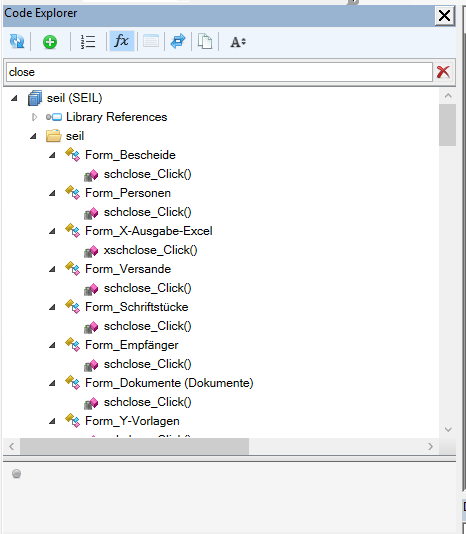
Gener4tor
on 18 Feb 2019
Thanks for explaining! That helps us to understand the issues. We will see if we can modify the CE's toolbar and configurations to support those scenarios. This will likely address both this and #4808.
bclothier
on 18 Feb 2019
Related issues
 susnick
·
3Comments
susnick
·
3Comments
 DecimalTurn
·
3Comments
DecimalTurn
·
3Comments
 ChrisBrackett
·
3Comments
ChrisBrackett
·
3Comments
 philippetev
·
3Comments
philippetev
·
3Comments
 ThunderFrame
·
3Comments
ThunderFrame
·
3Comments
Most helpful comment
Thanks for explaining! That helps us to understand the issues. We will see if we can modify the CE's toolbar and configurations to support those scenarios. This will likely address both this and #4808.