Rpi-jukebox-rfid: RC522 module
First of all thank you for this awesome tutorial. Even as bloody beginner I was able to get most of my own project - a jukebox for my little son - running. The only thing which suddenly stopped me was, that you are using an USB RFID reader instead of the RC522 module, which I am using.
If somebody can give me a hint how to integrate this one instead of an USB reader, this would be great!
 B5GeK8A2YqH9
All 104 comments
(I leave this issue open, because I get similar questions quite often)
This code base only works with USB RFID readers and I can not give any advice how to use this code with other models (like using pins). If anybody else has ideas and pointers, feel free to post them in this issue thread.
USB RFID readers usually are set up in a way that they act "like a keyboard". The Chip ID is pushed to the RPi as if you were typing it in a keyboard and pressed "enter". This input is what the python daemon is waiting for and then it pipes the result into the bash script.
 MiczFlor
on 24 Jan 2018
MiczFlor
on 24 Jan 2018
I have adjust the code to work with the RC522 module over GPIOs. Have a look at https://github.com/keinkurt/RPi-Jukebox-RFID/tree/MFRC255
BTW @MiczFlor Great project, thank you very much. I'm now beginning to build my own Jukebox.
 keinkurt
on 5 Mar 2018
keinkurt
on 5 Mar 2018
@keinkurt thanks for the scripts. Would it be ok, if I copy them over in a subfolder to this project?
MiczFlor
on 5 Mar 2018
@MiczFlor yes, no problem for me. Don't forget to copy the MFRC522.py, too.
keinkurt
on 6 Mar 2018
both of you, great project!
@keinkurt , can you give me further advices as how to activate and use it with the mfrc522? I know how to read my uids (https://github.com/pimylifeup/MFRC522-python) but have no clue how to register the device as in configure.md or proceed even further in the manual.
Thanks a lot! Jakob@Kiel
 jackwidu
on 24 Mar 2018
jackwidu
on 24 Mar 2018
@keinkurt @jackwidu If either of you or both of you would write a quick "howto" for the troubleshooting section on "how to (try to) add any RFID reader" - that would be awesome. I don't plan to buy a couple to play with them, but it seems I don't need to, because there is great talent here in the (small) community to fix this issue. Thanks!
MiczFlor
on 26 Mar 2018
Ok, finally I got it working. There were bugs that of course weren't your fault.
To help others:
1) go throught the installation manual. Be sure, that you have the mfrc522.py file in your scripts folder at the end. If you encounter errors, replace all the "php" installation with "php5". I have no idea what the linus-headers are for, but for my raspPi it didn't work (couldn't find 4.14)
2) make sure your NFC Chip works and is properly connected. Try it with https://github.com/pimylifeup/MFRC522-python or the more conclusive description on https://pimylifeup.com/raspberry-pi-rfid-rc522/. When you manually start the Python Scripts it should be able to tell you the UID. I encountered problems, which were related to missing tabstops (always on the last line). Be careful and correct your python scripts if necessary.
3) From the configure.md you can totally ignore the passages "Identify and configure your RFID reader" and "Register your USB device for the jukebox". To be sure, there are no errors, it might be a good idea to start the daemon_rfid_reader.py file manually (python /home/pi/RPi-Jukebox-RFID/scripts/daemon_rfid_reader.py). If this gives you the uid back, everything looks fine. With me, it told me there were errors, that were again associated with missing tabstops in the last line of the daemon_rf..py and the reader.py-File. Compare with https://github.com/keinkurt/RPi-Jukebox-RFID/blob/master/scripts/daemon_rfid_reader.py.
By now, you should also be able to visit the web app and folder via smb.
Thats it, all credit to @MiczFlor and @keinkurt !!!
jackwidu
on 26 Mar 2018
Works like a charm on my RPi3 with the RFIO-RC522 module. Thanks for all your effort!
I used the jessie-install-default-01.sh for the initial installation.
Additional steps I took:
- Connect the RC522 module properly
- Enable the SPI (raspi-config or /boot/config.txt)
- Install python-spidev (
sudo apt-get install python-spidev) Copy the scripts from @keinkurt into the scripts folders
Enjoy!
 ottk3
on 4 Apr 2018
ottk3
on 4 Apr 2018
Hi @keinkurt @ottk3 @jackwidu @B5GeK8A2YqH9 thanks for your input.
Personally, I haven't yet gotten my hands dirty with anything beyond the USB plugin. Thanks for your input and I will link to this thread from the manual. (until I will get my hands dirty, build one with the RC522, verify your great work, include it and finally close the issue ;)
MiczFlor
on 16 Apr 2018
Strange i cannot find the SPI module (fixed)
root@JukeBox:/home/pi/RPi-Jukebox-RFID/scripts# dpkg -l | grep spidev
ii  python-spidev                   20170223~145721-1                 all          Bindings for Linux SPI access through spidev (Python 2)
ii  python3-spidev                  20170223~145721-1                 all          Bindings for Linux SPI access through spidev (Python 3)
root@JukeBox:/home/pi/RPi-Jukebox-RFID/scripts# python Reader.py
Traceback (most recent call last):
  File "Reader.py", line 1, in <module>
    import MFRC522
  File "/home/pi/RPi-Jukebox-RFID/scripts/MFRC522.py", line 5, in <module>
    import spi
ImportError: No module named spi
root@JukeBox:/home/pi/RPi-Jukebox-RFID/scripts#
root@JukeBox:/home/pi/RPi-Jukebox-RFID/scripts# lsmod
Module                  Size  Used by
cmac                    3239  1
bnep                   12051  2
hci_uart               20020  1
btbcm                   7916  1 hci_uart
bluetooth             365844  24 hci_uart,bnep,btbcm
spidev                  7373  0
brcmfmac              292911  0
brcmutil                9863  1 brcmfmac
cfg80211              544609  1 brcmfmac
rfkill                 20851  6 bluetooth,cfg80211
snd_bcm2835            24427  0
snd_pcm                98565  1 snd_bcm2835
snd_timer              23968  1 snd_pcm
snd                    70032  3 snd_timer,snd_bcm2835,snd_pcm
bcm2835_gpiomem         3940  2
spi_bcm2835             7596  0
uio_pdrv_genirq         3923  0
uio                    10204  1 uio_pdrv_genirq
fixed                   3285  0
ip_tables              13161  0
x_tables               20578  1 ip_tables
ipv6                  409461  30
root@JukeBox:/home/pi/RPi-Jukebox-RFID/scripts#
I fixed it by running
git clone https://github.com/lthiery/SPI-Py.git
sudo python setup.py install
 raymonvdm
on 17 Apr 2018
raymonvdm
on 17 Apr 2018
Is it possible to add a buzzer to the RC522 / Pi to get the beep when reading a TAG. I have found a working example but i don`t no how to translate this to the current project
https://github.com/eoghan-c/team_track/blob/master/team_track.py
raymonvdm
on 18 Apr 2018
@raymonvdm it's a good idea. I will try it and after that I can tell you what to do.
keinkurt
on 18 Apr 2018
Hi @MalteHST,
I am not sure I can be of help here, actually, I am sure I can be of no
help here, because I don't use the RC522 module. Hopefully @keinkurt
can jump to the rescue?
If you find a solution, please share it here, so I can add it to the
documentation. Don't forget :)
Thanks, micz
MiczFlor
on 9 Jul 2018
Hi @MiczFlor,
fortunately I could help me with the troubleshooting section of you. I had the problem that the rfid reader works perfectly if I communicate per terminal, but not in the webserver. But I added the delay at reboot as you described it. Thanks.
 MalteHST
on 15 Jul 2018
MalteHST
on 15 Jul 2018
Has anyone tried to implement the "Stop on removal" - Function for the RC522 Module?
Maybe this gives a sufficient approach:
https://github.com/miguelbalboa/rfid/issues/188
But I'm not so deep in this project, that I know where to add code and if it is really that simple like described in the link above.
@keinkurt Are you able to give an advice for this issue? Do you have an idea?
This is the last feature to get the jukebox project running properly for my little kid. My idea is to get some of those self tapping RFID chips and attach them to a toy figure according to an audiobook or kids music. As long as the figure stands on the box it plays the linked audio.
MalteHST
on 24 Jul 2018
@MalteHST Please try this adjustment on the rfid daemon and RC522 Reader: https://github.com/keinkurt/RPi-Jukebox-RFID/commit/0b48c4d841d51657ad6ca1602a4abe3b39e6f7f3
keinkurt
on 9 Aug 2018
Hi @keinkurt
how about adding both flavours of your script (as pull requests :) to the code base here? I will then add them to the documentation.
All the best, micz
MiczFlor
on 10 Aug 2018
Many thanks @keinkurt. Stop on removal - Feature works perfectly with this adjustment. Also has a good reaction time.
Update:
Works nearly perfectly with the new release 1.0. Just add the MFRC522.py file and replace Reader.py and daemon_rfid_reader.py by the files from @keinkurt.
Except the resume play for audiobooks seems not to work.
Really nice and proper work. Thanks
MalteHST
on 10 Aug 2018
Hi @keinkurt,
thank you for providing this implementation for RC522 Reader.
Do you think it would be a valid option to integrate your script and the script from https://github.com/MiczFlor/RPi-Jukebox-RFID/issues/175 that way, that enables us users to choose from USB, RC522 and RDM6300? Maybe in the installscript?
 leachiM2k
on 10 Sep 2018
leachiM2k
on 10 Sep 2018
I can't get the reader running under version 1.1.3 anymore does anyone else have the problem?
//EDIT
When I use daemon_rfid_reader.py and Reader.py from the stop on removal branch it works. What could be the reason?
 Ardios
on 24 Sep 2018
Ardios
on 24 Sep 2018
Hey @keinkurt,
is there a way to use the reader normally or is it just possible to use the stop on removal method?
Thank you
Ardios
Ardios
on 25 Sep 2018
@Ardios I'm working on a solution to integrate the RC522 to main repository and installation process. Please wait for this.
keinkurt
on 26 Sep 2018
this PR #235 should now working with usb, rc522 and rdm6300 devices, dynamically. @Ardios please test it!
keinkurt
on 3 Oct 2018
Hi @keinkurt @Ardios
I merged the pull request into the develop branch - if you want to test it, please checkout that branch. I will only find time to test on the weekend, and only on a USB device.
https://github.com/MiczFlor/RPi-Jukebox-RFID/pull/235
MiczFlor
on 3 Oct 2018
@MiczFlor First of all, thanks for this amazing project !
I'm trying to set up my MFRC522 reader, but I fail.
Using current master or develop, RegisterDevice.py is unable to detect my rfid card reader.
Only when I use the Version-1.1.5-dynamicRFIDreader branch, my reader gets recognized:
pi@musicbox:~/RPi-Jukebox-RFID/scripts $ python RegisterDevice.py
Choose the reader from list
..

pi@musicbox:~/RPi-Jukebox-RFID/scripts $ git checkout develop
Branch develop set up to track remote branch develop from origin.
Switched to a new branch 'develop'

pi@musicbox:~/RPi-Jukebox-RFID/scripts $ python RegisterDevice.py
Choose the reader from list

pi@musicbox:~/RPi-Jukebox-RFID/scripts $ git checkout Version-1.1.5-dynamicRFIDreader
Switched to branch 'Version-1.1.5-dynamicRFIDreader'
Your branch is up-to-date with 'origin/Version-1.1.5-dynamicRFIDreader'.

pi@musicbox:~/RPi-Jukebox-RFID/scripts $ python RegisterDevice.py
Choose the reader from list:
0 MFRC522
1 RDM6300
…
Can you please give details about the current state of usage of non-USB readers, or point me to current docs how to set it up ? Thx !
 varac
on 5 Nov 2018
varac
on 5 Nov 2018
In the Version-1.1.5-dynamicRFIDreader branch I could register and use the reader successfully, daemon_rfid_reader.py shows Card found when reading a RFID tag.
Using daemon_rfid_reader.py from master branch fails:
pi@musicbox:~/RPi-Jukebox-RFID/scripts $ python /home/pi/RPi-Jukebox-RFID/scripts/daemon_rfid_reader.py
Could not find the device MFRC522
. Make sure is connected
The only problem with the Version-1.1.5-dynamicRFIDreader branch seems to be that the webinterface settings still show RFID Reader Disabled, and Switch ON don't have any effect (where are the logs from the webinterface, logs/debug.log doesn't show any output from trying to switch it on) ?
varac
on 5 Nov 2018
I also had to install pyserial. Otherwise 1.1.8 RC2 is working fine following the posts from above.
 martinclausen2
on 25 Nov 2018
martinclausen2
on 25 Nov 2018
The only problem with the
Version-1.1.5-dynamicRFIDreaderbranch seems to be that the webinterface settings still showRFID Reader Disabled, andSwitch ONdon't have any effect (where are the logs from the webinterface,logs/debug.logdoesn't show any output from trying to switch it on) ?
Also have the exact same issue.
when registering new cards tho it autopopulates with RFID card scanned. even tho the
'RFID Reader Disabled' and the 'Switch ON' doesnt do anything
 internetfan420
on 28 Nov 2018
internetfan420
on 28 Nov 2018
Thanks for the tutorial.
Unfortunately, I can't get it running.
Following the howto from jackwidu I can read and write cards via pimilifeup.
But Phoniebox won't recognize any card ID anyway. Starting the daemon_rfid_reader.py manually, he won't do anything as well. cancelling it he gives me feedback as follows:
Traceback (most recent call last):
File "/home/pi/RPi-Jukebox-RFID/scripts/daemon_rfid_reader.py", line 31, in
cardid = reader.reader.read_card()
File "/home/pi/RPi-Jukebox-RFID/scripts/Reader.py", line 36, in read_card
select([self.dev], [], [])
File "/home/pi/RPi-Jukebox-RFID/scripts/daemon_rfid_reader.py", line 20, in end_read
reader.reader.cleanup()
AttributeError: 'UsbReader' object has no attribute 'cleanup'
What am I doing wrong? Sorry, I'm not that experienced in this. Thanks
 fapoo
on 2 Dec 2018
fapoo
on 2 Dec 2018
Thanks for the tutorial.
Unfortunately, I can't get it running.
Following the howto from jackwidu I can read and write cards via pimilifeup.
But Phoniebox won't recognize any card ID anyway. Starting the daemon_rfid_reader.py manually, he won't do anything as well. cancelling it he gives me feedback as follows:Traceback (most recent call last):
File "/home/pi/RPi-Jukebox-RFID/scripts/daemon_rfid_reader.py", line 31, in
cardid = reader.reader.read_card()
File "/home/pi/RPi-Jukebox-RFID/scripts/Reader.py", line 36, in read_card
select([self.dev], [], [])
File "/home/pi/RPi-Jukebox-RFID/scripts/daemon_rfid_reader.py", line 20, in end_read
reader.reader.cleanup()
AttributeError: 'UsbReader' object has no attribute 'cleanup'What am I doing wrong? Sorry, I'm not that experienced in this. Thanks
Did you already register the device? Just run:
python ~/RPi-Jukebox-RFID/scripts/RegisterDevice.py
and choose the right device number for MFRC522
 alex-voigt
on 8 Dec 2018
alex-voigt
on 8 Dec 2018
Thanks for the tutorial.
Unfortunately, I can't get it running.
Following the howto from jackwidu I can read and write cards via pimilifeup.
But Phoniebox won't recognize any card ID anyway. Starting the daemon_rfid_reader.py manually, he won't do anything as well. cancelling it he gives me feedback as follows:
Traceback (most recent call last):
File "/home/pi/RPi-Jukebox-RFID/scripts/daemon_rfid_reader.py", line 31, in
cardid = reader.reader.read_card()
File "/home/pi/RPi-Jukebox-RFID/scripts/Reader.py", line 36, in read_card
select([self.dev], [], [])
File "/home/pi/RPi-Jukebox-RFID/scripts/daemon_rfid_reader.py", line 20, in end_read
reader.reader.cleanup()
AttributeError: 'UsbReader' object has no attribute 'cleanup'
What am I doing wrong? Sorry, I'm not that experienced in this. ThanksDid you already register the device? Just run:
python ~/RPi-Jukebox-RFID/scripts/RegisterDevice.py
and choose the right device number for MFRC522
I tried to. But this is all I get from the list:
_Choose the reader from list
0 C-Media Electronics Inc. USB PnP Sound Device
Device Number:_
fapoo
on 9 Dec 2018
I have tried to use an MFRC522 with phoniebox. Got it working with the 1.1.5 branch but had reinstall clean. So i am just doing a reinstall and saw this during installation. Maybe that is the reason why it is not working in the master branch? Not shure, don't have the time to investigate further.
Collecting pi-rc522 (from -r requirements.txt (line 12))
  Downloading https://files.pythonhosted.org/packages/84/f2/e3d02257949e9caa9bff26044e0185e743ff45d3e0e099a93880e10bf718/pi-rc522-2.2.1.tar.gz
    Complete output from command python setup.py egg_info:
    Traceback (most recent call last):
      File "<string>", line 1, in <module>
      File "/tmp/pip-build-tLkqiZ/pi-rc522/setup.py", line 11, in <module>
        from pirc522 import __version__  # flake8: noqa
      File "pirc522/__init__.py", line 4, in <module>
        from .rfid import RFID
      File "pirc522/rfid.py", line 2, in <module>
        import spidev
    ImportError: No module named spidev

    ----------------------------------------
Command "python setup.py egg_info" failed with error code 1 in /tmp/pip-build-tLkqiZ/pi-rc522/
Collecting evdev==0.7.0
  Using cached https://files.pythonhosted.org/packages/67/15/eac376f3e1fc1960a54439c21459b2582e68340001aff83b4ace9e5bd110/evdev-0.7.0.tar.gz
Building wheels for collected packages: evdev
  Running setup.py bdist_wheel for evdev ... done
  Stored in directory: /root/.cache/pip/wheels/a3/41/1e/95f092bf01636d415841ed521d0f15d07eb2e2e6e9f10110ff
Successfully built evdev
Installing collected packages: evdev
Successfully installed evdev-0.7.0
Collecting youtube_dl
  Using cached https://files.pythonhosted.org/packages/79/f8/8dd8256bf7df4282c5b04920f61f1c6e87616d4f8366eec4107b73a22771/youtube_dl-2018.12.17-py2.py3-none-any.whl
Installing collected packages: youtube-dl
Successfully installed youtube-dl-2018.12.17
Collecting pi-rc522
  Using cached https://files.pythonhosted.org/packages/84/f2/e3d02257949e9caa9bff26044e0185e743ff45d3e0e099a93880e10bf718/pi-rc522-2.2.1.tar.gz
    Complete output from command python setup.py egg_info:
    Traceback (most recent call last):
      File "<string>", line 1, in <module>
      File "/tmp/pip-build-5twEMz/pi-rc522/setup.py", line 11, in <module>
        from pirc522 import __version__  # flake8: noqa
      File "pirc522/__init__.py", line 4, in <module>
        from .rfid import RFID
      File "pirc522/rfid.py", line 2, in <module>
        import spidev
    ImportError: No module named spidev

    ----------------------------------------
Command "python setup.py egg_info" failed with error code 1 in /tmp/pip-build-5twEMz/pi-rc522/
 pyriand3r
on 26 Dec 2018
pyriand3r
on 26 Dec 2018
Hi @pyriand3r I guess you need to install the spidev python lib manually.
martinclausen2
on 27 Dec 2018
@pyriand3r: Joining your problem.
Seems to be one of the "well known" python2<->python3 issues.
Couldn't install the missing spidev manually.
But installing _apt-get install python3-pip_ gives me a _pip3_.
With _pip3 install -r requirements.txt_ the script runs to the end.
Lets see if I make it work...
 EsraDan
on 30 Dec 2018
EsraDan
on 30 Dec 2018
Hi, I have the same issue and could install the requirements with pip3 install -r requirements.txt. The card reader is working (I tested it with MFRC522 Read.py).
sudo systemctl status phoniebox-rfid-reader shows active (running) but if I swipe the card the web interface is not popping up the card id.
For testing, I stopped the service sudo systemctl stop phoniebox-rfid-reader and started python2 /home/pi/RPi-Jukebox-RFID/scripts/daemon_rfid_reader.py manually but it's not showing any information except
pi@raspberrypi:~ $ python2 /home/pi/RPi-Jukebox-RFID/scripts/daemon_rfid_reader.py
/home/pi/RPi-Jukebox-RFID/scripts/pirc522/rfid.py:78: RuntimeWarning: This channel is already in use, continuing anyway.  Use GPIO.setwarnings(False) to disable warnings.
  GPIO.setup(pin_rst, GPIO.OUT)
/home/pi/RPi-Jukebox-RFID/scripts
Any idea if it is a problem that the channel is already in use? And how can I solve my issue? Any ideas?
 fhuebner2
on 18 Jan 2019
fhuebner2
on 18 Jan 2019
Hi @fhuebner2
Could you add that to the wiki please?
All the best, micz
Sent with GitHawk
MiczFlor
on 18 Jan 2019
Hi @MiczFlor
I wouldn't add this as long as my issue is not solved :-),
fhuebner2
on 18 Jan 2019
Hi folks!
At last I fixed my problems the typical way: rtfm
I downloaded the latest stretch image.
Made a update&upgrade.
And it work out of the box by using installation string & batch file.
My mistake was to install an older stretch via pybakery to get the headless setup. Update&Upgrade didn't work for me. (on Pi 3)
I also set up the hole thing on zero w to shrink it.
Even there, with the latest image, the installations failed, because I didn't update&upgrade.
After update&upgrade everything worked perfectly.
So in my opinion the whole installation tool chain is very sensitive to the environment.
But that's quite common...
EsraDan
on 18 Jan 2019
@EsraDan thanks for the input. The install script might well be more up to date than the step by step guide. I haven‘t updated that for some time.
Possibly I should add more infos in the comments of the install script and limit the wiki to tweaks and additional info.
Sent with GitHawk
MiczFlor
on 18 Jan 2019
@EsraDan also with an RFID-RC522 ?
fhuebner2
on 18 Jan 2019
@fhuebner2
No- I used an old FS-0022 from easyident.
It's overkill, but it was laying in my shelve for more than a decade ;-)
I wrote my own ReaderSerial.py there for.
But I use _serial.Serial("/dev/ttyUSB0")_.
So my last comment just fixes the _ImportError: No module named spidev_ topic
The installation script throws no exceptions anymore.
(Have a look at my very first comment in this thread. )
EsraDan
on 18 Jan 2019
I just tried it with a complete new installation. Latest Stretch Lite version, then sudo apt-get update, sudo apt-get upgrade, sudo rpi-update. Same issue occurs. The rfid card id is still not getting inserted when swiping it. But it shows as "running" on the settings page.
Collecting spidev (from -r requirements.txt (line 11))
  Downloading https://files.pythonhosted.org/packages/36/83/73748b6e1819b57d8e1df8090200195cdae33aaa22a49a91ded16785eedd/spidev-3.2.tar.gz
Requirement already satisfied: RPi.GPIO in /usr/lib/python2.7/dist-packages (from -r requirements.txt (line 12))
Collecting pi-rc522 (from -r requirements.txt (line 13))
  Downloading https://files.pythonhosted.org/packages/84/f2/e3d02257949e9caa9bff26044e0185e743ff45d3e0e099a93880e10bf718/pi-rc522-2.2.1.tar.gz
    Complete output from command python setup.py egg_info:
    Traceback (most recent call last):
      File "<string>", line 1, in <module>
      File "/tmp/pip-build-vQbCbV/pi-rc522/setup.py", line 11, in <module>
        from pirc522 import __version__  # flake8: noqa
      File "pirc522/__init__.py", line 4, in <module>
        from .rfid import RFID
      File "pirc522/rfid.py", line 2, in <module>
        import spidev
    ImportError: No module named spidev

    ----------------------------------------
Command "python setup.py egg_info" failed with error code 1 in /tmp/pip-build-vQbCbV/pi-rc522/
But then later in the same installation procedure it seems to be installed successfully:
Collecting spidev
  Using cached https://files.pythonhosted.org/packages/36/83/73748b6e1819b57d8e1df8090200195cdae33aaa22a49a91ded16785eedd/spidev-3.2.tar.gz
Building wheels for collected packages: spidev
  Running setup.py bdist_wheel for spidev ... done
  Stored in directory: /root/.cache/pip/wheels/e4/4b/92/edbf6146136d76f26e8b8486c4013593100617da7a194b34cf
Successfully built spidev
Installing collected packages: spidev
Successfully installed spidev-3.2
@fhuebner2
I can't remember exactly which steps I have done by installing everything on the second device.(Was quick&dirty in the middle of the night thing)
But I remember a strange feeling that update&upgrade->installation-script throwed an exception.
Because I was almost sleeping and my thoughts were not so clear, I just type upgrade&update (what is "wrong") and tried it again.
So in my opinion that fits with your experience.
EsraDan
on 18 Jan 2019
Hi @fhuebner2
Because you are working with stretch lite, this thread might help:
https://github.com/MiczFlor/RPi-Jukebox-RFID/issues/385
Sent with GitHawk
MiczFlor
on 19 Jan 2019
Sorry, unfortunately it's still not working. :(
fhuebner2
on 20 Jan 2019
Same here. Can't get it running.
fapoo
on 20 Jan 2019
I did a complete new installation with Normal Raspbian stretch (but without recommended software).
Still not get it running :(
fhuebner2
on 21 Jan 2019
Hey, at first sorry for my broken english.
a german guide from me u can find here: https://raspi.mobi/viewtopic.php?f=10&t=4
i had problems in earlier versions so now i always install 1-2 things before i start with the one line script
1.) Start with a Fresh Installation of raspian lite (Raspbian stretch desktop works too)
2.) Then we searching for updates sudo apt update && sudo apt upgrade
3.) Enable the SPI Interface with sudo raspi-config then 5 Interfacing Options then P4 SPI and select Yes
4.) Now install few packages sudo apt install python-dev python-pip git (I have no idea if it's necessary or not, but that's how it works for me.)
5.) Now we install spidev sudo pip install spidev
6.) Now we install pi-rc522 sudo pip install pi-rc522
7.) After this we install the phoniebox with the One line Script from here https://github.com/MiczFlor/RPi-Jukebox-RFID/wiki/INSTALL-stretch#one-line-install-command (in my case i used the classic Edition)
8.) After the Installation we have to copy two files cp /home/pi/RPi-Jukebox-RFID/scripts/Reader.py /home/pi/RPi-Jukebox-RFID/scripts/Reader.py.old
9.) And cp /home/pi/RPi-Jukebox-RFID/scripts/Reader.py.experimental /home/pi/RPi-Jukebox-RFID/scripts/Reader.py
10.) Now we must Register our Reader with python /home/pi/RPi-Jukebox-RFID/scripts/RegisterDevice.py and select 0 MFRC522
11.) Go in the webgui to Settings and switch the RFID Reader button to on
Finish
i hope it works and again sorry for my bad broken english ;)
Ardios
on 21 Jan 2019
Hey, at first sorry for my broken english.
a german guide from me u can find here: https://raspi.mobi/viewtopic.php?f=10&t=4
i had problems in earlier versions so now i always install 1-2 things before i start with the one line script
1.) Start with a Fresh Installation of raspian lite
2.) Then we searching for updatessudo apt update && sudo apt upgrade
3.) Now install few packagessudo apt install python-dev python-pip git(I have no idea if it's necessary or not, but that's how it works for me.)
4.) Now we install spidevsudo pip install spidev
5.) Now we install pi-rc522sudo pip install pi-rc522
6.) After this we install the phoniebox with the One line Script from here https://github.com/MiczFlor/RPi-Jukebox-RFID/wiki/INSTALL-stretch#one-line-install-command (in my case i used the classic Edition)
7.) After the Installation we have to copy two filescp /home/pi/RPi-Jukebox-RFID/scripts/Reader.py /home/pi/RPi-Jukebox-RFID/scripts/Reader.py.old
8.) Andcp /home/pi/RPi-Jukebox-RFID/scripts/Reader.py.experimental /home/pi/RPi-Jukebox-RFID/scripts/Reader.py
9.) Now we must Register our Reader withpython /home/pi/RPi-Jukebox-RFID/scripts/RegisterDevice.pyand select 0 MFRC522
10.) Go in the webgui to Settings and switch the RFID Reader button to onFinish
i hope it works and again sorry for my bad broken english ;)
That's exactly what I was looking for. I'll try it later.
Besten Dank.
fapoo
on 21 Jan 2019
@fhuebner2
I just remembered something...How did you wire the reader? 7 or 8 wires? u need to wire the IRQ pin too for the pi-rc522 package…
https://github.com/ondryaso/pi-rc522 scroll a litte bit down to "Connecting"
Ardios
on 21 Jan 2019
@Ardios I can't believe it! That did it! Thank you so much. Later I will try to get it running with stretch lite. Shouldn't be a problem anymore.
fhuebner2
on 21 Jan 2019
@fhuebner2
I'm glad that it worked
my install notes from above working fine with stretch lite
Ardios
on 21 Jan 2019
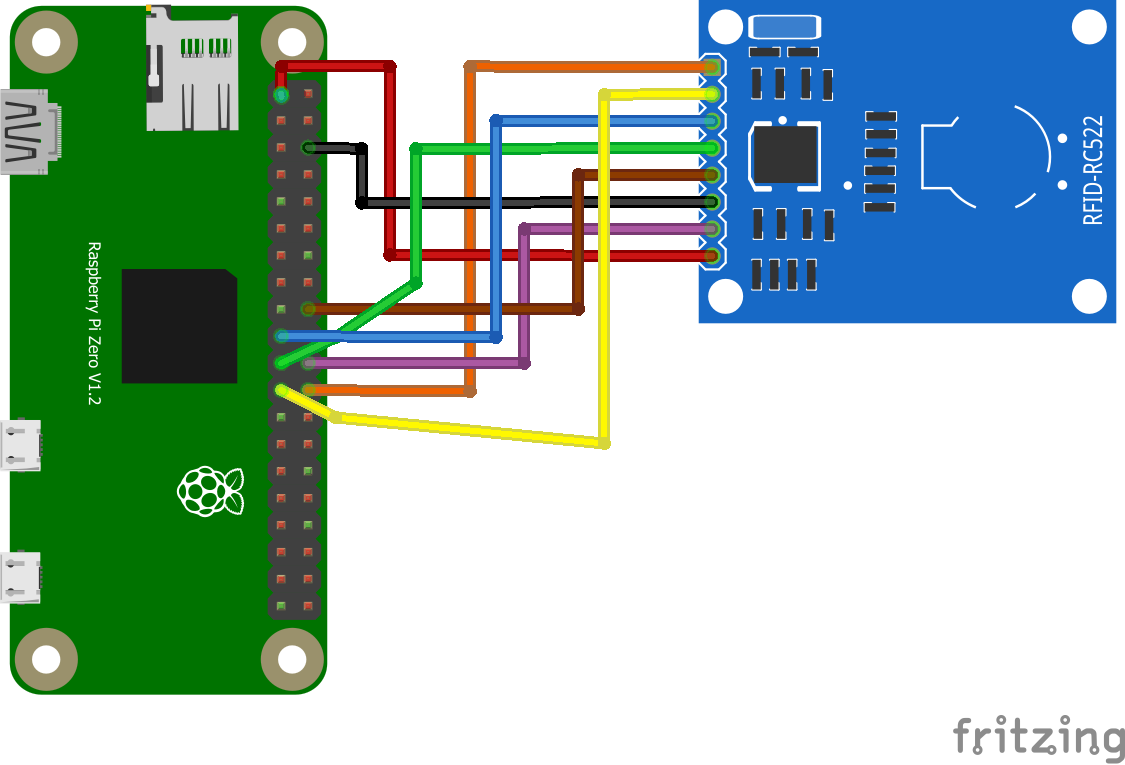
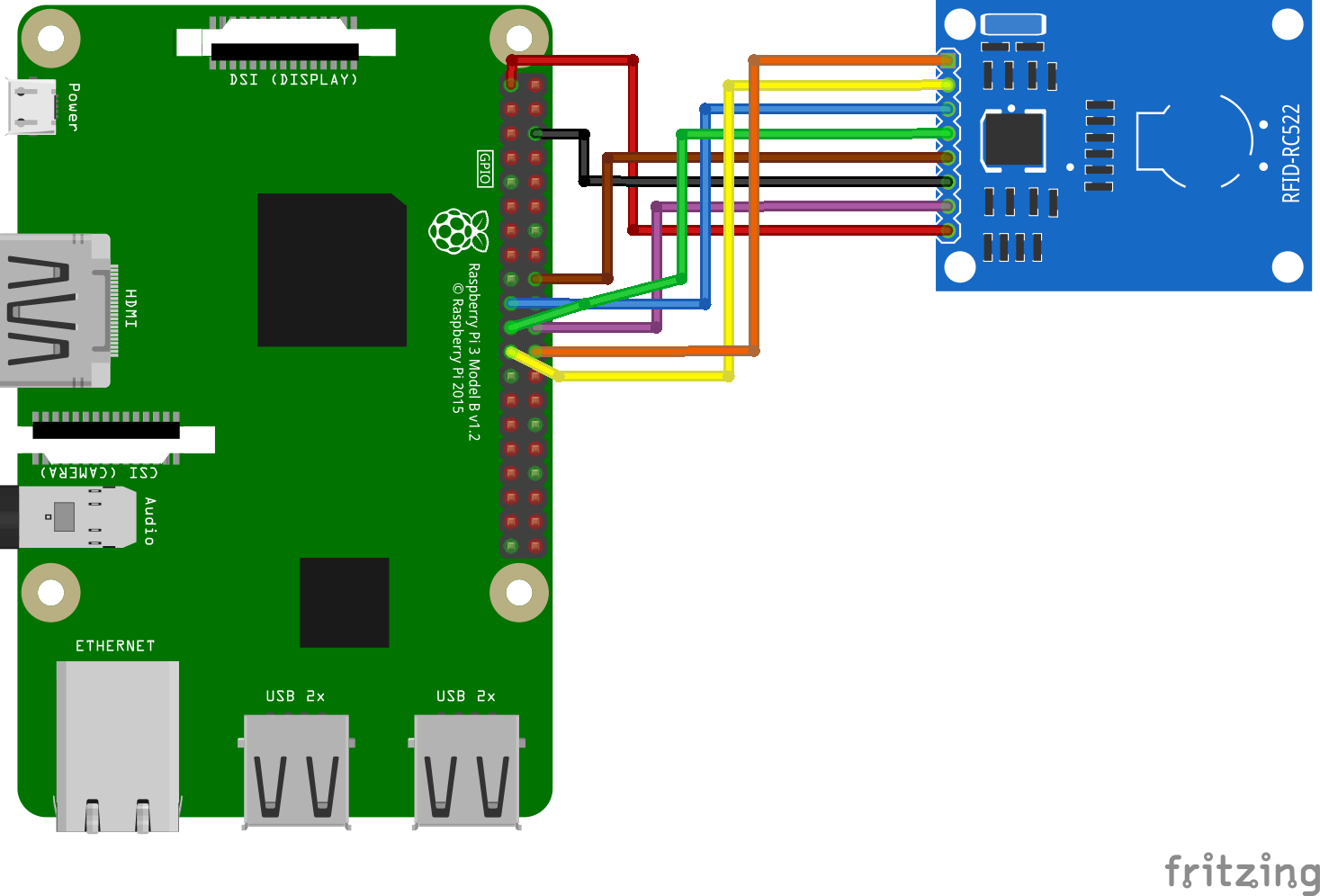
Here a fritzing layout for wire a RC522 with the Raspberry Pi incl. IRQ Pin, 2 different Version (RPi3 and RPi Zero..only visual nothing else)
RPi Zero:
RPi 3:
Ardios
on 22 Jan 2019
@Ardios wonderbar!!! It works now for me! Awesome! :) Thank you so much!!! Vielen lieben Dank!!!
So now I can choose my RC-522 and also enable the RFID reader using the WebUI...
The only thing is that when I want to add a new card and hold my card in front of the reader, it won't fill out the Chip-ID :(
The reader is working, I tried that before using the MFRC522-python -> Read.py
Do you have any suggestions for me?
Or is there a place where I can see log files so that I can see what's not working?
 georgbachmann
on 25 Jan 2019
georgbachmann
on 25 Jan 2019
@georgbachmann
have you wire the IRQ Pin from RC522 to Raspberry Pin18/GPIO24?
See the fritzing Picture above (brown cable is the IRQ Pin) ...you must soldering all 8 wires from the Reader...
Ardios
on 26 Jan 2019
Awesome!!!! I was following a tutorial where that pin was left empty... thank you very much!!! Now it's working like it should! Great!!! :)
georgbachmann
on 26 Jan 2019
Hi @Ardios @georgbachmann
I added your wiring and info to the wiki. Thanks for sorting this out here in the issue thread - for all to benefit.
https://github.com/MiczFlor/RPi-Jukebox-RFID/wiki/Wiring_for_RC522_card_reader
MiczFlor
on 1 Feb 2019
Hi!
really great project... I think I did the newbie mistake and try the have all approach (Display, rotary switch, RC522, Buttons,...)
I just try to get the basic done. To keep it simple initially by using the classic version. I have followed Ardios how to, all 8 pins soldered. Reader LED is on and config has worked, incl. enabling in the WebUI. However a swipe does literally nothing and I do not even get the latestID.txt in my shared folders.
Maybe the last one is a result of having the service not started?
pi@raspberrypi:~ $ sudo systemctl status phoniebox-rfid-reader
● phoniebox-rfid-reader.service - Phoniebox RFID-Reader Service
Loaded: loaded (/etc/systemd/system/phoniebox-rfid-reader.service; enabled; vendor preset: enabled)
Active: failed (Result: exit-code) since Sat 2019-02-16 12:42:37 GMT; 1s ago
Process: 1171 ExecStart=/home/pi/RPi-Jukebox-RFID/scripts/daemon_rfid_reader.py (code=exited, status
Main PID: 1171 (code=exited, status=1/FAILURE)
Feb 16 12:42:37 raspberrypi systemd[1]: phoniebox-rfid-reader.service: Failed with result 'exit-code'.
Feb 16 12:42:37 raspberrypi systemd[1]: phoniebox-rfid-reader.service: Service hold-off time over, sch
Feb 16 12:42:37 raspberrypi systemd[1]: Stopped Phoniebox RFID-Reader Service.
Feb 16 12:42:37 raspberrypi systemd[1]: phoniebox-rfid-reader.service: Start request repeated too quic
Feb 16 12:42:37 raspberrypi systemd[1]: Failed to start Phoniebox RFID-Reader Service.
Feb 16 12:42:37 raspberrypi systemd[1]: phoniebox-rfid-reader.service: Unit entered failed state.
Feb 16 12:42:37 raspberrypi systemd[1]: phoniebox-rfid-reader.service: Failed with result 'exit-code'.
lines 1-13/13 (END)...skipping...
● phoniebox-rfid-reader.service - Phoniebox RFID-Reader Service
Loaded: loaded (/etc/systemd/system/phoniebox-rfid-reader.service; enabled; vendor preset: enabled)
Active: failed (Result: exit-code) since Sat 2019-02-16 12:42:37 GMT; 1s ago
Process: 1171 ExecStart=/home/pi/RPi-Jukebox-RFID/scripts/daemon_rfid_reader.py (code=exited, status=1/FAILURE)
Main PID: 1171 (code=exited, status=1/FAILURE)
Feb 16 12:42:37 raspberrypi systemd[1]: phoniebox-rfid-reader.service: Failed with result 'exit-code'.
Feb 16 12:42:37 raspberrypi systemd[1]: phoniebox-rfid-reader.service: Service hold-off time over, scheduling restart.
Feb 16 12:42:37 raspberrypi systemd[1]: Stopped Phoniebox RFID-Reader Service.
Feb 16 12:42:37 raspberrypi systemd[1]: phoniebox-rfid-reader.service: Start request repeated too quickly.
Feb 16 12:42:37 raspberrypi systemd[1]: Failed to start Phoniebox RFID-Reader Service.
Feb 16 12:42:37 raspberrypi systemd[1]: phoniebox-rfid-reader.service: Unit entered failed state.
Feb 16 12:42:37 raspberrypi systemd[1]: phoniebox-rfid-reader.service: Failed with result 'exit-code'.
any hint would be really helpful! Thanks a lot!
 domu83
on 16 Feb 2019
domu83
on 16 Feb 2019
really great project... I think I did the newbie mistake and try the have all approach (Display, rotary switch, RC522, Buttons,...)
...
any hint would be really helpful! Thanks a lot!
Which version of scripts/Reader.py are you using? Did you replace the default one with Reader.py.experimental? RC522 does need the experimental verison.
 pseeger
on 17 Feb 2019
pseeger
on 17 Feb 2019
yes, I have replaced the default with the experimental, so Reader.py is the RC522 version
domu83
on 17 Feb 2019
@domu83
sorry for the late answer.
Can we test a few things?
Try this:
git clone https://github.com/ondryaso/pi-rc522.git
Then start the example Read Script with:
python /home/pi/pi-rc522/examples/Read.py
Now you can test the Reader, is this working for you?
When not, i think you have to check the wire
As always, excuse my bad English. ;)
Ardios
Ardios
on 19 Feb 2019
Hi Ardios,
no problem, what language is your preferred? I'm very happy for any help!
I get the following when I execute your guidance:
pi@raspberrypi:~ $ python /home/pi/pi-rc522/examples/Read.py
Traceback (most recent call last):
File "/home/pi/pi-rc522/examples/Read.py", line 10, in
rdr = RFID()
File "/usr/local/lib/python2.7/dist-packages/pirc522/rfid.py", line 47, in __init__
self.spi.open(bus, device)
IOError: [Errno 2] No such file or directory
domu83
on 19 Feb 2019
@domu83
i'm from Germany ;)
Try this:
sudo raspi-config
Then:
5 Interfacing Options
Then:
P4 SPI
Then:
Would you like the SPI interface to be enabled?
Select Yes
Now Reboot and test again
Ardios
Ardios
on 19 Feb 2019
lol... ich auch
jetzt hängt er nachdem
python /home/pi/pi-rc522/examples/Read.py
/usr/local/lib/python2.7/dist-packages/pirc522/rfid.py:51: RuntimeWarning: This channel is already in use, continuing anyway. Use GPIO.setwarnings(False) to disable warnings.
GPIO.setup(pin_rst, GPIO.OUT)
Starting
domu83
on 19 Feb 2019
@domu83
Dann passt das ja xD
Konntest du vorher den Reader erfolgreich registrieren?
Ansonten nochmal probieren mit:
python /home/pi/RPi-Jukebox-RFID/scripts/RegisterDevice.py
Und da dann den MFRC522 nehmen, dann nochmal ins Webinterface den Reader aktivieren (Falls deaktiviert) und dann müsste es eigentlich laufen
Grüße
Ardios
Ardios
on 19 Feb 2019
;)
ja, registrieren lässt er sich und in der Weboberfläche ist er auch registriert
allerdings gibt es keine Ausgabe und interessanterweise generiert er auch nicht die 'last scan' datei im shared folder :(
aber zumindest zeigt sudo systemctl status phoniebox-rfid-reader dass der Service nun läuft
domu83
on 19 Feb 2019
jeder restart tut gut... jetzt krieg ich eine Ausgabe!!! :)
Vielen Dank für Deine Unterstützung!!!
domu83
on 19 Feb 2019
@domu83
Das freut mich...habe die Anleitung oben auch mit dem SPI Interface ergänzt...habe es in der deutschen Anleitung mit drin aber bei der englischen leider vergessen, sorry.
Aber hauptsache ist ja, das es jetzt läuft :)
Grüße
Ardios
Ardios
on 19 Feb 2019
Hey everyone!
I've tried multiple different ways to implement the rfid RC522 and make it work. Whenever I execute any script with the MFRC522 module I get the same error:
TypeError: function takes exactly 2 arguments (1 given)
Any idea of what is happening? Couldn't find any info on web, hope you can give me a hand!
 rpiresp
on 22 Feb 2019
rpiresp
on 22 Feb 2019
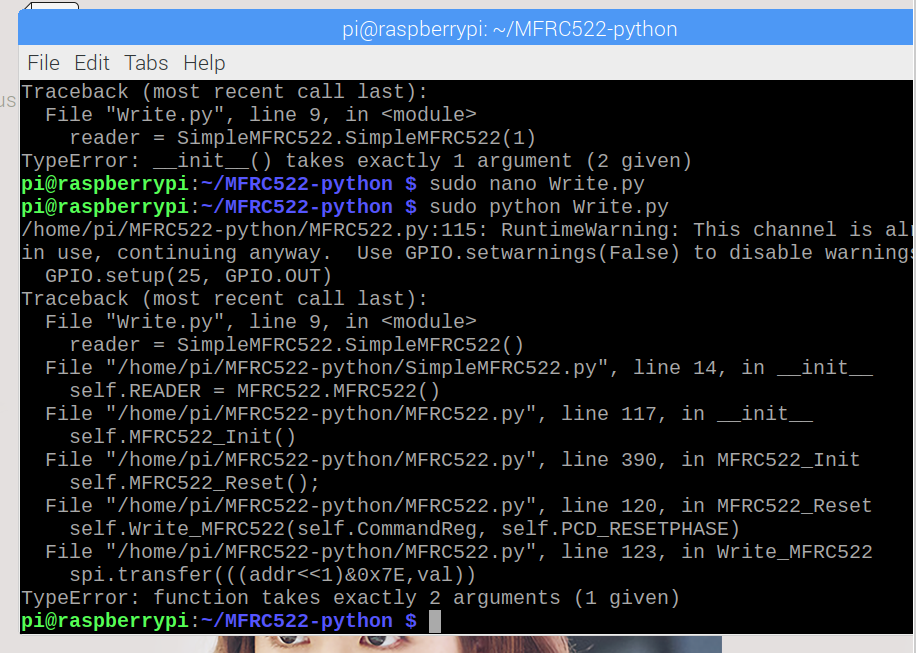
I have the same issue too, tried to add 1 in the brackets, tried changing reader to READER, tried everything, not sure how to make it work, didn't see any fault in the code
 LEOyrh
on 25 Feb 2019
LEOyrh
on 25 Feb 2019
I found the solution @rpiresp take the () off the SimpleMFRC
LEOyrh
on 25 Feb 2019
nvm that didn't work out, the error still occurs at it needs an instance meaning it needs the brackets
LEOyrh
on 25 Feb 2019
I have the same issue too @rpiresp !
I've tried all different types of rapsbian and triple checked my sensor is wired correctly.
 tev66
on 25 Feb 2019
tev66
on 25 Feb 2019
Hello all,
I am having the same issue @rpiresp.
I've checked the communication itself to the MFC522 Reader with a C-File.
With the spidev_test Script I am getting a response of the spi mode, bits per word and max speed.
So it looks like there is something wrong with the Python Script itself.
Any Ideas? :-)
Many thanks in advance!
 alexanderbrun90
on 25 Feb 2019
alexanderbrun90
on 25 Feb 2019
@LEOyrh @tev66 @alexanderbrun90
i reinstall my Raspberry Zero Right now...give me a Minute
Ardios
Ardios
on 25 Feb 2019
@LEOyrh yes, that's exactly the problem I'm struggling with! Tried some new things but no results until now. I'll keep you updated!
rpiresp
on 25 Feb 2019
@tev66 @alexanderbrun90 yeah, unfortunately I went through the same processes as you and none of them resulted in better results. Still looking for a reason and proper solution. I'll keep you updated as well. Thanks!
rpiresp
on 25 Feb 2019
Thanks a lot for this great commitment :-)
alexanderbrun90
on 25 Feb 2019
Could there be something wrong with the class MFRC522 itself? It looks like the 'self' Paramter while creating the instance of the class wouldn't be interpreted correct or am I wrong here?
alexanderbrun90
on 25 Feb 2019
@alexanderbrun90
have you soldered all 8 cables from the RC522?
Can you check the Reader with the example script from pi-rc522?
git clone https://github.com/ondryaso/pi-rc522.git
Then start the example Read Script with:
python /home/pi/pi-rc522/examples/Read.py
Ardios
Ardios
on 25 Feb 2019
This is working for me :-) thanks a lot
alexanderbrun90
on 25 Feb 2019
But first after i've connected the IRQ pin, which were not connected in the other tutorials!
alexanderbrun90
on 25 Feb 2019
@alexanderbrun90
Glad to hear it.
@rpiresp @tev66 @LEOyrh
Please check First your cables with fritzing Image from the wiki:
https://github.com/MiczFlor/RPi-Jukebox-RFID/wiki/Wiring_for_RC522_card_reader
If it still doesn't work then please have a look at my tutorial from above:
https://github.com/MiczFlor/RPi-Jukebox-RFID/issues/11#issuecomment-456071515
Ardios
Ardios
on 25 Feb 2019
@Ardios thank you for your help! So here's what happened: first I checked the cables and added the IRQ connection. Then I followed the instructions you gave to @alexanderbrun90 and got the result as follows when approaching the card:
Detected: 10
Car read UID: 48,63,55,164
Setting tag
Selecting UID [48, 63, 35, 164, 136]
Authorizing
Changing used auth key to [116,0,82,53,0,255] using method B
Reading
Calling card_auth on UID [48, 63, 35, 164, 136]
Error on S1B0
Deauthorizing
Changing auth key and method to None
What is this error on S1B0? What should I expect to see running this Read.py script?
Thank you.
rpiresp
on 25 Feb 2019
@rpiresp
Looks fine…
Did you follow my tutorial? You must Register the Reader etc.
https://github.com/MiczFlor/RPi-Jukebox-RFID/issues/11#issuecomment-456071515
If you already installed phoniebox check Point 8 to 11
Ardios
Ardios
on 25 Feb 2019
Hi everyone,
I added @Ardios sketches and info to the wiki a while ago. Please update the wiki, if need be:
https://github.com/MiczFlor/RPi-Jukebox-RFID/wiki/Wiring_for_RC522_card_reader
Thanks to all for the productive exchange!
All the best, micz
MiczFlor
on 25 Feb 2019
Hi @keinkurt
how about adding both flavours of your script (as pull requests :) to the code base here? I will then add them to the documentation.
All the best, micz
i found a way to make "pause/stop on tag removal" possible on pi-rc522 basis ==> lower cpu/battery usage if anybody is interested ... but i found out as well i am un able to commit a fix here 8) still trying ... this is a GREAT PROJECT thanks for sharing
 gusman80
on 18 Mar 2019
gusman80
on 18 Mar 2019
@gusman80
can you tell us your way for stop on removal?
Thanks a lot
Ardios
on 27 May 2019
I had some trouble getting this to work, because I just followed the wiring figure in the wiki. However, my RC522 module seems to have another pin-assignment. This is how it worked for me (the colors are the one from my flat cable):
Color | RPi | GPIO | RC522 | Pin | 9-pin
----- |--- |--- |--- |--- |---
orange | 17 | Vcc | Vcc | 1 | 8
yellow | 18 | GPIO24 | IRQ | 8 | 1
green | 19 | MOSI | MOSI | 5 | 4
blue | 20 | GND | GND | 3 | 6
purple | 21 | MISO | MISO | 4 | 5
grey | 22 | GPIO25 | RST | 2 | 7
white | 23 | SCLK | SCK | 6 | 3
black | 24 | GPIO8/CE0 | NSS | 7 | 2
And this is the model I'm working with: https://www.reichelt.de/entwicklerboards-rfid-modul-nxp-mfrc-522-debo-rfid-rc522-p192147.html?&trstct=pos_0
 baflo
on 2 Jan 2020
baflo
on 2 Jan 2020
Hi @keinkurt
how about adding both flavours of your script (as pull requests :) to the code base here? I will then add them to the documentation.
All the best, miczi found a way to make "pause/stop on tag removal" possible on pi-rc522 basis ==> lower cpu/battery usage if anybody is interested ... but i found out as well i am un able to commit a fix here 8) _still trying_ ... this is a GREAT PROJECT thanks for sharing
@Ardios Is there any other reader that allows this feature?
baflo
on 2 Jan 2020
Hi I am trying to register a rc522 and I have run through all the install steps. I have added the scripts etc but just coming up with this. I can run a python test and the reader works. any ideas ??
pi@raspberrypi:~ $ python /home/pi/RPi-Jukebox-RFID/scripts/RegisterDevice.py
Traceback (most recent call last):
  File "/home/pi/RPi-Jukebox-RFID/scripts/RegisterDevice.py", line 4, in <module>
    from Reader import get_devices
  File "/home/pi/RPi-Jukebox-RFID/scripts/Reader.py", line 17, in <module>
    from py532lib.i2c import *
ModuleNotFoundError: No module named 'py532lib'
pi@raspberrypi:~ $
 doojit
on 19 Jun 2020
doojit
on 19 Jun 2020
Did you run components/rfid-reader/RC522/setup_rc522.sh?
Then you don't need to run RegisterDevice.py, which currently contains a bug.
 s-martin
on 19 Jun 2020
s-martin
on 19 Jun 2020
Hi @s-martin
not the right thread, I suppose to ask this, but: what happened with RegisterDevice.py? My last installs all worked fine and the last changes in the file were from 5 months ago. What happened in the environment?
I updated my Phoniebox and tried :
~
$ ./RegisterDevice.py
Choose the reader from list
0 Barcode Reader
Device Number:
~
And it all seems to work fine?
MiczFlor
on 19 Jun 2020
IIRC there was an issue with import of py packages for RC522 and PN532, which are not installed by default anymore on a blank system.
1002 should fix this currently on develop
s-martin
on 19 Jun 2020
Did you run
components/rfid-reader/RC522/setup_rc522.sh?Then you don't need to run
RegisterDevice.py, which currently contains a bug.
Thanks I am on my way to office I have not tried that fingers crossed thanks
doojit
on 19 Jun 2020
I have run the components/rfid-reader/RC522/setup_rc522.sh? it all installs fine but them open phoniebox and when I switch the rfid reader on its just turns it back off when i leave the screen, and goes back to disabled. I have checked the wiring again and all fine. No card reconized red light on the reader. Bit lost cheers.
doojit
on 19 Jun 2020
Could you post the output of tail -n 500 /var/log/syslog?
Thanks
s-martin
on 19 Jun 2020
Oh sorry, you need to run the setup script with sudo.
Maybe a reboot also helps.
s-martin
on 19 Jun 2020
Could you post the output of
tail -n 500 /var/log/syslog?Thanks
Jun 19 11:58:56 raspberrypi systemd[1]: Starting dphys-swapfile - set up, mount/unmount, and delete a swap file...
Jun 19 11:58:56 raspberrypi systemd[1]: Condition check resulted in Copy user wpa_supplicant.conf being skipped.
Jun 19 11:58:56 raspberrypi thd[393]: Found socket passed from systemd
Jun 19 11:58:56 raspberrypi systemd[1]: Starting dhcpcd on all interfaces...
Jun 19 11:58:56 raspberrypi systemd[1]: Started Daily man-db regeneration.
Jun 19 11:58:56 raspberrypi systemd[1]: Starting rng-tools.service...
Jun 19 11:58:56 raspberrypi systemd[1]: Started Daily rotation of log files.
Jun 19 11:58:56 raspberrypi systemd[1]: Started D-Bus System Message Bus.
Jun 19 11:58:56 raspberrypi systemd-udevd[184]: Process '/usr/sbin/th-cmd --socket /var/run/thd.socket --passfd --udev' failed with exit code 1.
Jun 19 11:58:56 raspberrypi avahi-daemon[390]: Found user 'avahi' (UID 108) and group 'avahi' (GID 113).
Jun 19 11:58:56 raspberrypi avahi-daemon[390]: Successfully dropped root privileges.
Jun 19 11:58:56 raspberrypi avahi-daemon[390]: avahi-daemon 0.7 starting up.
Jun 19 11:58:56 raspberrypi rng-tools[409]: Starting Hardware RNG entropy gatherer daemon: rngd.
Jun 19 11:58:56 raspberrypi rngd[427]: rngd 2-unofficial-mt.14 starting up...
Jun 19 11:58:56 raspberrypi systemd[1]: Starting WPA supplicant...
Jun 19 11:58:56 raspberrypi systemd[1]: Starting Check for v3d driver...
Jun 19 11:58:56 raspberrypi systemd[1]: Started Daily apt download activities.
Jun 19 11:58:56 raspberrypi systemd[1]: Started Daily apt upgrade and clean activities.
Jun 19 11:58:56 raspberrypi systemd[1]: Reached target Timers.
Jun 19 11:58:56 raspberrypi systemd[1]: Condition check resulted in Turn on SSH if /boot/ssh is present being skipped.
Jun 19 11:58:56 raspberrypi dhcpcd[408]: dev: loaded udev
Jun 19 11:58:56 raspberrypi systemd[1]: Starting LSB: Switch to ondemand cpu governor (unless shift key is pressed)...
Jun 19 11:58:56 raspberrypi udisksd[391]: udisks daemon version 2.8.1 starting
Jun 19 11:58:56 raspberrypi rsyslogd: imuxsock: Acquired UNIX socket '/run/systemd/journal/syslog' (fd 3) from systemd.  [v8.1901.0]
Jun 19 11:58:56 raspberrypi rsyslogd:  [origin software="rsyslogd" swVersion="8.1901.0" x-pid="398" x-info="https://www.rsyslog.com"] start
Jun 19 11:58:56 raspberrypi systemd[1]: Started Regular background program processing daemon.
Jun 19 11:58:56 raspberrypi rngd[427]: entropy feed to the kernel ready
Jun 19 11:58:56 raspberrypi systemd[1]: Started triggerhappy global hotkey daemon.
Jun 19 11:58:56 raspberrypi cron[453]: (CRON) INFO (pidfile fd = 3)
Jun 19 11:58:56 raspberrypi systemd[1]: Started System Logging Service.
Jun 19 11:58:56 raspberrypi systemd[1]: Started Check for Raspberry Pi EEPROM updates.
Jun 19 11:58:56 raspberrypi systemd[1]: Started Save/Restore Sound Card State.
Jun 19 11:58:56 raspberrypi kernel: [    7.864250] 8021q: 802.1Q VLAN Support v1.8
Jun 19 11:58:56 raspberrypi systemd[1]: Started Deferred execution scheduler.
Jun 19 11:58:56 raspberrypi systemd[1]: Started rng-tools.service.
Jun 19 11:58:56 raspberrypi cron[453]: (CRON) INFO (Running @reboot jobs)
Jun 19 11:58:56 raspberrypi systemd[1]: Started Check for v3d driver.
Jun 19 11:58:56 raspberrypi dhcpcd[408]: forked to background, child pid 465
Jun 19 11:58:56 raspberrypi systemd[1]: Reached target Sound Card.
Jun 19 11:58:57 raspberrypi dphys-swapfile[403]: want /var/swap=100MByte, checking existing: keeping it
Jun 19 11:58:57 raspberrypi systemd[1]: Started Login Service.
Jun 19 11:58:57 raspberrypi wpa_supplicant[431]: Successfully initialized wpa_supplicant
Jun 19 11:58:57 raspberrypi avahi-daemon[390]: Successfully called chroot().
Jun 19 11:58:57 raspberrypi avahi-daemon[390]: Successfully dropped remaining capabilities.
Jun 19 11:58:57 raspberrypi avahi-daemon[390]: No service file found in /etc/avahi/services.
Jun 19 11:58:57 raspberrypi systemd[1]: Started dhcpcd on all interfaces.
Jun 19 11:58:57 raspberrypi avahi-daemon[390]: Network interface enumeration completed.
Jun 19 11:58:57 raspberrypi avahi-daemon[390]: Server startup complete. Host name is raspberrypi.local. Local service cookie is 2807698032.
Jun 19 11:58:57 raspberrypi udisksd[391]: failed to load module crypto: libbd_crypto.so.2: cannot open shared object file: No such file or directory
Jun 19 11:58:57 raspberrypi udisksd[391]: failed to load module mdraid: libbd_mdraid.so.2: cannot open shared object file: No such file or directory
Jun 19 11:58:57 raspberrypi systemd[1]: Started WPA supplicant.
Jun 19 11:58:57 raspberrypi systemd[1]: Started Avahi mDNS/DNS-SD Stack.
Jun 19 11:58:57 raspberrypi systemd[1]: Reached target Network.
Jun 19 11:58:57 raspberrypi systemd[1]: Started Phoniebox RFID-Reader Service.
Jun 19 11:58:57 raspberrypi udisksd[391]: Failed to load the 'mdraid' libblockdev plugin
Jun 19 11:58:57 raspberrypi udisksd[391]: Failed to load the 'crypto' libblockdev plugin
Jun 19 11:58:57 raspberrypi dbus-daemon[413]: [system] Activating via systemd: service name='org.freedesktop.PolicyKit1' unit='polkit.service' requested by ':1.5' (uid=0 pid=391 comm="/usr/lib/udisks2/udisksd ")
Jun 19 11:58:57 raspberrypi systemd[1]: Started Phoniebox Idle Watchdog Service.
Jun 19 11:58:57 raspberrypi dhcpcd-run-hooks[490]: wlan0: starting wpa_supplicant
Jun 19 11:58:57 raspberrypi systemd[1]: Condition check resulted in fast remote file copy program daemon being skipped.
Jun 19 11:58:57 raspberrypi systemd[1]: Starting Music Player Daemon...
Jun 19 11:58:57 raspberrypi kernel: [    8.225583] Adding 102396k swap on /var/swap.  Priority:-2 extents:1 across:102396k SSFS
Jun 19 11:58:57 raspberrypi systemd[1]: Started Phoniebox Rotary Encoder Service.
Jun 19 11:58:57 raspberrypi systemd[494]: phoniebox-rotary-encoder.service: Failed to execute command: No such file or directory
Jun 19 11:58:57 raspberrypi systemd[494]: phoniebox-rotary-encoder.service: Failed at step EXEC spawning /home/pi/RPi-Jukebox-RFID/scripts/rotary-encoder.py: No such file or directory
Jun 19 11:58:57 raspberrypi systemd[1]: Started Phoniebox GPIO Buttons Service.
Jun 19 11:58:57 raspberrypi systemd[1]: Reached target Network is Online.
Jun 19 11:58:57 raspberrypi systemd[1]: Starting LSB: exim Mail Transport Agent...
Jun 19 11:58:57 raspberrypi systemd[1]: Starting Samba NMB Daemon...
Jun 19 11:58:57 raspberrypi systemd[1]: Starting /etc/rc.local Compatibility...
Jun 19 11:58:57 raspberrypi systemd[1]: Starting Lighttpd Daemon...
Jun 19 11:58:57 raspberrypi kernel: [    8.358162] IPv6: ADDRCONF(NETDEV_UP): wlan0: link is not ready
Jun 19 11:58:57 raspberrypi kernel: [    8.358189] brcmfmac: brcmf_cfg80211_set_power_mgmt: power save enabled
Jun 19 11:58:57 raspberrypi systemd[1]: Starting Permit User Sessions...
Jun 19 11:58:57 raspberrypi systemd[1]: Started dphys-swapfile - set up, mount/unmount, and delete a swap file.
Jun 19 11:58:57 raspberrypi systemd[1]: phoniebox-rotary-encoder.service: Main process exited, code=exited, status=203/EXEC
Jun 19 11:58:57 raspberrypi systemd[1]: phoniebox-rotary-encoder.service: Failed with result 'exit-code'.
Jun 19 11:58:57 raspberrypi systemd[1]: Started /etc/rc.local Compatibility.
Jun 19 11:58:57 raspberrypi systemd[1]: Started Permit User Sessions.
Jun 19 11:58:57 raspberrypi systemd[1]: Starting Authorization Manager...
Jun 19 11:58:57 raspberrypi systemd[1]: Starting Light Display Manager...
Jun 19 11:58:57 raspberrypi systemd[1]: Starting Hold until boot process finishes up...
Jun 19 11:58:57 raspberrypi systemd[1]: phoniebox-rotary-encoder.service: Service RestartSec=100ms expired, scheduling restart.
Jun 19 11:58:57 raspberrypi systemd[1]: phoniebox-rotary-encoder.service: Scheduled restart job, restart counter is at 1.
Jun 19 11:58:57 raspberrypi systemd[1]: Stopped Phoniebox Rotary Encoder Service.
Jun 19 11:58:57 raspberrypi systemd[1]: Started Phoniebox Rotary Encoder Service.
Jun 19 11:58:57 raspberrypi systemd[515]: phoniebox-rotary-encoder.service: Failed to execute command: No such file or directory
Jun 19 11:58:57 raspberrypi systemd[515]: phoniebox-rotary-encoder.service: Failed at step EXEC spawning /home/pi/RPi-Jukebox-RFID/scripts/rotary-encoder.py: No such file or directory
Jun 19 11:58:57 raspberrypi systemd[1]: phoniebox-rotary-encoder.service: Main process exited, code=exited, status=203/EXEC
Jun 19 11:58:57 raspberrypi systemd[1]: phoniebox-rotary-encoder.service: Failed with result 'exit-code'.
Jun 19 11:58:57 raspberrypi dhcpcd[465]: wlan0: connected to Access Point `'
Jun 19 11:58:58 raspberrypi kernel: [    8.969845] lan78xx 1-1.1.1:1.0 eth0: kevent 4 may have been dropped
Jun 19 11:58:58 raspberrypi kernel: [    8.984824] IPv6: ADDRCONF(NETDEV_UP): eth0: link is not ready
Jun 19 11:58:58 raspberrypi kernel: [    8.984843] 8021q: adding VLAN 0 to HW filter on device eth0
Jun 19 11:58:58 raspberrypi dhcpcd[465]: eth0: waiting for carrier
Jun 19 11:58:58 raspberrypi dhcpcd[465]: wlan0: waiting for carrier
Jun 19 11:58:58 raspberrypi dhcpcd[465]: wlan0: carrier acquired
Jun 19 11:58:58 raspberrypi dhcpcd[465]: DUID 00:01:00:01:26:60:d3:bd:b8:27:eb:60:1a:d9
Jun 19 11:58:58 raspberrypi dhcpcd[465]: wlan0: IAID eb:35:4f:8c
Jun 19 11:58:58 raspberrypi dhcpcd[465]: wlan0: adding address fe80::9226:d939:362f:dc1
Jun 19 11:58:58 raspberrypi avahi-daemon[390]: Joining mDNS multicast group on interface wlan0.IPv6 with address fe80::9226:d939:362f:dc1.
Jun 19 11:58:58 raspberrypi dhcpcd[465]: wlan0: carrier lost
Jun 19 11:58:58 raspberrypi avahi-daemon[390]: New relevant interface wlan0.IPv6 for mDNS.
Jun 19 11:58:58 raspberrypi avahi-daemon[390]: Registering new address record for fe80::9226:d939:362f:dc1 on wlan0.*.
Jun 19 11:58:58 raspberrypi systemd[1]: phoniebox-rotary-encoder.service: Service RestartSec=100ms expired, scheduling restart.
Jun 19 11:58:58 raspberrypi systemd[1]: phoniebox-rotary-encoder.service: Scheduled restart job, restart counter is at 2.
Jun 19 11:58:58 raspberrypi systemd[1]: Stopped Phoniebox Rotary Encoder Service.
Jun 19 11:58:58 raspberrypi dhcpcd[465]: wlan0: deleting address fe80::9226:d939:362f:dc1
Jun 19 11:58:58 raspberrypi avahi-daemon[390]: Withdrawing address record for fe80::9226:d939:362f:dc1 on wlan0.
Jun 19 11:58:58 raspberrypi avahi-daemon[390]: Leaving mDNS multicast group on interface wlan0.IPv6 with address fe80::9226:d939:362f:dc1.
Jun 19 11:58:58 raspberrypi avahi-daemon[390]: Interface wlan0.IPv6 no longer relevant for mDNS.
Jun 19 11:58:58 raspberrypi systemd[539]: phoniebox-rotary-encoder.service: Failed to execute command: No such file or directory
Jun 19 11:58:58 raspberrypi systemd[539]: phoniebox-rotary-encoder.service: Failed at step EXEC spawning /home/pi/RPi-Jukebox-RFID/scripts/rotary-encoder.py: No such file or directory
Jun 19 11:58:58 raspberrypi systemd[1]: Started Phoniebox Rotary Encoder Service.
Jun 19 11:58:58 raspberrypi systemd[1]: phoniebox-rotary-encoder.service: Main process exited, code=exited, status=203/EXEC
Jun 19 11:58:58 raspberrypi systemd[1]: phoniebox-rotary-encoder.service: Failed with result 'exit-code'.
Jun 19 11:58:58 raspberrypi kernel: [    9.372102] IPv6: ADDRCONF(NETDEV_CHANGE): eth0: link becomes ready
Jun 19 11:58:58 raspberrypi dhcpcd[465]: eth0: carrier acquired
Jun 19 11:58:58 raspberrypi dhcpcd[465]: eth0: IAID eb:60:1a:d9
Jun 19 11:58:58 raspberrypi dhcpcd[465]: eth0: adding address fe80::fa64:ddb1:632c:7732
Jun 19 11:58:58 raspberrypi avahi-daemon[390]: Joining mDNS multicast group on interface eth0.IPv6 with address fe80::fa64:ddb1:632c:7732.
Jun 19 11:58:58 raspberrypi avahi-daemon[390]: New relevant interface eth0.IPv6 for mDNS.
Jun 19 11:58:58 raspberrypi avahi-daemon[390]: Registering new address record for fe80::fa64:ddb1:632c:7732 on eth0.*.
Jun 19 11:58:58 raspberrypi systemd[1]: phoniebox-rotary-encoder.service: Service RestartSec=100ms expired, scheduling restart.
Jun 19 11:58:58 raspberrypi systemd[1]: phoniebox-rotary-encoder.service: Scheduled restart job, restart counter is at 3.
Jun 19 11:58:58 raspberrypi systemd[1]: Stopped Phoniebox Rotary Encoder Service.
Jun 19 11:58:58 raspberrypi systemd[1]: Started Phoniebox Rotary Encoder Service.
Jun 19 11:58:58 raspberrypi systemd[550]: phoniebox-rotary-encoder.service: Failed to execute command: No such file or directory
Jun 19 11:58:58 raspberrypi systemd[550]: phoniebox-rotary-encoder.service: Failed at step EXEC spawning /home/pi/RPi-Jukebox-RFID/scripts/rotary-encoder.py: No such file or directory
Jun 19 11:58:58 raspberrypi systemd[1]: phoniebox-rotary-encoder.service: Main process exited, code=exited, status=203/EXEC
Jun 19 11:58:58 raspberrypi systemd[1]: phoniebox-rotary-encoder.service: Failed with result 'exit-code'.
Jun 19 11:58:58 raspberrypi lightdm[514]: Error getting user list from org.freedesktop.Accounts: GDBus.Error:org.freedesktop.DBus.Error.ServiceUnknown: The name org.freedesktop.Accounts was not provided by any .service files
Jun 19 11:58:58 raspberrypi polkitd[509]: started daemon version 0.105 using authority implementation `local' version `0.105'
Jun 19 11:58:58 raspberrypi dbus-daemon[413]: [system] Successfully activated service 'org.freedesktop.PolicyKit1'
Jun 19 11:58:58 raspberrypi systemd[1]: Started Authorization Manager.
Jun 19 11:58:58 raspberrypi systemd[1]: Received SIGRTMIN+21 from PID 186 (plymouthd).
Jun 19 11:58:58 raspberrypi systemd[1]: phoniebox-rotary-encoder.service: Service RestartSec=100ms expired, scheduling restart.
Jun 19 11:58:58 raspberrypi systemd[1]: phoniebox-rotary-encoder.service: Scheduled restart job, restart counter is at 4.
Jun 19 11:58:58 raspberrypi systemd[1]: Stopped Phoniebox Rotary Encoder Service.
Jun 19 11:58:58 raspberrypi systemd[1]: Started Phoniebox Rotary Encoder Service.
Jun 19 11:58:58 raspberrypi systemd[576]: phoniebox-rotary-encoder.service: Failed to execute command: No such file or directory
Jun 19 11:58:58 raspberrypi systemd[576]: phoniebox-rotary-encoder.service: Failed at step EXEC spawning /home/pi/RPi-Jukebox-RFID/scripts/rotary-encoder.py: No such file or directory
Jun 19 11:58:58 raspberrypi systemd[1]: plymouth-quit-wait.service: Succeeded.
Jun 19 11:58:58 raspberrypi systemd[1]: Started Hold until boot process finishes up.
Jun 19 11:58:58 raspberrypi systemd[1]: plymouth-start.service: Succeeded.
Jun 19 11:58:58 raspberrypi systemd[1]: phoniebox-rotary-encoder.service: Main process exited, code=exited, status=203/EXEC
Jun 19 11:58:58 raspberrypi systemd[1]: phoniebox-rotary-encoder.service: Failed with result 'exit-code'.
Jun 19 11:58:58 raspberrypi dhcpcd[465]: eth0: soliciting an IPv6 router
Jun 19 11:58:59 raspberrypi systemd[1]: Received SIGRTMIN+21 from PID 186 (n/a).
Jun 19 11:58:59 raspberrypi systemd[1]: Started Light Display Manager.
Jun 19 11:58:59 raspberrypi dhcpcd[465]: eth0: rebinding lease of 192.168.1.11
Jun 19 11:58:59 raspberrypi systemd[1]: Started Getty on tty1.
Jun 19 11:58:59 raspberrypi systemd[1]: Reached target Login Prompts.
Jun 19 11:58:59 raspberrypi systemd[1]: phoniebox-rotary-encoder.service: Service RestartSec=100ms expired, scheduling restart.
Jun 19 11:58:59 raspberrypi systemd[1]: phoniebox-rotary-encoder.service: Scheduled restart job, restart counter is at 5.
Jun 19 11:58:59 raspberrypi systemd[1]: Stopped Phoniebox Rotary Encoder Service.
Jun 19 11:58:59 raspberrypi systemd[1]: phoniebox-rotary-encoder.service: Start request repeated too quickly.
Jun 19 11:58:59 raspberrypi systemd[1]: phoniebox-rotary-encoder.service: Failed with result 'exit-code'.
Jun 19 11:58:59 raspberrypi systemd[1]: Failed to start Phoniebox Rotary Encoder Service.
Jun 19 11:58:59 raspberrypi raspi-config[446]: Checking if shift key is held down: No. Switching to ondemand scaling governor.
Jun 19 11:58:59 raspberrypi systemd[1]: Started LSB: Switch to ondemand cpu governor (unless shift key is pressed).
Jun 19 11:58:59 raspberrypi systemd[1]: Started Disk Manager.
Jun 19 11:58:59 raspberrypi udisksd[391]: Acquired the name org.freedesktop.UDisks2 on the system message bus
Jun 19 11:58:59 raspberrypi systemd[1]: Started Lighttpd Daemon.
Jun 19 11:59:00 raspberrypi systemd[1]: systemd-rfkill.service: Succeeded.
Jun 19 11:59:00 raspberrypi exim4[499]: Starting MTA: exim4.
Jun 19 11:59:00 raspberrypi systemd[1]: Started LSB: exim Mail Transport Agent.
Jun 19 11:59:00 raspberrypi daemon_rfid_reader.py[489]: Traceback (most recent call last):
Jun 19 11:59:00 raspberrypi daemon_rfid_reader.py[489]:   File "/home/pi/RPi-Jukebox-RFID/scripts/daemon_rfid_reader.py", line 8, in <module>
Jun 19 11:59:00 raspberrypi daemon_rfid_reader.py[489]:     from Reader import Reader
Jun 19 11:59:00 raspberrypi daemon_rfid_reader.py[489]:   File "/home/pi/RPi-Jukebox-RFID/scripts/Reader.py", line 17, in <module>
Jun 19 11:59:00 raspberrypi daemon_rfid_reader.py[489]:     from py532lib.i2c import *
Jun 19 11:59:00 raspberrypi daemon_rfid_reader.py[489]: ModuleNotFoundError: No module named 'py532lib'
Jun 19 11:59:00 raspberrypi systemd[1]: phoniebox-rfid-reader.service: Main process exited, code=exited, status=1/FAILURE
Jun 19 11:59:00 raspberrypi systemd[1]: phoniebox-rfid-reader.service: Failed with result 'exit-code'.
Jun 19 11:59:00 raspberrypi systemd[1]: phoniebox-rfid-reader.service: Service RestartSec=100ms expired, scheduling restart.
Jun 19 11:59:00 raspberrypi systemd[1]: phoniebox-rfid-reader.service: Scheduled restart job, restart counter is at 1.
Jun 19 11:59:00 raspberrypi systemd[1]: Stopped Phoniebox RFID-Reader Service.
Jun 19 11:59:00 raspberrypi systemd[1]: Started Phoniebox RFID-Reader Service.
Jun 19 11:59:01 raspberrypi daemon_rfid_reader.py[882]: Traceback (most recent call last):
Jun 19 11:59:01 raspberrypi daemon_rfid_reader.py[882]:   File "/home/pi/RPi-Jukebox-RFID/scripts/daemon_rfid_reader.py", line 8, in <module>
Jun 19 11:59:01 raspberrypi daemon_rfid_reader.py[882]:     from Reader import Reader
Jun 19 11:59:01 raspberrypi daemon_rfid_reader.py[882]:   File "/home/pi/RPi-Jukebox-RFID/scripts/Reader.py", line 17, in <module>
Jun 19 11:59:01 raspberrypi daemon_rfid_reader.py[882]:     from py532lib.i2c import *
Jun 19 11:59:01 raspberrypi daemon_rfid_reader.py[882]: ModuleNotFoundError: No module named 'py532lib'
Jun 19 11:59:01 raspberrypi systemd[1]: phoniebox-rfid-reader.service: Main process exited, code=exited, status=1/FAILURE
Jun 19 11:59:01 raspberrypi systemd[1]: phoniebox-rfid-reader.service: Failed with result 'exit-code'.
Jun 19 11:59:01 raspberrypi systemd[1]: phoniebox-rfid-reader.service: Service RestartSec=100ms expired, scheduling restart.
Jun 19 11:59:01 raspberrypi systemd[1]: phoniebox-rfid-reader.service: Scheduled restart job, restart counter is at 2.
Jun 19 11:59:01 raspberrypi systemd[1]: Stopped Phoniebox RFID-Reader Service.
Jun 19 11:59:01 raspberrypi systemd[1]: Started Phoniebox RFID-Reader Service.
Jun 19 11:59:01 raspberrypi daemon_rfid_reader.py[887]: Traceback (most recent call last):
Jun 19 11:59:01 raspberrypi daemon_rfid_reader.py[887]:   File "/home/pi/RPi-Jukebox-RFID/scripts/daemon_rfid_reader.py", line 8, in <module>
Jun 19 11:59:01 raspberrypi daemon_rfid_reader.py[887]:     from Reader import Reader
Jun 19 11:59:01 raspberrypi daemon_rfid_reader.py[887]:   File "/home/pi/RPi-Jukebox-RFID/scripts/Reader.py", line 17, in <module>
Jun 19 11:59:01 raspberrypi daemon_rfid_reader.py[887]:     from py532lib.i2c import *
Jun 19 11:59:01 raspberrypi daemon_rfid_reader.py[887]: ModuleNotFoundError: No module named 'py532lib'
Jun 19 11:59:02 raspberrypi systemd[1]: phoniebox-rfid-reader.service: Main process exited, code=exited, status=1/FAILURE
Jun 19 11:59:02 raspberrypi systemd[1]: phoniebox-rfid-reader.service: Failed with result 'exit-code'.
Jun 19 11:59:02 raspberrypi systemd[1]: phoniebox-rfid-reader.service: Service RestartSec=100ms expired, scheduling restart.
Jun 19 11:59:02 raspberrypi systemd[1]: phoniebox-rfid-reader.service: Scheduled restart job, restart counter is at 3.
Jun 19 11:59:02 raspberrypi systemd[1]: Stopped Phoniebox RFID-Reader Service.
Jun 19 11:59:02 raspberrypi systemd[1]: Started Phoniebox RFID-Reader Service.
Jun 19 11:59:02 raspberrypi systemd[1]: Started Music Player Daemon.
Jun 19 11:59:02 raspberrypi systemd[1]: Starting Phoniebox Startup...
Jun 19 11:59:02 raspberrypi bash[901]: AUDIOFOLDERSPATH="/home/pi/RPi-Jukebox-RFID/shared/audiofolders"
Jun 19 11:59:02 raspberrypi bash[901]: PLAYLISTSFOLDERPATH="/home/pi/RPi-Jukebox-RFID/playlists"
Jun 19 11:59:02 raspberrypi bash[901]: SECONDSWIPE="RESTART"
Jun 19 11:59:02 raspberrypi bash[901]: AUDIOIFACENAME="PCM"
Jun 19 11:59:02 raspberrypi bash[901]: AUDIOVOLCHANGESTEP="3"
Jun 19 11:59:02 raspberrypi bash[901]: AUDIOVOLMAXLIMIT="40"
Jun 19 11:59:02 raspberrypi bash[901]: AUDIOVOLMINLIMIT="1"
Jun 19 11:59:02 raspberrypi bash[901]: AUDIOVOLSTARTUP="0"
Jun 19 11:59:02 raspberrypi bash[901]: VOLCHANGEIDLE="TRUE"
Jun 19 11:59:02 raspberrypi bash[901]: IDLETIMESHUTDOWN="0"
Jun 19 11:59:02 raspberrypi bash[901]: SHOWCOVER="ON"
Jun 19 11:59:02 raspberrypi bash[901]: READWLANIPYN="OFF"
Jun 19 11:59:02 raspberrypi bash[901]: EDITION="classic"
Jun 19 11:59:02 raspberrypi bash[901]: LANG="en-UK"
Jun 19 11:59:02 raspberrypi bash[901]: VERSION="2.0 - ed888da - master"
Jun 19 11:59:02 raspberrypi bash[901]: 0
Jun 19 11:59:02 raspberrypi lightdm[918]: Error getting user list from org.freedesktop.Accounts: GDBus.Error:org.freedesktop.DBus.Error.ServiceUnknown: The name org.freedesktop.Accounts was not provided by any .service files
Jun 19 11:59:02 raspberrypi daemon_rfid_reader.py[900]: Traceback (most recent call last):
Jun 19 11:59:02 raspberrypi daemon_rfid_reader.py[900]:   File "/home/pi/RPi-Jukebox-RFID/scripts/daemon_rfid_reader.py", line 8, in <module>
Jun 19 11:59:02 raspberrypi daemon_rfid_reader.py[900]:     from Reader import Reader
Jun 19 11:59:02 raspberrypi daemon_rfid_reader.py[900]:   File "/home/pi/RPi-Jukebox-RFID/scripts/Reader.py", line 17, in <module>
Jun 19 11:59:02 raspberrypi daemon_rfid_reader.py[900]:     from py532lib.i2c import *
Jun 19 11:59:02 raspberrypi daemon_rfid_reader.py[900]: ModuleNotFoundError: No module named 'py532lib'
Jun 19 11:59:02 raspberrypi systemd[1]: Created slice User Slice of UID 1000.
Jun 19 11:59:02 raspberrypi systemd[1]: Starting User Runtime Directory /run/user/1000...
Jun 19 11:59:02 raspberrypi systemd[1]: Started User Runtime Directory /run/user/1000.
Jun 19 11:59:02 raspberrypi systemd[1]: Starting User Manager for UID 1000...
Jun 19 11:59:02 raspberrypi systemd[1]: phoniebox-rfid-reader.service: Main process exited, code=exited, status=1/FAILURE
Jun 19 11:59:02 raspberrypi systemd[1]: phoniebox-rfid-reader.service: Failed with result 'exit-code'.
Jun 19 11:59:02 raspberrypi systemd[926]: Listening on GnuPG cryptographic agent and passphrase cache (access for web browsers).
Jun 19 11:59:02 raspberrypi systemd[926]: Listening on GnuPG cryptographic agent and passphrase cache (restricted).
Jun 19 11:59:02 raspberrypi systemd[926]: Starting D-Bus User Message Bus Socket.
Jun 19 11:59:02 raspberrypi systemd[926]: Reached target Paths.
Jun 19 11:59:02 raspberrypi systemd[926]: Listening on GnuPG cryptographic agent and passphrase cache.
Jun 19 11:59:02 raspberrypi systemd[926]: Listening on GnuPG network certificate management daemon.
Jun 19 11:59:02 raspberrypi systemd[926]: Listening on GnuPG cryptographic agent (ssh-agent emulation).
Jun 19 11:59:02 raspberrypi systemd[926]: Reached target Timers.
Jun 19 11:59:02 raspberrypi systemd[1]: phoniebox-rfid-reader.service: Service RestartSec=100ms expired, scheduling restart.
Jun 19 11:59:02 raspberrypi systemd[1]: phoniebox-rfid-reader.service: Scheduled restart job, restart counter is at 4.
Jun 19 11:59:02 raspberrypi systemd[1]: Stopped Phoniebox RFID-Reader Service.
Jun 19 11:59:02 raspberrypi systemd[1]: Started Phoniebox RFID-Reader Service.
Jun 19 11:59:02 raspberrypi systemd[926]: Listening on D-Bus User Message Bus Socket.
Jun 19 11:59:02 raspberrypi systemd[926]: Reached target Sockets.
Jun 19 11:59:03 raspberrypi systemd[926]: Reached target Basic System.
Jun 19 11:59:03 raspberrypi systemd[1]: Started User Manager for UID 1000.
Jun 19 11:59:03 raspberrypi systemd[926]: Starting Music Player Daemon...
Jun 19 11:59:03 raspberrypi systemd[1]: Started Session c1 of user pi.
Jun 19 11:59:03 raspberrypi lightdm[514]: Error opening audit socket: Protocol not supported
Jun 19 11:59:03 raspberrypi systemd[926]: Started D-Bus User Message Bus.
Jun 19 11:59:03 raspberrypi daemon_rfid_reader.py[939]: Traceback (most recent call last):
Jun 19 11:59:03 raspberrypi daemon_rfid_reader.py[939]:   File "/home/pi/RPi-Jukebox-RFID/scripts/daemon_rfid_reader.py", line 8, in <module>
Jun 19 11:59:03 raspberrypi daemon_rfid_reader.py[939]:     from Reader import Reader
Jun 19 11:59:03 raspberrypi daemon_rfid_reader.py[939]:   File "/home/pi/RPi-Jukebox-RFID/scripts/Reader.py", line 17, in <module>
Jun 19 11:59:03 raspberrypi daemon_rfid_reader.py[939]:     from py532lib.i2c import *
Jun 19 11:59:03 raspberrypi daemon_rfid_reader.py[939]: ModuleNotFoundError: No module named 'py532lib'
Jun 19 11:59:03 raspberrypi systemd[1]: phoniebox-rfid-reader.service: Main process exited, code=exited, status=1/FAILURE
Jun 19 11:59:03 raspberrypi systemd[1]: phoniebox-rfid-reader.service: Failed with result 'exit-code'.
Jun 19 11:59:03 raspberrypi kernel: [   14.789059] Bluetooth: Core ver 2.22
Jun 19 11:59:03 raspberrypi kernel: [   14.789125] NET: Registered protocol family 31
Jun 19 11:59:03 raspberrypi kernel: [   14.789129] Bluetooth: HCI device and connection manager initialized
Jun 19 11:59:03 raspberrypi kernel: [   14.789147] Bluetooth: HCI socket layer initialized
Jun 19 11:59:03 raspberrypi kernel: [   14.789153] Bluetooth: L2CAP socket layer initialized
Jun 19 11:59:03 raspberrypi kernel: [   14.789179] Bluetooth: SCO socket layer initialized
Jun 19 11:59:03 raspberrypi kernel: [   14.809423] Bluetooth: HCI UART driver ver 2.3
Jun 19 11:59:03 raspberrypi kernel: [   14.809434] Bluetooth: HCI UART protocol H4 registered
Jun 19 11:59:03 raspberrypi kernel: [   14.809509] Bluetooth: HCI UART protocol Three-wire (H5) registered
Jun 19 11:59:03 raspberrypi kernel: [   14.809645] Bluetooth: HCI UART protocol Broadcom registered
Jun 19 11:59:03 raspberrypi btuart[400]: bcm43xx_init
Jun 19 11:59:03 raspberrypi btuart[400]: Flash firmware /lib/firmware/brcm/BCM4345C0.hcd
Jun 19 11:59:03 raspberrypi btuart[400]: Set BDADDR UART: b8:27:eb:ca:b0:73
Jun 19 11:59:03 raspberrypi btuart[400]: Set Controller UART speed to 3000000 bit/s
Jun 19 11:59:03 raspberrypi btuart[400]: Device setup complete
Jun 19 11:59:03 raspberrypi systemd[1]: Started Configure Bluetooth Modems connected by UART.
Jun 19 11:59:03 raspberrypi systemd[1]: phoniebox-rfid-reader.service: Service RestartSec=100ms expired, scheduling restart.
Jun 19 11:59:03 raspberrypi systemd[1]: phoniebox-rfid-reader.service: Scheduled restart job, restart counter is at 5.
Jun 19 11:59:03 raspberrypi systemd[1]: Created slice system-bthelper.slice.
Jun 19 11:59:03 raspberrypi systemd[1]: Starting Bluetooth service...
Jun 19 11:59:03 raspberrypi systemd[1]: Stopped Phoniebox RFID-Reader Service.
Jun 19 11:59:03 raspberrypi systemd[1]: phoniebox-rfid-reader.service: Start request repeated too quickly.
Jun 19 11:59:03 raspberrypi systemd[1]: phoniebox-rfid-reader.service: Failed with result 'exit-code'.
Jun 19 11:59:03 raspberrypi systemd[1]: Failed to start Phoniebox RFID-Reader Service.
Jun 19 11:59:03 raspberrypi systemd[1]: Starting Load/Save RF Kill Switch Status...
Jun 19 11:59:03 raspberrypi systemd[1]: Started Load/Save RF Kill Switch Status.
Jun 19 11:59:04 raspberrypi dhcpcd[465]: eth0: probing for an IPv4LL address
Jun 19 11:59:04 raspberrypi dhcpcd[465]: eth0: DHCP lease expired
Jun 19 11:59:04 raspberrypi dhcpcd[465]: eth0: soliciting a DHCP lease
Jun 19 11:59:04 raspberrypi bluetoothd[993]: Bluetooth daemon 5.50
Jun 19 11:59:04 raspberrypi mpd[940]: exception: failed to open log file "/var/log/mpd/mpd.log" (config line 39): Permission denied
Jun 19 11:59:04 raspberrypi systemd[1]: Started Bluetooth service.
Jun 19 11:59:04 raspberrypi systemd[1]: Started Raspberry Pi bluetooth helper.
Jun 19 11:59:04 raspberrypi systemd[1]: Reached target Bluetooth.
Jun 19 11:59:04 raspberrypi systemd[1]: Started BluezALSA proxy.
Jun 19 11:59:04 raspberrypi bluetoothd[993]: Starting SDP server
Jun 19 11:59:04 raspberrypi systemd[1]: Started Session c2 of user pi.
Jun 19 11:59:04 raspberrypi kernel: [   15.296032] Bluetooth: BNEP (Ethernet Emulation) ver 1.3
Jun 19 11:59:04 raspberrypi kernel: [   15.296041] Bluetooth: BNEP filters: protocol multicast
Jun 19 11:59:04 raspberrypi kernel: [   15.296056] Bluetooth: BNEP socket layer initialized
Jun 19 11:59:04 raspberrypi dbus-daemon[413]: [system] Activating via systemd: service name='org.freedesktop.hostname1' unit='dbus-org.freedesktop.hostname1.service' requested by ':1.13' (uid=0 pid=993 comm="/usr/lib/bluetooth/bluetoothd ")
Jun 19 11:59:04 raspberrypi bluetoothd[993]: Bluetooth management interface 1.14 initialized
Jun 19 11:59:04 raspberrypi bluetoothd[993]: Sap driver initialization failed.
Jun 19 11:59:04 raspberrypi bluetoothd[993]: sap-server: Operation not permitted (1)
Jun 19 11:59:04 raspberrypi bash[901]: High Performance MPEG 1.0/2.0/2.5 Audio Player for Layers 1, 2 and 3
Jun 19 11:59:04 raspberrypi bash[901]: #011version 1.25.10; written and copyright by Michael Hipp and others
Jun 19 11:59:04 raspberrypi bash[901]: #011free software (LGPL) without any warranty but with best wishes
Jun 19 11:59:04 raspberrypi systemd[1]: Starting Hostname Service...
Jun 19 11:59:04 raspberrypi bluetoothd[993]: Endpoint registered: sender=:1.16 path=/org/bluez/hci0/A2DP/SBC/Source/1
Jun 19 11:59:04 raspberrypi bluetoothd[993]: Endpoint registered: sender=:1.16 path=/org/bluez/hci0/A2DP/SBC/Source/2
Jun 19 11:59:04 raspberrypi bthelper[999]: Changing power off succeeded
Jun 19 11:59:04 raspberrypi systemd[926]: mpd.service: Main process exited, code=exited, status=1/FAILURE
Jun 19 11:59:04 raspberrypi systemd[926]: mpd.service: Failed with result 'exit-code'.
Jun 19 11:59:04 raspberrypi systemd[926]: Failed to start Music Player Daemon.
Jun 19 11:59:04 raspberrypi systemd[926]: Reached target Default.
Jun 19 11:59:04 raspberrypi systemd[926]: Startup finished in 1.699s.
Jun 19 11:59:04 raspberrypi kernel: [   15.420287] Bluetooth: RFCOMM TTY layer initialized
Jun 19 11:59:04 raspberrypi kernel: [   15.420306] Bluetooth: RFCOMM socket layer initialized
Jun 19 11:59:04 raspberrypi kernel: [   15.420325] Bluetooth: RFCOMM ver 1.11
Jun 19 11:59:04 raspberrypi dbus-daemon[951]: [session uid=1000 pid=951] Activating via systemd: service name='org.gtk.vfs.Daemon' unit='gvfs-daemon.service' requested by ':1.3' (uid=1000 pid=942 comm="/usr/bin/lxsession -s LXDE-pi -e LXDE ")
Jun 19 11:59:04 raspberrypi systemd[926]: Starting Virtual filesystem service...
Jun 19 11:59:04 raspberrypi bash[901]: Directory: /home/pi/RPi-Jukebox-RFID/shared/
Jun 19 11:59:04 raspberrypi bash[901]: Playing MPEG stream 1 of 1: startupsound.mp3 ...
Jun 19 11:59:04 raspberrypi bash[901]: MPEG 1.0 L III cbr64 44100 j-s
Jun 19 11:59:04 raspberrypi bash[901]: Artist:  Phoniebox
Jun 19 11:59:04 raspberrypi bthelper[999]: [#033[0;93mCHG#033[0m] Controller B8:27:EB:CA:B0:73 Powered: yes
Jun 19 11:59:04 raspberrypi bthelper[999]: [#033[0;93mCHG#033[0m] Controller B8:27:EB:CA:B0:73 UUIDs: 00001112-0000-1000-8000-00805f9b34fb
Jun 19 11:59:04 raspberrypi bthelper[999]: [#033[0;93mCHG#033[0m] Controller B8:27:EB:CA:B0:73 UUIDs: 00001801-0000-1000-8000-00805f9b34fb
Jun 19 11:59:04 raspberrypi bthelper[999]: [#033[0;93mCHG#033[0m] Controller B8:27:EB:CA:B0:73 UUIDs: 0000110e-0000-1000-8000-00805f9b34fb
Jun 19 11:59:04 raspberrypi bthelper[999]: [#033[0;93mCHG#033[0m] Controller B8:27:EB:CA:B0:73 UUIDs: 00001800-0000-1000-8000-00805f9b34fb
Jun 19 11:59:04 raspberrypi bthelper[999]: [#033[0;93mCHG#033[0m] Controller B8:27:EB:CA:B0:73 UUIDs: 00001200-0000-1000-8000-00805f9b34fb
Jun 19 11:59:04 raspberrypi bthelper[999]: [#033[0;93mCHG#033[0m] Controller B8:27:EB:CA:B0:73 UUIDs: 0000110c-0000-1000-8000-00805f9b34fb
Jun 19 11:59:04 raspberrypi bthelper[999]: [#033[0;93mCHG#033[0m] Controller B8:27:EB:CA:B0:73 UUIDs: 0000110a-0000-1000-8000-00805f9b34fb
Jun 19 11:59:04 raspberrypi bthelper[999]: [#033[0;93mCHG#033[0m] Controller B8:27:EB:CA:B0:73 UUIDs: 0000111f-0000-1000-8000-00805f9b34fb
Jun 19 11:59:04 raspberrypi bthelper[999]: [#033[0;93mCHG#033[0m] Controller B8:27:EB:CA:B0:73 UUIDs: 00001112-0000-1000-8000-00805f9b34fb
Jun 19 11:59:04 raspberrypi bthelper[999]: [#033[0;93mCHG#033[0m] Controller B8:27:EB:CA:B0:73 UUIDs: 00001801-0000-1000-8000-00805f9b34fb
Jun 19 11:59:04 raspberrypi bthelper[999]: [#033[0;93mCHG#033[0m] Controller B8:27:EB:CA:B0:73 UUIDs: 0000110e-0000-1000-8000-00805f9b34fb
Jun 19 11:59:04 raspberrypi bthelper[999]: [#033[0;93mCHG#033[0m] Controller B8:27:EB:CA:B0:73 UUIDs: 00001800-0000-1000-8000-00805f9b34fb
Jun 19 11:59:04 raspberrypi bthelper[999]: [#033[0;93mCHG#033[0m] Controller B8:27:EB:CA:B0:73 UUIDs: 00001200-0000-1000-8000-00805f9b34fb
Jun 19 11:59:04 raspberrypi bthelper[999]: [#033[0;93mCHG#033[0m] Controller B8:27:EB:CA:B0:73 UUIDs: 0000110c-0000-1000-8000-00805f9b34fb
Jun 19 11:59:04 raspberrypi bthelper[999]: [#033[0;93mCHG#033[0m] Controller B8:27:EB:CA:B0:73 UUIDs: 0000110a-0000-1000-8000-00805f9b34fb
Jun 19 11:59:04 raspberrypi bthelper[999]: [#033[0;93mCHG#033[0m] Controller B8:27:EB:CA:B0:73 UUIDs: 0000111f-0000-1000-8000-00805f9b34fb
Jun 19 11:59:04 raspberrypi bthelper[999]: [#033[0;93mCHG#033[0m] Controller B8:27:EB:CA:B0:73 Alias: BlueZ 5.50
Jun 19 11:59:04 raspberrypi bthelper[999]: [#033[0;93mCHG#033[0m] Controller B8:27:EB:CA:B0:73 Pairable: yes
Jun 19 11:59:04 raspberrypi bthelper[999]: [#033[0;93mCHG#033[0m] Controller B8:27:EB:CA:B0:73 Class: 0x00080000
Jun 19 11:59:04 raspberrypi bthelper[999]: [#033[0;93mCHG#033[0m] Controller B8:27:EB:CA:B0:73 UUIDs: 00001112-0000-1000-8000-00805f9b34fb
Jun 19 11:59:04 raspberrypi bthelper[999]: [#033[0;93mCHG#033[0m] Controller B8:27:EB:CA:B0:73 UUIDs: 00001801-0000-1000-8000-00805f9b34fb
Jun 19 11:59:04 raspberrypi bthelper[999]: [#033[0;93mCHG#033[0m] Controller B8:27:EB:CA:B0:73 UUIDs: 0000110e-0000-1000-8000-00805f9b34fb
Jun 19 11:59:04 raspberrypi bthelper[999]: [#033[0;93mCHG#033[0m] Controller B8:27:EB:CA:B0:73 UUIDs: 00001800-0000-1000-8000-00805f9b34fb
Jun 19 11:59:04 raspberrypi bthelper[999]: [#033[0;93mCHG#033[0m] Controller B8:27:EB:CA:B0:73 UUIDs: 00001200-0000-1000-8000-00805f9b34fb
Jun 19 11:59:04 raspberrypi bthelper[999]: [#033[0;93mCHG#033[0m] Controller B8:27:EB:CA:B0:73 UUIDs: 0000110c-0000-1000-8000-00805f9b34fb
Jun 19 11:59:04 raspberrypi bthelper[999]: [#033[0;93mCHG#033[0m] Controller B8:27:EB:CA:B0:73 UUIDs: 0000110a-0000-1000-8000-00805f9b34fb
Jun 19 11:59:04 raspberrypi bthelper[999]: [#033[0;93mCHG#033[0m] Controller B8:27:EB:CA:B0:73 UUIDs: 0000111f-0000-1000-8000-00805f9b34fb
Jun 19 11:59:04 raspberrypi bthelper[999]: [#033[0;93mCHG#033[0m] Controller B8:27:EB:CA:B0:73 UUIDs: 00001112-0000-1000-8000-00805f9b34fb
Jun 19 11:59:04 raspberrypi bthelper[999]: [#033[0;93mCHG#033[0m] Controller B8:27:EB:CA:B0:73 UUIDs: 00001801-0000-1000-8000-00805f9b34fb
Jun 19 11:59:04 raspberrypi bthelper[999]: [#033[0;93mCHG#033[0m] Controller B8:27:EB:CA:B0:73 UUIDs: 0000110e-0000-1000-8000-00805f9b34fb
Jun 19 11:59:04 raspberrypi bthelper[999]: [#033[0;93mCHG#033[0m] Controller B8:27:EB:CA:B0:73 UUIDs: 00001800-0000-1000-8000-00805f9b34fb
Jun 19 11:59:04 raspberrypi bthelper[999]: [#033[0;93mCHG#033[0m] Controller B8:27:EB:CA:B0:73 UUIDs: 00001200-0000-1000-8000-00805f9b34fb
Jun 19 11:59:04 raspberrypi bthelper[999]: [#033[0;93mCHG#033[0m] Controller B8:27:EB:CA:B0:73 UUIDs: 0000110c-0000-1000-8000-00805f9b34fb
Jun 19 11:59:04 raspberrypi bthelper[999]: [#033[0;93mCHG#033[0m] Controller B8:27:EB:CA:B0:73 UUIDs: 0000110a-0000-1000-8000-00805f9b34fb
Jun 19 11:59:04 raspberrypi bthelper[999]: [#033[0;93mCHG#033[0m] Controller B8:27:EB:CA:B0:73 UUIDs: 0000111f-0000-1000-8000-00805f9b34fb
Jun 19 11:59:04 raspberrypi bthelper[999]: [#033[0;93mCHG#033[0m] Controller B8:27:EB:CA:B0:73 Class: 0x00480000
Jun 19 11:59:04 raspberrypi bthelper[999]: [#033[0;93mCHG#033[0m] Controller B8:27:EB:CA:B0:73 UUIDs: 00001112-0000-1000-8000-00805f9b34fb
Jun 19 11:59:04 raspberrypi bthelper[999]: [#033[0;93mCHG#033[0m] Controller B8:27:EB:CA:B0:73 UUIDs: 00001801-0000-1000-8000-00805f9b34fb
Jun 19 11:59:04 raspberrypi bthelper[999]: [#033[0;93mCHG#033[0m] Controller B8:27:EB:CA:B0:73 UUIDs: 0000110e-0000-1000-8000-00805f9b34fb
Jun 19 11:59:04 raspberrypi bthelper[999]: [#033[0;93mCHG#033[0m] Controller B8:27:EB:CA:B0:73 UUIDs: 00001800-0000-1000-8000-00805f9b34fb
Jun 19 11:59:04 raspberrypi bthelper[999]: [#033[0;93mCHG#033[0m] Controller B8:27:EB:CA:B0:73 UUIDs: 00001200-0000-1000-8000-00805f9b34fb
Jun 19 11:59:04 raspberrypi bthelper[999]: [#033[0;93mCHG#033[0m] Controller B8:27:EB:CA:B0:73 UUIDs: 0000110c-0000-1000-8000-00805f9b34fb
Jun 19 11:59:04 raspberrypi bthelper[999]: [#033[0;93mCHG#033[0m] Controller B8:27:EB:CA:B0:73 UUIDs: 0000110a-0000-1000-8000-00805f9b34fb
Jun 19 11:59:04 raspberrypi bthelper[999]: [#033[0;93mCHG#033[0m] Controller B8:27:EB:CA:B0:73 UUIDs: 0000111f-0000-1000-8000-00805f9b34fb
Jun 19 11:59:04 raspberrypi bthelper[999]: Changing power on succeeded
Jun 19 11:59:04 raspberrypi systemd[1]: [email protected]: Succeeded.
Jun 19 11:59:04 raspberrypi dbus-daemon[951]: [session uid=1000 pid=951] Successfully activated service 'org.gtk.vfs.Daemon'
Jun 19 11:59:04 raspberrypi systemd[926]: Started Virtual filesystem service.
Jun 19 11:59:04 raspberrypi kernel: [   15.652187] fuse init (API version 7.27)
Jun 19 11:59:04 raspberrypi systemd[1]: Mounting FUSE Control File System...
Jun 19 11:59:04 raspberrypi systemd[1]: Mounted FUSE Control File System.
Jun 19 11:59:04 raspberrypi dbus-daemon[413]: [system] Successfully activated service 'org.freedesktop.hostname1'
Jun 19 11:59:04 raspberrypi systemd[1]: Started Hostname Service.
Jun 19 11:59:05 raspberrypi dbus-daemon[951]: [session uid=1000 pid=951] Activating via systemd: service name='org.gtk.vfs.UDisks2VolumeMonitor' unit='gvfs-udisks2-volume-monitor.service' requested by ':1.7' (uid=1000 pid=1061 comm="pcmanfm --desktop --profile LXDE-pi ")
Jun 19 11:59:05 raspberrypi systemd[926]: Starting Virtual filesystem service - disk device monitor...
Jun 19 11:59:05 raspberrypi dbus-daemon[951]: [session uid=1000 pid=951] Successfully activated service 'org.gtk.vfs.UDisks2VolumeMonitor'
Jun 19 11:59:05 raspberrypi systemd[926]: Started Virtual filesystem service - disk device monitor.
Jun 19 11:59:06 raspberrypi dbus-daemon[951]: [session uid=1000 pid=951] Activating via systemd: service name='org.gtk.vfs.GoaVolumeMonitor' unit='gvfs-goa-volume-monitor.service' requested by ':1.7' (uid=1000 pid=1061 comm="pcmanfm --desktop --profile LXDE-pi ")
Jun 19 11:59:06 raspberrypi systemd[926]: Starting Virtual filesystem service - GNOME Online Accounts monitor...
Jun 19 11:59:06 raspberrypi dbus-daemon[951]: [session uid=1000 pid=951] Successfully activated service 'org.gtk.vfs.GoaVolumeMonitor'
Jun 19 11:59:06 raspberrypi systemd[926]: Started Virtual filesystem service - GNOME Online Accounts monitor.
Jun 19 11:59:06 raspberrypi dbus-daemon[951]: [session uid=1000 pid=951] Activating via systemd: service name='org.gtk.vfs.AfcVolumeMonitor' unit='gvfs-afc-volume-monitor.service' requested by ':1.7' (uid=1000 pid=1061 comm="pcmanfm --desktop --profile LXDE-pi ")
Jun 19 11:59:06 raspberrypi systemd[926]: Starting Virtual filesystem service - Apple File Conduit monitor...
Jun 19 11:59:06 raspberrypi gvfs-afc-volume-monitor[1114]: Volume monitor alive
Jun 19 11:59:06 raspberrypi dbus-daemon[951]: [session uid=1000 pid=951] Successfully activated service 'org.gtk.vfs.AfcVolumeMonitor'
Jun 19 11:59:06 raspberrypi systemd[926]: Started Virtual filesystem service - Apple File Conduit monitor.
Jun 19 11:59:06 raspberrypi dbus-daemon[951]: [session uid=1000 pid=951] Activating via systemd: service name='org.gtk.vfs.GPhoto2VolumeMonitor' unit='gvfs-gphoto2-volume-monitor.service' requested by ':1.7' (uid=1000 pid=1061 comm="pcmanfm --desktop --profile LXDE-pi ")
Jun 19 11:59:06 raspberrypi systemd[926]: Starting Virtual filesystem service - digital camera monitor...
Jun 19 11:59:06 raspberrypi dbus-daemon[951]: [session uid=1000 pid=951] Successfully activated service 'org.gtk.vfs.GPhoto2VolumeMonitor'
Jun 19 11:59:06 raspberrypi systemd[926]: Started Virtual filesystem service - digital camera monitor.
Jun 19 11:59:06 raspberrypi dbus-daemon[951]: [session uid=1000 pid=951] Activating via systemd: service name='org.gtk.vfs.MTPVolumeMonitor' unit='gvfs-mtp-volume-monitor.service' requested by ':1.7' (uid=1000 pid=1061 comm="pcmanfm --desktop --profile LXDE-pi ")
Jun 19 11:59:06 raspberrypi systemd[926]: Starting Virtual filesystem service - Media Transfer Protocol monitor...
Jun 19 11:59:06 raspberrypi dbus-daemon[951]: [session uid=1000 pid=951] Successfully activated service 'org.gtk.vfs.MTPVolumeMonitor'
Jun 19 11:59:06 raspberrypi systemd[926]: Started Virtual filesystem service - Media Transfer Protocol monitor.
Jun 19 11:59:08 raspberrypi bash[901]: [0:04] Decoding of startupsound.mp3 finished.
Jun 19 11:59:08 raspberrypi systemd[1]: Started Phoniebox Startup.
Jun 19 11:59:08 raspberrypi systemd[1]: systemd-rfkill.service: Succeeded.
Jun 19 11:59:09 raspberrypi dhcpcd[465]: eth0: using IPv4LL address 169.254.122.128
Jun 19 11:59:09 raspberrypi avahi-daemon[390]: Joining mDNS multicast group on interface eth0.IPv4 with address 169.254.122.128.
Jun 19 11:59:09 raspberrypi dhcpcd[465]: eth0: adding route to 169.254.0.0/16
Jun 19 11:59:09 raspberrypi avahi-daemon[390]: New relevant interface eth0.IPv4 for mDNS.
Jun 19 11:59:09 raspberrypi avahi-daemon[390]: Registering new address record for 169.254.122.128 on eth0.IPv4.
Jun 19 11:59:09 raspberrypi dhcpcd[465]: eth0: adding default route
Jun 19 11:59:09 raspberrypi systemd[1]: Started Samba NMB Daemon.
Jun 19 11:59:09 raspberrypi systemd[1]: Starting Samba SMB Daemon...
Jun 19 11:59:10 raspberrypi systemd[1]: Started Samba SMB Daemon.
Jun 19 11:59:10 raspberrypi systemd[1]: Reached target Multi-User System.
Jun 19 11:59:10 raspberrypi systemd[1]: Reached target Graphical Interface.
Jun 19 11:59:10 raspberrypi systemd[1]: Starting Update UTMP about System Runlevel Changes...
Jun 19 11:59:10 raspberrypi systemd[1]: systemd-update-utmp-runlevel.service: Succeeded.
Jun 19 11:59:10 raspberrypi systemd[1]: Started Update UTMP about System Runlevel Changes.
Jun 19 11:59:10 raspberrypi systemd[1]: Startup finished in 1.596s (kernel) + 19.775s (userspace) = 21.372s.
Jun 19 11:59:11 raspberrypi dhcpcd[465]: eth0: no IPv6 Routers available
Jun 19 11:59:25 raspberrypi systemd[1]: systemd-fsckd.service: Succeeded.
Jun 19 11:59:33 raspberrypi dhcpcd[465]: eth0: offered 192.168.1.11 from 192.168.1.1
Jun 19 11:59:33 raspberrypi dhcpcd[465]: eth0: probing address 192.168.1.11/24
Jun 19 11:59:34 raspberrypi systemd[1]: systemd-hostnamed.service: Succeeded.
Jun 19 11:59:38 raspberrypi dhcpcd[465]: eth0: leased 192.168.1.11 for 86400 seconds
Jun 19 11:59:38 raspberrypi dhcpcd[465]: eth0: adding route to 192.168.1.0/24
Jun 19 11:59:38 raspberrypi dhcpcd[465]: eth0: changing default route via 192.168.1.1
Jun 19 11:59:38 raspberrypi avahi-daemon[390]: Registering new address record for 192.168.1.11 on eth0.IPv4.
Jun 19 11:59:38 raspberrypi dhcpcd[465]: eth0: deleting route to 169.254.0.0/16
Jun 19 11:59:38 raspberrypi avahi-daemon[390]: Withdrawing address record for 169.254.122.128 on eth0.
Jun 19 11:59:38 raspberrypi avahi-daemon[390]: Leaving mDNS multicast group on interface eth0.IPv4 with address 169.254.122.128.
Jun 19 11:59:38 raspberrypi avahi-daemon[390]: Joining mDNS multicast group on interface eth0.IPv4 with address 192.168.1.11.
Jun 19 11:59:38 raspberrypi dhcpcd[465]: eth0: pid 465 deleted default route via 192.168.1.1
Jun 19 11:59:39 raspberrypi kernel: [   50.399953] logitech-hidpp-device 0003:046D:404D.0005: HID++ 4.1 device connected.
Jun 19 12:00:06 raspberrypi systemd-timesyncd[345]: Synchronized to time server for the first time 213.251.53.217:123 (0.debian.pool.ntp.org).
Jun 19 12:00:07 raspberrypi systemd[1]: phoniebox-idle-watchdog.service: Succeeded.
Jun 19 12:00:18 raspberrypi systemd[1]: Started Phoniebox RFID-Reader Service.
Jun 19 12:00:18 raspberrypi daemon_rfid_reader.py[1678]: Traceback (most recent call last):
Jun 19 12:00:18 raspberrypi daemon_rfid_reader.py[1678]:   File "/home/pi/RPi-Jukebox-RFID/scripts/daemon_rfid_reader.py", line 8, in <module>
Jun 19 12:00:18 raspberrypi daemon_rfid_reader.py[1678]:     from Reader import Reader
Jun 19 12:00:18 raspberrypi daemon_rfid_reader.py[1678]:   File "/home/pi/RPi-Jukebox-RFID/scripts/Reader.py", line 17, in <module>
Jun 19 12:00:18 raspberrypi daemon_rfid_reader.py[1678]:     from py532lib.i2c import *
Jun 19 12:00:18 raspberrypi daemon_rfid_reader.py[1678]: ModuleNotFoundError: No module named 'py532lib'
Jun 19 12:00:18 raspberrypi systemd[1]: phoniebox-rfid-reader.service: Main process exited, code=exited, status=1/FAILURE
Jun 19 12:00:18 raspberrypi systemd[1]: phoniebox-rfid-reader.service: Failed with result 'exit-code'.
Jun 19 12:00:18 raspberrypi systemd[1]: phoniebox-rfid-reader.service: Service RestartSec=100ms expired, scheduling restart.
Jun 19 12:00:18 raspberrypi systemd[1]: phoniebox-rfid-reader.service: Scheduled restart job, restart counter is at 1.
Jun 19 12:00:18 raspberrypi systemd[1]: Stopped Phoniebox RFID-Reader Service.
Jun 19 12:00:18 raspberrypi systemd[1]: Started Phoniebox RFID-Reader Service.
Jun 19 12:00:19 raspberrypi daemon_rfid_reader.py[1739]: Traceback (most recent call last):
Jun 19 12:00:19 raspberrypi daemon_rfid_reader.py[1739]:   File "/home/pi/RPi-Jukebox-RFID/scripts/daemon_rfid_reader.py", line 8, in <module>
Jun 19 12:00:19 raspberrypi daemon_rfid_reader.py[1739]:     from Reader import Reader
Jun 19 12:00:19 raspberrypi daemon_rfid_reader.py[1739]:   File "/home/pi/RPi-Jukebox-RFID/scripts/Reader.py", line 17, in <module>
Jun 19 12:00:19 raspberrypi daemon_rfid_reader.py[1739]:     from py532lib.i2c import *
Jun 19 12:00:19 raspberrypi daemon_rfid_reader.py[1739]: ModuleNotFoundError: No module named 'py532lib'
Jun 19 12:00:19 raspberrypi systemd[1]: phoniebox-rfid-reader.service: Main process exited, code=exited, status=1/FAILURE
Jun 19 12:00:19 raspberrypi systemd[1]: phoniebox-rfid-reader.service: Failed with result 'exit-code'.
Jun 19 12:00:19 raspberrypi systemd[1]: phoniebox-rfid-reader.service: Service RestartSec=100ms expired, scheduling restart.
Jun 19 12:00:19 raspberrypi systemd[1]: phoniebox-rfid-reader.service: Scheduled restart job, restart counter is at 2.
Jun 19 12:00:19 raspberrypi systemd[1]: Stopped Phoniebox RFID-Reader Service.
Jun 19 12:00:19 raspberrypi systemd[1]: Started Phoniebox RFID-Reader Service.
Jun 19 12:00:19 raspberrypi daemon_rfid_reader.py[1740]: Traceback (most recent call last):
Jun 19 12:00:19 raspberrypi daemon_rfid_reader.py[1740]:   File "/home/pi/RPi-Jukebox-RFID/scripts/daemon_rfid_reader.py", line 8, in <module>
Jun 19 12:00:19 raspberrypi daemon_rfid_reader.py[1740]:     from Reader import Reader
Jun 19 12:00:19 raspberrypi daemon_rfid_reader.py[1740]:   File "/home/pi/RPi-Jukebox-RFID/scripts/Reader.py", line 17, in <module>
Jun 19 12:00:19 raspberrypi daemon_rfid_reader.py[1740]:     from py532lib.i2c import *
Jun 19 12:00:19 raspberrypi daemon_rfid_reader.py[1740]: ModuleNotFoundError: No module named 'py532lib'
Jun 19 12:00:19 raspberrypi systemd[1]: phoniebox-rfid-reader.service: Main process exited, code=exited, status=1/FAILURE
Jun 19 12:00:19 raspberrypi systemd[1]: phoniebox-rfid-reader.service: Failed with result 'exit-code'.
Jun 19 12:00:20 raspberrypi systemd[1]: phoniebox-rfid-reader.service: Service RestartSec=100ms expired, scheduling restart.
Jun 19 12:00:20 raspberrypi systemd[1]: phoniebox-rfid-reader.service: Scheduled restart job, restart counter is at 3.
Jun 19 12:00:20 raspberrypi systemd[1]: Stopped Phoniebox RFID-Reader Service.
Jun 19 12:00:20 raspberrypi systemd[1]: Started Phoniebox RFID-Reader Service.
Jun 19 12:00:20 raspberrypi daemon_rfid_reader.py[1741]: Traceback (most recent call last):
Jun 19 12:00:20 raspberrypi daemon_rfid_reader.py[1741]:   File "/home/pi/RPi-Jukebox-RFID/scripts/daemon_rfid_reader.py", line 8, in <module>
Jun 19 12:00:20 raspberrypi daemon_rfid_reader.py[1741]:     from Reader import Reader
Jun 19 12:00:20 raspberrypi daemon_rfid_reader.py[1741]:   File "/home/pi/RPi-Jukebox-RFID/scripts/Reader.py", line 17, in <module>
Jun 19 12:00:20 raspberrypi daemon_rfid_reader.py[1741]:     from py532lib.i2c import *
Jun 19 12:00:20 raspberrypi daemon_rfid_reader.py[1741]: ModuleNotFoundError: No module named 'py532lib'
Jun 19 12:00:20 raspberrypi systemd[1]: phoniebox-rfid-reader.service: Main process exited, code=exited, status=1/FAILURE
Jun 19 12:00:20 raspberrypi systemd[1]: phoniebox-rfid-reader.service: Failed with result 'exit-code'.
Jun 19 12:00:20 raspberrypi systemd[1]: phoniebox-rfid-reader.service: Service RestartSec=100ms expired, scheduling restart.
Jun 19 12:00:20 raspberrypi systemd[1]: phoniebox-rfid-reader.service: Scheduled restart job, restart counter is at 4.
Jun 19 12:00:20 raspberrypi systemd[1]: Stopped Phoniebox RFID-Reader Service.
Jun 19 12:00:20 raspberrypi systemd[1]: Started Phoniebox RFID-Reader Service.
Jun 19 12:00:21 raspberrypi daemon_rfid_reader.py[1742]: Traceback (most recent call last):
Jun 19 12:00:21 raspberrypi daemon_rfid_reader.py[1742]:   File "/home/pi/RPi-Jukebox-RFID/scripts/daemon_rfid_reader.py", line 8, in <module>
Jun 19 12:00:21 raspberrypi daemon_rfid_reader.py[1742]:     from Reader import Reader
Jun 19 12:00:21 raspberrypi daemon_rfid_reader.py[1742]:   File "/home/pi/RPi-Jukebox-RFID/scripts/Reader.py", line 17, in <module>
Jun 19 12:00:21 raspberrypi daemon_rfid_reader.py[1742]:     from py532lib.i2c import *
Jun 19 12:00:21 raspberrypi daemon_rfid_reader.py[1742]: ModuleNotFoundError: No module named 'py532lib'
Jun 19 12:00:21 raspberrypi systemd[1]: phoniebox-rfid-reader.service: Main process exited, code=exited, status=1/FAILURE
Jun 19 12:00:21 raspberrypi systemd[1]: phoniebox-rfid-reader.service: Failed with result 'exit-code'.
Jun 19 12:00:21 raspberrypi systemd[1]: phoniebox-rfid-reader.service: Service RestartSec=100ms expired, scheduling restart.
Jun 19 12:00:21 raspberrypi systemd[1]: phoniebox-rfid-reader.service: Scheduled restart job, restart counter is at 5.
Jun 19 12:00:21 raspberrypi systemd[1]: Stopped Phoniebox RFID-Reader Service.
Jun 19 12:00:21 raspberrypi systemd[1]: phoniebox-rfid-reader.service: Start request repeated too quickly.
Jun 19 12:00:21 raspberrypi systemd[1]: phoniebox-rfid-reader.service: Failed with result 'exit-code'.
Jun 19 12:00:21 raspberrypi systemd[1]: Failed to start Phoniebox RFID-Reader Service.
Ok, sorry that's not fixed on master yet.
Workaround: please run
sudo python3 -m pip install --upgrade --force-reinstall -r /home/pi/RPi-Jukebox-RFID/components/rfid-reader/PN532/requirements.txt
Maybe you need to restart again.
@MiczFlor, I think we should release 2.1 soon, so some major issues are fixed. Open issues could be moved to a later release.
s-martin
on 19 Jun 2020
Ok, sorry that's not fixed on master yet.
Workaround: please runsudo python3 -m pip install --upgrade --force-reinstall -r /home/pi/RPi-Jukebox-RFID/components/rfid-reader/PN532/requirements.txtMaybe you need to restart again.
@MiczFlor, I think we should release 2.1 soon, so some major issues are fixed. Open issues could be moved to a later release.
You are a star thank you that fixed it no worries. Many thanks for your help.
doojit
on 19 Jun 2020
But first after i've connected the IRQ pin, which were not connected in the other tutorials!
That was the game changer, no one connected IRQ and it is simply not working without it. Only our tutorial in here features that, once again the link for ref:
https://github.com/MiczFlor/RPi-Jukebox-RFID/wiki/Wiring_for_RC522_card_reader
 viennaa
on 8 Nov 2020
viennaa
on 8 Nov 2020
That issue is pretty old, so much info may be outdated.
Please refer to the info in the wiki or open a new issue, if you have problems.
s-martin
on 8 Nov 2020
Related issues
s-martin
·
6Comments
 zxa
·
6Comments
zxa
·
6Comments
 warlok85
·
7Comments
warlok85
·
7Comments
 daireod1
·
9Comments
daireod1
·
9Comments
 drocx
·
10Comments
drocx
·
10Comments
Most helpful comment
Hey, at first sorry for my broken english.
a german guide from me u can find here: https://raspi.mobi/viewtopic.php?f=10&t=4
i had problems in earlier versions so now i always install 1-2 things before i start with the one line script
1.) Start with a Fresh Installation of raspian lite (Raspbian stretch desktop works too)
2.) Then we searching for updates
sudo apt update && sudo apt upgrade3.) Enable the SPI Interface with
sudo raspi-configthen 5 Interfacing Options then P4 SPI and select Yes4.) Now install few packages
sudo apt install python-dev python-pip git(I have no idea if it's necessary or not, but that's how it works for me.)5.) Now we install spidev
sudo pip install spidev6.) Now we install pi-rc522
sudo pip install pi-rc5227.) After this we install the phoniebox with the One line Script from here https://github.com/MiczFlor/RPi-Jukebox-RFID/wiki/INSTALL-stretch#one-line-install-command (in my case i used the classic Edition)
8.) After the Installation we have to copy two files
cp /home/pi/RPi-Jukebox-RFID/scripts/Reader.py /home/pi/RPi-Jukebox-RFID/scripts/Reader.py.old9.) And
cp /home/pi/RPi-Jukebox-RFID/scripts/Reader.py.experimental /home/pi/RPi-Jukebox-RFID/scripts/Reader.py10.) Now we must Register our Reader with
python /home/pi/RPi-Jukebox-RFID/scripts/RegisterDevice.pyand select 0 MFRC52211.) Go in the webgui to Settings and switch the RFID Reader button to on
Finish
i hope it works and again sorry for my bad broken english ;)