Rpi-jukebox-rfid: RFID player / web app / speakers all working on their own just.
Hello all,
I am using Rasberry 3 A+, with Neuftech RFID reader.
I installed the programme onto my rasp pi (Buster os) and finally got the web app to work.
I am using version 2.0 of phoniebox.
Now when i register a card, it gets picked up on the web app and I assigned songs to them. I can play play songs to the speaker (PCM) using the VNC and they play fine.
I just can't seem to get the RFID card to trigger the songs to play.
Any advice?
Thanks
 daireod1
All 9 comments
Hi @daireod1,
did you install it from the master (2.0 rc4) or from the develop branch (2.0 rc5)?
BR Clemens
 ctietze
on 28 Nov 2019
ctietze
on 28 Nov 2019
Hi @ctietze
I downloaded from the master I'm near sure, is there anyway to check for definite?
daireod1
on 28 Nov 2019
Yes just checked it is 2.0 rc4 @ctietze
daireod1
on 28 Nov 2019
Hi @daireod1,
you can enable a debug mode for the rfid trigger in the script _"rfid_trigger_play.sh"_ and check what is happening (or obviously not ;) ).
To enable the debug output, set the variable DEBUG in the script [1] to _true_.
Then you can start the output of the debug logfile [2]
tail -fn200 ~/RPi-Jukebox-RFID/logs/debug.log
and use the card. Now the output should be similar to following and you can check what folder is associated with the card.
########### SCRIPT rfid_trigger_play.sh (2019-11-28.20:41:53) ##
  ######### SCRIPT inc.readArgsFromCommandLine.sh (2019-11-28.20:41:53) ##
  # VAR CARDID: 0004886926
  # VAR COMMAND:
  # VAR FOLDER:
  # VAR VALUE:
Card ID '0004886926' was used
This ID has been used before.
The shortcut points to audiofolder 'Parkway Drive - Atlas'.
# Attempting to play: /home/pi/RPi-Jukebox-RFID/shared/audiofolders/Parkway Drive - Atlas
BR Clemens
[1] https://github.com/MiczFlor/RPi-Jukebox-RFID/blob/master/scripts/rfid_trigger_play.sh
[2] Assumes that your installation is located in "/home/pi/RPi-Jukebox-RFID". Otherwise change the path.
ctietze
on 28 Nov 2019
Hi @daireod1,
you can enable a debug mode for the rfid trigger in the script _"rfid_trigger_play.sh"_ and check what is happening (or obviously not ;) ).
To enable the debug output, set the variable DEBUG in the script [1] to _true_.
Then you can start the output of the debug logfile [2]
tail -fn200 ~/RPi-Jukebox-RFID/logs/debug.logand use the card. Now the output should be similar to following and you can check what folder is associated with the card.
########### SCRIPT rfid_trigger_play.sh (2019-11-28.20:41:53) ##
  ######### SCRIPT inc.readArgsFromCommandLine.sh (2019-11-28.20:41:53) ##
  # VAR CARDID: 0004886926
  # VAR COMMAND:
  # VAR FOLDER:
  # VAR VALUE:
Card ID '0004886926' was used
This ID has been used before.
The shortcut points to audiofolder 'Parkway Drive - Atlas'.
# Attempting to play: /home/pi/RPi-Jukebox-RFID/shared/audiofolders/Parkway Drive - Atlas
BR Clemens
[1] https://github.com/MiczFlor/RPi-Jukebox-RFID/blob/master/scripts/rfid_trigger_play.sh
[2] Assumes that your installation is located in "/home/pi/RPi-Jukebox-RFID". Otherwise change the path.
Hello I have done this and this is what comes up when it tries to play a song added to the folders. (I have actually got some spotify songs working now :) ) just not downloaded songs yet.
#START### SCRIPT inc.settingsFolderSpecific.sh (2019-11-28.21:16:07) ##
# Folder exists: /home/pi/RPi-Jukebox-RFID/shared/audiofolders/abba/folder.conf
CURRENTFILENAME="filename"
ELAPSED="0"
PLAYSTATUS="Stopped"
RESUME="OFF"
SHUFFLE="OFF"
LOOP="OFF"
SINGLE="OFF"
# SINGLE TRACK PLAY: OFF
# # CHANGING: mpc single off
# SHUFFLE FOLDER: OFF
# # CHANGING: mpc random off
#END##### SCRIPT inc.settingsFolderSpecific.sh (2019-11-28.21:16:07) ##
######### SCRIPT inc.readArgsFromCommandLine.sh (2019-11-28.21:16:07) ##
# VAR CARDID:
# VAR COMMAND: resume
# VAR FOLDER:
# VAR VALUE:
START##### SCRIPT resume_play.sh (2019-11-28.21:16:07)
VAR AUDIOFOLDERSPATH: /home/pi/RPi-Jukebox-RFID/shared/audiofolders
VAR COMMAND: resume
VAR VALUE:
VAR FOLDER:
VAR FOLDER from settings/Latest_Folder_Played: abba
content of /home/pi/RPi-Jukebox-RFID/shared/audiofolders/abba/folder.conf
CURRENTFILENAME="filename"
ELAPSED="0"
PLAYSTATUS="Stopped"
RESUME="OFF"
SHUFFLE="OFF"
LOOP="OFF"
SINGLE="OFF"
Now doing what COMMAND wants: resume
entering: resume with value OFF
END####### SCRIPT resume_play.sh (2019-11-28.21:16:07)
mpc load abba && /home/pi/RPi-Jukebox-RFID/scripts/resume_play.sh -c=resume
echo abba > /home/pi/RPi-Jukebox-RFID/scripts/../settings/Latest_Folder_Played
VAR Latest_Folder_Played:
daireod1
on 28 Nov 2019
Hi @daireod1
chances are you are on the develop branch. I just realised that the install script still has an old line in it, switching to develop.
Check like this
Type this in your terminal:
~
cd
cd RPi-Jukebox-RFID
git branch
~
If you see this, you are on develop:
~~~
- develop
master
~~~
The star indicates the active branch.
You can switch to master with
~
git checkout master
~
 MiczFlor
on 28 Nov 2019
MiczFlor
on 28 Nov 2019
Hi @daireod1 ,
this was the output after you have put the card on the reader?
I`m missing the output of "rfid_trigger_play.sh". Did you set the value to debug in the mentioned script?
BR Clemens
ctietze
on 1 Dec 2019
Hi @daireod1 @ctietze
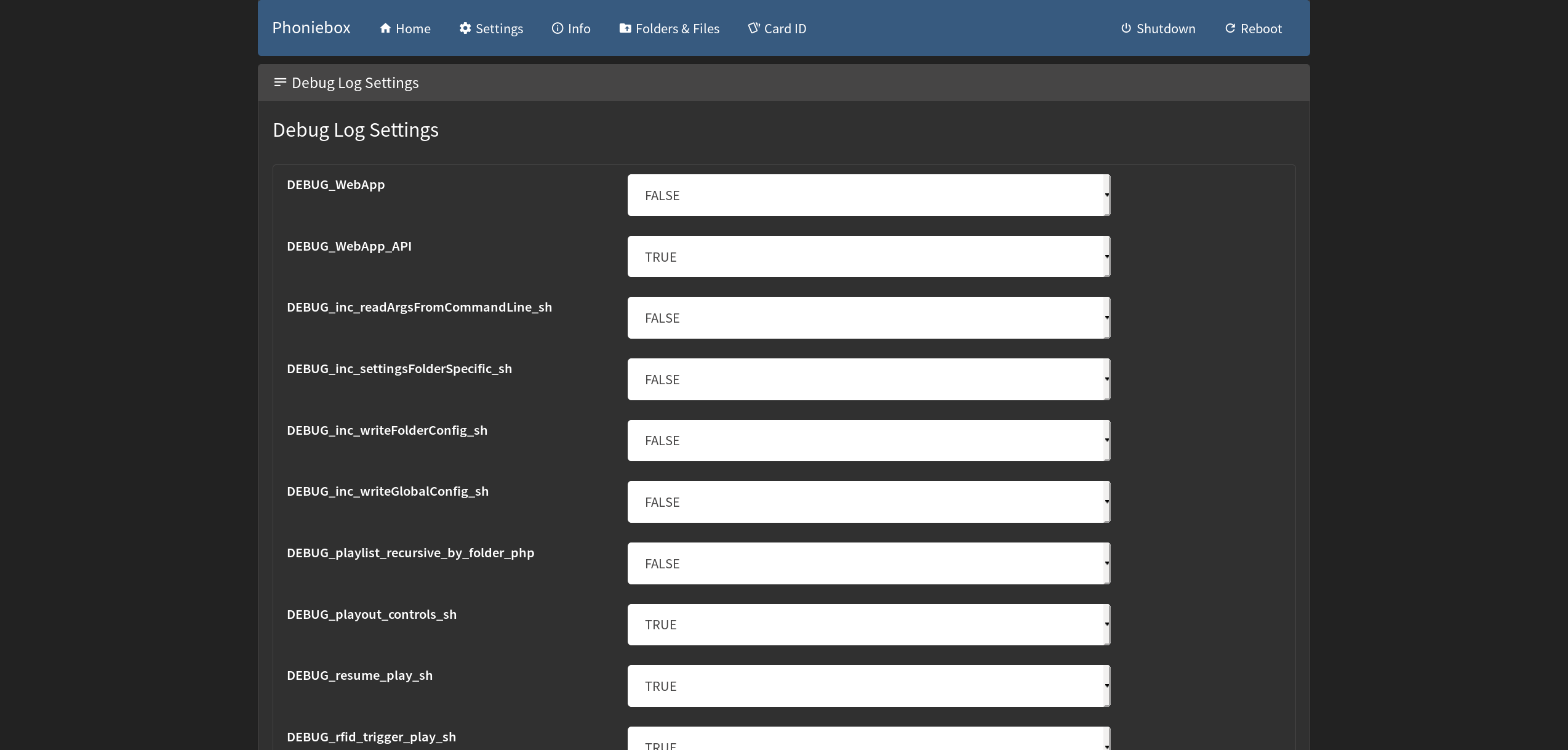
debugging is easier now with the version 2.0 rc5 (master branch). If you checkout to master and git pull, you will be able to set the debugging under Settings > Debug Log Settings (bottom of the page). Select what script you'll be working on. Then the tail (latest 40 lines) can be seen under Info at the bottom. The log file is still located in the folder logs/debug.log. The web app makes it easier to handle - and also to clear the log file.
MiczFlor
on 1 Dec 2019
Thank you all. Got it sorted by changing to Master.
Such a brilliant well explained code. Thank you very much
daireod1
on 3 Dec 2019
Related issues
 warlok85
·
7Comments
warlok85
·
7Comments
 laclaro
·
10Comments
laclaro
·
10Comments
 Ghostsl84
·
12Comments
Ghostsl84
·
12Comments
 topas-rec
·
9Comments
topas-rec
·
9Comments
 bastiitsab
·
11Comments
bastiitsab
·
11Comments