Rpi-jukebox-rfid: 🐛 | Spotify Name from Playlist not showing in Home View
Bug
What I did
Linked a Card to a Spotify Playlist over website (iris)
What happened
Linking is successfull but Name is not shown in the Home view
I've made a Screenshot from this. The Top Spotify List is marked with the yellow box from me. The second spotify is without that mark.
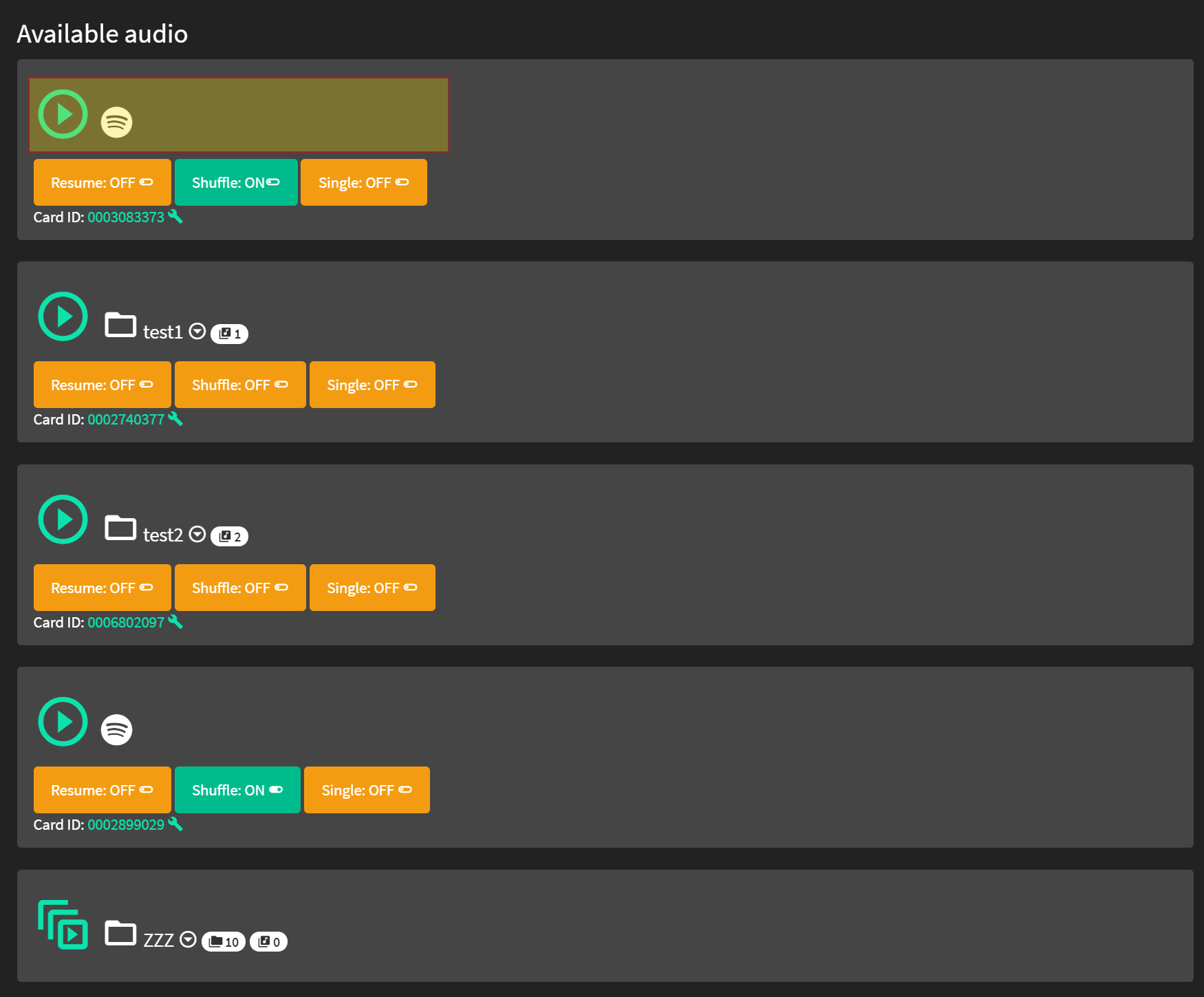
I expected this to happen
Name shown in Home View
Further information that might help
Software
Base image and version
2020-02-05-raspbian-buster-lite
Branch / Release
master
Installscript
scripts/installscripts/buster-install-default.sh
Hardware
RaspberryPi version
4b
RFID Reader
Neuftech
Soundcard
Hifiberry MiniAMP
Other notable hardware
 bastiitsab
All 11 comments
I did some debugging. The output in func.php is not the problem. The title.txt file is always empty for Spotify Albums.
 webflo
on 26 Feb 2020
webflo
on 26 Feb 2020
I did some debugging. The output in func.php is not the problem. The title.txt file is always empty for Spotify Albums.
You are right. I've just added a text in the title.txt and this title is shown in the Home-View!
So the title.txt is not correct created during creation of Spotify-Playlist
bastiitsab
on 27 Feb 2020
cover.jpg is also empty (0 byte). Which part of the codebase is responsible for title and cover extraction? Thanks!
webflo
on 28 Feb 2020
I have the same problem. But I can't edit title.txt or change the cover.jpg when accessing it via windows explorer over the network. I use the user pi to access my pi over the network and already added the user pi to the group www-data. But I still can't edit the files.
Is there a way how I can edit the files over the network?
 dhanessar
on 2 Mar 2020
dhanessar
on 2 Mar 2020
Is there a way how I can edit the files over the network?
you can edit it via ssh
bastiitsab
on 11 Mar 2020
Thank you. I feared that would be the answer.
I found another way which also works fine. I create the right title.txt and cover.jpg on my computer and upload them via web interface in the right directory.
dhanessar
on 12 Mar 2020
Could it be that there are not the right access rights on the audio folders so mopidy can't change the files?
How could I check this?
Since I can't change files or replace them via samba shares and I can't change title.txt without sudo I wondered itf it might be an access rights problem.
I connected the smb share on my PC with the pi user and I don't have the rights to edit or replace the file. If I remember correctly I was able to do this on the old version of Phoniebox. I can however add new folders to the folder audiofolders.
 Hamsert
on 14 Mar 2020
Hamsert
on 14 Mar 2020
-rwxrw-rw- 1 pi pi 27 Sep 15 21:12 title.txt
These are the permissions set to a title file in one of the audiofolders. Do these look correct, especially in the context that mopidy can edit that file?
Hamsert
on 14 Mar 2020
I experience the same bug. In my case the file has the following setting:
-rw-r--r-- 1 www-data www-data 0 Mar 16 21:14 title.txt
What's strange is that from code here, if I remove the title.txt, it should actually print the folder (or "basename") in html. Again, not happening (or I'm to dumb to read the code correctly).
I also looked into inc.viewFolderTree.php where the title.txt is written - If this is actually working, I would suggest to add the interpret since it would only show the album title otherwise.
 lovethisshit
on 18 Mar 2020
lovethisshit
on 18 Mar 2020
Same to me with version 2.0 rc7. title.txt and cover.jpg are empty, file permissions are -rw-r--r-- owner is www-data.
 Jan-2k
on 22 Mar 2020
Jan-2k
on 22 Mar 2020
Found the issue: file_get_contents returns HTTP code 400. I'm not a PHP developer but after some googlin' I got the right clue from here:
https://stackoverflow.com/a/43750037
So we need to set a user agent at least for this request.
If anybody could tell me where to place such a setting I would make a pull request with the changes!
lovethisshit
on 22 Mar 2020
Related issues
 daireod1
·
9Comments
daireod1
·
9Comments
 Caliandroid
·
7Comments
Caliandroid
·
7Comments
 s-martin
·
6Comments
Hamsert
·
11Comments
s-martin
·
6Comments
Hamsert
·
11Comments
 elalemanyo
·
10Comments
elalemanyo
·
10Comments
Most helpful comment
I did some debugging. The output in func.php is not the problem. The title.txt file is always empty for Spotify Albums.