I've tried everything with no success. I am still getting the error: Failed to reach Ring server at https://oauth.ring.com/oauth/token. unable to verify the first certificate. Trying again in 5 seconds...
DNS is working fine. Network working fine. Restarted everything. Error began after most recent ring and config ui x update.
homebridge-ring v9.12.5
homebridge-config-ui-x v4.34.0
Node.js Version v14.15.1
NPM Version v6.14.9
_Originally posted by @jmac0027 in https://github.com/dgreif/ring/issues/496#issuecomment-731508795_
 jmac0027
All 88 comments
This error is related to ssl and missing certificates. I haven't ever seen it before and as far as I know you are the only use that has run into this. Do you have anything weird set up with ssl certificates? What version of node are you on?
 dgreif
on 21 Nov 2020
dgreif
on 21 Nov 2020
Negative regarding ssl. I am running a basic setup.
Versions are:
homebridge-ring v9.12.5
homebridge-config-ui-x v4.34.0
Node.js Version v14.15.1
NPM Version v6.14.9
jmac0027
on 21 Nov 2020
As much as I hated to do it, I had to delete the plugin because the error was hitting every 5 seconds. All other plugins are working without issue. I even tried: npm config set strict-ssl false. It's very strange. I never setup SSL. The only other installation on the Pi is a Unifi Controller. The IP is fixed as well.
jmac0027
on 21 Nov 2020
If it was working fine on 9.12.4, I'd suggest you try downgrading to that version to see if you still have errors. You can install specific versions through the homebridge ui. Let me know if that version works.
dgreif
on 21 Nov 2020
From testing, v9.12.2 and lower work without any errors. When I try v9.12.3 the plugin won't even start. Version above that cause the certificate error. Prior to this testing I did a full removal of the plugin.
jmac0027
on 21 Nov 2020
I'm seeing this on v9.12.5 too - I'm running HOOBS v3.2.10/Node v12.19.0.
Going to try downgrading now to see what works
 mac-n-cheese-uk
on 21 Nov 2020
mac-n-cheese-uk
on 21 Nov 2020
I too have been getting this error starting with 9.12.4 and now 9.12.5
Running vanilla homebridge with same versions as jmac0027
 dsrigby
on 21 Nov 2020
dsrigby
on 21 Nov 2020
Same issue here, went back to 9.12.2, since that seems to be 'bug-free' for/to me.
 paqpaqpaq
on 22 Nov 2020
paqpaqpaq
on 22 Nov 2020
What's weird is the only impactful changes after 9.12.2 were dependency updates. It's going to be a challenge to track down exactly which dependency is causing the issue, especially since I can't recreate the unable to verify the first certificate issue. I just bumped all the dependencies again in 9.12.6. If someone could give that version a try and let me know if it's any better than 9.12.5, that would be great!
dgreif
on 22 Nov 2020
Upgraded to 9.12.6 and it seems to be behaving much better in my situation. Not sure if it's just my imagination, but it seems to be more responsive too as I go in/out of live view.
dsrigby
on 22 Nov 2020
No dice for me I'm afraid - still getting a sea of errors although it's altered slightly and I now get:
[Ring] Failed to reach Ring server at https://oauth.ring.com/oauth/token. Client network socket disconnected before secure TLS connection was established. Trying again in 5 seconds...
mac-n-cheese-uk
on 22 Nov 2020
11/22/2020, 8:44:16 PM [Ring] Failed to reach Ring server at https:// oauth.ring.com/oauth/token. connect ECONNREFUSED 127.0.0.1:443. Trying again in 5 seconds...
That's what I keep getting even after updating
 schpeen
on 23 Nov 2020
schpeen
on 23 Nov 2020
How do i roll back to a previous versions ?
schpeen
on 23 Nov 2020
I also receive the error with version 9.12.6. Reverted back to v9.12.2.
jmac0027
on 23 Nov 2020
Schpeen if you are using config ui there will be a circle arrow. Click that and select the version you want. As I stated, v9.12.2 works for me.

jmac0027
on 23 Nov 2020
@dxdc @Sunoo @smockle @apexad any of you running into issues on the versions 9.12.4/9.12.5? I can't recreate any of the issues other than the original NGHTTP2_ENHANCE_YOUR_CALM in #496 and would appreciate any help in debugging this unable to verify the first certificate error if any of you are seeing it.
dgreif
on 23 Nov 2020
Haven’t noticed any problems lately, I just quickly tested the latest version and all functionality appears to be working fine.
 Sunoo
on 23 Nov 2020
Sunoo
on 23 Nov 2020
No issue here.
Curious if it is possibly a Node 12 issue? I am on 14.15.1
 apexad
on 23 Nov 2020
apexad
on 23 Nov 2020
I’m still on 12.
Sunoo
on 23 Nov 2020
I tried both with no issues and I think some users are having issues on both. Reverting to ring 9.12.2 seems to fix it for those having issues. Basically just dependency bumps since then so it's not clear what went wrong. Thanks for checking for me!
dgreif
on 23 Nov 2020
Upgraded to 9.12.6 and it seems to be behaving much better in my situation. Not sure if it's just my imagination, but it seems to be more responsive too as I go in/out of live view.
Same here!
Seems faster than ever.
Edit:
No srsly, on ring pro:
< 1 sec. locally, and about 2 sec. from a different network
Ring 2 is about 1 sec. 'slower'.
paqpaqpaq
on 23 Nov 2020
@jmac0027 I am using Hoobs how could I do it using that? thanks for help.
schpeen
on 23 Nov 2020
No issues here. Few ideas, @jmac0027
- Confirm time/date is set correctly. If time/date is wrong, it can cause SSL verification issues.
- Are you running through a proxy server or have some kind of firewall set up?
sudo apt-get update && sudo apt-get -y --reinstall ca-certificates
 dxdc
on 23 Nov 2020
dxdc
on 23 Nov 2020
@dxdc Time is correct, nothing changed on my network all was working well before the update. Also tried to run sudo command you posted and it said it was unable to download. I am using hoobs any easy way for me to roll back update? I am still learning with all this homebridge stuff so appreciate help.
schpeen
on 23 Nov 2020
Maybe try sudo update-ca-certificates
dxdc
on 23 Nov 2020
it said it was unable to download
This may be another issue affecting your install
dxdc
on 23 Nov 2020
can anyone please tell me how to re install version 9.12.2 using hoobs. I tried to run the npm for that version and copied and put in terminal but thats not working I must be doing something wrong.
schpeen
on 24 Nov 2020
can anyone please tell me how to re install version 9.12.2 using hoobs. I tried to run the npm for that version and copied and put in terminal but thats not working I must be doing something wrong.
You'll have to consult HOOBS support.
apexad
on 24 Nov 2020
Thanks for the suggestions dxdc. I did try those prior to posting. I don't run a proxy and firewall is on my USG.
jmac0027
on 24 Nov 2020
Seems like a HOOBS -related issue, relating to SSL verification. There's a seemingly related issue here:
https://github.com/hoobs-org/HOOBS/issues/478
I imagine that you'll trigger the same error using a basic curl request too.
Please post the results of this command:
openssl s_client -showcerts -connect oauth.ring.com:443
Maybe something there will be diagnostic. You can also try:
curl -kvvv https://oauth.ring.com
dxdc
on 24 Nov 2020
I had the same experience/issues after updating recently. I had to uninstall the plugin as it was a problem, but – after reading the comments here – I downgraded and tried the following versions...
––––––––––
homebridge-ring
v9.12.6 and v9.12.5 result in the same "Failed to reach Ring server..." error.
v9.12.4 seems to (mostly) work, except the first attempt at viewing the live camera feed – after opening the app – does not produce audio. I had to back out of the feed in the Home app, and then click on it again... then the audio worked. I had to repeat this process whenever opening the Home app after it had been completely closed.
v9.12.3 basically crashes Homebridge.
For both v9.12.4 and v9.12.3, logs – including red errors for v9.12.3 – were produced that I didn't capture/copy. Though, if need be, I can load those versions again and copy/paste the logs or any errors reported. Let me know.
v9.12.2 works with no noticeable issues, and no errors in the logs.
––––––––––
NOTE 1: I am running the following versions for Homebridge...
homebridge-config-ui-x v4.34.0
Node.js Version v14.15.1
NPM Version v6.14.8
NOTE 2: Homebridge is telling me there is an update for NPM (v6.14.9)... can anyone tell me how to update NPM?
Thanks!
 LordZork
on 24 Nov 2020
LordZork
on 24 Nov 2020
I am seeing the same issue as well, 9.12.2 works flawlessly (and no errors in logs).
 Manav-Seth
on 25 Nov 2020
Manav-Seth
on 25 Nov 2020
I’m not on hoobs, just a straight homebridge install on OSX 11.0.1 with Node.js Version v14.15.1 and npm v6.14.8.
Hope the output helps.
sidjohn1@mini ~ % openssl s_client -showcerts -connect oauth.ring.com:443
CONNECTED(00000006)
depth=2 C = US, O = DigiCert Inc, OU = www.digicert.com, CN = DigiCert Global Root CA
verify return:1
depth=1 C = US, O = DigiCert Inc, CN = DigiCert SHA2 Secure Server CA
verify return:1
depth=0 C = US, ST = California, L = Santa Monica, O = Ring LLC, CN = *.ring.com
verify return:1
Certificate chain
0 s:/C=US/ST=California/L=Santa Monica/O=Ring LLC/CN=*.ring.com
i:/C=US/O=DigiCert Inc/CN=DigiCert SHA2 Secure Server CA
-----BEGIN CERTIFICATE-----
MIIGmDCCBYCgAwIBAgIQBLCROtzBNzl9D6ThPbHV+zANBgkqhkiG9w0BAQsFADBN
MQswCQYDVQQGEwJVUzEVMBMGA1UEChMMRGlnaUNlcnQgSW5jMScwJQYDVQQDEx5E
aWdpQ2VydCBTSEEyIFNlY3VyZSBTZXJ2ZXIgQ0EwHhcNMjAwNzI5MDAwMDAwWhcN
MjIwOTI4MTIwMDAwWjBhMQswCQYDVQQGEwJVUzETMBEGA1UECBMKQ2FsaWZvcm5p
YTEVMBMGA1UEBxMMU2FudGEgTW9uaWNhMREwDwYDVQQKEwhSaW5nIExMQzETMBEG
A1UEAwwKKi5yaW5nLmNvbTCCASIwDQYJKoZIhvcNAQEBBQADggEPADCCAQoCggEB
AJ0Vt0uILgnatEwQIhn5ffLM224AxFYzz/lIMQ9rXsu05hDwpRDEcInUSeXEVZBf
91HP7H0MCcfJFvsPZQVDzfvCDDgx9Oea7sPujG4Q+1ejqkOn/ifINcumxTo99E9p
+dHJfEJYucQgnFDGLbvACoVyYt2vNKfaexUK1+IvYHJH31HYzEhjMB4sqm9vick8
fzofA2b7s7dagExwi0DxKuGatsa7eFWN5rCChyVeNmobZ/WjOsB47BuTeTUoMvtj
PE2vkMReBgZZ6RdaKDPk0umncWVwV/PnalOPHNoWjO+uUATsWU0AxNzsm6BsBBYQ
VUegpGALu43x5IOuMmovvmECAwEAAaOCA14wggNaMB8GA1UdIwQYMBaAFA+AYRyC
MWHVLyjnjUY4tCzhxtniMB0GA1UdDgQWBBRwoeIcKS6/EFgkHWSiZ5V3gwR3BDAf
BgNVHREEGDAWggoqLnJpbmcuY29tgghyaW5nLmNvbTAOBgNVHQ8BAf8EBAMCBaAw
HQYDVR0lBBYwFAYIKwYBBQUHAwEGCCsGAQUFBwMCMGsGA1UdHwRkMGIwL6AtoCuG
KWh0dHA6Ly9jcmwzLmRpZ2ljZXJ0LmNvbS9zc2NhLXNoYTItZzYuY3JsMC+gLaAr
hilodHRwOi8vY3JsNC5kaWdpY2VydC5jb20vc3NjYS1zaGEyLWc2LmNybDBMBgNV
HSAERTBDMDcGCWCGSAGG/WwBATAqMCgGCCsGAQUFBwIBFhxodHRwczovL3d3dy5k
aWdpY2VydC5jb20vQ1BTMAgGBmeBDAECAjB8BggrBgEFBQcBAQRwMG4wJAYIKwYB
BQUHMAGGGGh0dHA6Ly9vY3NwLmRpZ2ljZXJ0LmNvbTBGBggrBgEFBQcwAoY6aHR0
cDovL2NhY2VydHMuZGlnaWNlcnQuY29tL0RpZ2lDZXJ0U0hBMlNlY3VyZVNlcnZl
ckNBLmNydDAMBgNVHRMBAf8EAjAAMIIBfwYKKwYBBAHWeQIEAgSCAW8EggFrAWkA
dgApeb7wnjk5IfBWc59jpXflvld9nGAK+PlNXSZcJV3HhAAAAXObn+jlAAAEAwBH
MEUCIQCjmjYxW/KMfG9pcLnnKHwsVubVllc4iOU8MpFJZLQXtwIgDUsjBpA3u126
ehHdb6ursHM6NHJu21nGyhxM1rmFDv8AdwAiRUUHWVUkVpY/oS/x922G4CMmY63A
S39dxoNcbuIPAgAAAXObn+kTAAAEAwBIMEYCIQCmHCqxXQ6gr1bUQA1uOaAcy+qZ
sysBSVTfw8q1S4lrwAIhAMl8ax/2zNxh0XJVgMJz7xEw5IXbo5awVecwGT9TR5bQ
AHYAUaOw9f0BeZxWbbg3eI8MpHrMGyfL956IQpoN/tSLBeUAAAFzm5/pYQAABAMA
RzBFAiEAigu1bPbKuB2h8dk0v4U7kE8Y5dEnTykraN93N3QG4ioCIBAFHtAYP9sX
L3n18xCoCg5rNo9oKQK93nFdEbfmK/TyMA0GCSqGSIb3DQEBCwUAA4IBAQDakmbz
d4cPBiC/ZCYaLAiLdSmYcGAjlm1zJxn1VpCQ2xdDclofjc9UmmLSeALNgESgeOnP
6xZJfNZvcRyTDEE534R6xGsPQ4YWALYeTorjxfgiJX1vND8XWEQBFy2sC+7sUAOx
tUyCXMSbHhYOySxvfzExrJdS4IcBqpKtD2h/mkJ1XIqP3Y+LE/0SyESQ/oS3tqtN
qEoIYJ7Mtodse8d/rTFVhmMWkQBg5gpHL5uYaIsNdhRJXB+vbTFOsMxbbpkrGswT
dbDwDuHXAcBWc2GarJBdMI0pRw0US6ZBLIqeQeTWWPpAz4kRb25x5a//tvqXwOv+
gtjIu9+fSbeIBa/N
-----END CERTIFICATE-----
1 s:/C=US/O=DigiCert Inc/CN=DigiCert SHA2 Secure Server CA
i:/C=US/O=DigiCert Inc/OU=www.digicert.com/CN=DigiCert Global Root CA
-----BEGIN CERTIFICATE-----
MIIElDCCA3ygAwIBAgIQAf2j627KdciIQ4tyS8+8kTANBgkqhkiG9w0BAQsFADBh
MQswCQYDVQQGEwJVUzEVMBMGA1UEChMMRGlnaUNlcnQgSW5jMRkwFwYDVQQLExB3
d3cuZGlnaWNlcnQuY29tMSAwHgYDVQQDExdEaWdpQ2VydCBHbG9iYWwgUm9vdCBD
QTAeFw0xMzAzMDgxMjAwMDBaFw0yMzAzMDgxMjAwMDBaME0xCzAJBgNVBAYTAlVT
MRUwEwYDVQQKEwxEaWdpQ2VydCBJbmMxJzAlBgNVBAMTHkRpZ2lDZXJ0IFNIQTIg
U2VjdXJlIFNlcnZlciBDQTCCASIwDQYJKoZIhvcNAQEBBQADggEPADCCAQoCggEB
ANyuWJBNwcQwFZA1W248ghX1LFy949v/cUP6ZCWA1O4Yok3wZtAKc24RmDYXZK83
nf36QYSvx6+M/hpzTc8zl5CilodTgyu5pnVILR1WN3vaMTIa16yrBvSqXUu3R0bd
KpPDkC55gIDvEwRqFDu1m5K+wgdlTvza/P96rtxcflUxDOg5B6TXvi/TC2rSsd9f
/ld0Uzs1gN2ujkSYs58O09rg1/RrKatEp0tYhG2SS4HD2nOLEpdIkARFdRrdNzGX
kujNVA075ME/OV4uuPNcfhCOhkEAjUVmR7ChZc6gqikJTvOX6+guqw9ypzAO+sf0
/RR3w6RbKFfCs/mC/bdFWJsCAwEAAaOCAVowggFWMBIGA1UdEwEB/wQIMAYBAf8C
AQAwDgYDVR0PAQH/BAQDAgGGMDQGCCsGAQUFBwEBBCgwJjAkBggrBgEFBQcwAYYY
aHR0cDovL29jc3AuZGlnaWNlcnQuY29tMHsGA1UdHwR0MHIwN6A1oDOGMWh0dHA6
Ly9jcmwzLmRpZ2ljZXJ0LmNvbS9EaWdpQ2VydEdsb2JhbFJvb3RDQS5jcmwwN6A1
oDOGMWh0dHA6Ly9jcmw0LmRpZ2ljZXJ0LmNvbS9EaWdpQ2VydEdsb2JhbFJvb3RD
QS5jcmwwPQYDVR0gBDYwNDAyBgRVHSAAMCowKAYIKwYBBQUHAgEWHGh0dHBzOi8v
d3d3LmRpZ2ljZXJ0LmNvbS9DUFMwHQYDVR0OBBYEFA+AYRyCMWHVLyjnjUY4tCzh
xtniMB8GA1UdIwQYMBaAFAPeUDVW0Uy7ZvCj4hsbw5eyPdFVMA0GCSqGSIb3DQEB
CwUAA4IBAQAjPt9L0jFCpbZ+QlwaRMxp0Wi0XUvgBCFsS+JtzLHgl4+mUwnNqipl
5TlPHoOlblyYoiQm5vuh7ZPHLgLGTUq/sELfeNqzqPlt/yGFUzZgTHbO7Djc1lGA
8MXW5dRNJ2Srm8c+cftIl7gzbckTB+6WohsYFfZcTEDts8Ls/3HB40f/1LkAtDdC
2iDJ6m6K7hQGrn2iWZiIqBtvLfTyyRRfJs8sjX7tN8Cp1Tm5gr8ZDOo0rwAhaPit
c+LJMto4JQtV05od8GiG7S5BNO98pVAdvzr508EIDObtHopYJeS4d60tbvVS3bR0
j6tJLp07kzQoH3jOlOrHvdPJbRzeXDLz
-----END CERTIFICATE-----
Server certificate
subject=/C=US/ST=California/L=Santa Monica/O=Ring LLC/CN=*.ring.com
issuer=/C=US/O=DigiCert Inc/CN=DigiCert SHA2 Secure Server CA
No client certificate CA names sent
Server Temp Key: ECDH, X25519, 253 bits
SSL handshake has read 3498 bytes and written 281 bytes
New, TLSv1/SSLv3, Cipher is ECDHE-RSA-CHACHA20-POLY1305
Server public key is 2048 bit
Secure Renegotiation IS supported
Compression: NONE
Expansion: NONE
No ALPN negotiated
SSL-Session:
Protocol : TLSv1.2
Cipher : ECDHE-RSA-CHACHA20-POLY1305
Session-ID: 249557C4F36E26BF34C8136EB9F95E00769E59920C8FC0D27A9843BACCFD064B
Session-ID-ctx:
Master-Key: E802A0549E4B7516272E4841AA82C12B0BEA44551620001073C73D7E9E75785565C485478882237AD2AF9645FAAE5F10
TLS session ticket lifetime hint: 64799 (seconds)
TLS session ticket:
0000 - dd d1 d0 07 2b f0 0a 08-34 46 14 73 73 ea ab e9 ....+...4F.ss...
0010 - 3b f2 a0 4b 00 6c 01 18-16 72 d2 99 77 ab 66 e8 ;..K.l...r..w.f.
0020 - 61 d6 fc 73 c7 c7 88 58-e4 b8 4e 18 4f 59 3c 37 a..s...X..N.OY<7
0030 - 9f f3 87 2f b8 c5 16 c9-da 45 a9 b9 80 cf 98 7b .../.....E.....{
0040 - e0 30 73 b9 e4 67 46 69-01 23 cc 24 cc ce ab 46 .0s..gFi.#.$...F
0050 - 52 9f 85 ed a4 cf 2f 66-6f 75 e1 e7 72 7f be f7 R...../fou..r...
0060 - 2b 8a 0f d7 8a 7a fc 7e-98 6a 74 9b 7d 41 7b ea +....z.~.jt.}A{.
0070 - b3 90 ba 55 41 87 8a 68-29 a4 e1 22 d1 7c 77 20 ...UA..h)..".|w
0080 - b0 4b d5 02 72 f7 73 e7-a1 1e 40 55 52 75 45 97 .K..r.s...@URuE.
0090 - b8 26 95 52 86 6c 72 bc-20 18 5e 9f fb 83 da a1 .&.R.lr. .^.....
00a0 - a0 15 6d 73 3a 26 4a f3-b2 31 a8 13 3c 5c a4 87 ..ms:&J..1..<..
Start Time: 1606321153
Timeout   : 7200 (sec)
Verify return code: 0 (ok)
closed
sidjohn1@mini ~ % curl -kvvv https://oauth.ring.com
- Trying 104.17.127.1...
- TCP_NODELAY set
- Connected to oauth.ring.com (104.17.127.1) port 443 (#0)
- ALPN, offering h2
- ALPN, offering http/1.1
- successfully set certificate verify locations:
- CAfile: /etc/ssl/cert.pem
CApath: none - TLSv1.2 (OUT), TLS handshake, Client hello (1):
- TLSv1.2 (IN), TLS handshake, Server hello (2):
- TLSv1.2 (IN), TLS handshake, Certificate (11):
- TLSv1.2 (IN), TLS handshake, Server key exchange (12):
- TLSv1.2 (IN), TLS handshake, Server finished (14):
- TLSv1.2 (OUT), TLS handshake, Client key exchange (16):
- TLSv1.2 (OUT), TLS change cipher, Change cipher spec (1):
- TLSv1.2 (OUT), TLS handshake, Finished (20):
- TLSv1.2 (IN), TLS change cipher, Change cipher spec (1):
- TLSv1.2 (IN), TLS handshake, Finished (20):
- SSL connection using TLSv1.2 / ECDHE-RSA-CHACHA20-POLY1305
- ALPN, server accepted to use h2
- Server certificate:
- subject: C=US; ST=California; L=Santa Monica; O=Ring LLC; CN=*.ring.com
- start date: Jul 29 00:00:00 2020 GMT
- expire date: Sep 28 12:00:00 2022 GMT
- issuer: C=US; O=DigiCert Inc; CN=DigiCert SHA2 Secure Server CA
- SSL certificate verify ok.
- Using HTTP2, server supports multi-use
- Connection state changed (HTTP/2 confirmed)
- Copying HTTP/2 data in stream buffer to connection buffer after upgrade: len=0
- Using Stream ID: 1 (easy handle 0x7fa400809800)
GET / HTTP/2
Host: oauth.ring.com
User-Agent: curl/7.64.1
Accept: /
- Connection state changed (MAX_CONCURRENT_STREAMS == 256)!
< HTTP/2 404
< date: Wed, 25 Nov 2020 16:19:57 GMT
< content-type: text/plain; charset=utf-8
< content-length: 19
< set-cookie: __cfduid=d8ebefb781455b740dfb41ee6edad31211606321197; expires=Fri, 25-Dec-20 16:19:57 GMT; path=/; domain=.ring.com; HttpOnly; SameSite=Lax
< strict-transport-security: max-age=31536000; includeSubDomains
< x-content-type-options: nosniff
< cf-cache-status: DYNAMIC
< cf-request-id: 06a1cd6a3c00000f02f51af000000001
< expect-ct: max-age=604800, report-uri="https://report-uri.cloudflare.com/cdn-cgi/beacon/expect-ct"
< server: cloudflare
< cf-ray: 5f7cb1bd2e390f02-DFW
<
404 page not found- Connection #0 to host oauth.ring.com left intact
- Closing connection 0
 sidjohn1
on 25 Nov 2020
sidjohn1
on 25 Nov 2020
I don't see any issues there @sidjohn1
dxdc
on 25 Nov 2020
How about openssl version ?
dxdc
on 25 Nov 2020
Ring servers are down. Maybe that caused it.
paqpaqpaq
on 25 Nov 2020
LibreSSL 2.8.3
sidjohn1
on 25 Nov 2020
Well, it worked if I downgraded so it can’t be due to ring servers. Yes they might be down today but that will effect even the ring app, not just homebridge.
Sent from my iPhone
On Nov 25, 2020, at 8:47 AM, paqpaqpaq notifications@github.com wrote:
Ring servers are down. Maybe that caused it.
—
You are receiving this because you commented.
Reply to this email directly, view it on GitHubhttps://github.com/dgreif/ring/issues/497#issuecomment-733823366, or unsubscribehttps://github.com/notifications/unsubscribe-auth/AGMKBWQWDYT6IZFSZCQPP6DSRUYK3ANCNFSM4T5RV6MQ.
Manav-Seth
on 25 Nov 2020
This issue was definitely caused by a dependency update after 9.12.2. The problem is I can't reproduce the error and only a subset of users are experiencing it. Anyone out there able to reproduce and debug the issue to figure out which dependency is causing problems? If you can't help debug it, please just watch this thread and be patient for a solution. In the mean time you can downgrade to 9.12.2.
dgreif
on 25 Nov 2020
Is this the same or different problem as getting this message when running ring-auth-cli or ring-mqtt with DEBUG=*:
ring Failed to reach Ring server at https://oauth.ring.com/oauth/token. Hostname/IP does not match certificate's altnames: Host: oauth.ring.com. is not in the cert's altnames: DNS:*.alchemyapi.io, DNS:alchemyapi.io. Trying again in 5 seconds...
and/or
ring Failed to reach Ring server at https://oauth.ring.com/oauth/token. Hostname/IP does not match certificate's altnames: Host: oauth.ring.com. is not in the cert's altnames: DNS:*.acmecorp.info. Trying again in 5 seconds...
I haven't gotten this working in quite some time (apparently - guess I wasn't monitoring it well), so I don't remember when it last worked. I didn't think I was monkeying around with any DNS, though. Raspbian buster, node 14.15.0-1nodesource1
 rpavlik
on 25 Nov 2020
rpavlik
on 25 Nov 2020
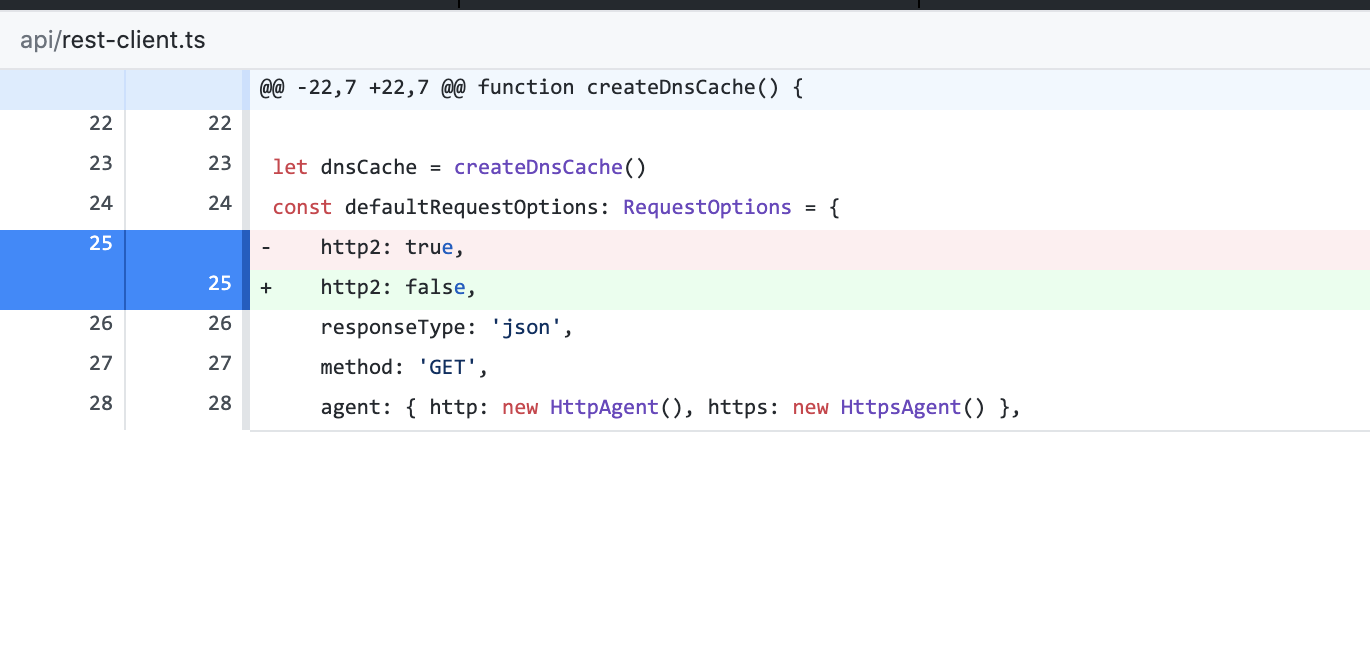
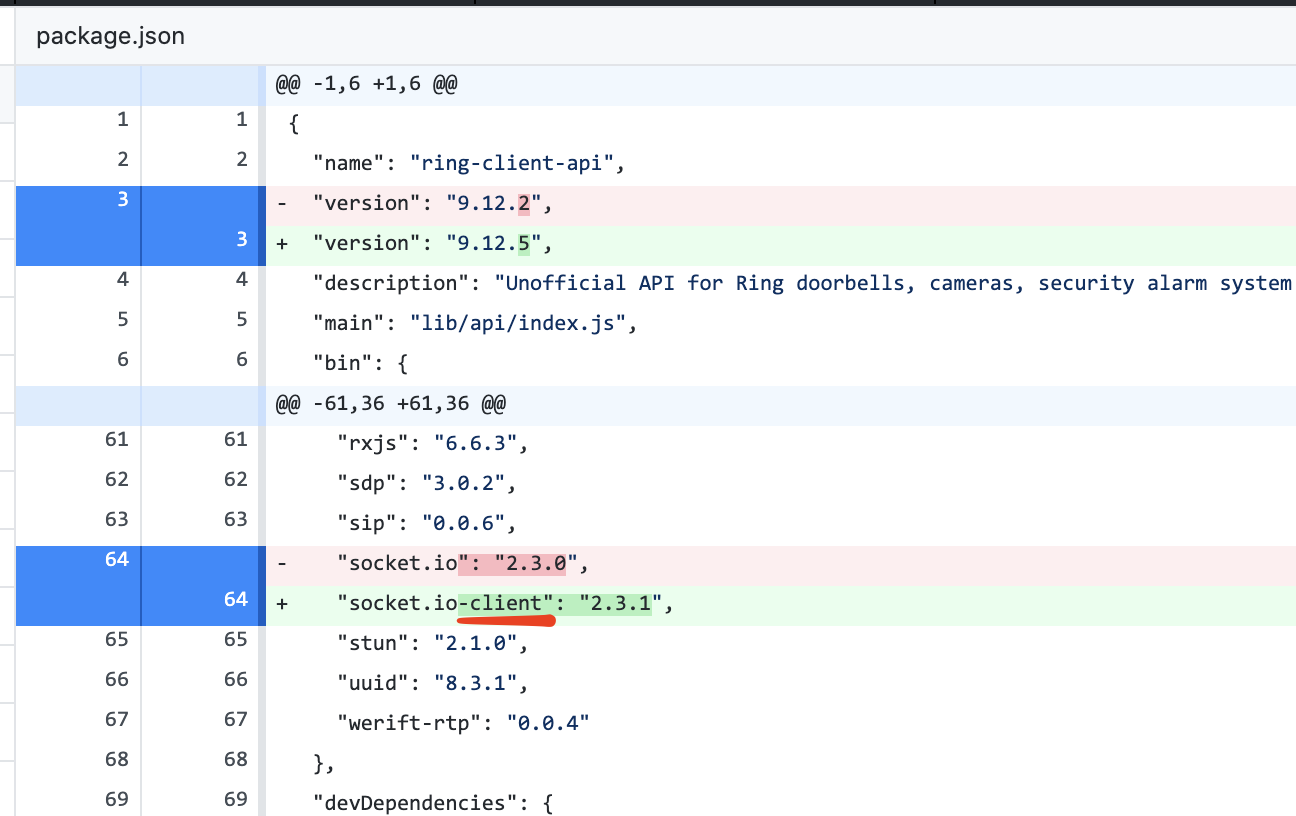
I looked through the source changes between 9.12.2 and 9.12.5. Here are the changes that look interesting to me:
- Why was the
socket.iodependency changed tosocket.io-client? - Why was
http2changed fromtruetofalse?
Maybe worth reverting these 2 changes to a beta branch and testing if it fixes the problem.
dxdc
on 25 Nov 2020
I've pushed a beta branch that reverts the socket.io client back to version 2.3.1. @jmac0027 and others with this issue, can you please try v9.12.7-beta.0? If you have the latest homebridge-config-ui-x, there is a button timeline button that lets you install specific versions. For others, you can run sudo npm i -g --unsafe-perm [email protected]. Please let me know if you see the unable to verify the first certificate error anymore. For a sanity check, please try flipping back and forth between 9.12.6 and this beta a few times to see if the error is there in 9.12.6 and gone in the beta version.
@dxdc the http2: false change was to address #496, which was seeing an NGHTTP2_ENHANCE_YOUR_CALM error. This is http2 related, but _may_ have been caused by the same underlying issue that is now causing this unable to verify the first certificate error.
dgreif
on 27 Nov 2020
@dgreif
I just tried v9.12.7-beta.0.
Same issue:
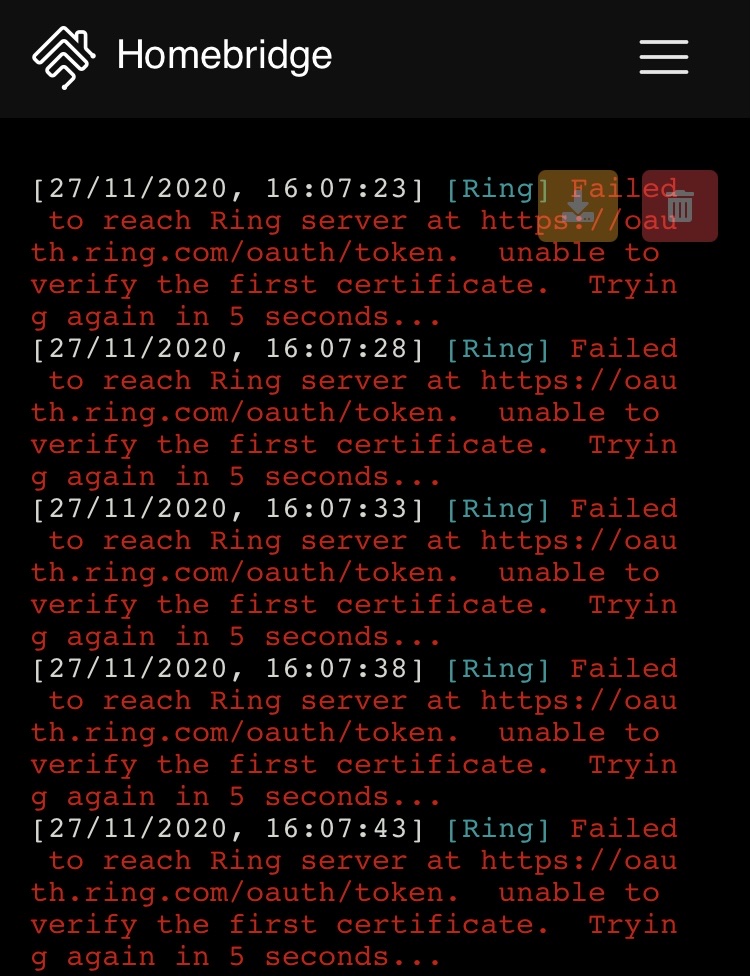
Reverted back to v9.12.2 and everything is working again.
LordZork
on 27 Nov 2020
@LordZork (or anyone) can you give 9.12.7-beta.1 a try? Just another dependency bump.
dgreif
on 28 Nov 2020
@LordZork (or anyone) can you give
9.12.7-beta.1a try? Just another dependency bump.
@dgreif, I Just tried 9.12.7-beta.1 (same result):
[28/11/2020, 15:10:32] [Ring] Failed to reach Ring server at https://oauth.ring.com/oauth/token. unable to verify the first certificate. Trying again in 5 seconds...
Reverted back to v9.12.2 and everything is working again.
I appreciate your efforts here... let me know when you have another version to test, and I will keep testing. Thanks!
LordZork
on 28 Nov 2020
@LordZork (or anyone) can you give
9.12.7-beta.1a try? Just another dependency bump.
Went from 12.6 to 12.7.
Both work fine for me on ring pro.
I can test tomorrow on ring 2.
paqpaqpaq
on 28 Nov 2020
12.7 works on a ring 2 for me.
paqpaqpaq
on 29 Nov 2020
Beta 9.12.7-beta.1 caused the same error for me sir. I've reverted back to 9.12.2
JM
jmac0027
on 30 Nov 2020
In my situation I just went ahead and started from scratch with a fresh install of Hoobs and even running the latest Ring plug-in it’s working fine now and actually seems faster. Also the problem hasn’t happened again
schpeen
on 30 Nov 2020
Beta 9.12.7-beta.1 caused the same error for me sir. I've reverted back to 9.12.2
JM
Same.
 mreassassin
on 30 Nov 2020
mreassassin
on 30 Nov 2020
Not sure when this started, but I just made my systemd homebridge instance hb-service. Now with every reboot, I see this error in the starting log. However, all seems to be working fine.
[2020-12-1 17:13:41] Initializing platform accessory 'Poly-control Door Lock (#9)'...
[2020-12-1 17:13:43] [Ring] 404 from endpoint https://api.ring.com/clients_api/ring_devices
[2020-12-1 17:13:43] [Ring] Session hardware_id not found.  Creating a new session and trying again.
[2020-12-1 17:13:44] [Nest] initing thermostat "Family Room Thermostat": deviceId: 0
I just tried 9.12.7 on HOOBS and still getting the network socket error
03/12/2020, 23:08:33 [Ring] Failed to reach Ring server at https://oauth.ring.com/oauth/token. Client network socket disconnected before secure TLS connection was established. Trying again in 5 seconds...
Any suggestions?
mac-n-cheese-uk
on 4 Dec 2020
I'm still trying to narrow down which dependency caused these issues to start. I just released a slew of beta versions to help narrow it down. Anyone experiencing the unable to verify the first certificate error (like @LordZork), please copy the following template and let me know how each version works for you. @mac-n-cheese-uk your error is a little different, but I'd still be interested to see which work for you. Don't forget to restart homebridge after installing each version.
v9.12.8-beta.0: pass/fail
v9.12.8-beta.1: pass/fail
v9.12.8-beta.2: pass/fail
v9.12.8-beta.3: pass/fail
v9.12.8-beta.4: pass/fail
v9.12.8-beta.5: pass/fail
dgreif
on 4 Dec 2020
@dgreif
When I click on the timeline button – in homebridge-config-ui-x – this (below) is the only beta version I see (and it failed):
v9.12.8-beta.5: fail
How do I install/test the other beta versions you listed?
LordZork
on 4 Dec 2020
Assuming a fairly normal setup, you can run sudo npm i -g --unsafe-perm [email protected]
dgreif
on 4 Dec 2020
@dgreif
Tried all 6 betta versions (installed and restarted Homebridge after each version install)...
v9.12.8-beta.0: fail
v9.12.8-beta.1: fail
v9.12.8-beta.2: fail
v9.12.8-beta.3: fail
v9.12.8-beta.4: fail
v9.12.8-beta.5: fail
LordZork
on 4 Dec 2020
@dgreif two questions (and I apologize, I'm somewhat of a noob here):
- Is it possible that the issue could be caused by not having the latest Npm Version (I have v6.14.8)?
- Would you [or anyone else] be able to tell me how to update to the latest Npm Version (currently v6.14.9)?
This (below) showed up in Homebridge Terminal:
New patch version of npm available! 6.14.8 → 6.14.9
Changelog: https://github.com/npm/cli/releases/tag/v6.14.9
Run npm install -g npm to update!
Note: the changelog (link above) shows two dependency updates, under DEPENDDENCIES. Not sure if this is relevant, but I'm mentioning it here as an FYI.
That said, I've tried:
npm update
npm install -g npm
sudo npm install -g npm
sudo npm i -g [email protected]
No matter what I do, System Information still shows: v6.14.8
However, when I run npm version it shows: v6.14.9
I'm not sure what I'm doing wrong, or if anything even is wrong. Thoughts?
LordZork
on 4 Dec 2020
I still get the following error when using anything after v9.12.4:
Failed to reach Ring server at https://oauth.ring.com/oauth/token. cacheableLookup ENOTFOUND localhost. Trying again in 5 seconds...
 gallarda
on 4 Dec 2020
gallarda
on 4 Dec 2020
@LordZork the npm version shouldn't be an issue. I'm really confused because the beta.0 should have reset everything back to how it was in 9.12.2. Can you try that one again? Here is a different install script that matches how homebridge-config-ui-x does the install: sudo -E -n npm install -g [email protected]
@gallarda cacheableLookup ENOTFOUND localhost is a different issue and is probably specific to your environment. In particular, you may have messed up your /etc/hosts file. Please open a new GitHub issue and fill out the template with all the information about your environment, rather than continuing to post about it on this issue.
@paqpaqpaq the Session hardware_id not found issue is unrelated, but something I'll track down separately as I've been seeing that too.
@mac-n-cheese-uk your issue is likely network related. See https://stackoverflow.com/questions/53593182/client-network-socket-disconnected-before-secure-tls-connection-was-established which suggests that it is probably due to proxy settings.
Let's keep discussion in this thread limited to the original issue. If you have any error other than unable to verify the first certificate, please open a separate GitHub issue.
dgreif
on 5 Dec 2020
@dgreif,
- Installed:
sudo -E -n npm install -g [email protected] - Rebooted after installation (and verified version under _Plugins_)...
[05/12/2020, 12:22:35] [Ring] Failed to reach Ring server at https://oauth.ring.com/oauth/token. unable to verify the first certificate. Trying again in 5 seconds...
- Reverted back to:
v9.12.2– all is working again.
I ran through these steps twice, with the same result.
As always, I greatly appreciate your efforts and will continue testing versions you releasee, thanks!
LordZork
on 5 Dec 2020
@LordZork I just released 9.12.9-beta.0 which is a full revert to the code deployed in 9.12.2. This is mainly a sanity check since none of the 9.12.8 betas worked for you. My guess is that the http2: false option is what is is causing the unable to verify the first certificate error, and it is one of the few things I didn't revert. Assuming this beta works for you, I will then try updating dependencies in different ways to see if we can get to the root of the NGHTTP2_ENHANCE_YOUR_CALM issue. I really appreciate your help with all this testing, and I apologize it's taken so long. Hopefully we will figure it out this weekend!
dgreif
on 12 Dec 2020
@dgreif 9.12.9-beta.0 is working – no errors or issues!
Let me know if/when you have need of more testing for future builds as you update dependencies, and try to weed out any other issues.
This is awesome, thank you!
LordZork
on 12 Dec 2020
@dgreif
9.12.9-beta.0is working – no errors or issues!Let me know if/when you have need of more testing for future builds as you update dependencies, and try to weed out any other issues.
This is awesome, thank you!
Same.
Thanks!
mreassassin
on 12 Dec 2020
@LordZork @mreassassin 9.12.9-beta.1,2 and 3 are up. Each updates some of the dependencies. I expect that you will see the NGHTTP2_ENHANCE_YOUR_CALM error after one of the updates, so let me know which work and which fail (including the error message you get when it fails). If they _all_ work fine, then there is one more dependency change I can make, but wanted to start with these first. I also noticed that the NGHTTP2_ENHANCE_YOUR_CALM error didn't always happen right away, so if they all seem good, trying running them for a little while to make sure. Thanks in advance!
dgreif
on 12 Dec 2020
This is an observation that I have on my network ... I have been running the last several releases of homebridge-ring without issue including the 9.12.8 version. Snapshots and live video worked just fine.
This morning I changed my network mask from 255.255.224.0 to 255.255.255.0 based on another app's recommendation. Snap shots continued to work but live video stopped. I tried 9.12.7, 9.12.6, 9.12.5, 9.12.9-beta.1 and beta.3. Sill the same behavior. I then changed the mask back to 255.255.224.0 and both snap shots and live are back working with 9.12.8.
Why did I have the mask at 255.255.224.0 you may ask? A couple months ago I moved from an Apple AirPort Time Capsule to a Linksys MR9600 WiFi-6 router. I had all sorts of issues so I started troubleshooting by copying over the configuration that I had on the AirPort and this is how the Linksys settings have remained. 255.255.224.0 was the default for the AirPort.
Not sure if related but thought I would pass on.
 DMBlakeley
on 12 Dec 2020
DMBlakeley
on 12 Dec 2020
@dgreif beta2 seemed to work for a bit then stopped responding on HK and started this

If I wait for a few Minutes it comes back online.
Beta 1 and 3 never seemed to respond for me.
mreassassin
on 12 Dec 2020
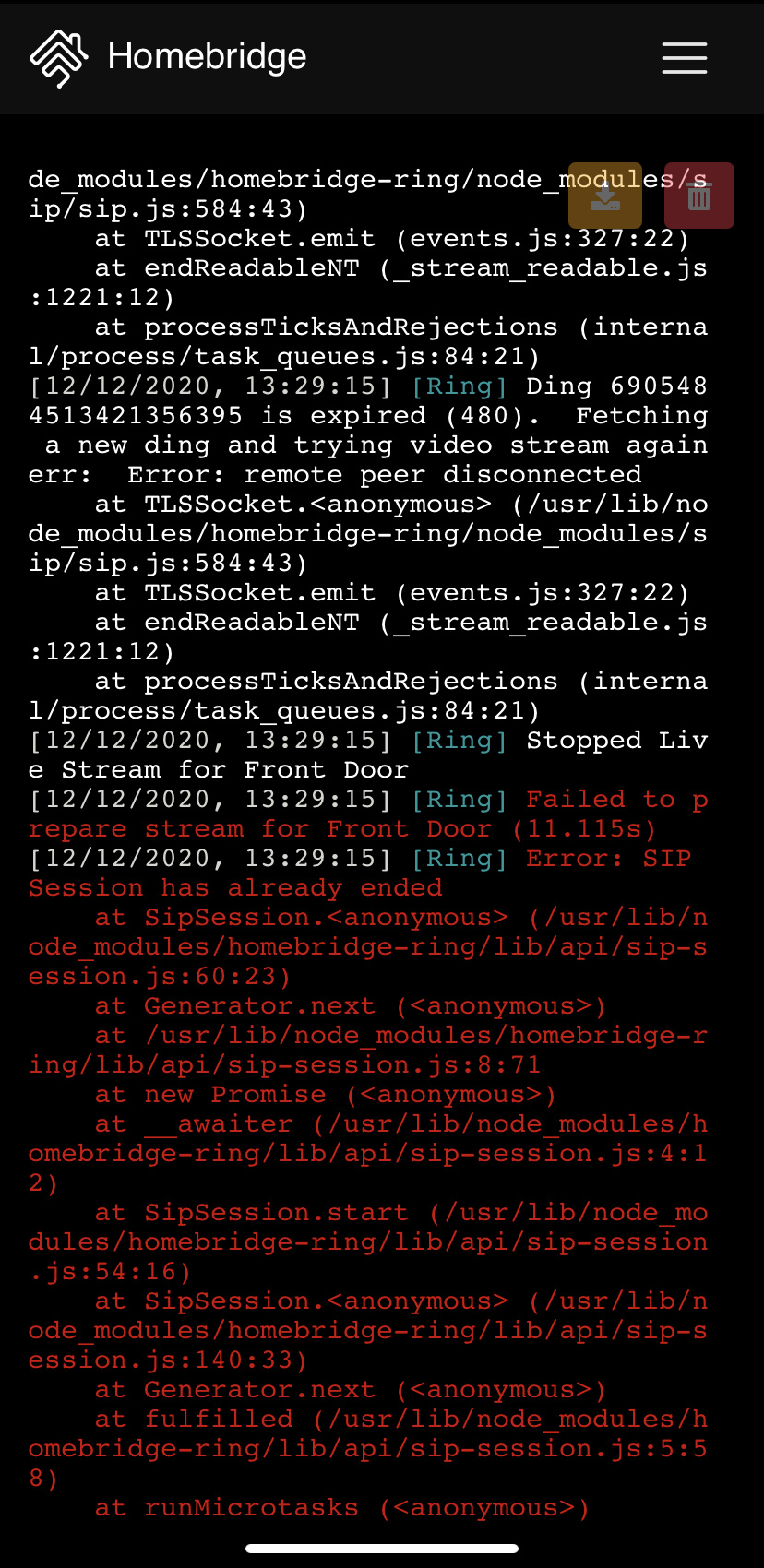
Beta 3 gave these errors.
mreassassin
on 12 Dec 2020
@dgreif
[FIRST TRY]
9.12.9-beta.1
Installed...
- reboot – no errors or issues
- reboot – no errors or issues
9.12.9-beta.2
Installed...
- reboot – errors (below), but no [noticeable] issues:
[12/12/2020, 15:04:20] [Ring] 404 from endpoint https://api.ring.com/clients_api/ring_devices
[12/12/2020, 15:04:20] [Ring] Session hardware_id not found. Creating a new session and trying again.
- reboot – no errors or issues
9.12.9-beta.3
Installed...
- reboot – no errors or issues
- reboot – no errors or issues
[SECOND TRY]
9.12.9-beta.2
Installed...
- reboot – no errors or issues
- reboot – no errors or issues
[NOTES]
I will leave 9.12.9-beta.2 running for the rest of the afternoon, until sometime this evening (unless I encounter issues), and then revert to 9.12.9-beta.1 and let that run over night. Then I will run 9.12.9-beta.3 tomorrow morning, and I will report back.
LordZork
on 12 Dec 2020
@DMBlakeley you issue is definitely unrelated. Changing the subnet mask will impact which devices on your network have access to each other. 255.255.255.0 means 192.168.1.xxx can see each other. 255.255.224.0 is a bigger range of ips that can see each other. This is 100% specific to your network and not related to the plugin in any way.
@mreassassin @LordZork I ran beta.3 over night and woke up to a log full of NGHTTP2_ENHANCE_YOUR_CALM errors. The good news is this means I can reproduce the remaining issue on my end and won't be as dependent on your responses to continue working on a fix. If either of you ran beta.2 for an extended period of time, please let me know how it went. Either way, this is definitely helping to narrow down the dependency that caused the issue.
dgreif
on 13 Dec 2020
@dgreif
I had intended on running beta.2 for only part of yesterday (until the evening), then switching. However, I forgot and left it running over night (until now). I just scrolled through the logs, and I only see one error:
[12/12/2020, 16:56:44] [Ring] Ring beams_bridge_v1 XXXXXXXX-XXXX-XXXX-XXXX-XXXXXXXXXXXX is offline or on cellular backup. Waiting for status to change
[I replaced the alphanumeric string with Xs]
I'm guessing this is my Ring Bridge. A few minutes later, it came back online:
[12/12/2020, 16:59:44] [Ring] Ring beams_bridge_v1 XXXXXXXX-XXXX-XXXX-XXXX-XXXXXXXXXXXX has come back online
Everything seems to be running fine with no issues and no other errors.
I just now reinstalled beta.1 (still no errors after reboot) and will let it run over night. I plan to report back tomorrow.
LordZork
on 13 Dec 2020
@dgreif
I've been running beta.2 for about 13 hours, and I just checked the logs and am showing a few errors:
[13/12/2020, 17:16:52] [Ring] Request to https://api.ring.com/clients_api/snapshots/timestamps failed with status 504. Response body: {"error":"Gateway Timeout","status_code":504}
[13/12/2020, 17:16:52] [Ring] Response code 504 (Gateway Timeout)
[13/12/2020, 17:16:52] [Ring] Failed to cache snapshot for Side (3.313s), The camera currently reports that it is online
[13/12/2020, 18:23:53] [Ring] Request to https://app.ring.com/api/v1/mode/location/XXXXXXXX-XXXX-XXXX-XXXX-XXXXXXXXXXXX failed with status 500. Response body: <html>
<head><title>500 Internal Server Error</title></head>
<body>
<center><h1>500 Internal Server Error</h1></center>
</body>
</html>

HTTPError: Response code 500 (Internal Server Error)
    at Request.<anonymous> (/usr/local/lib/node_modules/homebridge-ring/node_modules/got/dist/source/as-promise/index.js:117:42)
    at runMicrotasks (<anonymous>)
    at processTicksAndRejections (internal/process/task_queues.js:93:5) {
  code: undefined,
  timings: {
    start: 1607905431821,
    socket: 1607905431822,
    lookup: 1607905431822,
    connect: 1607905431822,
    secureConnect: 1607905431822,
    upload: 1607905431822,
    response: 1607905433862,
    end: 1607905433862,
    error: undefined,
    abort: undefined,
    phases: {
      wait: 1,
      dns: 0,
      tcp: 0,
      tls: 0,
      request: NaN,
      firstByte: 2040,
      download: 0,
      total: 2041
    }
  }
}
HTTPError: Response code 500 (Internal Server Error)
    at Request.<anonymous> (/usr/local/lib/node_modules/homebridge-ring/node_modules/got/dist/source/as-promise/index.js:117:42)
    at runMicrotasks (<anonymous>)
    at processTicksAndRejections (internal/process/task_queues.js:93:5) {
  code: undefined,
  timings: {
    start: 1607905431821,
    socket: 1607905431822,
    lookup: 1607905431822,
    connect: 1607905431822,
    secureConnect: 1607905431822,
    upload: 1607905431822,
    response: 1607905433862,
    end: 1607905433862,
    error: undefined,
    abort: undefined,
    phases: {
      wait: 1,
      dns: 0,
      tcp: 0,
      tls: 0,
      request: NaN,
      firstByte: 2040,
      download: 0,
      total: 2041
    }
  }
}
[I replaced the alphanumeric string with Xs]
Everything seems to be working fine currently, though. Also, I just rebooted and got no errors. I think I will revert back to beta.0 (though I may wait until the morning) – let me know if you need me to test any of these again, or any others.
LordZork
on 14 Dec 2020
Good Day - After updating my node to v14.15.2 from 14.15.1 I tried the default upgrade for Ring. Again I was getting the same unable to verify the first certificate error. Then I tried v9.12.9-beta.3 and I am very happy to say the error has gone away!!! Thank you dgrief for your relentless hard work. I also updated myQ plugin. Other than those three things nothing else was changed in my config to get it working. Hope this helps. JM
jmac0027
on 17 Dec 2020
I have done a bunch of testing with the 9.12.9 betas and here's what I've found so far:
- The
unable to verify the first certificateerror goes away if we use HTTP2 for requests. HTTP2 was disabled in9.12.5to fix a different issue -NGHTTP2_ENHANCE_YOUR_CALMfrom #496. - The
NGHTTP2_ENHANCE_YOUR_CALMerror _seemed_ to have started in 9.12.4, but I was able to reproduce the issue on older versions like 9.12.2. I think this is actually caused by changes on Rings servers, and they are now terminating connections under certain conditions with rate limiting or session expiration. I haven't pinned down the exact issue yet, but if I can get that figured out, then I can re-enable HTTP2 and theunable to verify the first certificateissue should go away for everyone.
For now, anyone having the unable to verify the first certificate issue can install 9.12.2
dgreif
on 26 Dec 2020
I installed version 9.13.0 and it immediately began giving me the "unable to verify the first certificate error" I had to revet back to v9.12.9-beta.6.
jmac0027
on 1 Jan 2021
9.13.0
every day around 11:45 am and 11:45 pm:
[1/6/2021, 11:47:54 PM] [Ring] Failed to reach Ring server at https://api.ring.com/clients_api/ring_devices.  queryAaaa ENOTIMP api.ring.com.  Trying again in 5 seconds...
[1/6/2021, 11:47:54 PM] [Ring] Failed to reach Ring server at https://api.ring.com/clients_api/dings/active.  queryAaaa ENOTIMP api.ring.com.  Trying again in 5 seconds...
 lishan89uc
on 7 Jan 2021
lishan89uc
on 7 Jan 2021
@jmac0027 @LordZork can you give 9.14.1-beta.1 a try? Seems like Ring isn't causing issues with http2 anymore, so we should hopefully be able to merge this back in. I'm going to run it for a few days and see if I get any issues
dgreif
on 8 Jan 2021
I have been on 9.14.1 beta 1 for a day or so. The live view is hit and miss however at least it is semi working. I still am getting many errors saying it can’t connect but it actually can. Lol
lishan89uc
on 8 Jan 2021
@dgreif 9.14.1 beta 1 is working just fine.
jmac0027
on 9 Jan 2021
@dgreif, I have been on 9.14.1-beta.1 for a few hours. As @lishan89uc mentioned, the live view is hit and miss, but mostly working. Sometimes it's video only (no audio) on the first attempt. Once or twice the live stream did not work, at all, but then worked after closing the Home app and trying again. I've only noticed one error (below), but it seems to happen almost every time – if not every time – I activate a live stream.
[09/01/2021, 01:34:40] [Ring] Ding XXXXXXXXXXXXXXXXXXX is expired (480).  Fetching a new ding and trying video stream again
err:  Error: remote peer disconnected
    at TLSSocket.<anonymous> (/usr/local/lib/node_modules/homebridge-ring/node_modules/sip/sip.js:584:43)
    at TLSSocket.emit (events.js:327:22)
    at endReadableNT (internal/streams/readable.js:1327:12)
    at processTicksAndRejections (internal/process/task_queues.js:80:21)
Ok, 9.14.1 has been released and uses http2 without any dns caching or keepalive agents. Let me know how it works for you @jmac0027.
@LordZork @lishan89uc the live stream issues are unrelated to this issue, and are something I'll hopefully get to in the near future. Short explanation is that Ring is slowly rolling out new media servers that I have _working_ but not _working perfectly_. That's why the streams are hit or miss. Same can be said for audio even if the video stream works. I'll probably open a new issue to track that problem.
dgreif
on 11 Jan 2021
Dgrief - 9.14.1 is working great! Thank you.
jmac0027
on 15 Jan 2021
Unfortunately I have 9.14.1 and am getting the dreaded NGHTTP2_ENHANCE _YOUR_CALM error when I try to look at my Ring Pro or Ring 2. If I restart Homebridge, I can successfully view the camera once, but then I get this error on the subsequent viewing. Any thoughts?
 steveura
on 15 Jan 2021
steveura
on 15 Jan 2021
@steveura Please see https://github.com/dgreif/ring/issues/548#issuecomment-760288703. You just need to update NodeJS and the error will go away.
dgreif
on 15 Jan 2021
Thanks for the quick reply - that did the trick!
steveura
on 15 Jan 2021
I did a npm update now I'm getting this anytime I try to view the live camera feed.

mreassassin
on 16 Jan 2021
@mreassassin that error may happen occasionally but shouldn't happen every time. 480's normally happen when you try multiple streams in close succession. If it continues, open a new GitHub issue
dgreif
on 16 Jan 2021
I have the same issue on a brand new installation. See https://github.com/dgreif/ring/issues/633
 fredsocial
on 4 May 2021
fredsocial
on 4 May 2021
@dxdc Running the command on a new RPi4 installation: openssl s_client -CApath /etc/ssl/certs/ -connect oauth.ring.com:443
I got the following:
CONNECTED(00000003)
depth=0 C = US, O = Circle Media Inc., CN = Circle002
verify error:num=20:unable to get local issuer certificate
verify return:1
depth=0 C = US, O = Circle Media Inc., CN = Circle002
verify error:num=21:unable to verify the first certificate
verify return:1
Running the same command on a RPi3 I got this:
openssl s_client -CApath /etc/ssl/certs/ -connect oauth.ring.com:443
CONNECTED(00000003)
depth=2 C = US, O = DigiCert Inc, OU = www.digicert.com, CN = DigiCert Global Root CA
verify return:1
depth=1 C = US, O = DigiCert Inc, CN = DigiCert SHA2 Secure Server CA
verify return:1
depth=0 C = US, ST = California, L = Santa Monica, O = Ring LLC, CN = *.ring.com
verify return:1
Both RPis are on the same network. Ring plugin works on the RPi3 but not on the RPi4.
It seems to be a certificate issue ("[Ring] Failed to reach Ring server at https://oauth.ring.com/oauth/token. unable to verify the first certificate. Trying again in 5 seconds...")
I'm using the latest homebridge image:
OS: Raspbian GNU/Linux Buster (10)
Node.js: v14.16.1
NPM: v7.11.1
homebridge-ring: 9.18.0
homebridge: v1.3.4
@dgreif
Note: I downgraded to 9.12.2 and that didn't fix the certificate issue.
fredsocial
on 4 May 2021
Related issues
 Lui5Jacint0
·
3Comments
Lui5Jacint0
·
3Comments
 gondalez
·
6Comments
gondalez
·
6Comments
 mrtekkid
·
3Comments
mrtekkid
·
3Comments
 zilnik1234
·
3Comments
zilnik1234
·
3Comments
 donavanbecker
·
7Comments
donavanbecker
·
7Comments