Bug Report
Describe the Bug
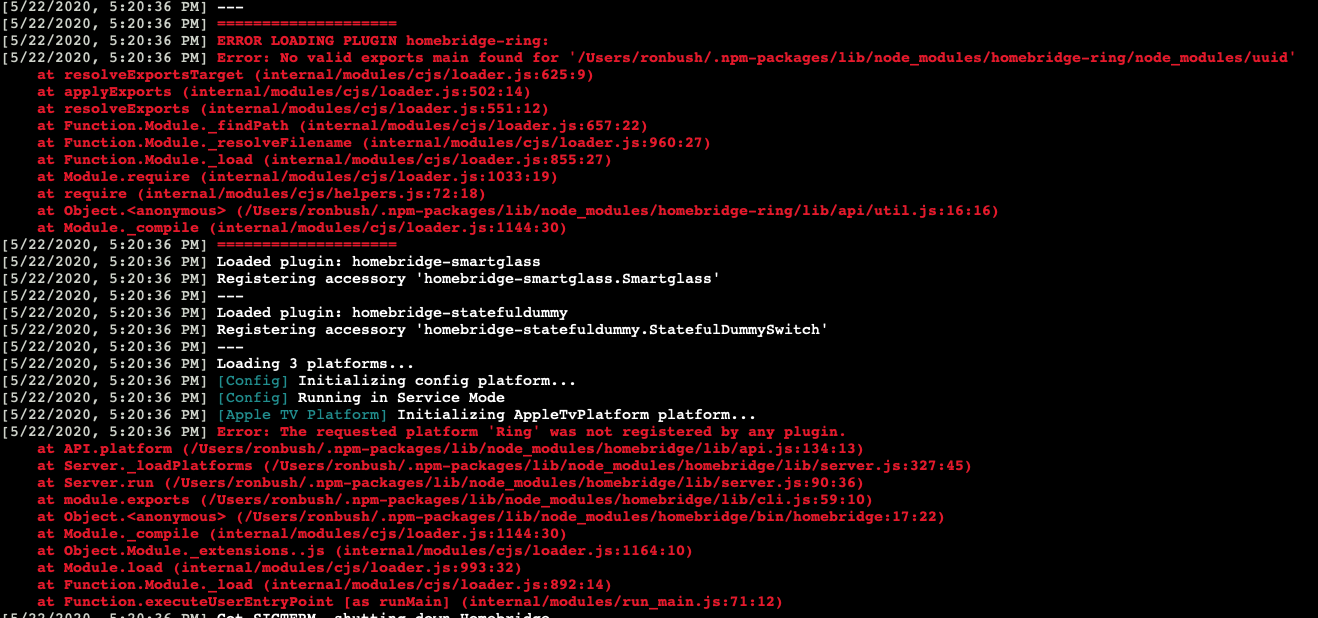
Ring is currently not working. And is creating looping errors in the log.
I am getting two errors from Homebridge install and I think they are related. I am not certain why this is happening and it was after I ran the latest update to Ring. I suspect both are related but i can't figure it out. Removing both plugins allows Homebridge to run normally.
My Homebridge log is showing this...when both are installed however...
I have temporarily removed Ring and FFMPEG and my logs calm down.
[5/22/2020, 5:15:14 PM] ERROR LOADING PLUGIN homebridge-ring:
[5/22/2020, 5:15:14 PM] Error: No valid exports main found for '/Users/USERNAME/.npm-packages/lib/node_modules/homebridge-ring/node_modules/uuid'
at resolveExportsTarget (internal/modules/cjs/loader.js:625:9)
at applyExports (internal/modules/cjs/loader.js:502:14)
at resolveExports (internal/modules/cjs/loader.js:551:12)
at Function.Module._findPath (internal/modules/cjs/loader.js:657:22)
at Function.Module._resolveFilename (internal/modules/cjs/loader.js:960:27)
at Function.Module._load (internal/modules/cjs/loader.js:855:27)
at Module.require (internal/modules/cjs/loader.js:1033:19)
at require (internal/modules/cjs/helpers.js:72:18)
at Object.
at Module._compile (internal/modules/cjs/loader.js:1144:30)
[5/22/2020, 5:15:14 PM] ====================
Theres also another error.. tied to FFMPEG that errors out as:
[5/22/2020, 5:16:38 PM] Error: The requested platform 'Camera-ffmpeg' was not registered by any plugin.
at API.platform (/Users/USERNAME/.npm-packages/lib/node_modules/homebridge/lib/api.js:134:13)
at Server._loadPlatforms (/Users/USERNAME/.npm-packages/lib/node_modules/homebridge/lib/server.js:327:45)
at Server.run (/Users/USERNAME/.npm-packages/lib/node_modules/homebridge/lib/server.js:90:36)
at module.exports (/Users/USERNAME/.npm-packages/lib/node_modules/homebridge/lib/cli.js:59:10)
at Object.
at Module._compile (internal/modules/cjs/loader.js:1144:30)
at Object.Module._extensions..js (internal/modules/cjs/loader.js:1164:10)
at Module.load (internal/modules/cjs/loader.js:993:32)
at Function.Module._load (internal/modules/cjs/loader.js:892:14)
at Function.executeUserEntryPoint [as runMain] (internal/modules/run_main.js:71:12)
When running without FFMPEG installed this error appears:
[5/22/2020, 5:40:48 PM] Error: The requested platform 'Ring' was not registered by any plugin.
at API.platform (/Users/user/.npm-packages/lib/node_modules/homebridge/lib/api.js:134:13)
at Server._loadPlatforms (/Users/user/.npm-packages/lib/node_modules/homebridge/lib/server.js:327:45)
at Server.run (/Users/user/.npm-packages/lib/node_modules/homebridge/lib/server.js:90:36)
at module.exports (/Users/user/.npm-packages/lib/node_modules/homebridge/lib/cli.js:59:10)
at Object.
at Module._compile (internal/modules/cjs/loader.js:1144:30)
at Object.Module._extensions..js (internal/modules/cjs/loader.js:1164:10)
at Module.load (internal/modules/cjs/loader.js:993:32)
at Function.Module._load (internal/modules/cjs/loader.js:892:14)
at Function.executeUserEntryPoint [as runMain] (internal/modules/run_main.js:71:12)
To Reproduce
Steps to reproduce the behavior:
- Start Homebridge
Errors in log. Ring doesn't update in Home app.
Expected behavior
Ring and FFMPEG runs as expected prior to the update and don't spam my Homebridge log with errors that crash the plugins.
Screenshots/Logs
If applicable, add screenshots and log output to help explain your problem.
Additional context
It started after I updated the plugin to the lates version.
Homebridge Ring Config
Post homebridge-ring platform config _without sensitive information_
HIGHLIGHT THIS TEXT AND POST CONFIG HERE
DO NOT INCLUDE YOUR REFRESH TOKEN OR EMAIL/PASSWORD (replace them with xxx)

  {
            "refreshToken": "xxx",
            "platform": "Ring"
        }
Environment
- OS: OSX Catalina
- Node.js: 13.0.6
- NPM:6.14.5
- homebridge-ring: 8.2.0
- homebridge: 0.4.50
 mrtekkid
All 3 comments
This looks like a duplicate of #310. You need to update to node 14 or down to node 12
 dgreif
on 22 May 2020
dgreif
on 22 May 2020
Upgraded to Node 14 since 13 for whatever reason couldn't be patched.
ran
brew upgrade node
And got this error:
==> Upgrading 1 outdated package:
node 13.6.0 -> 14.3.0
==> Upgrading node 13.6.0 -> 14.3.0
==> Downloading https://homebrew.bintray.com/bottles/icu4c-66.1.catalina.bottle.tar.gz
==> Downloading from https://akamai.bintray.com/f0/f01dbe4266d1180c1da01d973200ed897cfa8ec8bf505c0f57f7f693bc566062?__gda__=exp=1590201154~hmac=b377d25840fceb71378e83d75a8622a12993fe17ada1af659091341dc9
################################################################## 100.0%
==> Downloading https://homebrew.bintray.com/bottles/node-14.3.0.catalina.bottle.tar.gz
==> Downloading from https://akamai.bintray.com/e3/e34c4c25365bc0f5cc245d791dd936fc552ed1fa3fc37d61605df09ef47bcd20?__gda__=exp=1590201159~hmac=134c1b864b945998c498264da096d7f44ef5d238a752e6533edf2902af
################################################################## 100.0%
==> Installing dependencies for node: icu4c
==> Installing node dependency: icu4c
==> Pouring icu4c-66.1.catalina.bottle.tar.gz
==> Caveats
icu4c is keg-only, which means it was not symlinked into /usr/local,
because macOS provides libicucore.dylib (but nothing else).
If you need to have icu4c first in your PATH run:
echo 'export PATH="/usr/local/opt/icu4c/bin:$PATH"' >> ~/.zshrc
echo 'export PATH="/usr/local/opt/icu4c/sbin:$PATH"' >> ~/.zshrc
For compilers to find icu4c you may need to set:
export LDFLAGS="-L/usr/local/opt/icu4c/lib"
export CPPFLAGS="-I/usr/local/opt/icu4c/include"
For pkg-config to find icu4c you may need to set:
export PKG_CONFIG_PATH="/usr/local/opt/icu4c/lib/pkgconfig"
==> Summary
🍺 /usr/local/Cellar/icu4c/66.1: 258 files, 70.4MB
==> Installing node
==> Pouring node-14.3.0.catalina.bottle.tar.gz
Error: The brew link step did not complete successfully
The formula built, but is not symlinked into /usr/local
Could not symlink bin/node
Target /usr/local/bin/node
already exists. You may want to remove it:
rm '/usr/local/bin/node'
To force the link and overwrite all conflicting files:
brew link --overwrite node
To list all files that would be deleted:
brew link --overwrite --dry-run node
Possible conflicting files are:
/usr/local/bin/node
/usr/local/share/man/man1/node.1
/usr/local/lib/dtrace/node.d
Warning: The post-install step did not complete successfully
You can try again using brew postinstall node
==> Caveats
Bash completion has been installed to:
/usr/local/etc/bash_completion.d
==> Summary
🍺 /usr/local/Cellar/node/14.3.0: 4,659 files, 60.8MB
==> brew cleanup has not been run in 30 days, running now...
Removing: /Users/ronbush/Library/Caches/Homebrew/flac--1.3.3.mojave.bottle.tar.gz... (619.9KB)
Removing: /usr/local/Cellar/icu4c/64.2... (257 files, 69.2MB)
Removing: /Users/ronbush/Library/Caches/Homebrew/libbluray--1.1.2.mojave.bottle.tar.gz... (1MB)
Removing: /Users/ronbush/Library/Caches/Homebrew/libevent--2.1.11_1.mojave.bottle.tar.gz... (1.2MB)
Removing: /Users/ronbush/Library/Caches/Homebrew/libogg--1.3.4.mojave.bottle.tar.gz... (222.4KB)
Removing: /Users/ronbush/Library/Caches/Homebrew/libvidstab--1.1.0.mojave.bottle.tar.gz... (47.5KB)
Removing: /Users/ronbush/Library/Caches/Homebrew/nasm--2.14.02.mojave.bottle.tar.gz... (501.8KB)
Removing: /usr/local/Cellar/node/13.6.0... (4,663 files, 60.1MB)
Removing: /Users/ronbush/Library/Caches/Homebrew/node--13.6.0.catalina.bottle.tar.gz... (16.1MB)
Removing: /Users/ronbush/Library/Caches/Homebrew/[email protected]... (5.2MB)
Removing: /Users/ronbush/Library/Caches/Homebrew/p11-kit--0.23.18.1.mojave.bottle.tar.gz... (698.9KB)
Removing: /Users/ronbush/Library/Caches/Homebrew/pkg-config--0.29.2.mojave.bottle.1.tar.gz... (234.3KB)
Removing: /Users/ronbush/Library/Caches/Homebrew/readline--8.0.1.mojave.bottle.tar.gz... (517.9KB)
Removing: /Users/ronbush/Library/Caches/Homebrew/rtmpdump--2.4+20151223_1.mojave.bottle.tar.gz... (165.3KB)
Removing: /Users/ronbush/Library/Caches/Homebrew/sdl2--2.0.10.mojave.bottle.tar.gz... (1.3MB)
Removing: /Users/ronbush/Library/Caches/Homebrew/texi2html--5.0.mojave.bottle.2.tar.gz... (1MB)
Removing: /Users/ronbush/Library/Logs/Homebrew/node... (64B)
==> Checking for dependents of upgraded formulae...
==> No dependents found!
==> Caveats
==> icu4c
icu4c is keg-only, which means it was not symlinked into /usr/local,
because macOS provides libicucore.dylib (but nothing else).
If you need to have icu4c first in your PATH run:
echo 'export PATH="/usr/local/opt/icu4c/bin:$PATH"' >> ~/.zshrc
echo 'export PATH="/usr/local/opt/icu4c/sbin:$PATH"' >> ~/.zshrc
For compilers to find icu4c you may need to set:
export LDFLAGS="-L/usr/local/opt/icu4c/lib"
export CPPFLAGS="-I/usr/local/opt/icu4c/include"
For pkg-config to find icu4c you may need to set:
export PKG_CONFIG_PATH="/usr/local/opt/icu4c/lib/pkgconfig"
==> node
Bash completion has been installed to:
/usr/local/etc/bash_completion.d
using brew uninstall node and installing node again results in same error.
Now my entire Homebridge install is jacked up because node was updated.
Homebridge just loops in logs:
5/22/2020, 10:27:42 PM] [HB Supervisor] Started Homebridge v0.4.50 with PID: 91186
[5/22/2020, 10:27:42 PM] [HB Supervisor] Homebridge Process Ended. Code: null, Signal: SIGKILL
[5/22/2020, 10:27:47 PM] [HB Supervisor] Restarting Homebridge...
[5/22/2020, 10:27:47 PM] [HB Supervisor] Starting Homebridge with extra flags: -I
[5/22/2020, 10:27:47 PM] [HB Supervisor] Started Homebridge v0.4.50 with PID: 91187
[5/22/2020, 10:27:47 PM] [HB Supervisor] Homebridge Process Ended. Code: null, Signal: SIGKILL
[5/22/2020, 10:27:52 PM] [HB Supervisor] Restarting Homebridge...
[5/22/2020, 10:27:52 PM] [HB Supervisor] Starting Homebridge with extra flags: -I
[5/22/2020, 10:27:52 PM] [HB Supervisor] Started Homebridge v0.4.50 with PID: 91190
[5/22/2020, 10:27:52 PM] [HB Supervisor] Homebridge Process Ended. Code: null, Signal: SIGKILL
[5/22/2020, 10:27:57 PM] [HB Supervisor] Restarting Homebridge...
[5/22/2020, 10:27:57 PM] [HB Supervisor] Starting Homebridge with extra flags: -I
[5/22/2020, 10:27:57 PM] [HB Supervisor] Started Homebridge v0.4.50 with PID: 91191
[5/22/2020, 10:27:57 PM] [HB Supervisor] Homebridge Process Ended. Code: null, Signal: SIGKILL
Please assist this this was a "update 14 and close" suggestion.
Thanks
mrtekkid
on 23 May 2020
This was resolved. Had to completely remove all traces of HomeKit, npm and node. Reboot, reinstall each. restore config.
Now it's working.
mrtekkid
on 23 May 2020
Related issues
 malmentm
·
4Comments
malmentm
·
4Comments
 benfysh
·
6Comments
benfysh
·
6Comments
 DustinBryant
·
6Comments
DustinBryant
·
6Comments
 david-olshefski
·
3Comments
david-olshefski
·
3Comments
 divemasterjm
·
7Comments
divemasterjm
·
7Comments
Most helpful comment
This was resolved. Had to completely remove all traces of HomeKit, npm and node. Reboot, reinstall each. restore config.
Now it's working.