Retroarch: MacOS Metal 1.7.6 showing blocky text
Description
Launching a fresh copy of the RetroArch Metal shows the incorrect version and the text is blocky and unreadable.
Expected behavior
To be able to read the main text.
Actual behavior
Can't see any of the main text.

Steps to reproduce the bug
- Download MacOS Metal from the Downloads page
- Install RetroArch to /Applications
- Launch RetroArch
Version/Commit
- RetroArch: 1.7.6 (although I downloaded the link for 1.7.7 this is what shows up in "About Retroarch")
Environment information
- OS: MacOS Mojave 10.14.5
https://www.bountysource.com/issues/75987053-macos-metal-1-7-6-showing-blocky-text
 alexbaldwin
All 38 comments
Same problem here, MacOS Mojave 10.14.5 and RetroArch: 1.7.6.
I can also report that if you manually resize the window the text became readable again, but if you launch a game, going back to the menu again the blocky text will be there again.
 illando
on 27 Jun 2019
illando
on 27 Jun 2019
Try downloading a nightly, the 1.7.7 stable has issues.
 CatGreen90
on 27 Jun 2019
CatGreen90
on 27 Jun 2019
I tried with the 2019-06-27 nightly, and I can confirm the bug is present.
illando
on 29 Jun 2019
Able to confirm with this on 2016-07-06 nighty as well. On macOS Catalina 10.15 (beta 19A501i).
EDIT: Changing menu scale factor fixes it, but notifications and similar pop-ups still appear blocky.
 firelad97
on 6 Jul 2019
firelad97
on 6 Jul 2019
Menu and menu widget text work fine for me (on 10.14.5). Maybe it's an integrated graphics issue? My MBP has both an integrated and discrete GPU.
CatGreen90
on 6 Jul 2019
Someone on discord was having this problem yesterday and said switching to Ozone menu fixed it, as well, FWIW
 hizzlekizzle
on 6 Jul 2019
hizzlekizzle
on 6 Jul 2019
Hi there @alexbaldwin,
can you tell us your exact system specs? Click on the Apple logo in the top menu bar, and make a screencap of 'Overview'.
 twinaphex
on 7 Jul 2019
twinaphex
on 7 Jul 2019
@twinaphex In my case system specs are:
MacBook Pro (15-inch, 2016)
Radeon Pro 450 2 GB
Intel HD Graphics 530 1536 MB
illando
on 10 Jul 2019
I noticed that if you download the stable 1.7.7 version it's missing the assets for the icons however the text renders fine in a weird font. However if you go to the updater and download the assets the icons will show up but the text is now garbled.
MacOS 10.14.5 (18F132)
MacBook Pro (Retina, 15-inch, Mid 2015)
2.8 GHz Intel Core i7
16 GB 1600 MHz DDR3
AMD Radeon R9 M370X 2 GB
Intel Iris Pro 1536 MB
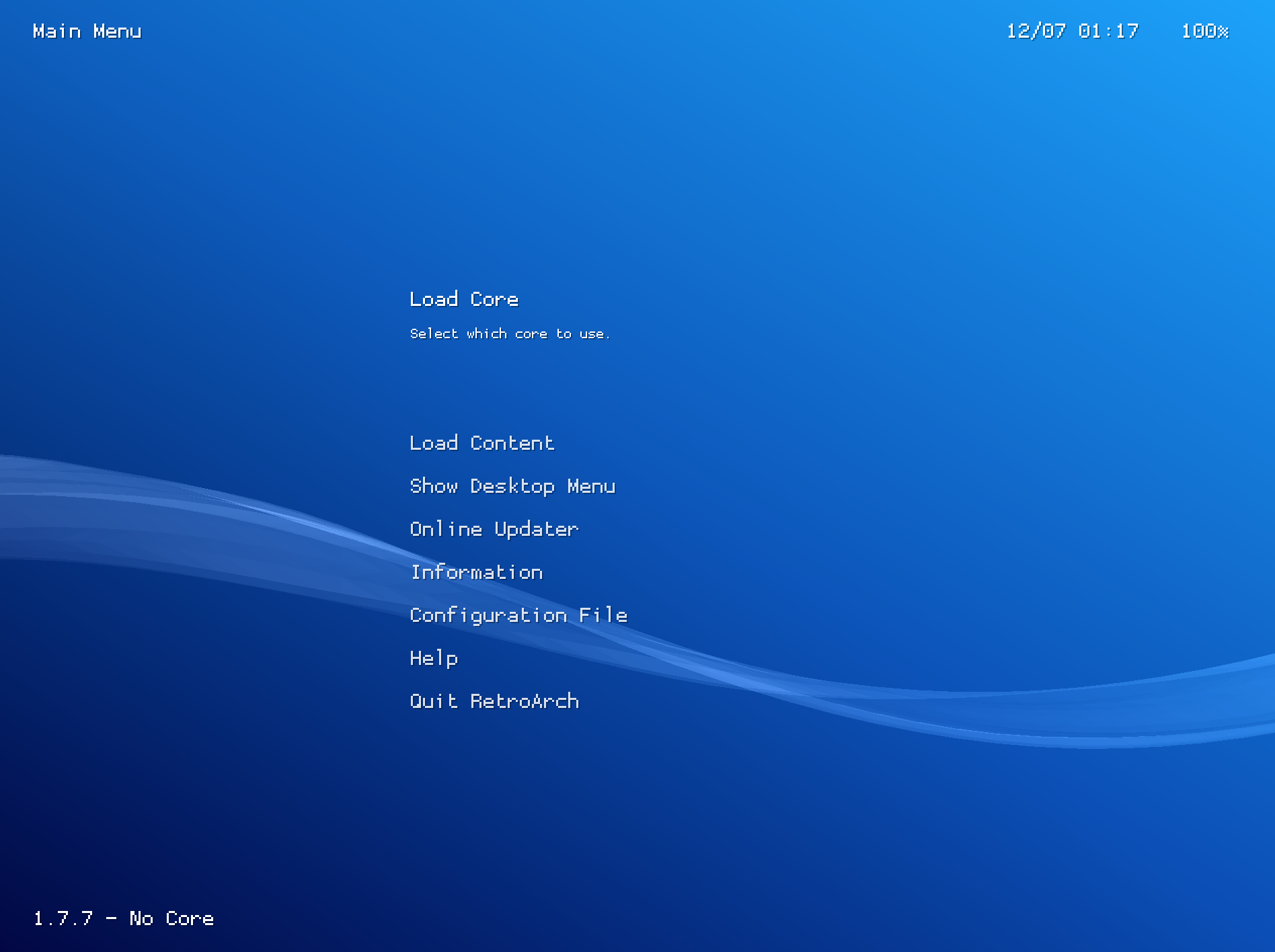
After updating the assets it looks just like the first image posted of the garbled text.
 antiquechrono
on 12 Jul 2019
antiquechrono
on 12 Jul 2019
Experiencing the exact same issue on a freshly downloaded copy of the stable that the main retroarch site recommends. Persists across relaunches.
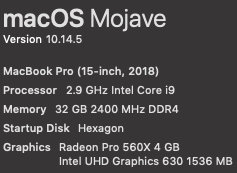
 appleguy
on 14 Jul 2019
appleguy
on 14 Jul 2019
It sucks that I can't reproduce this at all. Can anybody help here with some OSX experience? Can we bounty incentivize it? This is especially important now that Metal is going to become the only video driver moving forward on modern MacOS.
twinaphex
on 14 Jul 2019
I put August's bounty money towards this goal. It starts out at $100.
twinaphex
on 14 Jul 2019
I see the same blocky text on iMac 2019 with Vega 48 GPU. On iMac 2015 (R9 M395 GPU) menu text is OK (although notifications are blocky).
Both are run under macOS 10.14.5.
 zlib
on 14 Jul 2019
zlib
on 14 Jul 2019
Might be an AMD issue, my MBP has an Nvidia card and iGP and I've had no issues with text using either one.
CatGreen90
on 14 Jul 2019
So can every person here who experiences this issue confirm that t hey have a Mac with a Radeon GPU?
twinaphex
on 15 Jul 2019
Yes, I can confirm.
I have and AMD Radeon Pro 450 on my MacBook Pro 2,6 GHz Intel Core i7.
illando
on 15 Jul 2019
I can confirm this on an iMac 18,3 with a Radeon Pro 580.
The problem appears to be with STB_FONT. If I disable STB_FONT and re-enable Core Text (by reverting the changes from 49f5e6e) the problem seems to go away.
I'm not sure why STB_FONT renders that way, I can only see that removing it seems to fix the issue.
Diff:
diff --git a/pkg/apple/BaseConfig.xcconfig b/pkg/apple/BaseConfig.xcconfig
index 6f7adc9602..d8ba8a29e3 100644
--- a/pkg/apple/BaseConfig.xcconfig
+++ b/pkg/apple/BaseConfig.xcconfig
@@ -4,7 +4,7 @@
 //
 //  Created by Stuart Carnie on 5/10/18.
 //
-OTHER_CFLAGS = $(inherited) -DHAVE_RUNAHEAD -DHAVE_GRIFFIN -DHAVE_FLAC -DHAVE_DR_FLAC -DHAVE_DR_MP3 -DHAVE_LROUND -DFLAC__HAS_OGG=0 -DHAVE_CHD -DHAVE_STB_VORBIS -DHAVE_MINIUPNPC -DHAVE_BUILTINMINIUPNPC -DHAVE_UPDATE_ASSETS -DHAVE_LANGEXTRA -DRC_DISABLE_LUA -DHAVE_CHEEVOS -DHAVE_IMAGEVIEWER -DHAVE_IOHIDMANAGER -DHAVE_STB_FONT -DHAVE_RGUI -DHAVE_MENU -DHAVE_MENU_WIDGETS -DOSX -DHAVE_CC_RESAMPLER -DHAVE_GLSL -DINLINE=inline -D__LIBRETRO__ -DHAVE_COREAUDIO -DHAVE_DYNAMIC -DHAVE_OVERLAY -DHAVE_ZLIB -DHAVE_RPNG -DHAVE_RJPEG -DHAVE_RBMP -DHAVE_RTGA -DHAVE_NETWORKGAMEPAD -DHAVE_NETWORKING -DHAVE_NETPLAYDISCOVERY -DRARCH_INTERNAL -DHAVE_THREADS -DHAVE_DYLIB -DHAVE_7ZIP -DHAVE_MATERIALUI -DHAVE_HID -DHAVE_XMB -DHAVE_SHADERPIPELINE -DHAVE_MMAP -DHAVE_LIBRETRODB -DHAVE_GETOPT_LONG -DHAVE_METAL -DHAVE_COCOA_METAL -DHAVE_SLANG -DHAVE_GLSLANG -DHAVE_SPIRV_CROSS -DWANT_GLSLANG -DENABLE_HLSL -DGLSLANG_OSINCLUDE_UNIX -DMETAL_DEBUG -DHAVE_OPENGL -DHAVE_OZONE -DHAVE_EASTEREGG -DHAVE_GIT_VERSION -DHAVE_COREAUDIO3 -DHAVE_AUDIOMIXER
+OTHER_CFLAGS = $(inherited) -DHAVE_RUNAHEAD -DHAVE_GRIFFIN -DHAVE_FLAC -DHAVE_DR_FLAC -DHAVE_DR_MP3 -DHAVE_LROUND -DFLAC__HAS_OGG=0 -DHAVE_CHD -DHAVE_STB_VORBIS -DHAVE_MINIUPNPC -DHAVE_BUILTINMINIUPNPC -DHAVE_UPDATE_ASSETS -DHAVE_LANGEXTRA -DRC_DISABLE_LUA -DHAVE_CHEEVOS -DHAVE_IMAGEVIEWER -DHAVE_IOHIDMANAGER -DHAVE_CORETEXT -DHAVE_RGUI -DHAVE_MENU -DHAVE_MENU_WIDGETS -DOSX -DHAVE_CC_RESAMPLER -DHAVE_GLSL -DINLINE=inline -D__LIBRETRO__ -DHAVE_COREAUDIO -DHAVE_DYNAMIC -DHAVE_OVERLAY -DHAVE_ZLIB -DHAVE_RPNG -DHAVE_RJPEG -DHAVE_RBMP -DHAVE_RTGA -DHAVE_NETWORKGAMEPAD -DHAVE_NETWORKING -DHAVE_NETPLAYDISCOVERY -DRARCH_INTERNAL -DHAVE_THREADS -DHAVE_DYLIB -DHAVE_7ZIP -DHAVE_MATERIALUI -DHAVE_HID -DHAVE_XMB -DHAVE_SHADERPIPELINE -DHAVE_MMAP -DHAVE_LIBRETRODB -DHAVE_GETOPT_LONG -DHAVE_METAL -DHAVE_COCOA_METAL -DHAVE_SLANG -DHAVE_GLSLANG -DHAVE_SPIRV_CROSS -DWANT_GLSLANG -DENABLE_HLSL -DGLSLANG_OSINCLUDE_UNIX -DMETAL_DEBUG -DHAVE_OPENGL -DHAVE_OZONE -DHAVE_EASTEREGG -DHAVE_GIT_VERSION -DHAVE_COREAUDIO3 -DHAVE_AUDIOMIXER

 SRCBASE  = $(SRCROOT)/../..
 DEPS_DIR = $(SRCBASE)/deps
 cold-brewed
on 15 Jul 2019
cold-brewed
on 15 Jul 2019
The problem with CoreText is that the current implementation driver in RetroArch for CoreText doesn't support Unicode, and therefore, all sorts of languages won't render properly with it. Therefore, unless somebody adds support for that, it's not really a good solution at all to go back to that.
Instead, the bug should be fixed on the Stb side.
twinaphex
on 15 Jul 2019
Agreed. I thought I would leave that here as a data point in case it helps someone track down the root cause.
cold-brewed
on 15 Jul 2019
Same issue.
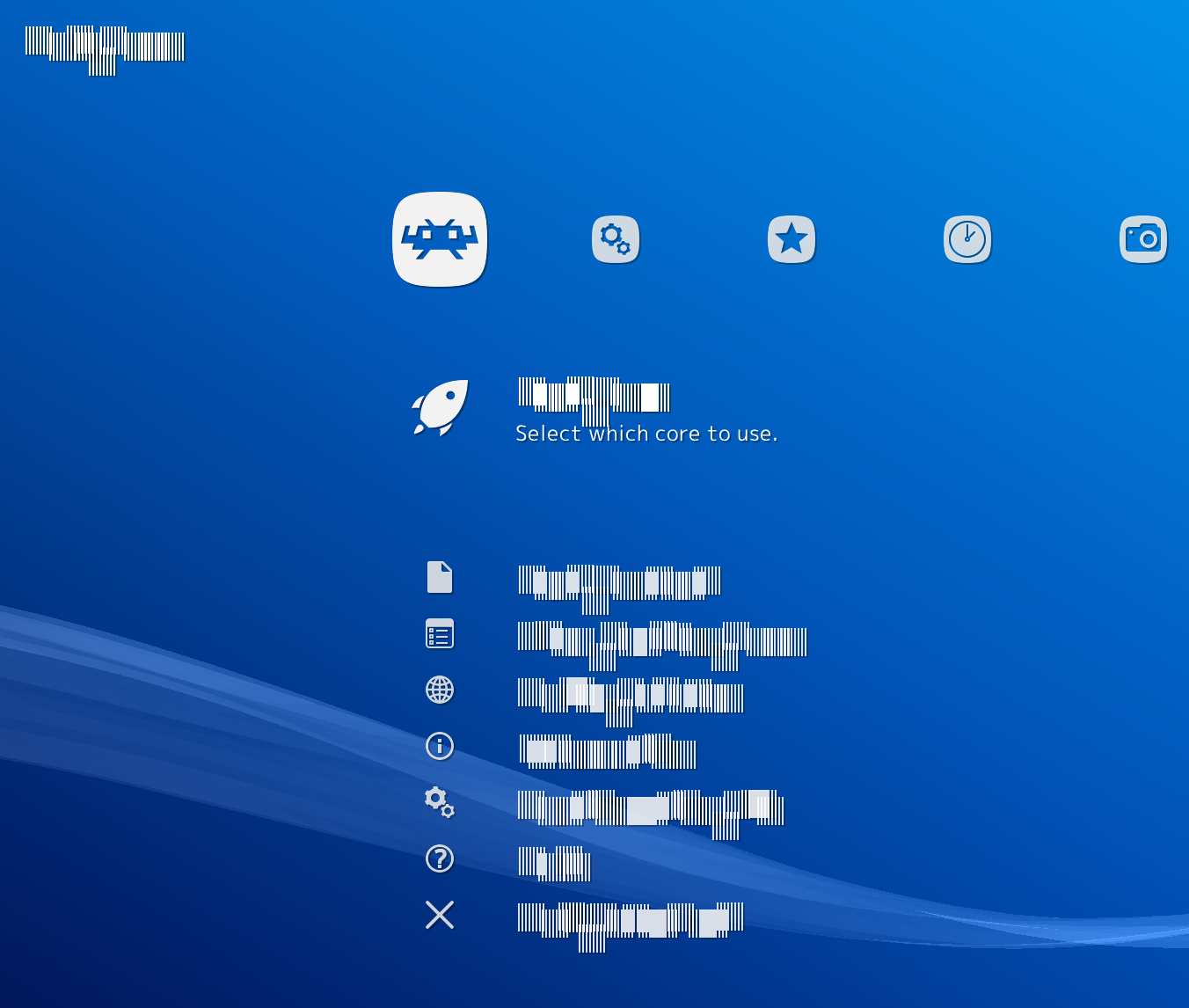
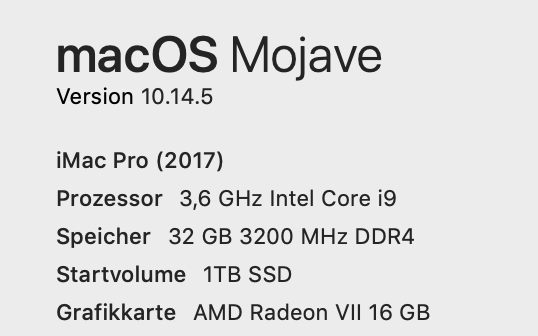
 XevDoc
on 15 Jul 2019
XevDoc
on 15 Jul 2019
Maybe the problem is not related to the font or the Unicode support, because I noticed that resizing the RetroArch window temporarily solves it till the next launch of a rom. Can somebody else with Radeon GPU try to launch RetroArch in window mode and resize the window when the blocky text appears?
illando
on 16 Jul 2019
Resizing the window does make the text reappear for me. However, it only works when I resize it horizontally, and beyond a certain threshold (10-20 or so pixels?). Vertical resizing has no effect.
Additionally, even when the text is temporarily fixed, the notification text is still blocky. Resizing doesn't seem to affect the notifications.
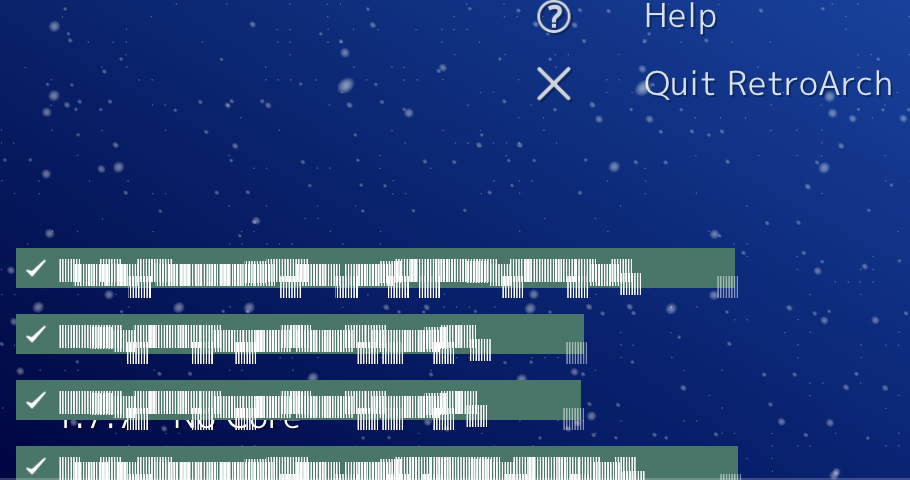
cold-brewed
on 16 Jul 2019
Same as @cold-brewed
XevDoc
on 16 Jul 2019
Considering that resizing seems to fix the issue, is the team open to a temporary workaround that automatically invalidates & redraws the buffers that CoreText is drawing into?
Is it possible that the initial layout is incorrect and the buffers are allocated at the wrong size for how they are ultimately displayed?
In any case, it seems like one good path to debugging would be determining exactly why resizing the window can fix the issue.
appleguy
on 21 Jul 2019
As suggested from @firelad97 a quick workaround is to change the font scale of menu and notification, save config, restart, and the blocky text should disappear.
Here are some step-by-step instructions:
- Resize horizontally RetroArch window to temporally visualise the font.
- Go to "Settings > User Interface"> Appearance" and change "Menu Scale Factor" to 99
- Go to "Settings > On Screen Display > On Screen Notifications" and change "Notifications Size" to 30.0
- Go to "Main Menu > Configuration File > Save Current Configuration
- Quit RetroArch and restart.
illando
on 9 Aug 2019
We are open to any programmatic solution/workaround, yes. The main issue is that this only seems reproducible on AMD GPUs.
twinaphex
on 9 Aug 2019
I was trying to debug this issue and found that the font texture is corrupted beyond the first few lines:
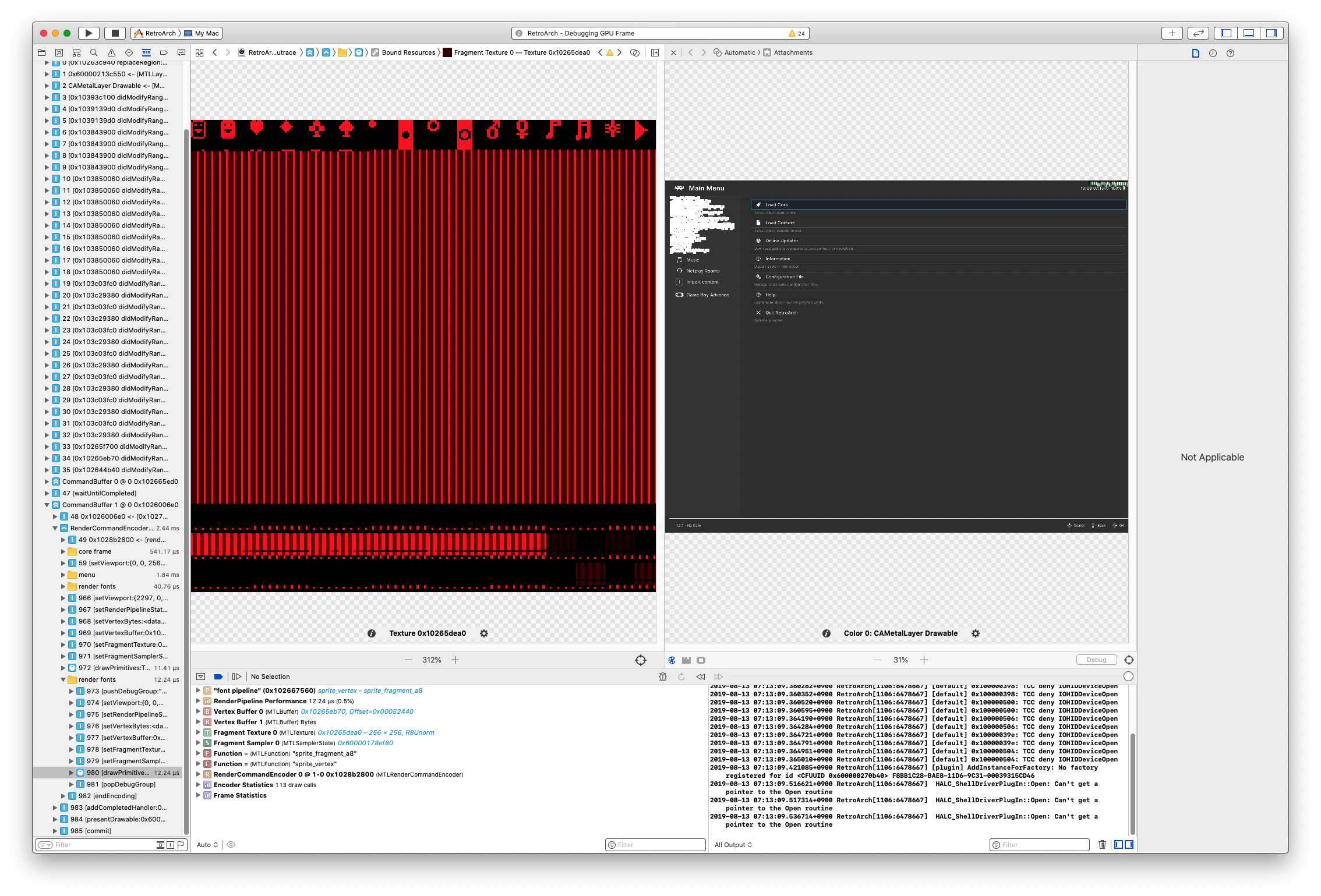
(That looks like uninitialized data)
I then inspected the raw buffer data of atlas but they are actually correct:

So I tried to insert some code to inspect the texture after it's being created (gfx/drivers_font/metal_raster_font.m:104):
      _texture = [_buffer newTextureWithDescriptor:td offset:0 bytesPerRow:_stride];
+     CIContext *ctx = [[CIContext alloc] initWithOptions:@{kCIContextUseSoftwareRenderer: [[NSNumber alloc] initWithBool:NO]}];
+     CIImage *image = [[CIImage alloc] initWithMTLTexture:_texture options:NULL];
+     struct CGImage *cgimage = [ctx createCGImage:image fromRect:image.extent];
      _capacity = 12000;
...then the font issue is gone.
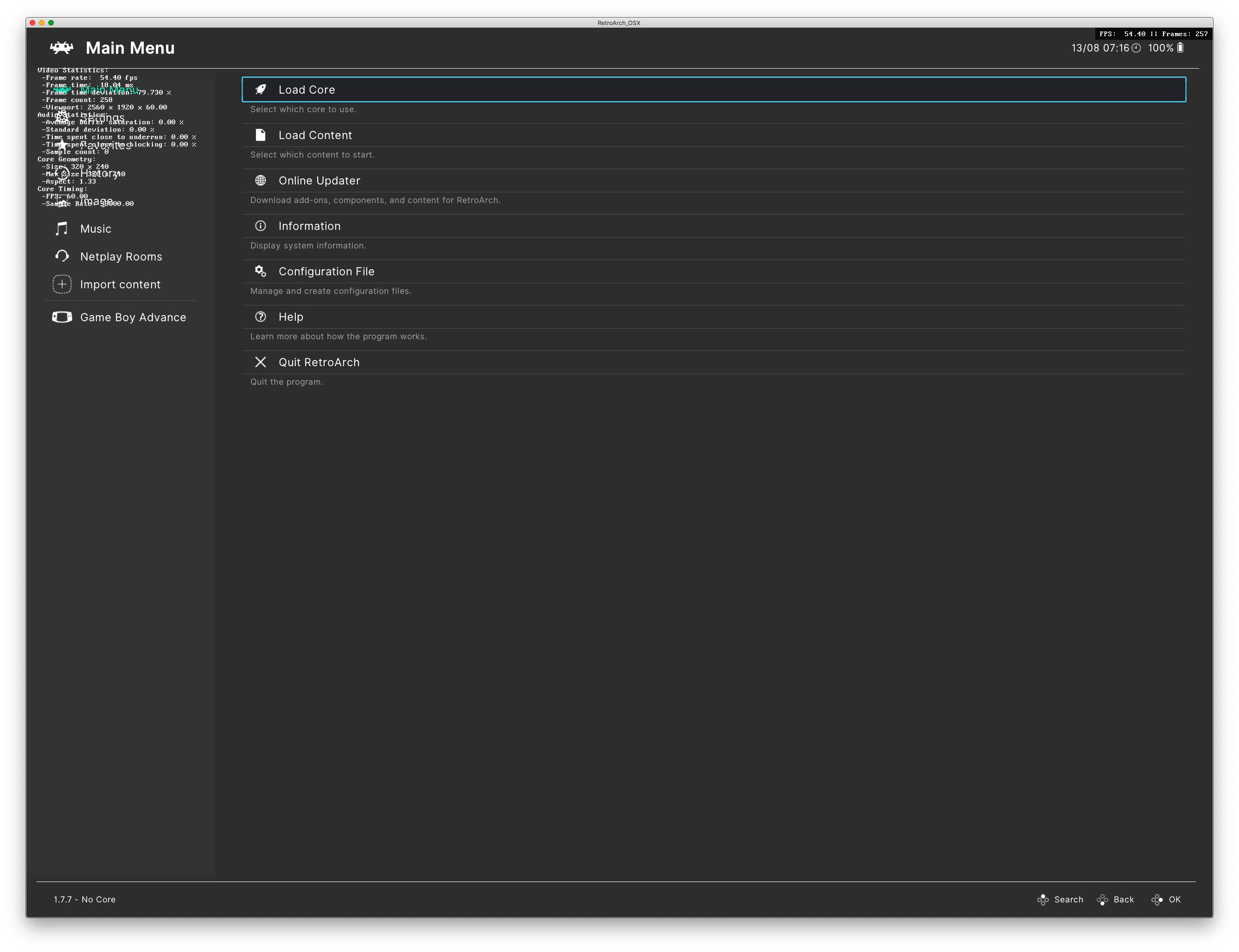
(note the scrambled text on the first image)
I'm not sure what's actually happening here...
EDIT: tried with xmb and it's also good.
 HarukaMa
on 13 Aug 2019
HarukaMa
on 13 Aug 2019
Can confirm, macOS 0.14.6, AMD Radeon R9 M370X 2 GB.
Resizing the window temporarily fixes the issue.
The rgui menu is completely broken, just shows a black/empty window, even after resizing.
 torarnv
on 1 Sep 2019
torarnv
on 1 Sep 2019
@HarukaMa So what do you recommend? We just add that bit of code in there to work around the issue for now? Since I don't have a Mac with an AMD GPU and it seems anybody other than yourself with any programming skills and the ability to fix this doesn't either.
twinaphex
on 1 Sep 2019
I suspect the CGImage trick will have a hefty performance penalty due to the texture readback, unless CGImage is smart enough to only do the read if the data is accessed.
Edit: Unless that piece of code only happens each time the glyph cache is re-generated?
torarnv
on 1 Sep 2019
Resizing the window does make the text reappear for me. However, it only works when I resize it horizontally, and beyond a certain threshold (10-20 or so pixels?). Vertical resizing has no effect.
This is interesting, and would be a good avenue to figure out what's going wrong. Is the glyph cache re-created at certain window sizes?
torarnv
on 1 Sep 2019
@torarnv Yeah if it's called only from the 'init' function, then it will only be called during initialization I believe. Try to confirm if this is the case.
twinaphex
on 1 Sep 2019
Yeah if it's called only from the 'init' function, then it will only be called during initialization I believe.
Makes sense.
Looking at the code, is the stride/atlas-width code correct?
Could it be that we're hitting one of those two code paths causing blocky text while the other works fine?
torarnv
on 1 Sep 2019
I didn't write the code so I wouldn't know. Only @stuartcarnie would know.
twinaphex
on 1 Sep 2019
I'm looking at this now, the stride seems to be the issue.
torarnv
on 1 Sep 2019
Please verify whether the latest nightly fixes this issue:
http://buildbot.libretro.com/nightly/apple/osx/x86_64/RetroArch.dmg
torarnv
on 1 Sep 2019
Hi there guys,
have people tested the latest nightly by now to see if the issue is resolved on their end?
twinaphex
on 6 Sep 2019
@twinaphex Tested now. I can confirm it is solved!
Thanks a lot!!!
illando
on 7 Sep 2019
Related issues
 alki-apps
·
3Comments
alki-apps
·
3Comments
 wrldwzrd89
·
3Comments
wrldwzrd89
·
3Comments
 Chocobubba
·
3Comments
Chocobubba
·
3Comments
 rrooij
·
3Comments
rrooij
·
3Comments
 GoronMegaZord
·
3Comments
GoronMegaZord
·
3Comments