Retroarch: Android - defaults to XMB menu
First and foremost consider this:
- Only RetroArch bugs should be filed here. Not core bugs or game bugs
- This is not a forum or a help section, this is strictly developer oriented
Description
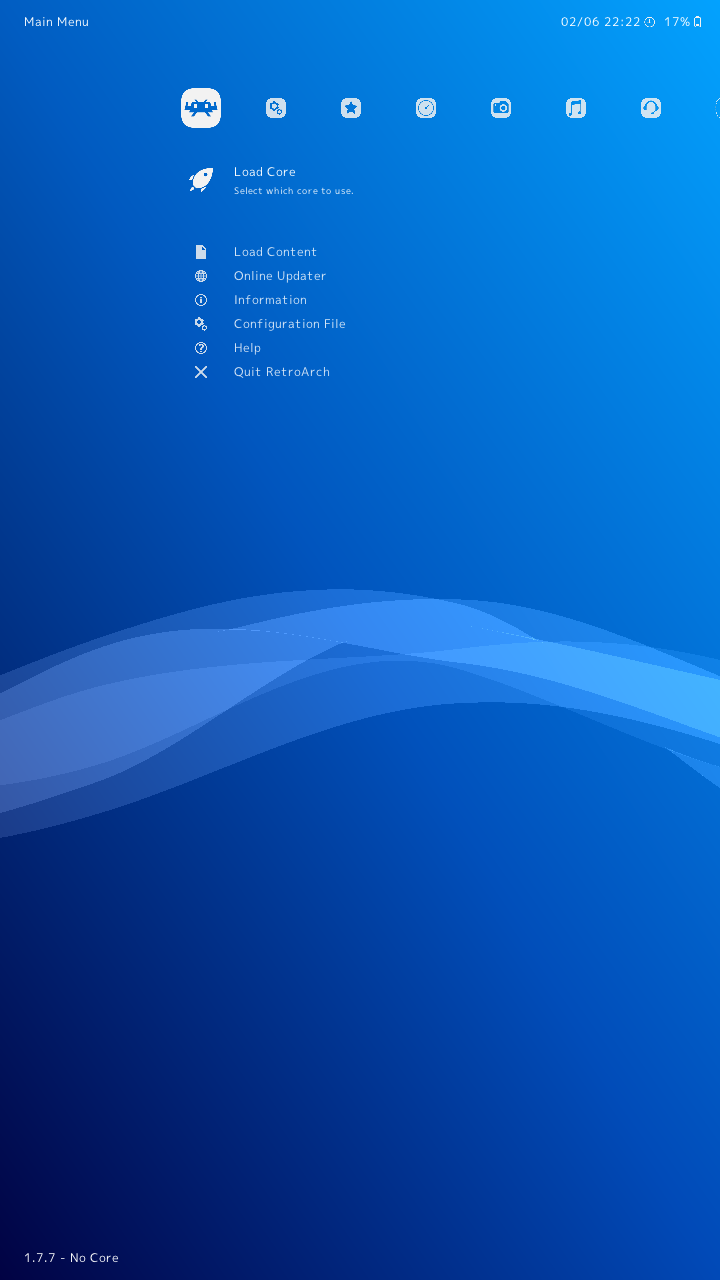
After install of Retroarch, on start the app displays the desktop menu (XMB) rather than the Android menu (MaterialUI). The screenshot does not reflect this, but it is very small on the screen of my phone, and difficult to make out the text.
Compounding the problem is the fact that whatever overlay buttons are supposed to be used to navigate are completely invisible. By randomly tapping on different portions of the screen I have been able to accidentally move between options, but I have not been able to successfully navigate into any of the configuration options to be able to change the default menu.
Expected behavior
See the MaterialUI menu
Actual behavior
See the XMB menu
Steps to reproduce the bug
- Install RetroArch
- Open RetroArch
- See wrong menu
Bisect Results
This became an issue for me late last month when I re-flashed my build of LineageOS. Prior to this my installation of RetroArch was working flawlessly - I believe I originally installed 1.7.6, then upgraded to 1.7.7 after its release (with no issues). After flashing, I reinstalled RetroArch 1.7.7 from scratch, which is when I first experienced this troublesome behavior.
Version/Commit
You can find this information under Information/System Information
- RetroArch: 1.7.7
Environment information
-Device: Moto G4 Play
-OS: LineageOS 14.1-20190210-NIGHTLY-harpia (Android 7.1.2)
 foolishgrunt
All 12 comments
You don't mention what kind of device this is, but RA by design tries to detect that the device is a phone before switching to materialui.
 bparker06
on 6 Jun 2019
bparker06
on 6 Jun 2019
You're right that I forgot to mention the device. Updated to reflect that it's a Moto G4 Play.
I can assure you that this is definitely a phone. Are there any log files I can provide that would help isolate why it's not being identifies as such?
More immediately, is there a workaround I can use to actually navigate, so that I can select a different interface?
foolishgrunt
on 7 Jun 2019
you could use a gamepad temporarily.
On Thu, Jun 6, 2019 at 9:33 PM foolishgrunt notifications@github.com
wrote:
You're right that I forgot to mention the device. Updated to reflect that
it's a Moto G4 Play.I can assure you that this is definitely a phone. Are there any log files
I can provide that would help isolate why it's not being identifies as such?More immediately, is there a workaround I can use to actually navigate, so
that I can select a different interface?—
You are receiving this because you are subscribed to this thread.
Reply to this email directly, view it on GitHub
https://github.com/libretro/RetroArch/issues/8906?email_source=notifications&email_token=AANEFUBGD6MD4GBOYKPXJZ3PZHCIZA5CNFSM4HSE2YVKYY3PNVWWK3TUL52HS4DFVREXG43VMVBW63LNMVXHJKTDN5WW2ZLOORPWSZGODXEWBHQ#issuecomment-499736734,
or mute the thread
https://github.com/notifications/unsubscribe-auth/AANEFUGKZCXN2IO7AZLXT7LPZHCIZANCNFSM4HSE2YVA
.
 fr500
on 7 Jun 2019
fr500
on 7 Jun 2019
Problem is this line:
https://github.com/libretro/RetroArch/blob/master/frontend/drivers/platform_unix.c#L574
It was introduced at this commit:
https://github.com/libretro/RetroArch/commit/6044044852f6c8358cf5f0b87561e46017b8acff
fr500
on 7 Jun 2019
OK, so it's unintentionally identifying 'Play' (as a substring) and then defaulting it to XMB. Guess we need a special exception for this device then.
 twinaphex
on 7 Jun 2019
twinaphex
on 7 Jun 2019
OK, so it's unintentionally identifying 'Play' (as a substring) and then defaulting it to XMB. Guess we need a special exception for this device then.
There are a good handful of Motorola devices that carry the name 'Play':
https://en.wikipedia.org/wiki/Motorola_Moto
foolishgrunt
on 7 Jun 2019
I also have a G4 Play (running Android 9 though) and the issue also happens here.
I was able to workaround it by using a file explorer and navigating to Internal Storage > Android > data > com.retroarch > files > retroarch.cfg and changing menu_driver to glui
 LiveLM
on 24 Jun 2019
LiveLM
on 24 Jun 2019
I was able to workaround it by using a file explorer and navigating to
Internal Storage > Android > data > com.retroarch > files > retroarch.cfgand changingmenu_drivertoglui
I had this idea as well, but hadn't taken the time yet to figure out which line item needed editing.
Anyway, confirmed that this workaround works.
foolishgrunt
on 24 Jun 2019
I'll takeout that line 'Play' then, since Xperia Play is already identified by the prior two strings anyway.
twinaphex
on 24 Jun 2019
Done. The next nightly should have these changes.
twinaphex
on 24 Jun 2019
@foolishgrunt Can you confirm if the recent nightlies fixed this for you?
twinaphex
on 29 Sep 2019
I cleared data, uninstalled, and reinstalled 1.7.8_git from Google Play. The issue is fixed for me.
foolishgrunt
on 30 Sep 2019
Related issues
 rrooij
·
3Comments
rrooij
·
3Comments
 ghost
·
3Comments
ghost
·
3Comments
 parkerlreed
·
3Comments
parkerlreed
·
3Comments
 RobLoach
·
3Comments
RobLoach
·
3Comments
 blackman91
·
3Comments
blackman91
·
3Comments
Most helpful comment
Done. The next nightly should have these changes.