Retroarch: Wii : Wrong colours in menu
Description
The colours are wrong as you can see :

Bisect Results
It started with this commit : https://github.com/libretro/RetroArch/pull/7779/commits/f603d4ec302769ffd89e3659e126f29d07460aa9
Version/Commit
I've tested the nightly and also compiled the latest commit: db36f08920774ec07da26d47a467b61ed7e2c59a
Suggested Fix
The Wii has a special RGB5A3 format.
http://wiki.tockdom.com/wiki/Image_Formats
https://craftedcart.github.io/SMBLevelWorkshop/documentation/index.html?page=tplFormat12
So maybe, add a GEKKO ifdef seperate from PSP https://github.com/libretro/RetroArch/blob/master/menu/drivers/rgui.c#L429:
static uint16_t argb32_to_rgb5a3(uint32_t col)
{
unsigned a = ((col >> 24) & 0xff) >> 5;
unsigned r = ((col >> 16) & 0xff) >> 4;
unsigned g = ((col >> 8) & 0xff) >> 4;
unsigned b = ((col & 0xff) ) >> 4;
return (a << 12) | (r << 8) | (g << 4) | b;
}
I've tested this code and it seems to work. But, I'm not 100% sure it's correct...
 Wiimpathy
All 19 comments
@jdgleaver Any help you can provide would be appreciated!
 orbea
on 9 Jan 2019
orbea
on 9 Jan 2019
Hi there @jdgleaver,
now we finally have confirmation that the current colours aren't working out for Wii.
I believe @Wiimpathy provided a solution above, try to see if you can commit that. You can use a GEKKO ifdef for it.
 twinaphex
on 9 Jan 2019
twinaphex
on 9 Jan 2019
@jdgleaver @Wiimpathy pushed this commit -
https://github.com/libretro/RetroArch/commit/60533b10b7f613859a40a7b20a32ab83fa88b6c9
@Wiimpathy Can you test if this works for you? Thanks in advance.
twinaphex
on 9 Jan 2019
@twinaphex Sorry I missed this yesterday - I don't always have internet access! Thanks for pushing the commit (it looks good to me).
@Wiimpathy Thank you so much for reporting this, and for providing a fix! None of us knew the correct pixel format for the Wii, so the recent updates relied upon the scheme defined in some old (and apparently misleading) legacy code. Now we can finally handle all platforms correctly.
Just for completeness, I'll run a quick simulation to check whether the limited alpha precision will have any discernable negative effect on background/border colours. If so, I'll try to wrangle a workaround.
 jdgleaver
on 10 Jan 2019
jdgleaver
on 10 Jan 2019
Yes, it's working, the colors are good. It's a little brighter than before but it's not a problem since we can change the gamma in the settings.
However, there's a bug related to gamma setting. The value is not saved since it's using a bool (config_set_bool) instead of int. I'll send a fix when I have time.
Wiimpathy
on 10 Jan 2019
Ah OK, glad to hear. Will be looking forward to that fix for the gamma setting.
twinaphex
on 10 Jan 2019
Okay, I've determined that the background and border colours on Gekko platforms are ~7% brighter than intended (due to the difference in alpha precision). I'm going to make a PR that should (hopefully) fix this.
jdgleaver
on 10 Jan 2019
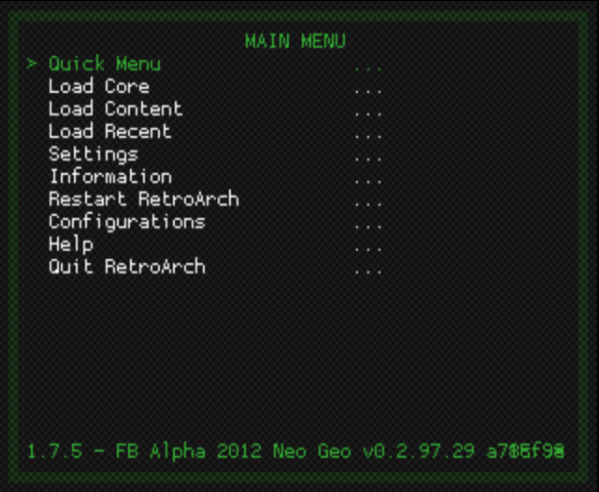
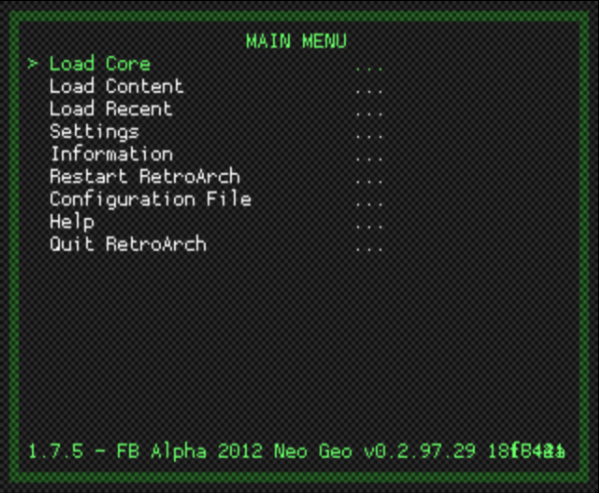
Tested on real hardware and it's almost the same brightness as before. It's still a bit brighter. Screenshots made with Dolphin :
Before Custom Colours
Now with your gamma improvement
Wiimpathy
on 10 Jan 2019
Great, thanks for testing this. Yes, the ~7% difference in brightness is subtle - but your screenshot shows that you're now getting the same colours as on all the other platforms (or as close as it's possible to get).
I think the underlying issue is that menus on the Wii were always too dark! The previous colours were some arcane, hard-coded legacy values which didn't really tally with anything (when I first started to add full colour customisation, I couldn't make any sense of these values at all...). Now all platforms are equal, which I think is a good thing...?
If you don't like the brighter green colours, please do check out the new themes under 'Settings > User Interface > Appearance'. There are 32 to choose from, with varying brightness, contrast and hue levels.
If you still don't like any of the new themes, please feel free to make suggestions! I would be happy to add more presets to the menu.
jdgleaver
on 10 Jan 2019
fwiw I agree that the first screenshot is too dark and the new one looks much better, but I don't have a wii...
orbea
on 10 Jan 2019
Yes, it's a good feature for those who want to customize the Gui. I guess there are enough presets to make everyone happy. I played with the menu_bg and menu_border values too and it's very close to what it was. There's also a gamma setting...
You're right it was a bit dark but not so much on TV. In fact, back in 1.2, the text was brighter and a bit clearer (or is it just my eyes?):

Wiimpathy
on 10 Jan 2019
Yes, its a slightly different shade of white, with the screenshot of the master I am getting #F5F5F5 while with 1.2 I am getting #FFFFFF. I think its extra noticeable because 1.2 also has a much higher contrast.
orbea
on 10 Jan 2019
Hmm! It looks like you have linear filtering turned on in the 1.7.5 screenshot, and off in the 1.2.2 screenshot. That would certainly explain the difference in text clarity (and probably the different white levels too).
Does the current Wii build have the option to turn linear filtering off under 'Settings > User Interface > Appearance'?
jdgleaver
on 10 Jan 2019
Yes, there's a bilinear filter setting. I don't remember if this 1.2.2 custom build had this setting to Off by default.
But, with or without this filter, it's more white and clear on this old release.
Wiimpathy
on 10 Jan 2019
Yes, there's a bilinear filter setting. I don't remember if this 1.2.2 custom build had this setting to Off by default.
I tried to disable Bilinear Filter by default... It hurts my eyes and makes everything look like soup. There are people who love it, but that's nay I.
 RobLoach
on 10 Jan 2019
RobLoach
on 10 Jan 2019
You're right, the bilinear filter is particularly blurry on Wii too. However, the real advantage of this platform is the '240p' mode or native resolutions. It's very close to the original on CRT(with real scanlines) or with OSSC + LCD screen.
Wiimpathy
on 11 Jan 2019
Yes, there's a bilinear filter setting. I don't remember if this 1.2.2 custom build had this setting to Off by default.
But, with or without this filter, it's more white and clear on this old release.
Oh! That actually smells like a bug, then.
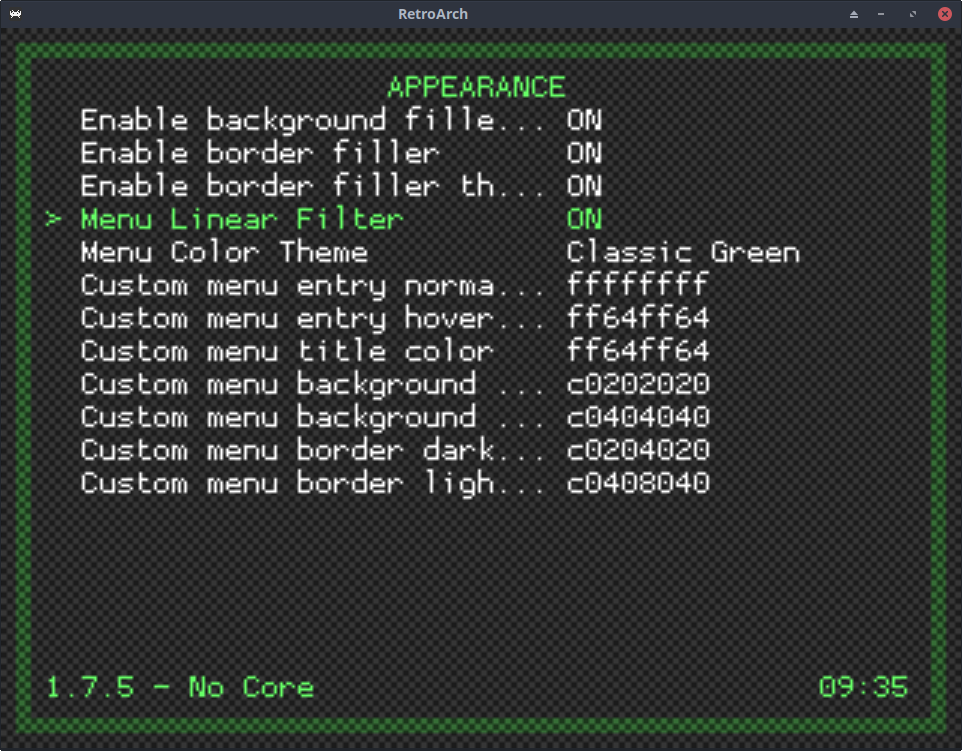
This is what RGUI looks like on Linux (you'll need to view these full size for a proper comparison):
- Menu linear filter ON (blurry and horrible, like your 1.7.5 screenshot):
- Menu linear filter OFF (sharp and clear, like your 1.2.2 screenshot):
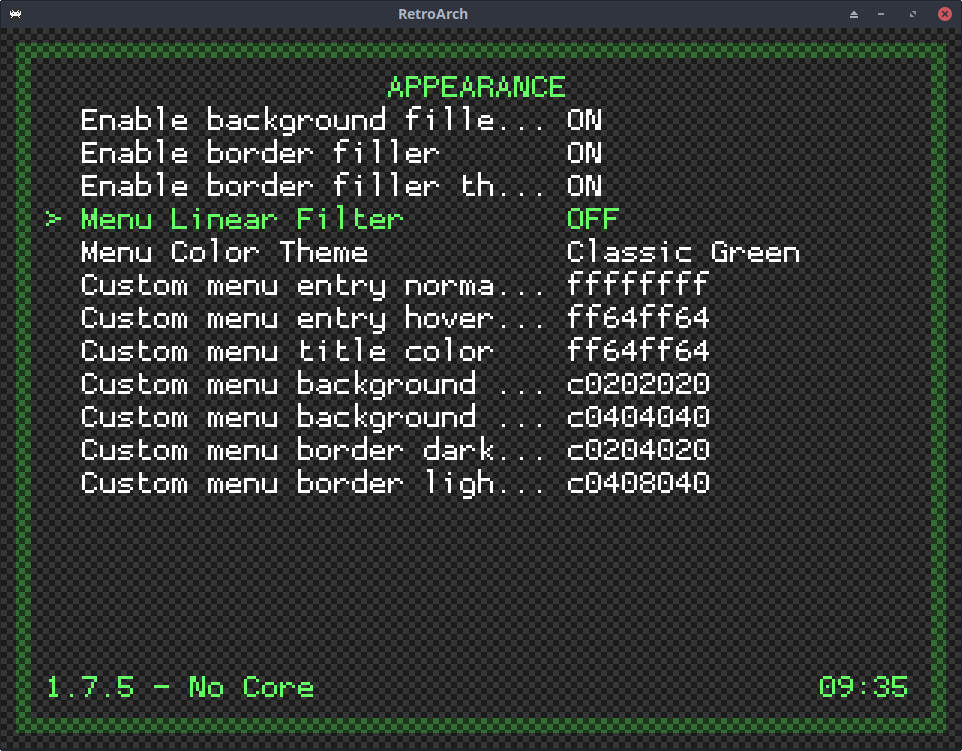
If the Wii ignores this setting, perhaps it's a platform gfx driver issue...?
jdgleaver
on 11 Jan 2019
Please disregard my comment about this 1.2 being clearer. It was a custom build I made with bilinear always Off. Also, note that screenshots are made with Dolphin. Perhaps, it doesn't reflect exactly what it looks like on Wii and TV. That'd be cool if someone else could test it on real hardware because my eyes start to bleed...
Personnally, I think it's good as it is now.
Wiimpathy
on 11 Jan 2019
Personnally, I think it's good as it is now.
I guess we can close this, if anyone tries it on real hardware and thinks it could be further improved please let us know!
orbea
on 2 Feb 2019
Related issues
 fr500
·
3Comments
fr500
·
3Comments
 meepingsnesroms
·
4Comments
meepingsnesroms
·
4Comments
 rrooij
·
3Comments
rrooij
·
3Comments
 hyarsan
·
4Comments
hyarsan
·
4Comments
 Chocobubba
·
3Comments
Chocobubba
·
3Comments
Most helpful comment
Please disregard my comment about this 1.2 being clearer. It was a custom build I made with bilinear always Off. Also, note that screenshots are made with Dolphin. Perhaps, it doesn't reflect exactly what it looks like on Wii and TV. That'd be cool if someone else could test it on real hardware because my eyes start to bleed...
Personnally, I think it's good as it is now.