Retroarch: [Meta] Ozone menu driver
What needs to be done before having it enabled by default :
- [x] Implement missing features
- [x] Console tabs (+ sidebar scrolling)
- [x] OSK
- [x] Messagebox / dialogs
- [x] Fix multiline sublabels + add word wrapping (like materialui)
- [x] Battery display and icon
- [x] Fix Japanese, Korean and Chinese languages
- [x] Fix floats issues on Switch
- [x] Theme selection and override (light or dark is detected on the Switch depending on system theme, defaults to light on other platforms)
- [x] Define
HAVE_OZONEon all relevant platforms, addHAVE_OZONE=autoinconfig.params.sh, always enable it inMakefile.common - [x] Set ozone back as default menu driver for libnx platform in
configuration.c
Planned features :
- [ ] Touch and mouse support
- [ ] Android layout (and darker theme ?)
- [ ] Collapsible sidebar with hamburger button
- [ ] Hide bottom right buttons indication
- [ ] Playlists layout and thumbnails (grid layout)
- [x] Screen DPI scaling instead of naive responsiveness
- [ ] Fully dynamic hint bar with all RetroPad buttons
- [ ] Add Y and X keys
Fancy shaders / menu display improvements :
- [x] Waving border color
- [ ] Blur (for playlists layout)
- [x] Rounded rectangle cursor
- [x] Box shadow around cursor
- [ ] Fix the slice texture glitch on everything but gl
- [ ] Implement scissoring in all menu display drivers (GX2/3DS/Vita still missing)
 natinusala
All 21 comments
Tried this out, and it's great! Very clear, and easy to understand what you're looking at. Looking forward to seeing how this evolves :+1:
 RobLoach
on 29 Oct 2018
RobLoach
on 29 Oct 2018
@RobLoach make sure you try the dark theme too, it really is great.
 m4xw
on 29 Oct 2018
m4xw
on 29 Oct 2018
When I set language to english, it works fine with ozone.
But fonts are crashing if I set it to korean.
https://ibb.co/kOxSsq
xmb is working fine with korean lang.
 uaevuon
on 7 Nov 2018
uaevuon
on 7 Nov 2018
@newget this is a known issue, let me add it to the list
natinusala
on 7 Nov 2018
It's usable but Korean is not fully fixed yet.
It displays korean well in submenu, but not in header title.
Might be bold font problem?
uaevuon
on 11 Nov 2018
natinusala
on 13 Nov 2018
Cheevos badges are now fixed, thanks for reporting
natinusala
on 19 Nov 2018
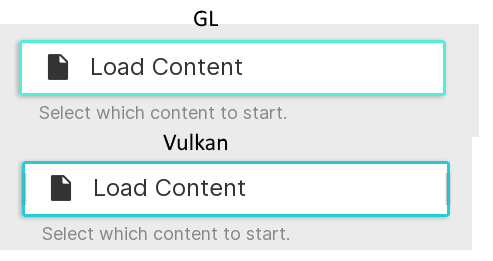
Drop shadow issue with the selector under Vulkan:
 Awakened0
on 21 Nov 2018
Awakened0
on 21 Nov 2018
menu_display_draw_texture_slice is the culprit here. Unfortunately I don't own any PC compatible with Vulkan at the moment, I'm limited to GL as far as my testing goes. Maybe someone who knows Vulkan can look into that ?
natinusala
on 21 Nov 2018
How long before thumbnails are implemented? It's the only reason I haven't made the switch
 zacly
on 21 Nov 2018
zacly
on 21 Nov 2018
I first need to add scaling support. For scaling support I need to replace all the hardcoded metrics by actual variables and calculations.
So, not soon.
natinusala
on 21 Nov 2018
I keep getting this missing asset error when using ozone on Windows nightlies despite updating my assets (just tested ac04c1bfc5ebba847557309aa6c55a55e0c05016):
[WARN] [OZONE] Asset missing: F:\Blue\Emulation\Emulators\RetroArch\assets\ozone\png\.png
[WARN] [OZONE] Assets missing
Awakened0
on 9 Jan 2019
I wondered because it only recently appeared and I didn't touch ozone for a while now. I will fix it before starting working back on it, so no rush
natinusala
on 10 Jan 2019
scissor was added to d3d9/10/11 FYI
 bparker06
on 28 Jan 2019
bparker06
on 28 Jan 2019
This will be my default when the DPI fix is in place. Amazing work. Right now I'd need 5x better eyesight to use it on a 4K TV :)
 daylerees
on 1 Sep 2019
daylerees
on 1 Sep 2019
@natinusala Anything new about playlist thumbnails grid layout ?
I did a quick edit and it would be so beautiful !

 andiandi13
on 23 Jun 2020
andiandi13
on 23 Jun 2020
I think this is definitely something that @jdgleaver has on his mind but it just takes a lot of time to refactor all the code in the menu driver to make this easily possible.
That being said, thanks for the mockup, and I do think something like that looks great, especially if we could even have additional size options so the user can control just how big the thumbnails should be.
 twinaphex
on 23 Jun 2020
twinaphex
on 23 Jun 2020
I see, I'm looking forward to that option !
andiandi13
on 23 Jun 2020
I think the groundwork has been done (for Material UI), the plan was to add it to ozone after adding it to MUI
natinusala
on 24 Jun 2020
Yes, we will most definitely be adding grid views. It'll take a little while, though - I still have to work out the required menu navigation changes, and then Material UI will be the first driver to get it (since this is already designed around the concept of multiple list view types). After that, it'll get ported to Ozone - this is quite a task, since it means replacing all of Ozone's thumbnail handling code with the routines we currently use in Material UI, and there will need to be some low-level redesign to support different view modes. But we'll get there, time permitting!
 jdgleaver
on 24 Jun 2020
jdgleaver
on 24 Jun 2020
if Grid view gets added, plus a way to filter thousands of roms in a smart way (I discussed using Merged ROMs and only allowing the parent to show when adding a Playlist) it will make other frontends obsolete! :)
 notNSANE
on 21 Oct 2020
notNSANE
on 21 Oct 2020
Related issues
 Alex793
·
3Comments
Alex793
·
3Comments
 charlydelta
·
3Comments
charlydelta
·
3Comments
 alki-apps
·
3Comments
alki-apps
·
3Comments
 hyarsan
·
4Comments
hyarsan
·
4Comments
 meepingsnesroms
·
4Comments
meepingsnesroms
·
4Comments
Most helpful comment
I first need to add scaling support. For scaling support I need to replace all the hardcoded metrics by actual variables and calculations.
So, not soon.