Description
While using a controller to play games, the screen will dim and eventually turn off, following the rules in power settings. I get this using an NES-004 controller with a USB adapter. It also happened with a DS4 controller. To prevent it, I have to press a keyboard key or move the mouse.
This was not an issue using the Ubuntu 18.04 PPA version.
This is an issue in the Ubuntu 18.10 PPA version.
This is also an issue for the latest git version.
It happened on both Kubuntu 18.04 and Kubuntu 18.10 on any version I have tried later than the Ubuntu 18.04 PPA version.
Expected behavior
RetroArch should prevent the screen from powering off.
Actual behavior
The screen powers off as if the computer is idle.
Steps to reproduce the bug
Play using a controller and wait for screen timeout.
Bisect Results
After the current Ubuntu 18.04 PPA version. Any version I've seen with the latency option has had this issue.
Version/Commit
RetroArch: Frontend for libretro -- v1.7.5 -- 0abb93228e --
Compiler: GCC (8.2.0) 64-bitBuilt: Oct 20 2018
- RetroArch: v1.7.5-252-g0abb93228e
Environment information
- OS: Kubuntu 18.10 amd64 (same issue on Kubuntu 18.04)
- Compiler: CC (8.2.0) 64-bitBuilt: Oct 20 2018 (same issue from PPA builds)
 codefossa
All 65 comments
Can you try the suspend screensaver option?
 twinaphex
on 21 Oct 2018
twinaphex
on 21 Oct 2018
This was not an issue using the Ubuntu 18.04 PPA version.
This is an issue in the Ubuntu 18.10 PPA version.
This is also an issue for the latest git version.
Could be that something changed inbetween versions so that our suspend screensaver code for Linux (using xdg-screensaver I think) no longer works.
twinaphex
on 21 Oct 2018
Can you try the suspend screensaver option?
I have tried that in other versions. I'm using the git release now and don't seem to have anything under the power options. How can I enable / add it when self-compiled?
codefossa
on 21 Oct 2018
I've seen this happen, and had to re-size the window to have the video refresh. Difficult to debug and reproduce reliably...
 RobLoach
on 21 Oct 2018
RobLoach
on 21 Oct 2018
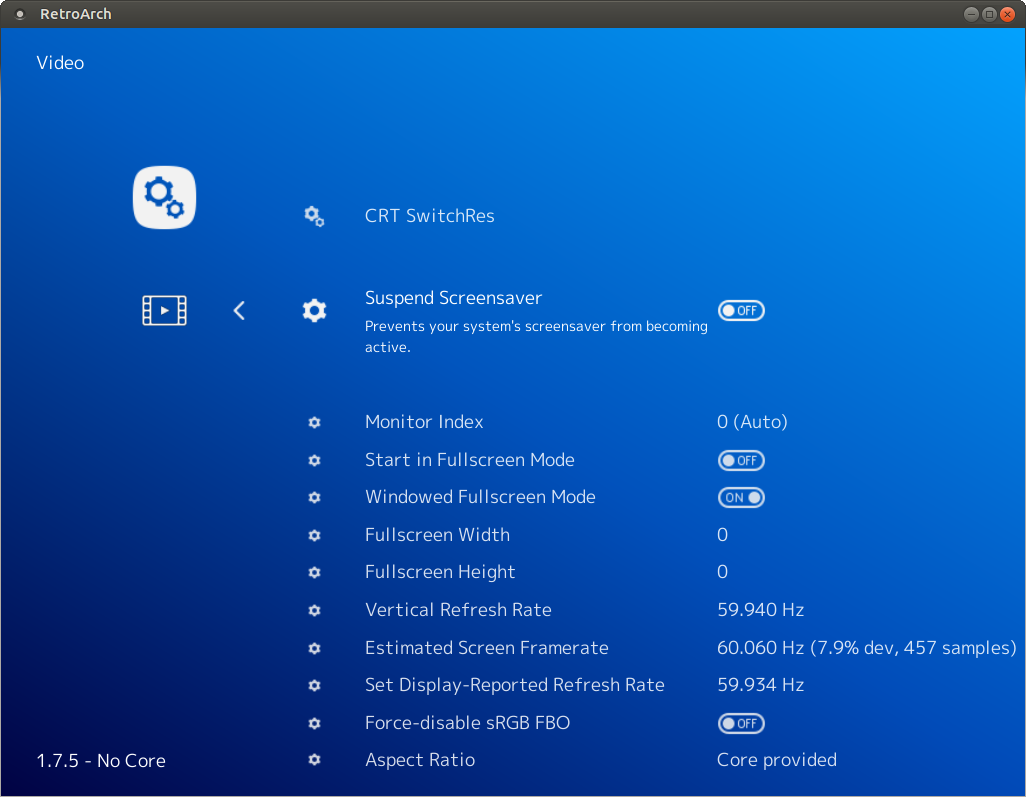
Oops! I was looking under power management, but yeah, suspend screensaver was turned on.
I've seen this happen, and had to re-size the window to have the video refresh. Difficult to debug and reproduce reliably...
My video doesn't have any issues with refreshing, but my screen will dim and turn off. Screensaver will also come.
codefossa
on 21 Oct 2018
The suspend screensaver still works here, can you explain your environment better? What DE or WM are you using? Is this with xorg or wayland?
In the past I have seen people experience issues like this with missing dependencies. Also note that the Suspend Screensaver requires a restart to work and changes will not take effect until you do so.
 orbea
on 24 Oct 2018
orbea
on 24 Oct 2018
I'm on Kubuntu 18.10 running Plasmashell 5.13.5 and using X11. I did have several restarts, and suspend screensaver was on each time.
codefossa
on 24 Oct 2018
Do you have xprop installed? I'm not sure what other dependencies could be missing that could cause problems. I don't suppose retroarch --verbose has any clues?
orbea
on 24 Oct 2018
$ xprop -version
xprop 1.2.3
I can't test it with verbose output until I get off work, but I will do that later today.
codefossa
on 24 Oct 2018
I tried with verbose and the only error I saw was that it couldn't connect to Wayland server.
[ERROR] [Wayland]: Failed to connect to Wayland server.
I'm on X11 though.
$ loginctl show-session 3 -p Type
Type=x11
codefossa
on 25 Oct 2018
I suppose its compiled against wayland as well and your system has libraries for both. I'm not sure if that could cause issues or not either... You could confirm by compiling it yourself with --disable-wayland.
git clone https://github.com/libretro/RetroArch/
cd RetroArch
./configure --disable-wayland && make
./retroarch
You could also try --enable-dbus, but screen suspension with dbus is certainly broken for some people and I'm not sure anyone is around that wants to fix it in those cases.
Could you also post your full verbose log here for reference?
orbea
on 25 Oct 2018
Sadly, that didn't solve the problem. It did get rid of the errors though. I've attached a log of my run after making the changes you mentioned in the previous reply.
codefossa
on 25 Oct 2018
I tried running while true; do xdg-screensaver reset; sleep 30; done while I had the game open, and that didn't help either. Is it possible that xdg-screensaver is unable to prevent the power saving settings in KDE? Older versions of RetroArch kept it alive though. Did it use a different method?
codefossa
on 25 Oct 2018
The relevant lines of the log sadly show no indication of failure.
[INFO] [X11]: Suspending screensaver (X11, xdg-screensaver).
[INFO] [Video]: Found display server: x11
Its very possible that there was a change in KDE that triggered this, but I don't have any knowledge or experience on how to debug this in KDE.
You could likely confirm if KDE is related or not by using only a minimal window manager with xscreensaver. At the very least this should work.
while :; do
  xscreensaver-command -deactivate
  sleep 100
done
So, KDE doesn't really have a screensaver exactly. It has power options that allow you to dim after so long of being inactive, as well as shutting off the screen and whatnot. I installed xscreensaver and disabled the KDE power options and xscreensaver does appear to be kept alive properly.
xscreensaver is a really ugly alternative, but I guess it can work for now. Is there any hope that we'll get back support for KDE's power options? There was a change in RetroArch that stopped working with it, because the version in Ubuntu 18.04's PPA works perfectly on Kubuntu 18.04, while the newer versions of RetroArch do not suspend the screensaver.
Here's the version that was working: retroarch (1.4.1+dfsg1-1)
Of course, I'm currently using 1.7.5.
codefossa
on 25 Oct 2018
Here is a loop that is actually working to prevent the KDE screensaver.
while :; do qdbus org.freedesktop.ScreenSaver /ScreenSaver org.freedesktop.ScreenSaver.SimulateUserActivity; sleep 30; done
codefossa
on 25 Oct 2018
Does it work if you build older releases? You can checkout older tags pretty easily.
git checkout v1.4.1
I would suggest using this to make sure you have a clean clone between builds.
git clean -xdf
git reset --hard
If it still doesn't work, then the change is not in RetroArch and its the newer power management in KDE that needs better handling. If it does work, then we could hopefully bisect and find where in RetroArch the issue first started.
orbea
on 25 Oct 2018
I just did a single branch clone into a new directory to avoid any problems. I disabled wayland and had to disable ffmpeg to avoid errors. Version 1.4.1 is keeping my screen alive.
I did make sure to test without either running that it blanked, then with 1.7.5 and it did blank, then 1.4.1 did not blank.
codefossa
on 25 Oct 2018
Just to make sure, did you try building v1.7.5 with ./configure --enable-dbus? In v1.4.1 it should of been enabled by default, but now in v1.7.5 it needs to be explicitly enabled at build time.
Assuming yes and that the issue persists the next step is to bisect RetroArch with git. This is not really hard, but does take a little time to complete.
I would first try newer tags until you find between which tags it broke. You can see all the git tags with.
git tag
You could bisect between v1.4.1 and v1.7.5, but it will probably go better if the commit range is smaller.
To start.
git bisect start
git bisect good v1.4.1
git bisect bad v1.7.5
Now git will tell checkout a commit between the good and bad commits/tags and you should build and test it.
If the build is good and the screen suspends correctly.
git bisect good
The the build is bad and the screen never suspends.
git bisect bad
If the build fails due to unrelated reasons which can't be easily resolved with something like --disable-ffmpeg then you can skip it.
git bisect skip
Eventually it will lead to the first bad commit where the the screen suspension stopped working for you.
If there is anything you don't understand and need a better explanation I can try to help.
orbea
on 25 Oct 2018
--enable-dbus solved the problem for me on v1.7.5! Should I use that as the solution then, or is there more information that could help?
codefossa
on 25 Oct 2018
So it seems the current situation is that xdg-screensaver works for some people and not others while the inverse is true for suspending the screen with dbus instead.
So I think the current solutions would be one of the following.
- You build retroarch yourself with
--enable-dbus. - The package maintainer for the ubuntu ppa does this instead.
- dbus is enabled by default again despite that it causes errors in the log for some people and that no one wants to look at this.
- Someone figures out why
xdg-screensaverdoesn't work in KDE, this might just be a KDE bug or maybe configuration issue.
I'm not sure which is really the best course of action.
orbea
on 25 Oct 2018
I've done this, so as far as I'm personally concerned, this is no longer an issue. Self-compiled works better for me for some reason, which may have been issues from changing versions.
I don't know how to go about suggesting this, and I don't know if they would care. Ubuntu has gnome-screensaver I believe, and it probably works with xdg-screensaver. Kubuntu on the other hand just uses the Ubuntu repositories.
If it's simply just log errors that nobody wants to look at, they could potentially be suppressed? This option sounds like it's probably the easiest for people, though building yourself takes very little effort since you can install build-dep. People will just have to probably find this thread with the answer of enabling dbus.
I found nothing useful on this topic, so my best guess is that the energy saver settings in Kubuntu don't really "count" as a screensaver. Using xscreensaver does fix the issue, but seeing that over ssdm is a bit of a let down when logging back in. It also fades out poorly, but it does work.
codefossa
on 25 Oct 2018
@twinaphex What is your preferred way to proceed here? As @Xaotique said, its probably easiest to revert the commit disabling dbus by default.
orbea
on 25 Oct 2018
Mention something in the documentation ?
 gouchi
on 4 Jan 2019
gouchi
on 4 Jan 2019
I'm experiencing this problem with the Retroarch snap package on Ubuntu 18.04. RetroArch git version: 7ffeebf. "Suspend screensaver" is turned on.
To be clear, the problem here isn't the screensaver, it's Ubuntu's "blank screen" option, accessible in the ubuntu settings under Power > Power Saving.
 geajack
on 9 Mar 2019
geajack
on 9 Mar 2019
I have this same problem on a minimal server install. So far I have been unable to figure out a way to stop the laptop from going to sleep.
Does anyone have a fix?
I followed the directions here to setup my system:
https://retropie.org.uk/forum/topic/18810/retropie-installation-on-ubuntu-server-x64-18-04-1
 scales11
on 22 Apr 2019
scales11
on 22 Apr 2019
Can you explain what you mean by a minimal server install? I do not have this issue with KMS or the vulkan equivalent.
orbea
on 22 Apr 2019
Sure,
Minimal server install=
- Boot off of Ubuntu server 18.04.2
- Press F4 and select “minimal installation”
- Install Ubuntu server
scales11
on 22 Apr 2019
I'm sorry, I am not sure what that does. I have never used ubuntu before. What kind of environment does that give you? Is xorg or wayland running? Are any window managers or desktop environments running? Is it only tty?
orbea
on 22 Apr 2019
Thank you for your help.
This install does not include xorg or wayland. I manually installed xorg when I followed the guide at the link I posted.
I used the following command from the guide:
sudo apt-get install xorg openbox pulseaudio alsa-utils menu libglib2.0-bin python-xdg at-spi2-core libglib2.0-bin dbus-x11 git dialog unzip xmlstarlet --no-install-recommends -y
scales11
on 22 Apr 2019
So this is Xorg + openbox?
I think the likely reason is that you are missing all or some of xdg-screensaver and dependencies which would prevent the screen from blanking when using RetroArch.
I am not very familiar with ubuntu so I am not sure what specific packages you would need to install.
Another possible issue is that you must make sure the screensaver suppression is enabled. In ~/.config/retroarch/retroarch.cfg you should have this setting.
suspend_screensaver_enable = "true"
You will need to restart RetroArch when changing this setting.
orbea
on 22 Apr 2019
Thank you very much, that helps!
I am familiar with the xdg-screensaver package, I will install it and check the setting file you mentioned.
scales11
on 22 Apr 2019
Well I am impressed, once I installed “xdg-utils” my screensaver/timeout was fixed. NOTE: xdg-utils is the Debian package that contains the mentioned xdg-screensaver
I also noticed that with the install method I chose I do not have a ~/.config/retroarch/retroarch.cfg file. Could this file be somewhere else?
Thank you orbea for your help!
scales11
on 23 Apr 2019
Well I am impressed, once I installed “xdg-utils” my screensaver/timeout was fixed. NOTE: xdg-utils is the Debian package that contains the mentioned xdg-screensaver
Glad to hear that!
I also noticed that with the install method I chose I do not have a ~/.config/retroarch/retroarch.cfg file. Could this file be somewhere else?
In the RetroArch menu navigate to Settings -> Directory -> Config, it should tell you exactly where its being saved.
orbea
on 23 Apr 2019
This seems to be a fairly old xdg-screensaver issue.
https://gitlab.freedesktop.org/xdg/xdg-utils/issues/114
mpv-player/mpv#4752
 LaserMoai
on 4 May 2019
LaserMoai
on 4 May 2019
I'm experiencing the same issue but I already have xdg-utils installed. I'm running Linux Mint 18.3 (aka Ubuntu 16.04) with the cinnamon DE and I'm using the PPA.
 mr-falafel
on 2 Jul 2019
mr-falafel
on 2 Jul 2019
KDE use D-Bus to allow applications, like media players, to prevent power management.
The example is using Qt, but I am sure they have other implementation.
 guoyunhe
on 23 Oct 2019
guoyunhe
on 23 Oct 2019
can confirm, lubuntu 18.04.
I think i don't install screensaver. This is dpms. Kodi 18 can disable dpms screen off while playing
 johndoe71rus
on 24 Oct 2019
johndoe71rus
on 24 Oct 2019
If you can still reproduce this issue on your system, please try to build #9632 and test if it works on your DE. And reply to that PR with:
- Your DE and version.
- If it works for you.
guoyunhe
on 24 Oct 2019
Found out that PR #9632 is not needed for KDE.
Most Linux distribution's RetroArch package doesn't build with --enable-dbus option. So they won't prevent ScreenSaver/PowerManagement.
- ArchLinux: https://git.archlinux.org/svntogit/community.git/tree/trunk/PKGBUILD?h=packages/retroarch
- openSUSE: https://build.opensuse.org/package/view_file/Emulators/retroarch/retroarch.spec?expand=1
- Debian: http://deb.debian.org/debian/pool/main/r/retroarch/retroarch_1.7.3+dfsg1-1.debian.tar.xz
- Ubuntu: http://archive.ubuntu.com/ubuntu/pool/universe/r/retroarch/retroarch_1.7.3+dfsg1-1build1.debian.tar.xz
Please contact your distribution's package maintainer to update the package. The problem should be solved.
guoyunhe
on 24 Oct 2019
i use lubuntu 18.04 and libretro team stable launchpad ppa
retroarch - 1.8.1-r201911041749-bfdc8e6-96~ubuntu18.04.1
problem is present.
i don't use screensaver, work dpms. kodi 18 on the same machine can disable dpms screen off, if kodi is run. Can you use some code from kodi to work with dpms?
johndoe71rus
on 12 Nov 2019
@johndoe71rus You need to contact the Ubuntu PPA package maintainer. Ask them to add --enable-dbus option to their build script.
guoyunhe
on 12 Nov 2019
I had already added the dbus dependency with the hope that it would detect it automatically at configure time, but that doesn't seem to be the case, so I explicitly added --enable-dbus to the configure step.
Give it some time to crank out new builds in the testing PPA. If that works for you, I'll push it out to the stable PPA, as well.
 hizzlekizzle
on 12 Nov 2019
hizzlekizzle
on 12 Nov 2019
try retroarch_1.8.1-r201911121649-312f143-97~ubuntu18.04.1_i386.deb and problem still present.
johndoe71rus
on 13 Nov 2019
It worth notice that every DE implement their own way of handling screensaver inhibition. Please try if it works with KDE/GNOME. If yes, then it is a problem with LXDE. If no, then it is the issue of the retroarch package.
guoyunhe
on 13 Nov 2019
lxde use xscreensaver. I don’t remember activating and setting it up. in my case, the signal just turns off. The message “no signal” after some time of inactivity. But the kodi may block the screen off. The main use for kodi, so I did not configure the screensaver.
johndoe71rus
on 13 Nov 2019
Running into this using the flatpack (v1.8.1) on Fedora 31, Gnome on X11. Should I open a new issue?
Edit: My bad, I didn't realise that I need to turn this feature on in settings. Sorry for the noise.
 dreua
on 16 Jan 2020
dreua
on 16 Jan 2020
You should contact the maintainer of that flatpak because it needs to be fixed in their side
guoyunhe
on 17 Jan 2020
I have already commented on #5909, I don't know if it's the same issue but I'm definitely having this problem where I have to move the mouse every 5 minutes. I'm on Gentoo KDE.
 KingDuckZ
on 26 Mar 2020
KingDuckZ
on 26 Mar 2020
@KingDuckZ It is the same issue. You should contact the person who package RetroArch for Gentoo and ask them to add --enable-dbus build option.
guoyunhe
on 26 Mar 2020
@guoyunhe I'm not an expert but the ebuild looks correct to me.
My USE-flags:
[ebuild R #] games-emulation/retroarch-1.8.5::menelkir USE="X alsa dbus egl ffmpeg flac freetype opengl pulseaudio sdl2 ssl subtitles systemd udev vulkan xmb xv zlib -cg -gles -gles3 -kms -libcaca -libusb -materialui -miniupnpc -openal -ozone -qt -rgui -sdl -sixel -stripes -tinyalsa -wayland -xrandr" CPU_FLAGS_X86="sse" 0 KiB
@KingDuckZ please first verify you can build locally (configure + make) without ebuild or whatever distribution packaging tools. Here might be issues within your ebuild script or distribution. But I cannot help with Gentoo specific technology.
guoyunhe
on 26 Mar 2020
@guoyunhe yes of course I can build locally! otherwise installing the package would fail :)
This is the final configure command I see in the logs:
./configure --prefix=/usr --build=x86_64-pc-linux-gnu --host=x86_64-pc-linux-gnu --mandir=/usr/share/man --infodir=/usr/share/info --datadir=/usr/share --sysconfdir=/etc --localstatedir=/var/lib --docdir=/usr/share/doc/retroarch-1.8.5 --libdir=/usr/lib64 --enable-mmap --enable-networking --enable-threads --disable-audioio --disable-builtinflac --disable-builtinmbedtls --disable-builtinminiupnpc --disable-builtinzlib --disable-coreaudio --disable-jack --disable-mpv --disable-oss --disable-roar --disable-rsound --disable-videocore --enable-alsa --disable-cg --enable-sse --enable-dbus --enable-egl --enable-freetype --enable-flac --enable-ffmpeg --disable-opengles --disable-opengles3 --disable-caca --disable-libusb --disable-materialui --disable-miniupnpc --disable-al --enable-opengl --disable-ozone --enable-pulse --disable-qt --disable-sdl --enable-sdl2 --disable-sixel --enable-ssa --enable-ssl --enable-systemd --disable-tinyalsa --enable-udev --enable-vulkan --disable-wayland --enable-x11 --disable-xrandr --enable-xvideo --enable-zlib
If you meant "build manually", I've tried the following just now:
wget 'https://github.com/libretro/RetroArch//archive/v1.8.5.tar.gz'
tar -xf v1.8.5.tar.gz
cd RetroArch-1.8.5/
./configure --prefix=$PWD/localinst --build=x86_64-pc-linux-gnu --host=x86_64-pc-linux-gnu --enable-mmap --enable-networking --enable-threads --disable-audioio --disable-builtinflac --disable-builtinmbedtls --disable-builtinminiupnpc --disable-builtinzlib --disable-coreaudio --disable-jack --disable-mpv --disable-oss --disable-roar --disable-rsound --disable-videocore --enable-alsa --disable-cg --enable-sse --enable-dbus --enable-egl --enable-freetype --enable-flac --enable-ffmpeg --disable-opengles --disable-opengles3 --disable-caca --disable-libusb --disable-materialui --disable-miniupnpc --disable-al --enable-opengl --disable-ozone --enable-pulse --disable-qt --disable-sdl --enable-sdl2 --disable-sixel --enable-ssa --enable-ssl --enable-systemd --disable-tinyalsa --enable-udev --enable-vulkan --disable-wayland --enable-x11 --disable-xrandr --enable-xvideo --enable-zlib
make -j8
make install
cd localinst/bin
./retroarch
I played for a few minutes and the screen still dims and switches off after a bit.
KingDuckZ
on 26 Mar 2020
@KingDuckZ just to make sure, you have enabled it in Settings -> Video -> Suspend Screensaver? I was not aware that this is disabled by default. (Bug sat in front of the screen in my case :see_no_evil: )
dreua
on 27 Mar 2020
already enabled. unfortunately it's not that :(

KingDuckZ
on 27 Mar 2020
@KingDuckZ if you are using KDE, check the system tray battery panel. It should show: "RetroArch is preventing power management". If you didn't see it, then here might be problems with your KDE.
guoyunhe
on 27 Mar 2020
I don't have any message like that, just the regular sliders and bars. I'll investigate, thanks for the pointer.
Btw I also don't see that message with mpv running, but mpv does prevent the screen from going to sleep, as well as firefox when I watch videos in it.
KingDuckZ
on 27 Mar 2020
It should be something like this:
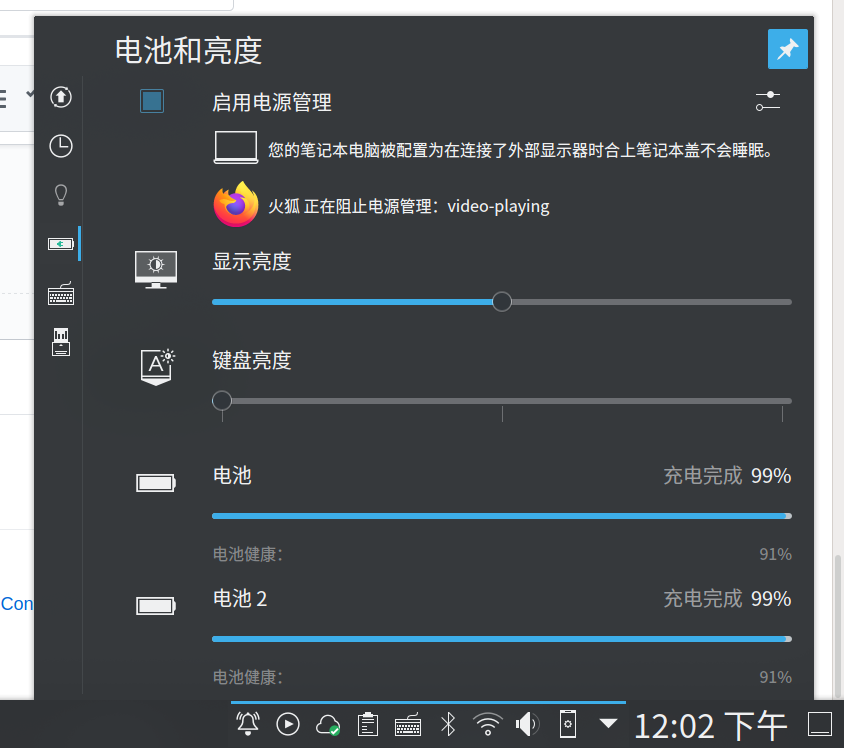
If it is not showing, your KDE must have some issues, even though some app might work.
guoyunhe
on 27 Mar 2020
@guoyunhe what version of kde are you running? I have kde-plasma/plasma-meta-5.17.5 and I don't see that message at all. I can't find any resource on this so I'm wondering if it's something they added recently.
KingDuckZ
on 27 Mar 2020
I am using KDE 5.18.3. This feature should be available in all KDE >= 5.12.
guoyunhe
on 27 Mar 2020
After a really long investigation it turned out it was something in my kde settings. In case it's useful to someone else, I located the activity uuid from ~/.config/plasma-org.kde.plasma.desktop-appletsrc and deleted every file that contained that uuid in that same directory. Eventually it worked, now I get the same notification that @guoyunhe showed.
I'm ready to swear it also worked with retroarch for a brief moment (I think it displayed a message like "because he's playing some game"), but even after logging out and back in it doesn't work. It does work for vlc, see screenshots. I tried both the system installed retroarch and the one I compiled manually.
_Edit_: it works if I delete ~/.config/retroarch. I swear this is the most hit-and-miss thing I've done in months.
_Edit 2_: I think I found the option that breaks this functionality: video_threaded = "true"
KingDuckZ
on 27 Mar 2020
@KingDuckZ you can post a new issue with this video_threaded specific bug. This thread is filled with too much information.
guoyunhe
on 29 Mar 2020
Hello,
I'm running GNU/Linux Debian 10 and XFCE4 and i compiled Retroarch following the official documentation: https://docs.libretro.com/development/retroarch/compilation/linux-and-bsd/
Everything works great however my screen turns off even if i have the option suspend screensaver activated.
I read the thread and someone suggested to add --enable-dbus during the configure command. Is it the correct solution to fix that behavior?
 blackmennewstyle
on 15 Jun 2020
blackmennewstyle
on 15 Jun 2020
@blackmennewstyle yes, --enable-dbus is the solution.
guoyunhe
on 15 Jun 2020
For me that option was already enabled so it wasn't the right fix. The fix for me was to disable the video threaded option in the retroarch settings.
KingDuckZ
on 17 Jun 2020
Related issues
 meepingsnesroms
·
4Comments
meepingsnesroms
·
4Comments
 fr500
·
3Comments
orbea
·
3Comments
fr500
·
3Comments
orbea
·
3Comments
 hyarsan
·
4Comments
hyarsan
·
4Comments
 bslenul
·
3Comments
bslenul
·
3Comments