Retroarch: Retroarch 1.7.4 Xbox Video issue
Description
These new version, does not work on my xbox in 480p or 720p resolutions, when you boot it, the screens is all mess up. It only works in 480i.
Expected behavior
To give a proper image
Actual behavior
The screen when you boot it in 480p or 720p is all mess up, you cant see anything
Steps to reproduce the bug
- Turn on my xbox
- Go to "EMULATOR" section
- Select Retroarch 1.7.4
- When it boots, the screen is all mess up, a video problem
Version/Commit
Retroarch 1.7.4
Environment information
Original Xbox v1.6, HDD IDE 500 GB, UnleashX as the main dashboard, video component output
 jamallego
All 9 comments
I have the same issue with 1.7.4 on XboxOG, i am using component cables.
 magusLOGS
on 4 Sep 2018
magusLOGS
on 4 Sep 2018
I will need Xbox OG developers to help with this. I can only test with 480i/SD on a real CRT.
 twinaphex
on 6 Sep 2018
twinaphex
on 6 Sep 2018
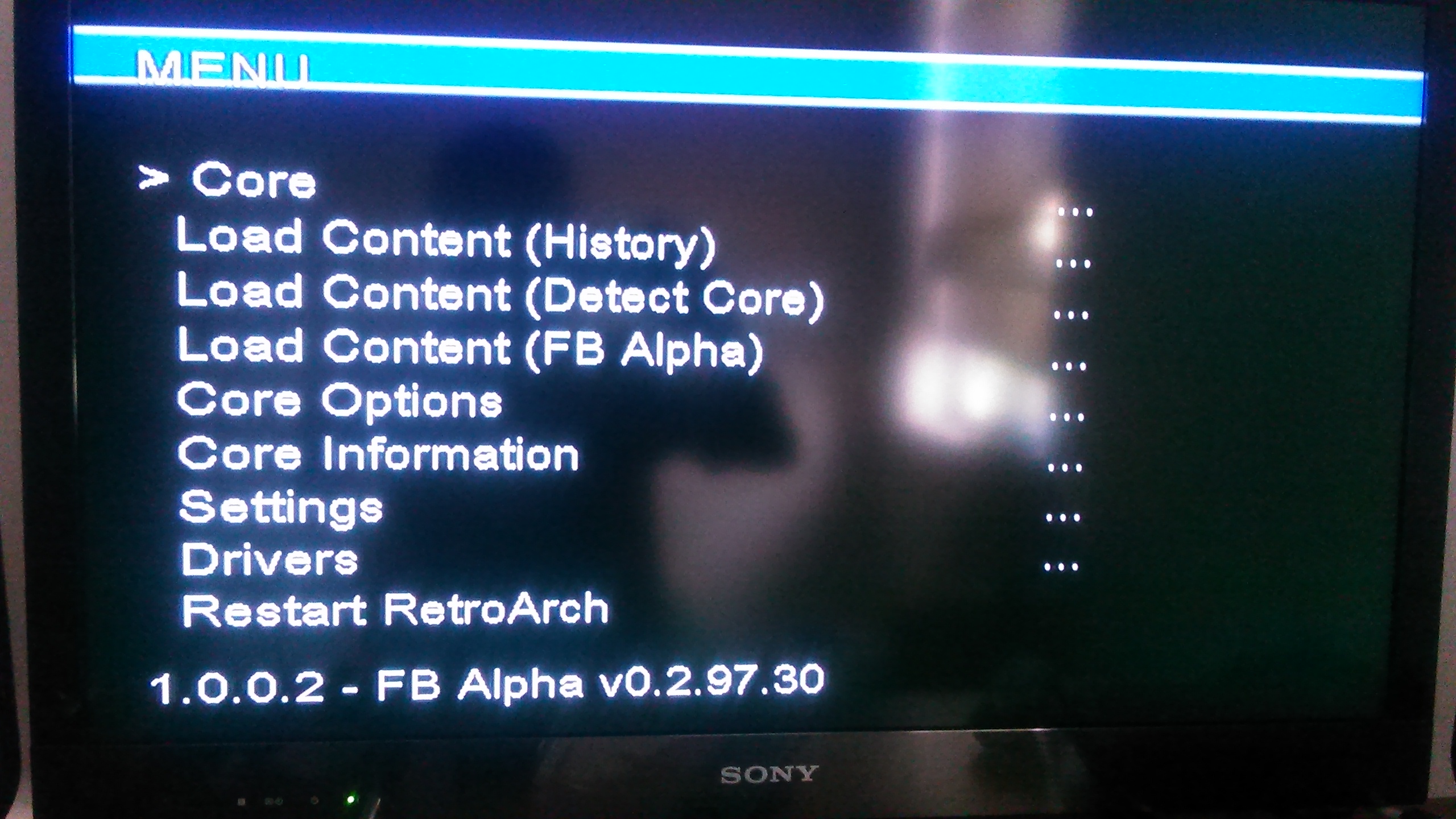
twinaphex , thanks for the reply, i still have on my OG XBOX retroarch version 1.7.0 (i think that is the version) and when you boot it up you see the video all mess up but if you press B twice, retroarch displays ok. Here are some pictures

jamallego
on 6 Sep 2018
Also, component. Can't seem to get any video mode to work. Appears as in the YouTube video above.
 dleslie
on 20 Sep 2018
dleslie
on 20 Sep 2018
We provide no support for old versions of RetroArch, only for the latest version.
As for component/HDTV - again - I keep saying - I cannot test this. I am on an European PAL TV and I only have composite/SCART RGB connectors, and both work fine for Xbox OG.
If you want to see this improved, become an Xbox OG homebrew developer and start sending PRs. There is little I can do here.
twinaphex
on 20 Sep 2018
If you are seeing the fuzzy blur of a screen as in this issue and as seen in the video:
Workarounds
I'm testing with NTSC M.
Workaround 1 -- Use EvoX instead of UnleashX
The issue exists when UnleashX launches RetroArch, but EvolutionX (EvoX) is able to launch RetroArch without issue.
Workaround 2 -- Restart RetroArch
With controller input, you can see that the green menu selector in rgui is visible in the fuzzy mess that is your screen. A very curious part of this issue is that RetroArch can display just fine once restarted. Navigate by mental memory to "Restart RetroArch" in the rgui menu and you can proceed with clear video:
- Press down on the d-pad 6 times and press A to select "Restart RetroArch".
Or:
- Press up on the d-pad 4 times and press A to select "Restart RetroArch".
The latter is more convenient, because you can tell when your menu selection has wrapped around as is at the bottom of the menu (by pressing up once on the d-pad). When you do, you are on "Quit RetroArch." Press up 3 more times and you are on "Restart RetroArch."
Workaround 3 -- Gamepad Shortcut on Boot
The UnleashX dashboard includes "Gamepad/IR Shortcut" options. Bind a button to the default.xbe of RetroArch. Hold this button during the Xbox splash screen on boot and it will skip the dashboard and go straight to RetroArch with cleanly rendered video (bypassing this issue).
This is inconvenient given that if you quit RetroArch and re-launch from the dashboard, you'll still run into this video rendering issue.
Note that UnleashX may have a bug in having Gamepad settings take effect. If the shortcut does not work for you, one option is to remove Config.xml and startover with your UnleashX configuration. Inconvenient.
Workaround 4 -- Disable HD
Disable 480p, 720p, and 1080i in UnleashX settings. You have the Advanced AV Pack with component cables, so why would you want to do this?
Additional Information
Not Every Xbox
I cloned RetroArch (1.7.3) from one softmod Xbox to another via FTP, such that the same binaries and configuration are running on two different Xbox systems.
Has the menu video rendering issue on startup:
- DVD Region: Region 0
- Version: (Unknown)
- Kernel Version: 1.0.5838.1
- Hardware Info: Flags: 1616 GPU Rev.: 225 MCP Rev.: 213
Does NOT have menu video rendering issues:
- DVD Region: Region 1
- Version: V1.1 (0b)
- Kernel Version: 1.0.5101.1
- Hardware Info: Flags: 528 GPU Rev.: 163 MCP Rev.: 212
Bonus: Clearer Text in the RetroArch Menu
On the original Xbox, the RetroArch menu text is blurry in HD. Turn off the menu linear filter to get clearer text, i.e. in retroarch.cfg:
menu_linear_filter = "false"
 rduplain
on 2 Nov 2018
rduplain
on 2 Nov 2018
rduplain thanks you very much!!!!!!! i manage to get retroarch working with workaround #2
really man, thak you a lot for these information, many people will benefit form these, can i post these useful info someoen else??
jamallego
on 3 Nov 2018
@jamallego Thanks for getting this issue started! Feel free to use the information however you'd like. Just be sure to link back to this issue so that new information can be seen/posted here.
rduplain
on 4 Nov 2018
Workaround 2 as mentioned by rduplain above worked for me as well, thanks a lot!
magusLOGS
on 19 Jan 2019
Related issues
 sergiobenrocha2
·
4Comments
sergiobenrocha2
·
4Comments
 meepingsnesroms
·
4Comments
meepingsnesroms
·
4Comments
 parkerlreed
·
3Comments
parkerlreed
·
3Comments
 danabnormal9000
·
3Comments
danabnormal9000
·
3Comments
 ghost
·
3Comments
ghost
·
3Comments