Retroarch: Per-content playtime log [BOUNTY] [$90]
This is one of those frivolous features that definitely don't represent anything fundamental to the experience of using Retroarch, but may enhance the user experience anyway in some form.
I was wondering whether it's possible to implement a form of playtime log tracking as a per-content feature in the UI. The way I was envisioning it from a design-wise perspective is as an indication of the total amount of time (hours : minutes : seconds) spent playing that specific ROM or content, which could be displayed for example on the right side of the Playlist menu.
 Ryunam
All 39 comments
Feature creep, we might have time for this after taking care of the crucial major bugs first.
 twinaphex
on 4 Oct 2016
twinaphex
on 4 Oct 2016
The bounty has increased to $75, could you update the title to reflect this @twinaphex? Thanks.
On a side note, if this happens, it would be great if the log was stored somewhere in the default save directory - as someone on reddit pointed out, this would allow play time to survive across installations and also be included if the user syncs their save directory across devices.
Also, it might be helpful to store the log as text so that users can manually edit their play time to add any time they might have spent on content before the log was implemented. :+1:
 Metasynic
on 21 Dec 2018
Metasynic
on 21 Dec 2018
Just thought I'd post a little update on this issue...
With PRs #8259 and #8327 (along with a clean up in PR #8347), we now have usable play time logging:
Ensure that
Settings > Saving > Save content runtime logis turned on.Ensure that
Settings > Playlists > Show playlist sublabelsis turned on.Play time is stored in
content_runtime.lpl(same directory ascontent_history.lpl).Play time is shown on the 'load recent'/'history' menu lists:
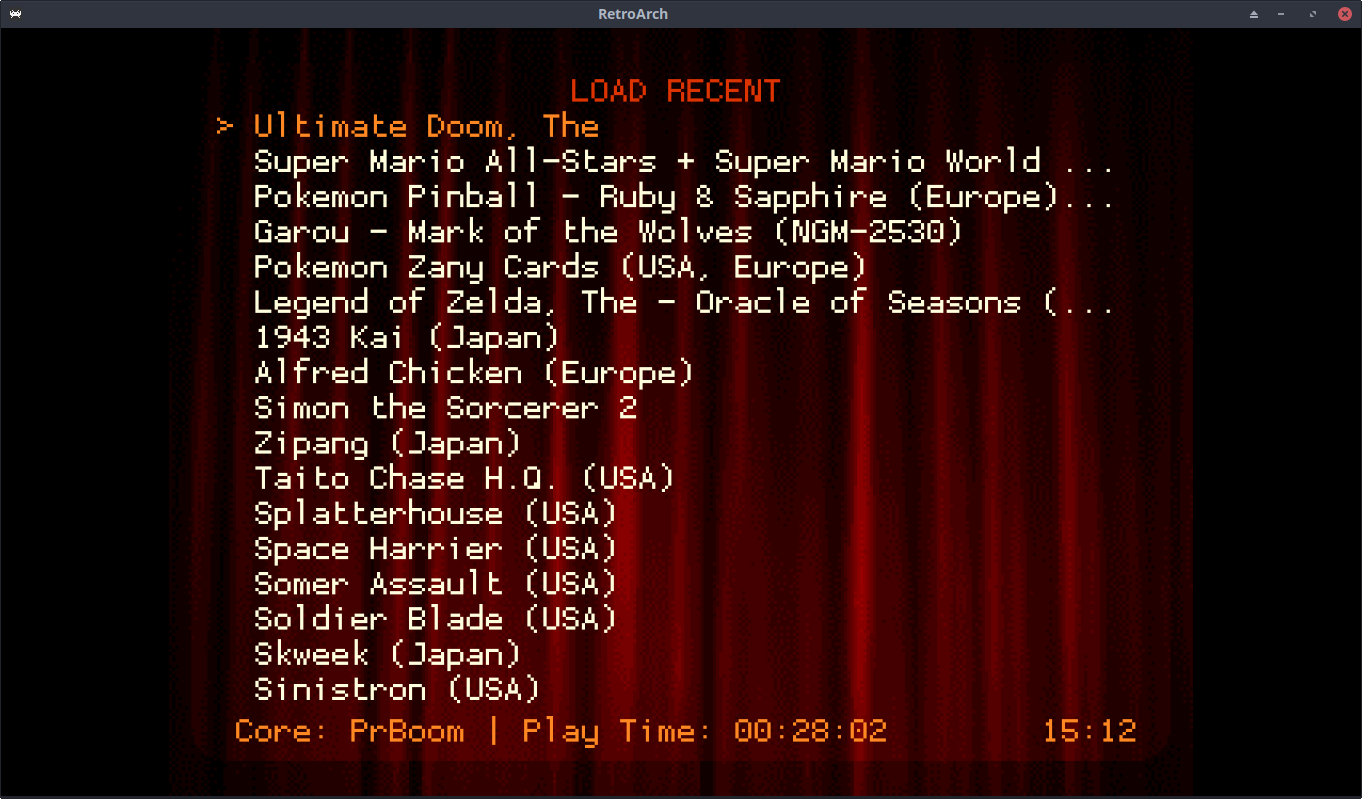
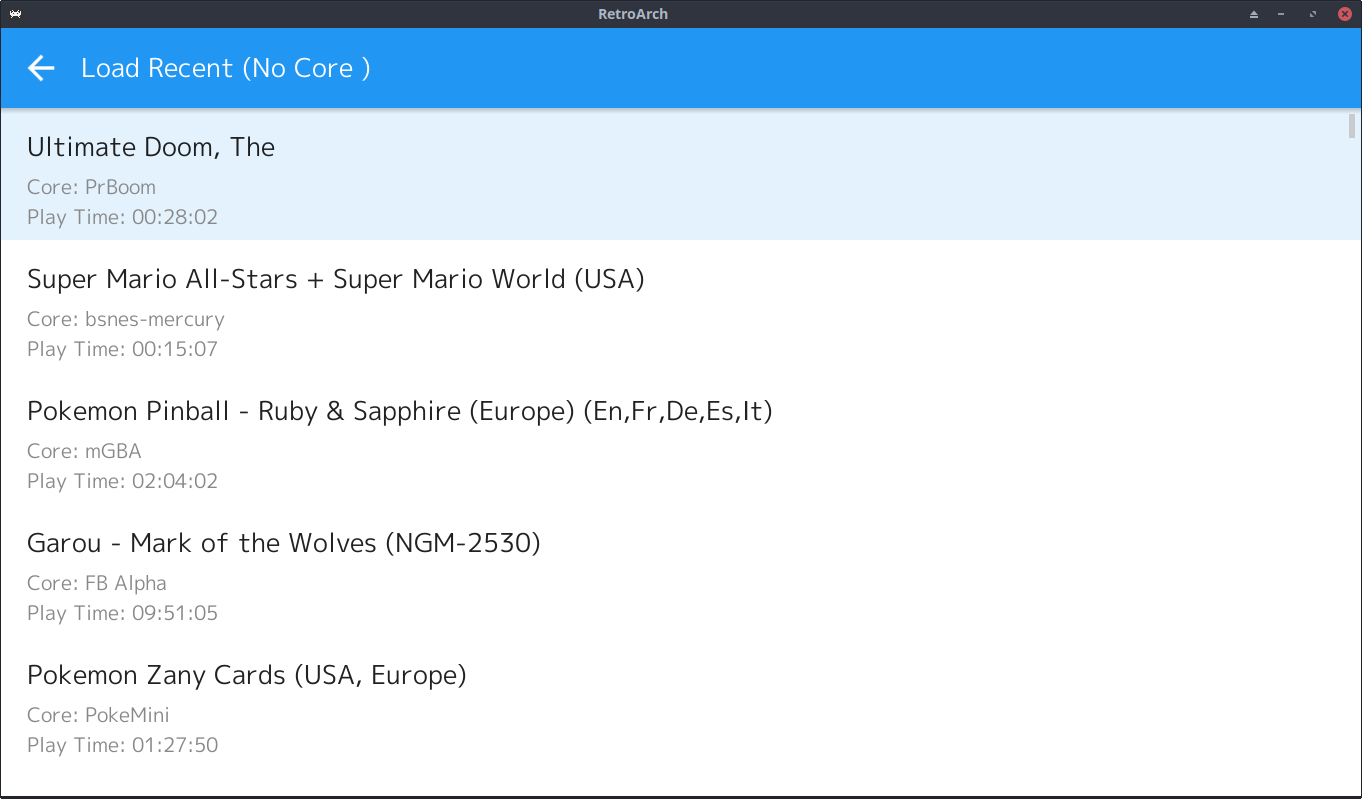
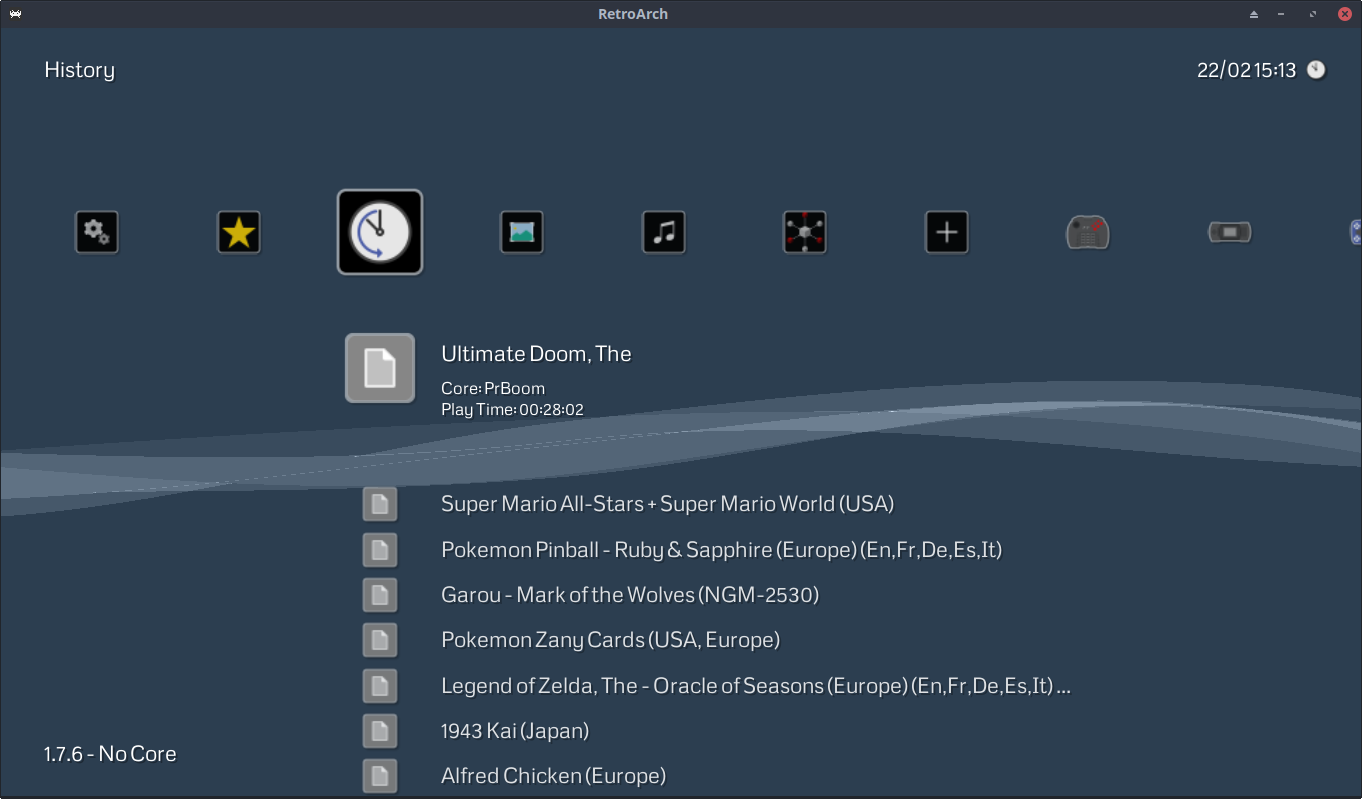
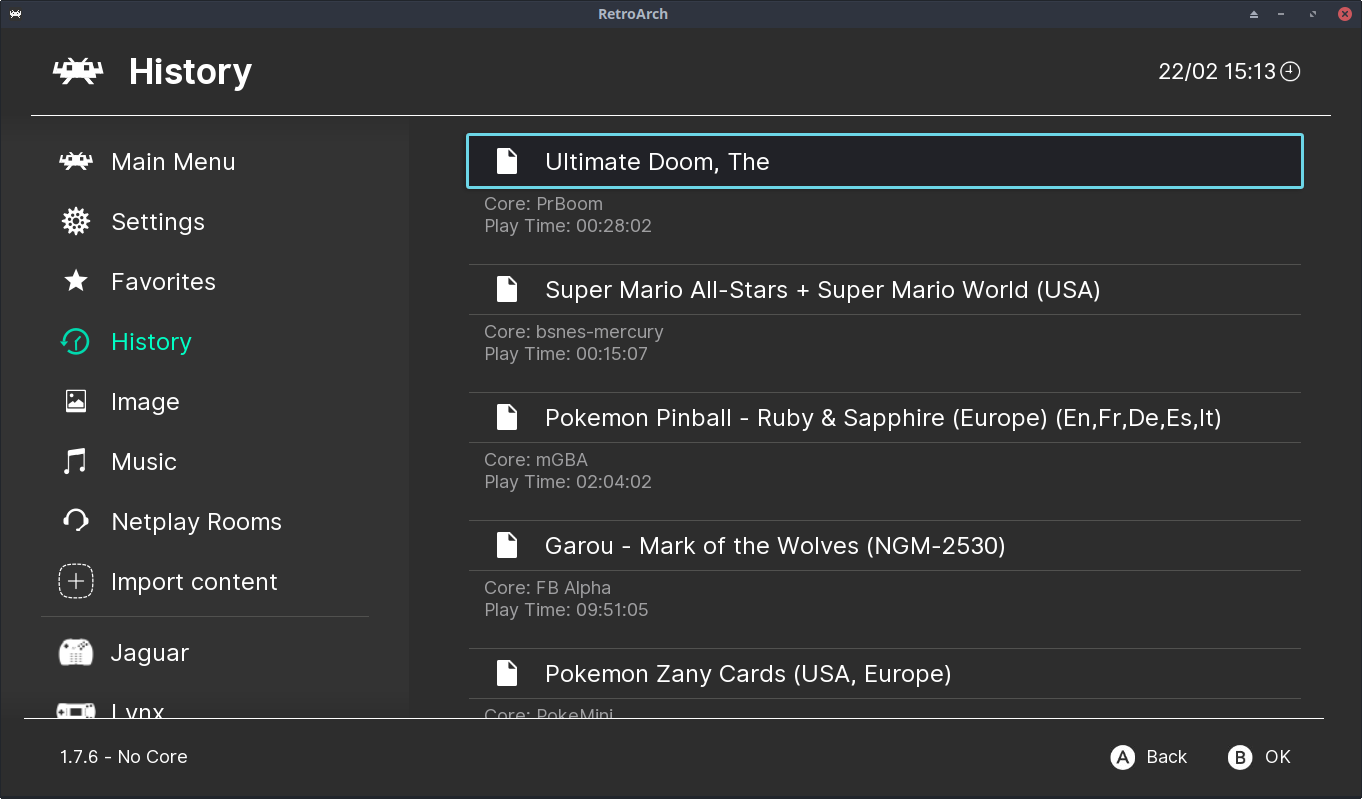
Note that this is still a work in progress, however, with the following limitations:
Since play time is stored in a separate playlist, we have to search it (multiple times) when parsing content history. The performance impact is generally negligible (unless history size is set very high), but it's not optimal.
The play time record is not entirely permanent. Once you exceed the current history size, launching a new game will discard the record for the oldest entry.
I've discovered that I like this play time logging feature more than I expected, so I'm going to try and implement some improvements over the next week or so:
Add per-game play time logging. This will be a separate file for each game/core combo, stored in the save directory alongside .srm files.
Combine
content_runtime.lplandcontent_history.lplinto a single file, to remove any performance overheads. Note that we still need this for display purposes - it's not practical to parse the individual per-game logs when refreshing the menu, but the playlist values will be synced with the per-game logs when closing content.
Anyway, I'll post an update when I'm finished...
 jdgleaver
on 23 Feb 2019
jdgleaver
on 23 Feb 2019
@jdgleaver, thank you so much for taking the time to work on this feature! I really like the way that you implemented it so far and it makes perfect sense to display this information in the sublabels under each playlist entry.
As an additional incentive to finetune this functionality even further, I have also added $15 more to the bounty. I would particularly appreciate having per-game playtime logging and, most importantly, making it so that this feature is independent from the history size and can be stored in a permanent fashion. Looking forward to the next updates.
Ryunam
on 25 Feb 2019
Just remember that some people want to keep their playtime separate for each core... so if you change the current behavior you'd want to add a setting for that.
 bparker06
on 25 Feb 2019
bparker06
on 25 Feb 2019
@jdgleaver
Since play time is stored in a separate playlist, we have to search it (multiple times)
Why?
launching a new game will discard the record for the oldest entry.
But this isn't the history playlist itself, why do you think it has the same limitation? Can you demonstrate this? Because it would be a bug if that really happens.
bparker06
on 25 Feb 2019
@Ryunam Well, I'm doing this because it's a cool feature, not for a bounty - but that's real nice of you :slightly_smiling_face:
(Also, @bparker06 did much of the groundwork for this - not sure how we would go about splitting the bounty...?)
@bparker06: You seem quite angry with me - I apologise if I've done anything to upset you...
Just remember that some people want to keep their playtime separate for each core... so if you change the current behavior you'd want to add a setting for that.
My intention is to have a log record alongside each save file - so that's automatically a separate log per content, per core.
Since play time is stored in a separate playlist, we have to search it (multiple times)
Why?
There is no guarantee that content_history.lpl is in any way synchronised with content_runtime.lpl. When parsing content_history.lpl, I need to get the runtime for each entry - how else can I get this, other than by searching content_runtime.lpl?
(If you mean: why multiple times? then that's just the fastest way to do it - i.e. you could scan content_runtime.lpl once and place everything in a hash table, but for normal history sizes this is slower than a linear search).
Integrating the two files would remove this issue entirely.
launching a new game will discard the record for the oldest entry.
But this isn't the history playlist itself, why do you think it has the same limitation? Can you demonstrate this? Because it would be a bug if that really happens.
Umm... This is by design...
https://github.com/libretro/RetroArch/blob/7ddb87633062066ff4c5d2e582e0548f2b91cb28/command.c#L2285-L2287
content_runtime.lpl has a fixed size - exceed this and the oldest entries are lost. (Just try it)
But if content_runtime.lpl had unlimited size, it would soon grow unwieldy. If we let it expand to a few 10,000's of entries, trying to parse it when generating playlist labels would be unworkably slow.
Having a log per core per content does not have this problem, since it scales trivially to an unlimited number of files. In this case, the playlist is just used for display (a sensible logical division)
jdgleaver
on 26 Feb 2019
@jdgleaver Nope I'm not angry at all :) Was just trying to understand the issue... sorry if I offended. And you're right, I didn't notice that the size was set to the same as the history playlist... I don't think that was quite intentional on my part.
Having a setting for per-core or per-game playtime sounds okay to me if @twinaphex agrees.
We do have users with tens of thousands of entries that don't complain about playlist parsing speed, so maybe for now it wouldn't be a big deal to simply increase the current runtime playlist size?
bparker06
on 26 Feb 2019
@bparker06 That's a relief - glad we're all friends here! :slightly_smiling_face:
Having a setting for per-core or per-game playtime sounds okay to me if @twinaphex agrees.
Currently trying to work out the best way to do this. If the user has Sort saves in folders turned on then we'll automatically get per core runtime logs. If not, then it'll just be per game - which is fine, but then the content history playlist will get out of sync (since this always records the core path). This will make a bit of a mess of the display, as we could have several distinct history entries all getting their runtime from the same source file, but all with different offsets (as the top history item will only get populated from the source file when the current content is closed).
I'm thinking that it might be best to append the core name to the runtime log files (<content>+<core_name>.lrtl) when the user has Sort saves in folders turned off. This keeps everything clean and distinct, and means all playlists will behave in a well defined manner. What do you think?
We do have users with tens of thousands of entries that don't complain about playlist parsing speed, so maybe for now it wouldn't be a big deal to simply increase the current runtime playlist size?
Oh, certainly - the average desktop can crunch huge playlists just fine. The issue here is that we have to search content_runtime.lpl while parsing each history item, so it's O(n^2) - which gets nasty pretty fast as we crank up the size. Again, a desktop system can probably brute force it without problems, but junk tier hardware like the 3DS is going to suffer.
In addition, it feels edgy to store 'user generated' content like this in a single big old file. It's kinda like storing individual .srm files in a single database object (i.e. the user has to pick things apart by hand if they want a particular item).
The playlist is absolutely required for display purposes, but for persistence I'd rather just go ahead and get the per content logs sorted. I expect to have this done in a few days, hopefully before anyone has exceeded the current content_runtime.lpl size limit... :wink:
jdgleaver
on 26 Feb 2019
@Ryunam Another update for you!
PRs #8377 and #8386 should finally lay this issue to rest. You can read the PR comments for details, but here's the potted version:
- We now have properly persistent per-content runtime log files. These are recorded with the following file path:
<playlist_dir>/logs/<core_name>/<content_name>.lrtl
- The log files are in JSON format, with the following content:
{
  "version": "1.0",
  "runtime": "1:28:27",
  "last_played": "2019-02-28 14:59:56"
}
PR #8386 still needs to be merged, but once it has we'll have the following new frontend features:
Runtime sublabels on all playlists (not just content history)
The addition of a 'last played' timestamp on playlist sublabels
Once everything is merged and built, please feel free to test these things as much as you like, and report back if there are any remaining issues :slightly_smiling_face:
jdgleaver
on 1 Mar 2019
Hi @jdgleaver, I'm currently testing this feature out, however I'm probably overlooking something since it is not saving any log at the moment with my current configuration.
I made sure to have the following options turned on:
- Settings > Saving > Save content runtime log
- Settings > Playlists > Show playlist sublabels
I also checked and the correct subfolder structure ("logs") was indeed created within my playlist folder, however the actual logs are nowhere to be seen. Is there any other option that is mandatory in order to have the logs be generated?
EDIT: I also tried creating a completely new and clean config file and only activating the two aforementioned options. When I close the content, it still displays just the core association within the sublabel with no mention of playtime or "last played" date.
Ryunam
on 1 Mar 2019
@Ryunam I can't reproduce this problem on any of my systems, but don't worry - we'll sort it out!
You are correct that Save content runtime log and Show playlist sublabels are the only options you need to enable in order for this to work.
Could you please generate a RetroArch system log for me? (https://docs.libretro.com/guides/generating-retroarch-logs/) i.e. do the following:
Go to your recent history playlist
Select/launch any title
Let it run for ~10 seconds
Open the quick menu and select 'Close Content' (or just press ESC to quit the game - that's fine too)
...and then post the RetroArch log here. I want to see if it's throwing an error while attempting to write the runtime log file.
jdgleaver
on 2 Mar 2019
As per your instructions @jdgleaver here is my log: https://pastebin.com/Zv0zVnZm
Content playtime is registered as 00 hours, 00 minutes and 00 seconds, even though I played the content for at least 2 minutes before pressing ESC to quit it.
It might be noteworthy to add (but perhaps this is completely unrelated) that I'm using:
- per-core overrirdes to redirect the savefile and savestate folders outside of the default directories;
- per-game overrides to set the number of Runahead frames accordingly.
Ryunam
on 2 Mar 2019
Thanks, that's very useful. Looks like the logging code is fine, but something's going wrong with the time calculation. I have a sneaky suspicion this has something to do with the runahead feature - I never tested this! If that's the case, then I'm hoping this is just a matter of changing the place where the final duration is determined (i.e. move it out of core deinit, and maybe do it at the same time that saves are flushed).
I'm kinda tied up for the rest of the weekend, but leave this with me - I'll get this tested as soon as I can next week!
jdgleaver
on 2 Mar 2019
Indeed you were right about that suspicion. I just disabled the Runahead option and repeated the test: lo and behold, the playtime log is now being calculated and displayed correctly along with "last time played".
Ryunam
on 2 Mar 2019
@jdgleaver One or more of the core_run() calls in runahead/run_ahead.c probably needs a rarch_core_runtime_tick() added after it.
bparker06
on 3 Mar 2019
@Ryunam @bparker06 Brilliant, thanks for the info!
I've also noticed that the log is sometimes skipped when closing content via 'unconventional' means - e.g. when selecting quit from the in game menu of PrBoom.
I'm going to give these edge cases a thorough testing. Epect a PR sometime tomorrow :slightly_smiling_face:
jdgleaver
on 3 Mar 2019
Well that was nice and easy!
PR #8405 should fix the remaining issues. @Ryunam - once it's merged, please take as much time as you need to test this and make sure it's working as you like. Let me know if you want any changes/additions :slightly_smiling_face:
jdgleaver
on 4 Mar 2019
playtime goes fast too when in fast-forward mode. dont think this should happen...
logs folder should probably be also somewhere other than playlist
 ghost
on 4 Mar 2019
ghost
on 4 Mar 2019
playtime goes fast too when in fast-forward mode. dont think this should happen...
That's kinda by design, since we're tracking in-game time. But sure, what does everyone think? Should this be modified to track only 'real' time?
jdgleaver
on 4 Mar 2019
logs folder should probably be also somewhere other than playlist
We already had this discussion here: #8377
What would you suggest?
jdgleaver
on 4 Mar 2019
@retro-wertz I thought about it some more, and I think you're right - playtime should be independent of fast forward/slow motion. So I just pushed a commit that fixes this :slightly_smiling_face:
jdgleaver
on 4 Mar 2019
@jdgleaver, thank you once again for working on this feature! I have tested the latest code and I can confirm that playtime logging now works perfectly with Runahead enabled. Here's a few things I have noted while experimenting around:
1) I agree with @retro-wertz that the logs might be better placed somewhere else. Maybe it would be good to have a "playtime_logs" folder positioned within the root folder of RetroArch?
2) The current implementation ties playtime of a certain content to the associated core, which is fine. I'm wondering though if it's possible to push this even further and have an individual per-game log that continues to track the time spent on a certain content, regardless of the core you have assigned to it. This would make it so that:
- for Arcade Cores or some console systems where you may shift from a specific core to another one just to test things out, playtime remains tied to the content itself and not the core you have selected. This would also help avoid generating multiple playtime logs for the same content;
- even when you remove the Core Association entirely from a playlist entry, it would still display the total amount of time you spent on that content.
I don't know if that makes sense or if it's even practical. The current implementation is totally fine by me, I'm just wondering about this.
Ryunam
on 4 Mar 2019
i also vote for timer to count on a per-content basis irrelevant to what core its associated with, i just dont know how to handle if the core is not the right one or incorrect core when loading the content but core does not do a safe-close when this happens? (like loading damaged roms and the core halts while trying to emulate the rom when it cant e.g. cpu has halted state)
ghost
on 4 Mar 2019
I agree with @retro-wertz that the logs might be better placed somewhere else. Maybe it would be good to have a "playtime_logs" folder positioned within the root folder of RetroArch?
I wish you guys had spoken up on this when I made PR #8377! :slightly_smiling_face:
I still think that playlists/logs is appropriate, and I'm reluctant to change any current default paths since this messes up existing users (I know we haven't had runtime logs for very log, but there's still been enough time for users to rack up some content).
However, I can make the runtime log directory user configurable. Is that an acceptable compromise?
The current implementation ties playtime of a certain content to the associated core, which is fine. I'm wondering though if it's possible to push this even further and have an individual per-game log that continues to track the time spent on a certain content, regardless of the core you have assigned to it.
i also vote for timer to count on a per-content basis irrelevant to what core its associated with
This is somewhat tricky.
If you want to continue logging per-core, but have the option of just displaying the aggregate total, then that's a can't fix/won't fix. It involves too much logic and searching, to the point where the performance impact is untenable. Since I mostly target low end hardware, that's not something I'd be willing to implement.
If, however, you're happy with a flat toggle between 'log runtime per core' and 'log runtime per content' (i.e. two distinct states, with separate sets of log files) then that's easy, and would have zero additional performance impact. I can certainly add this option.
I'm currently fixing up the 'add to favourites' feature, but I'll return to this straight after.
i just dont know how to handle if the core is not the right one or incorrect core when loading the content but core does not do a safe-close when this happens? (like loading damaged roms and the core halts while trying to emulate the rom when it cant e.g. cpu has halted state)
I'm not sure that this is something to deal with at this level...? i.e. don't we face the same issue with save files if the user has broken roms, or force loads content with the wrong core?
Perhaps there should be a mechanism for the frontend to detect such broken states, and ensure a clean core deinit...?
jdgleaver
on 5 Mar 2019
I would be perfectly okay with the logs folder being user-configurable, definitely. That way existing users can keep the logs they have created so far and at the same time we can customize the directory if need be.
With regards to per-content logging, I think it would be just fine to have it as a toggleable option. In fact, both approaches (per-core and per-content logging) make sense in their own regard, so it would be really cool to possibly choose which method to use according to one’s preference.
Ryunam
on 5 Mar 2019
Okay - give me a little time to make these two changes, and then maybe we can put this issue to bed!
jdgleaver
on 5 Mar 2019
Another update: PR #8426 adds optional 'per content' logging, irrespective of core.
Unfortunately, I realised that it's not possible to display the runtime for a playlist entry without having a core assigned, since some content requires the core path in order to determine the correct 'content name' for the log file (i.e. outlying cores like TyrQuake don't load content in a standard fashion, so jiggery pokery is required). This is annoying, but I don't think it's too bad - as soon as you assign a new core, the 'accumulated' log will appear again.
In consolation, I realised there was an easy way to record 'per content' and 'per content+core' logs simultaneously (see the PR comment), so if you want to you can always record everything and toggle the display between the different log types as you please.
Just have to make the log path configurable now... (might have to wait until next week - I'll see what happens...)
jdgleaver
on 7 Mar 2019
That’s really great! I’ll have time to test all of this tomorrow, so I’ll report back here in case I notice anything odd or some unresolved issue. So far so good!
Ryunam
on 7 Mar 2019
Awesome - I look forward to your test results! :slightly_smiling_face:
jdgleaver
on 7 Mar 2019
Okay @jdgleaver, I have tested everything extensively and it appears that both per-core and aggregate playtime logging are working perfectly now.
Only thing missing now is the configurable logpath - and that's not even a huge deal as far as I'm concerned - so thanks a lot already for all your hard work!
Ryunam
on 9 Mar 2019
Hey, that's great - thanks for testing, I'm glad everything's working correctly (I spent quite a while squishing those last bugs :slightly_smiling_face:)
I did have a look at making the log path configurable, and it's more work than I expected! It has to be set up individually for each platform, so that's a fair bit of fiddling. But not to worry - I'll get it done before I claim this bounty!
jdgleaver
on 9 Mar 2019
Not really!
I mean you can just define it in reference of playlists in every case by
default, then you wouldn't have to do all the platform drivers.
ie: if the config file entry is null, use a subdir in playlists, otherwise
use the dir, and set the default dir to null by default.
That's what I'd do anyway.
On Sat, Mar 9, 2019 at 12:26 PM jdgleaver notifications@github.com wrote:
Hey, that's great - thanks for testing, I'm glad everything's working
correctly (I spent quite a while squishing those last bugs 🙂)I did have a look at making the log path configurable, and it's more work
than I expected! It has to be set up individually for each platform, so
that's a fair bit of fiddling. But not to worry - I'll get it done before I
claim this bounty!—
You are receiving this because you are subscribed to this thread.
Reply to this email directly, view it on GitHub
https://github.com/libretro/RetroArch/issues/3527#issuecomment-471203240,
or mute the thread
https://github.com/notifications/unsubscribe-auth/ABpC0AzCU5R-X9PSI5cDAeNsEhPNkq8Vks5vU-7KgaJpZM4J1t56
.
 fr500
on 9 Mar 2019
fr500
on 9 Mar 2019
@fr500 I did originally plan something straightforward like that, and then I saw your PR #8425 and it made me think that paths ought to be added 'the hard way'...
But if you think it's alright to take a shortcut and sidestep the morass of platform drivers, than that's excellent - it'll save a great deal of effort, and give me more time to work on other new features!
I'll get going with this tomorrow. :slightly_smiling_face:
jdgleaver
on 10 Mar 2019
,,,and there we go: PR #8445 adds a configurable runtime log path. Thanks to @fr500's suggestion, this was easy peasy :slightly_smiling_face:
So I think we're just about done here (Hurrah!)
jdgleaver
on 11 Mar 2019
Perfect, I have tested the configurable directory and everything seems to be working great on my end. I think with this last addition we can consider this issue closed!
Ryunam
on 12 Mar 2019
Lovely stuff!
This was a fun little project. Time to move on to the next one!
jdgleaver
on 12 Mar 2019
If all parties involved agree, I believe you can claim the bounty at this point. I just closed this issue, but let me know if I need to reopen it in order to allow the bounty to be processed.
Ryunam
on 12 Mar 2019
Thanks - I've never claimed a bounty before, so let me go and see what's involved...
(I believe there's a 2 week grace period after making a claim, so anyone with remaining issues should have time to raise them :slightly_smiling_face: )
jdgleaver
on 12 Mar 2019
Related issues
 wrldwzrd89
·
3Comments
wrldwzrd89
·
3Comments
 hyarsan
·
4Comments
hyarsan
·
4Comments
 blackman91
·
3Comments
blackman91
·
3Comments
 alki-apps
·
3Comments
alki-apps
·
3Comments
 Alex793
·
3Comments
Alex793
·
3Comments
Most helpful comment
Just thought I'd post a little update on this issue...
With PRs #8259 and #8327 (along with a clean up in PR #8347), we now have usable play time logging:
Ensure that
Settings > Saving > Save content runtime logis turned on.Ensure that
Settings > Playlists > Show playlist sublabelsis turned on.Play time is stored in
content_runtime.lpl(same directory ascontent_history.lpl).Play time is shown on the 'load recent'/'history' menu lists:
Note that this is still a work in progress, however, with the following limitations:
Since play time is stored in a separate playlist, we have to search it (multiple times) when parsing content history. The performance impact is generally negligible (unless history size is set very high), but it's not optimal.
The play time record is not entirely permanent. Once you exceed the current history size, launching a new game will discard the record for the oldest entry.
I've discovered that I like this play time logging feature more than I expected, so I'm going to try and implement some improvements over the next week or so:
Add per-game play time logging. This will be a separate file for each game/core combo, stored in the save directory alongside .srm files.
Combine
content_runtime.lplandcontent_history.lplinto a single file, to remove any performance overheads. Note that we still need this for display purposes - it's not practical to parse the individual per-game logs when refreshing the menu, but the playlist values will be synced with the per-game logs when closing content.Anyway, I'll post an update when I'm finished...