Reportgenerator: Seems filters don't work
I am configuring azure CI pipeline.
and I've added following steps:
- test
- report generator
- publish code coverage
but in the generated report I see all the files assemblies (including xunit) because filter seems doesn't work.
also I changed report type to Dark scheme, but not changes in the report:
the list of filers is following:

but the result still contains
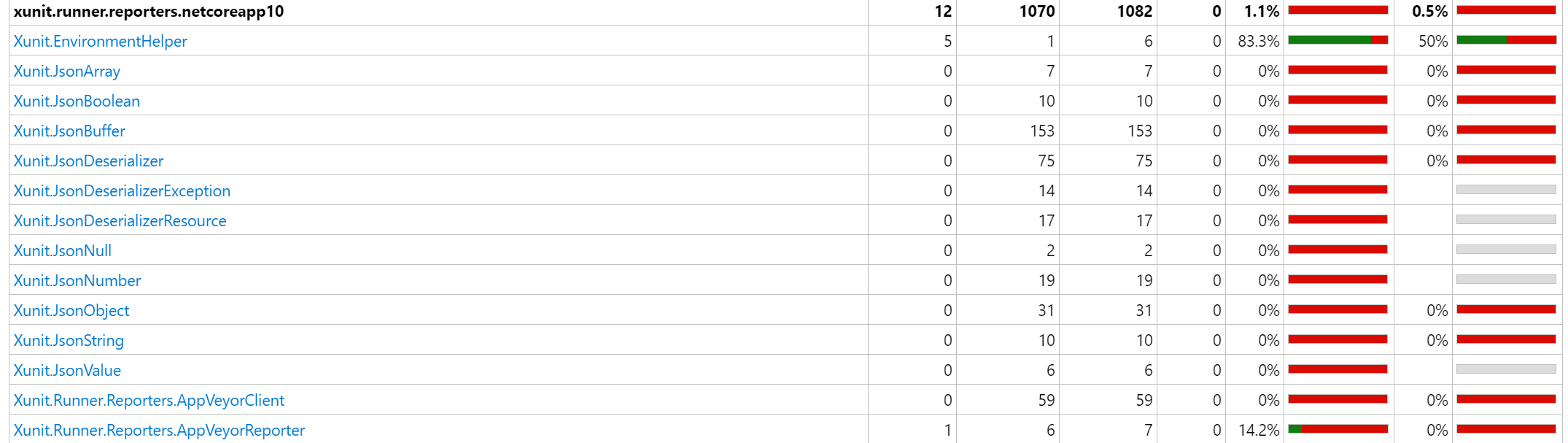
looks like no parameters applied from the configuration section, or I do something wrong
 nilfdev
All 5 comments
You are not doing anything wrong.
The problem is:
The generated HTML is ignored and regenerated by the 'Publish code coverage' task.
Microsoft changed that recently:
https://docs.microsoft.com/en-us/azure/devops/release-notes/2019/sprint-150-update#cobertura-code-coverage-report-updates
 danielpalme
on 10 May 2019
danielpalme
on 10 May 2019
You are not doing anything wrong.
The problem is:
The generated HTML is ignored and regenerated by the 'Publish code coverage' task.
Microsoft changed that recently:
https://docs.microsoft.com/en-us/azure/devops/release-notes/2019/sprint-150-update#cobertura-code-coverage-report-updates
does it mean that Microsoft ignoring all the filters, removed all the styles (according to the security reasons) but NOT add the filtering functionality by themselves?
means there is no workaround to apply filtering during publishing code coverage results?
nilfdev
on 10 May 2019
Correct.
Workaround:
Publish the report generated by 'ReportGenerator' as a separate artifact and ignore the coverage results from Azure DevOps.
danielpalme
on 10 May 2019
Microsoft as usually makes the life easier.
thank you for quick reply and great tool!
nilfdev
on 10 May 2019
I just found out, that you can set an environment variable to prevent regenerating the report:
disable.coverage.autogenerate: 'true'
Related issues
 lifemanship
·
3Comments
lifemanship
·
3Comments
 daniel-white
·
3Comments
daniel-white
·
3Comments
 gitlavir
·
4Comments
gitlavir
·
4Comments
 ByteDecoder
·
6Comments
ByteDecoder
·
6Comments
 dotnetjunkie
·
3Comments
dotnetjunkie
·
3Comments