Reportgenerator: Problems using dark themes with VSCode with the generated report
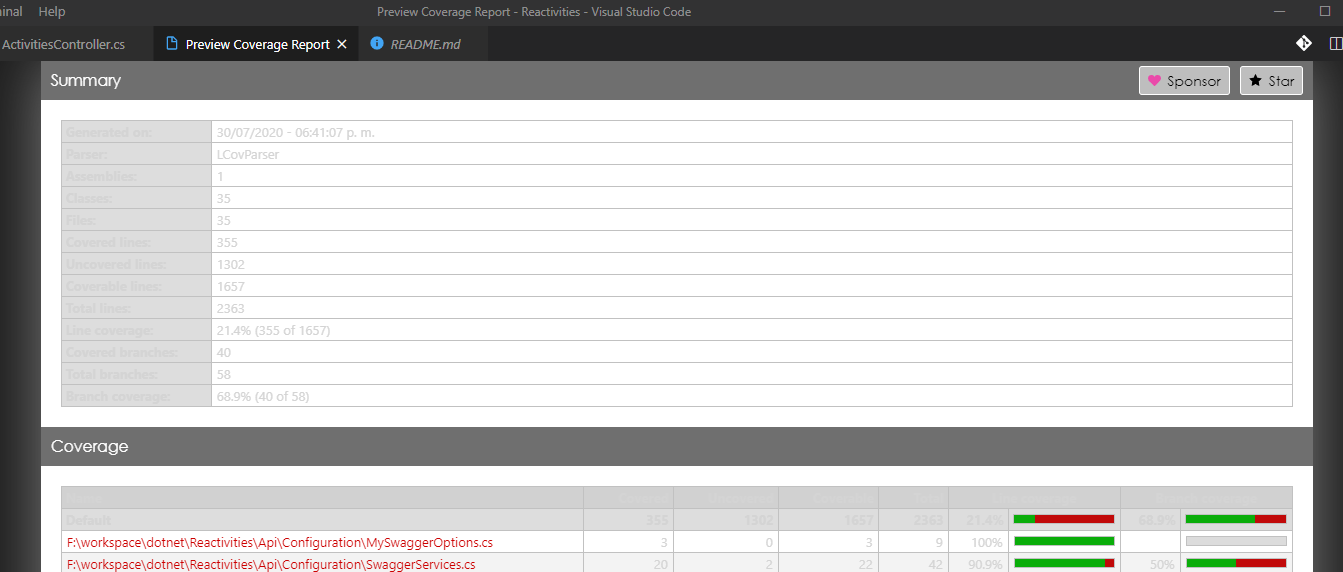
I am experienced a weird behavior using dark themes in VSCode. Is hard to read the report output inside the editor. Is there a workaround to fix this by not moving to a lighter theme?
 ByteDecoder
All 6 comments
Are you using a plugin to show the HTML page in VSCode?
 danielpalme
on 31 Jul 2020
danielpalme
on 31 Jul 2020
Hi, I am using the Coverage Gutters plugin and using the option to show the coverage report inside VSCode.
I am using the report tool with the next arguments:
reportgenerator "-reports:coverage/lcov.info" "-reporttypes:HTMLInline;Badges" "-targetdir:coverage/report"
I notice if I change the VSCode themes to lighter colors, the report output result colors became easier to distinguish.
ByteDecoder
on 31 Jul 2020
Will look into it.
danielpalme
on 1 Aug 2020
Thanks
ByteDecoder
on 2 Aug 2020
Release 4.6.3 of ReportGenerator fixes this issue (should be available within a few minutes).
By the way: If you prefer a dark theme for your report, try "-reporttypes:HtmlInline_AzurePipelines_Dark;Badges"instead of"-reporttypes:HTMLInline;Badges"`
danielpalme
on 2 Aug 2020
The enhancement is working now with Coverage Gutters with VSCode dark themes. Should I close the issue, or you will be doing that?
Thanks for the info about generating dark report theme.
ByteDecoder
on 2 Aug 2020
Related issues
 dotnetjunkie
·
3Comments
dotnetjunkie
·
3Comments
 Thilas
·
4Comments
Thilas
·
4Comments
 Sebastriani
·
7Comments
Sebastriani
·
7Comments
 diegoibellini
·
7Comments
diegoibellini
·
7Comments
 stephentoub
·
6Comments
stephentoub
·
6Comments