Reportgenerator: dotCover-Reports and TFS
I'm trying to get code coverage working for our TFS-based CI build. As coverage tool I'm using JetBrains' dotCover, which appears to work fine. Now, I want to publish that coverage on the TFS. MS provides the build task "Publish Code Coverage Report" which supports Cobertura and JaCoCo coverage files.
Thus, I would like to use the ReportGenerator task to convert the given coverage file into Cobertura format - how do I do this? :-)
I have configured the ReportGenerator task as follows:
- Reports: Path to coverage file as produced by dotCover
- Target directory: Path to some directory from where I want to pick up the Cobertura coverage file by the mentioned "Publish Code Coverage" task
- Report types: Cobertura
The output of the build server is as follows:
==============================================================================
Task         : ReportGenerator
Description  : ReportGenerator converts XML reports generated by OpenCover, PartCover, dotCover, Visual Studio, NCover, Cobertura or JaCoCo into human readable reports in various formats.
Version      : 1.0.3
Author       : Palmmedia
Help         : [More Information](https://github.com/danielpalme/ReportGenerator)
==============================================================================
"C:\Program Files\dotnet\dotnet.exe" C:\Agents\CX-BUILD01-Agent02\_work\_tasks\reportgenerator_be803a55-9253-4895-a525-be570d86f161\1.0.3\tools\netcoreapp2.0\ReportGenerator.dll -reports:C:\DotCoverResults\CoverageReport.xml -targetdir:C:\ReportGeneratorResults -reporttypes:Cobertura -sourcedirs: -historydir: -plugins: -assemblyfilters:+* -classfilters:+* -filefilters:+* -verbosity:Verbose -tag:20181112.7_#(build.buildid)
Loading report 'C:\DotCoverResults\CoverageReport.xml' 1/1
Coverage report parsing took 1,0 seconds
Initializing report builders for report types: Cobertura
Analyzing 0 classes
 Creating summary
Report generation took 1,1 seconds
For the sake of simplicity, I then downloaded the NuGet package and tried to locally generate a Cobertura coverage file, again with no luck. Here's my command and output:
PS C:\Users\foo\Desktop\reportgenerator.4.0.3\tools\net47> .\ReportGenerator.exe -reports:CoverageReport.xml -reporttypes:Cobertura -targetdir:the_report
Loading report 'C:\Users\foo\Desktop\reportgenerator.4.0.3\tools\net47\CoverageReport.xml' 1/1
Coverage report parsing took 0,4 seconds
Initializing report builders for report types: Cobertura
Analyzing 0 classes
 Creating summary
Report generation took 0,4 seconds
After execution, the directory the_report indeed contains a file Cobertura.xml, but it's pretty much empty:
<?xml version="1.0" encoding="utf-8"?>
<!DOCTYPE coverage SYSTEM "http://cobertura.sourceforge.net/xml/coverage-04.dtd">
<coverage line-rate="1" branch-rate="1" lines-covered="0" lines-valid="0" branches-covered="0" branches-valid="0" complexity="NaN" version="0" timestamp="1542036076">
  <sources />
  <packages />
</coverage>
For the sake of completeness, here's the beginning of the dotCover coverage file I'd like to convert:
<?xml version="1.0" encoding="utf-8"?>
<Root CoveredStatements="5156" TotalStatements="321286" CoveragePercent="2" ReportType="Xml" DotCoverVersion="2018.2.3">
<Assembly Name="Archiv" CoveredStatements="0" TotalStatements="9619" CoveragePercent="0">
<Namespace Name="Archiv" CoveredStatements="0" TotalStatements="8497" CoveragePercent="0">
<Type Name="ArchivDB" CoveredStatements="0" TotalStatements="123" CoveragePercent="0">
<Constructor Name="ArchivDB()" CoveredStatements="0" TotalStatements="10" CoveragePercent="0" />
<Constructor Name="ArchivDB()" CoveredStatements="0" TotalStatements="21" CoveragePercent="0" />
<AutoProperty Name="Ablagetypen:IDBTableG<int,DateiablageTyp>" CoveredStatements="0" TotalStatements="1" CoveragePercent="0">
<PropertyGetter CoveredStatements="0" TotalStatements="1" CoveragePercent="0" />
</AutoProperty>
Am I doing anything wrong? I had seen this comment, but I'm not sure what it means, since there does not seem to be a ReportType argument (only reporttypes), plus, I do not see DetailedXML mentioned in the help output, so my guess is that this is outdated...
 csoltenborn
All 23 comments
You are doing everything correctly.
It seems as if the _DotCover_ XML format has changed. You are using version 2018.2.3.
I have to see if _ReportGenerator_ can support that format too. The latest version I have tried is 2016.2
I will come back to you within the next days.
 danielpalme
on 12 Nov 2018
danielpalme
on 12 Nov 2018
Just found the root problem:
Please add the following parameter when you execute dotCover: /ReportType=DetailedXML
Then the XML will contain more details and _ReportGenerator_ should be able to create a meaningful report.
danielpalme
on 12 Nov 2018
Stupid me - I didn't get that this is an option of dotCover (instead of Reportgenerator)...
I'll give it a try tomorrow, and I'll let you know in case there are still problems. Thanks anyways for the fast answer!
csoltenborn
on 12 Nov 2018
Just to let you know: worked just fine now. Thanks again...
csoltenborn
on 13 Nov 2018
I thought that I just re-use this issue for a follow-up question - let me know if your prefer a new issue!
I have integrated ReportGenerator into our TFS build now, and reports are generated as expected. Now, I'd like to integrate the coverage results into the TFS "build results". Following these instructions, I have added the according task to my build config using the following settings:
Target directory: $(Build.SourcesDirectory)\CoverageResults
Report types: Cobertura;HtmlSummary
History directory: some network folder reachable by all build agents (seems to work fine)
Tag: $(build.buildnumber)_#$(build.buildid)
The result ist that TFS shows the overall coverage:
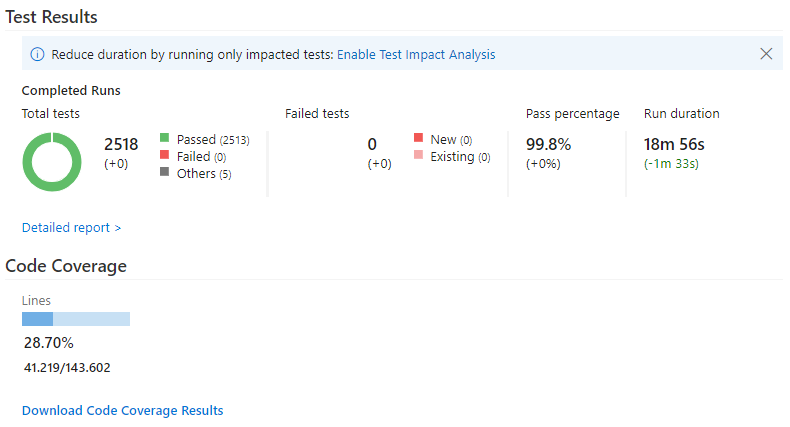
The downloadable coverage results contain the Cobertura.xml file and a file summary.htm. Is there any way to integrate that html file into the build summary? In an ideal world, I'd like to see the coverage history as part of the build's summary, and some more detailed information (in the line of the above summary.htm as part of the summary of an individual build (e.g., replacing the coverage number shown a part of the screenshot above).
Is there any way to do this, or will I have to stick with the single number (and have my users download the coverage results in case they are interested)?
csoltenborn
on 11 Mar 2019
I'm not sure if TFS support this. In Azure DevOps it works if the report file is named "index.html" instead of "summary.htm"
Perhaps you can add a build step which renames the file and try if this works in TFS.
danielpalme
on 11 Mar 2019
No, that didn't do the trick... However, we will soon migrate to Azure DevOps, and the nI will give it another try and let you know. Thanks already...
csoltenborn
on 12 Mar 2019
When you migrate you Azure DevOps, you can also use the ReportGenerator extension:
https://marketplace.visualstudio.com/items?itemName=Palmmedia.reportgenerator
danielpalme
on 12 Mar 2019
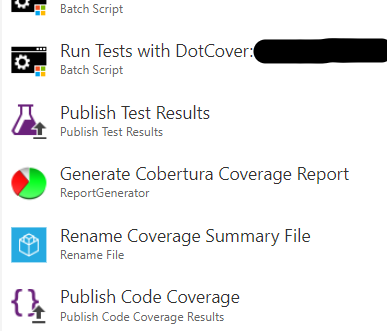
I think that I'm doing this already! Here's a screenshot of an excerpt of our TFS build definition:
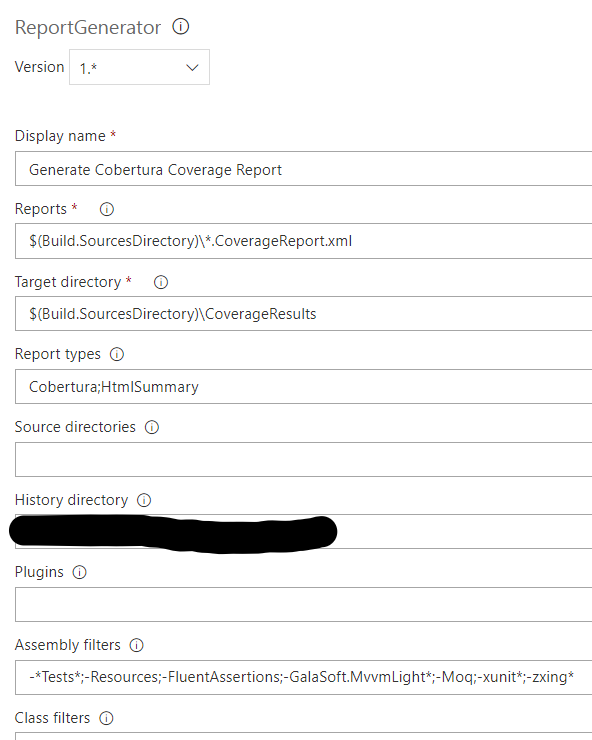
Details of the ReportGenerator task configuration (the history directory points to some network drive accessible by all build agents):
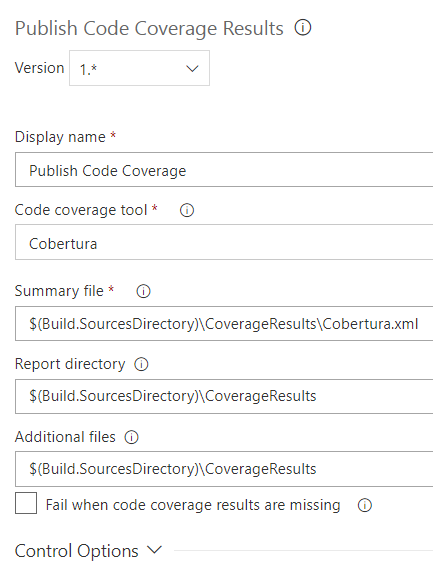
Finally, the Publish code coverage results task:
csoltenborn
on 14 Mar 2019
In fact, I mentioned the former because I hoped to get some advise on why this would not work ;-)
But don't worry: as I said, I will come back and annoy you as soon as we have switched to Azure DevOps if it still does not work!
csoltenborn
on 15 Mar 2019
Looks fine so far.
I guess the problem is the TFS here. With Azure DevOps you get a "Coverage" tab in the build results where you can view the coverage report.
danielpalme
on 15 Mar 2019
I'm having a very similar issue to that originally stated, but I'm using OpenCover, not dotCover. Do you have any suggestions on how to run either OpenCover or ReportGenerator in such a way that it reads the XML properly?
 DLMorrell
on 3 Jun 2019
DLMorrell
on 3 Jun 2019
What‘s the problem?
RepprtGenertor can parse OpenCover files without issues.
I need some more context to help you.
danielpalme
on 3 Jun 2019
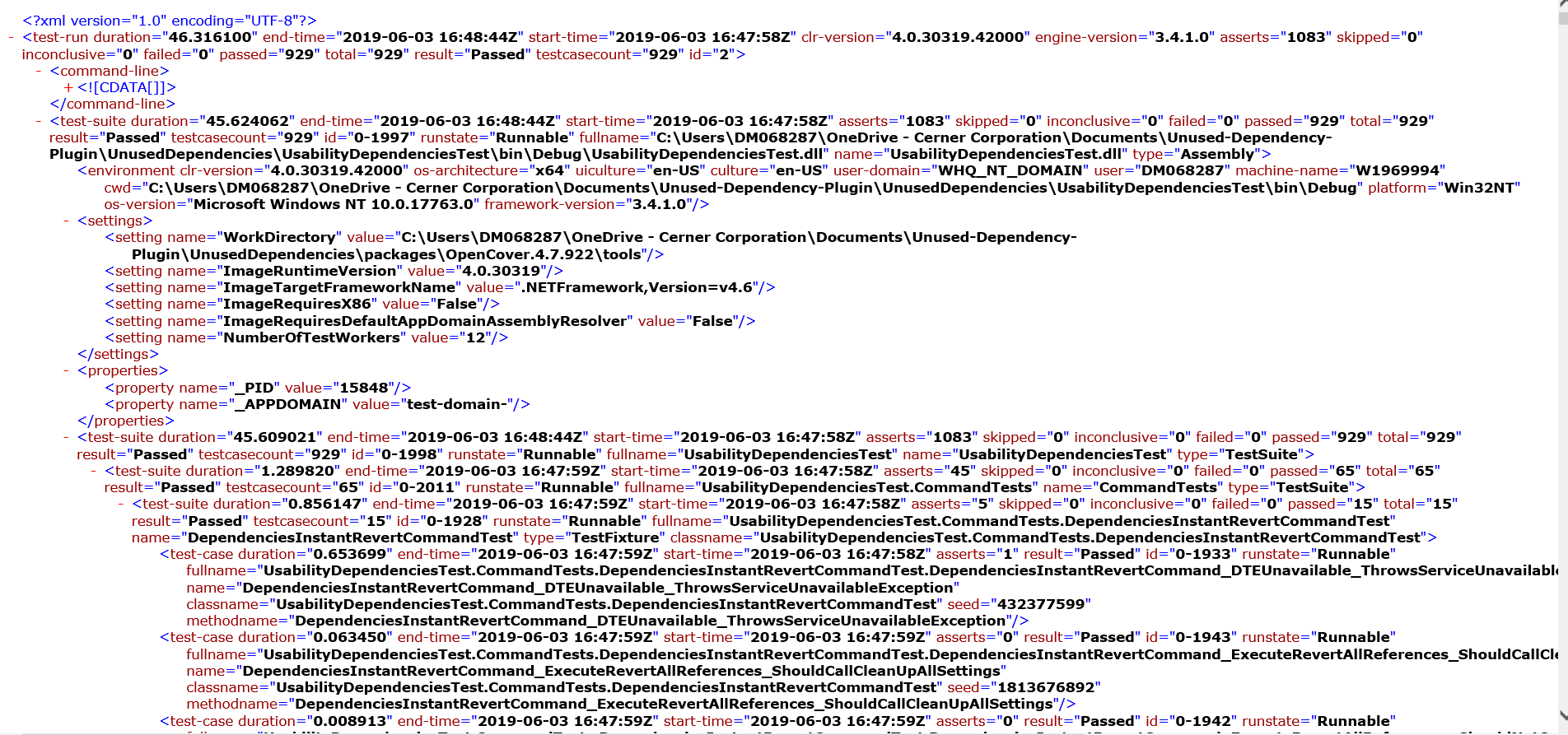
Sure, sorry if I was vague. I use OpenCover to generate an XML file that looks like this
-
-
Clearly having found my tests and passed them. Then when I run ReportGenerator I get
Loading report 'C:\Documents\Unused-Dependency-Plugin\UnusedDependencies\packages\ReportGenerator_4.1.9\net47\TestResult.xml' 1/1
Coverage report parsing took 0.0 seconds
Initializing report builders for report types: Html
Analyzing 0 classes
Creating summary
Writing report file
etc
When I open the index.htm file it looks as though it didn't load anything showing zeros in all fields.
Thanks in advance,
Daniel
DLMorrell
on 3 Jun 2019
Sorry it seemed to get rid of my xml code I pasted. It looks very similar to what the original question had, if you need me to attach it I can. It says version 1 utf-8 and all that.
DLMorrell
on 3 Jun 2019
It seems as if you pass the wrong file to ReportGenertor.
Can you share the XML?
danielpalme
on 3 Jun 2019
It doesn't actually seem to let me attach the xml file, but here's a snip of the first part:
DLMorrell
on 3 Jun 2019
Is that enough? If not do you have a suggestion for how I share it to you?
DLMorrell
on 3 Jun 2019
Also, to generate the OpenCover report I use this command:
OpenCover.Console.exe -target:"Path of your testing executable (for C# it’s nunit)" -targetargs:"Path of a test dll from your tested code“ -register:user
Where the output is it saying about 98% code coverage and a few other statistics, so I know it read everything properly at least.
DLMorrell
on 3 Jun 2019
You have to pass the XML file generated by _OpenCover_ to _ReportGenerator_. Currently you are passing the _NUnit_ report.
It should look like this (the -output: command line parameter is important):
OpenCover.Console.exe -target:"Path of your testing executable" -targetargs:"Path of a test dll“ -register:user -output:coverage.xml

ReportGenerator.exe -reports:coverage.xml -targetdir:coverage
Another sample can be found here:
https://github.com/danielpalme/DotNetCoverageToolComparision/blob/master/run.bat#L21
danielpalme
on 3 Jun 2019
That worked, thanks for your help! You're awesome and I hope you have a good day!
DLMorrell
on 3 Jun 2019
After moving our VC to Git and setting up new builds, I thought that I give ReportGenerator another shot. My current state is that I successfully run ReportGenerator. The resulting build has coverage information on the _Summary_ tab:
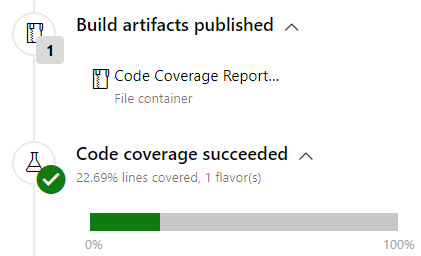
The content of the zip file I get when downloading the _Code Coverage Report_ from the _Build artifacts published_ looks as follows:
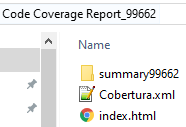
Note in particular that the zip file contains a file index.html since following your advice, I'm renaming the summary.htm file accordingly.
This is probably not important, but the index.html looks just fine (the coverage history is available since I have configured a _History directory_ for the _Report Generator_ task):
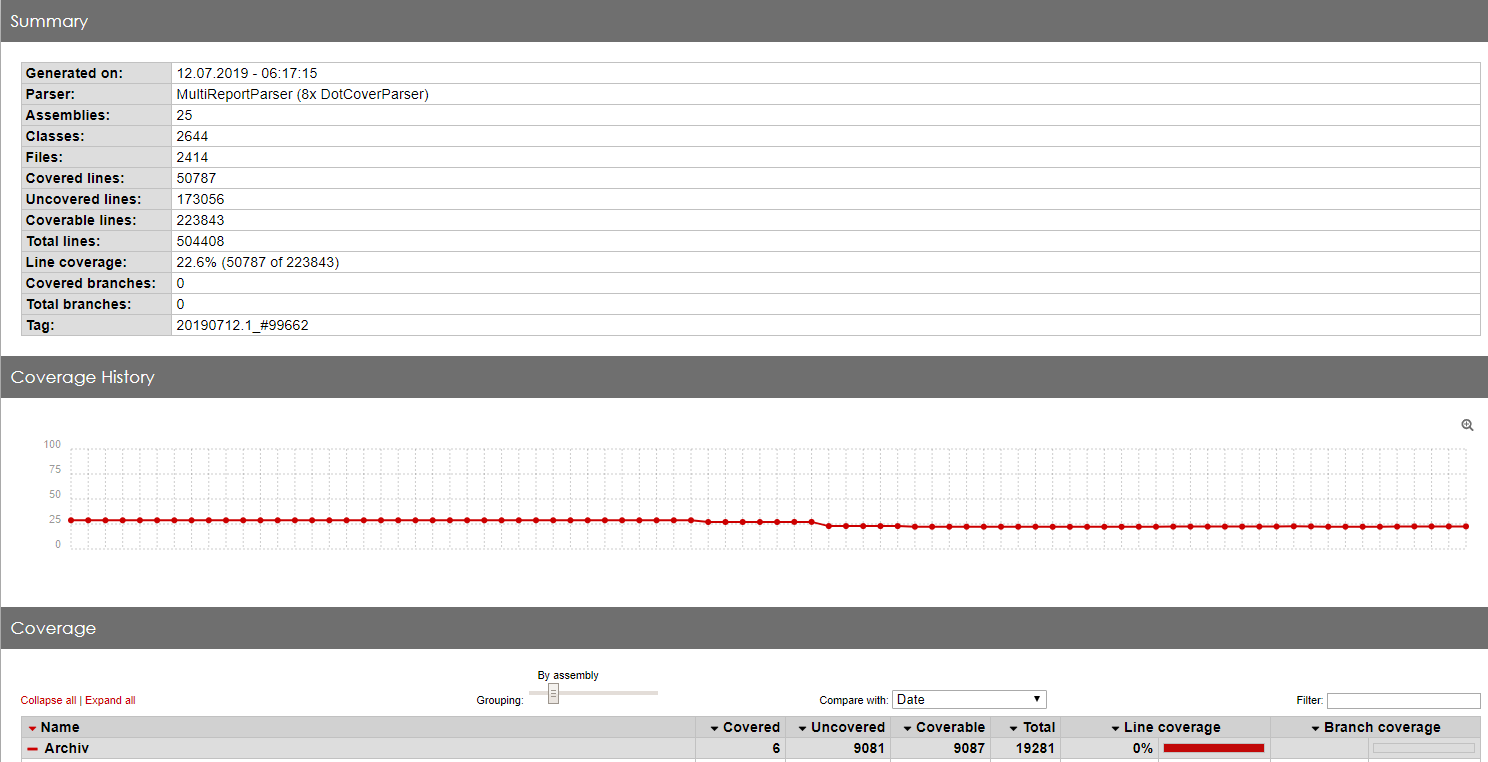
However, I would expect Azure DevOps to make the index.html file available somewhere in the build results such that my team can look at it without downloading the coverage report, but by just looking at the build summary. That does not seem to be the case, though... Am I doing something wrong, or do I expect too much?
Btw: Let me know if you prefer a new issue... and, of course, thanks in advance.
csoltenborn
on 12 Jul 2019
Are you using _Azure DevOps_ or a local _Azure DevOps Server_?
The _Azure DevOps Server_ seems to have a problem showing the "Code coverage" tab.
See:
- #261
- https://stackoverflow.com/questions/56886206/reportgenerator-missing-code-coverage-tab-azure-devops-server-2019-0-1
- https://developercommunity.visualstudio.com/content/problem/578111/code-coverage-tab-missing-in-azure-devops-server.html
With the online version _Azure DevOps_ it should work:
E.g.: https://dev.azure.com/danielpalme/ReportGenerator/_build/results?buildId=255&view=codecoverage-tab
danielpalme
on 12 Jul 2019
Related issues
 gitlavir
·
4Comments
gitlavir
·
4Comments
 nilfdev
·
5Comments
nilfdev
·
5Comments
 dotnetjunkie
·
3Comments
dotnetjunkie
·
3Comments
 lifemanship
·
3Comments
lifemanship
·
3Comments
 chtoucas
·
4Comments
chtoucas
·
4Comments