Reportgenerator: Inline styles for VSTS compatible eye candy?
Because of: https://github.com/Microsoft/vsts-tasks/issues/2357 would it possible to add switch for forcing styles to be inlined to report files? It of course would greatly increase the file sizes and it's by any standards wrong but since VSTS is apparently paranoid of meta tags and links, I would see this approach as a viable workaround.
 mkontula
All 22 comments
Should be possible. Will come back to you within the next 1-2 weeks
 danielpalme
on 12 May 2017
danielpalme
on 12 May 2017
Most appreciated!
mkontula
on 12 May 2017
Could you please test this release:
https://www.nuget.org/packages/ReportGenerator/2.5.8-beta1
You should use the following command line argument:
-reportypes:HtmlInline
instead of
-reportypes:Html
danielpalme
on 14 May 2017
@danielpalme Gave this beta package a try. Works pretty well. Thanks!
 nulltoken
on 15 May 2017
nulltoken
on 15 May 2017
@nulltoken
Did you test it with VSTS?
danielpalme
on 15 May 2017
Indeed. Otherwise I wouldn't have reported my test :wink:
As the html is displayed within an iframe, navigating within the report is a bit clunky (lack of a link back to the main page, and mandatory usage of the right mouse button, then select the "back" menu item) but a definitive enhancement compared to previous behavior.


Few minor findings, though:
- No "Collapse all / Expand all / Grouping/ Filtering " feature of the main page.
- The white "i" in the blue circle picture doesn't seem to be displayed next to "Cyclomatic complexity / NPath complexity ..." titles in the type detail page.
nulltoken
on 15 May 2017
The chrome console displays messages similar to the one below:
Blocked script execution in 'https://xxxxxxxx.visualstudio.com/xxxxxxxxxxx-dddd-cccccc-dddd-qqqqqqqqqqqq/_…owse/000001/Code%20Coverage%20Report_13370/XXXXXXXX_1.htm' because the document's frame is sandboxed and the 'allow-scripts' permission is not set.
Similar test results here. Mr. Trump would say "This is HUUUGE, I mean, HUUUUUGE improvement". Lack of scripts is understandable, due to vsts' paranoia.
mkontula
on 16 May 2017
Well played Sir! Keep up the good work and don't hesitate to ask for another hand anytime! Would be happy to help!
mkontula
on 16 May 2017
could some one give a sample of how to integrate it with vsts
 dzfweb
on 3 Jan 2018
dzfweb
on 3 Jan 2018
Some hints would be great. I would also like to add them to the wiki:
https://github.com/danielpalme/ReportGenerator/wiki/Integration
danielpalme
on 4 Jan 2018
@dzfweb
I managed to create a basic setup with the following steps
- Setup of a VSTS build agent which runs on my machine: https://YOURACCOUNT.visualstudio.com/CoverageTest/_admin/_AgentQueue
Commit/Push a sample project to VSTS. I created this project:
VSTS_CoverageSample.zip It contains a .NET class library and a test project based on xUnit. It also contains two _bat_ files which:- Executes the tests with OpenCover
- Generates a Cobertura file using OpenCoverToCoberturaConverter
- Generates HTML report using ReportGenerator
Setup of build definition in VSTS. In this case I used the ".NET Desktop" template and made some modifications:
- Removed the VsTest step
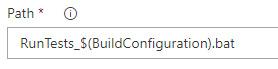
- Added a Batch Script step after Build solution which executes the bat file with the following command:
RunTests_$(BuildConfiguration).bat
- Added a Publish Test Results step after Publish symbols path. This uploads the xUnit results to VSTS
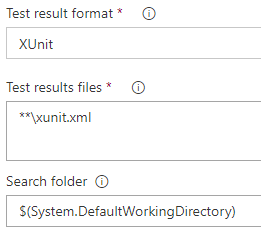
- Added a Publish Test Results step after Publish symbols path. This uploads the xUnit results to VSTS
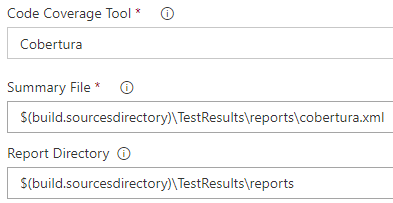
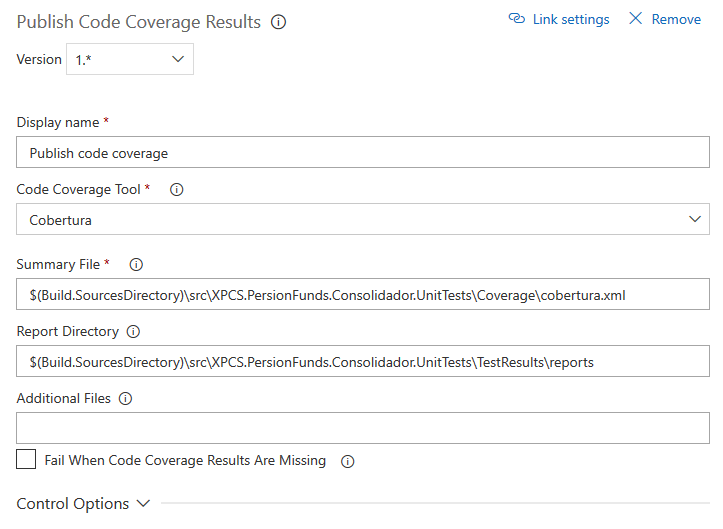
- Added a Publish Code Coverage Results step after Publish Test Results using the following configuration:
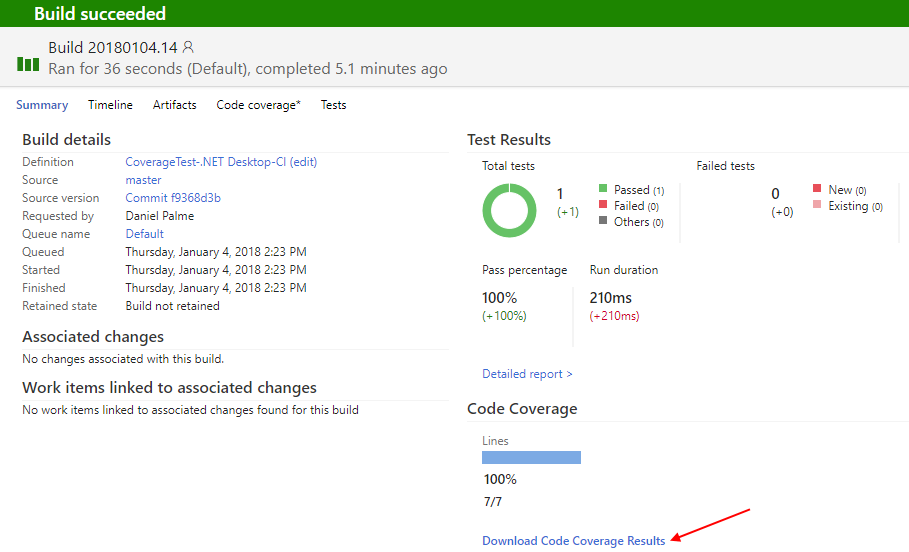
Execute build and see results
Hope this helps!
danielpalme
on 4 Jan 2018
@danielpalme thank you!!! It'll be realy helpful.
dzfweb
on 4 Jan 2018
@dzfweb
I updated the wiki as well: https://github.com/danielpalme/ReportGenerator/wiki/Integration
danielpalme
on 4 Jan 2018
thanks again @danielpalme,
another thing is how to do this whit MSTests? I'm not using xUnit, is it needed?
dzfweb
on 5 Jan 2018
xUnit is not required.
You have to make some modifications:
- Modify the bat file(s) to execute _MSTest_/_vstest.console.exe_ instead of _xunitconsole.exe_:
mkdir TestResults
mkdir TestResults\reports

%userprofile%\.nuget\packages\opencover\4.6.519\tools\OpenCover.Console.exe -register:user -coverbytest:* -returntargetcode -mergebyhash -target:"C:\Program Files (x86)\Microsoft Visual Studio\2017\Community\Common7\IDE\CommonExtensions\Microsoft\TestWindow\vstest.console.exe" "-targetargs:CalculatorTest\bin\Debug\CalculatorTest.dll /InIsolation /platform:x64" -filter:+[*]* "-output:TestResults\reports\opencover.xml"

%userprofile%\.nuget\packages\opencovertocoberturaconverter\0.2.6\tools\OpenCoverToCoberturaConverter.exe "-input:TestResults\reports\opencover.xml" "-sources:." "-output:TestResults\reports\cobertura.xml" "-includeGettersSetters:true"

%userprofile%\.nuget\packages\reportgenerator\3.1.1\tools\ReportGenerator.exe -reporttypes:HTMLInline "-reports:TestResults\reports\opencover.xml" "-targetdir:TestResults\reports" -verbosity:Info -historydir:TestResults\reports\history
- In step Publish Test Results change the _Test result format_ and _Test results files_
danielpalme
on 5 Jan 2018
Nice,
i think the path
C:\Program Files (x86)\Microsoft Visual Studio\2017\Community\Common7\IDE\CommonExtensions\Microsoft\TestWindow\vstest.console.exe won't work on vsts, wich path should i use?
dzfweb
on 5 Jan 2018
Sorry, I don't know. I have used a local build agent.
danielpalme
on 5 Jan 2018
Anyway, thank you so much for your time expended helping me, was realy helpful.
dzfweb
on 5 Jan 2018
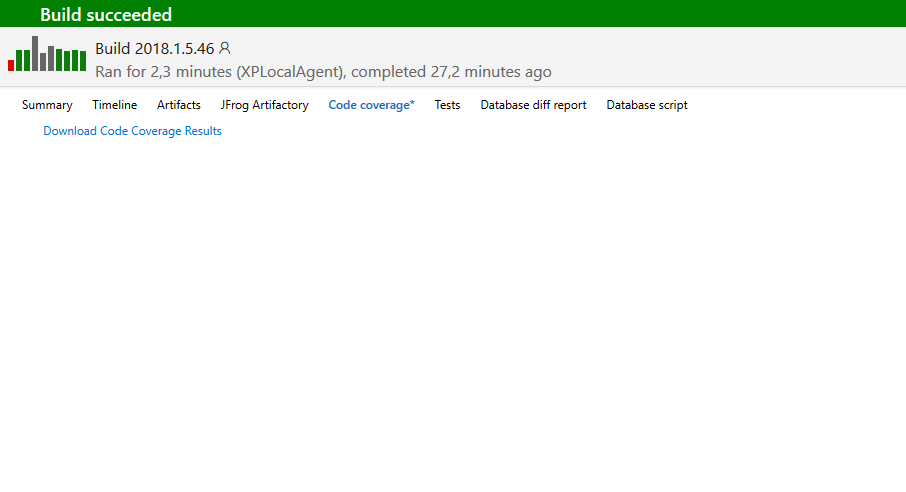
i've finally maked it works, but now i want to know if is possible to view the html generated inside the code coverage tab of build result.
My Publish code covarage:
dzfweb
on 5 Jan 2018
IMHO, that's not possible in VSTS.
Which path did you use for _MSTest/vstest.console.exe_?
danielpalme
on 6 Jan 2018
i've finally maked it works, but now i want to know if is possible to view the html generated inside the code coverage tab of build result.
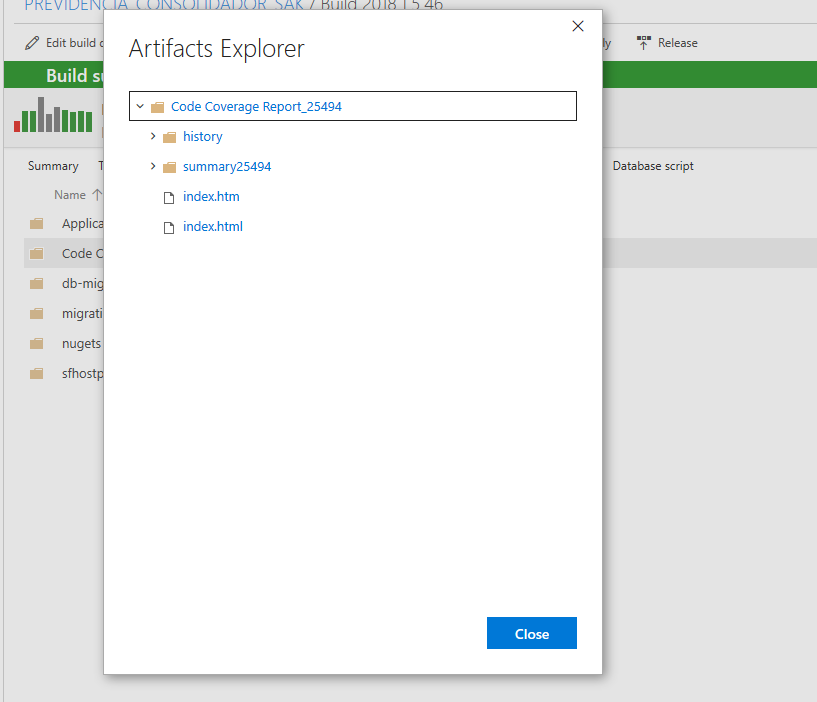
I'm able to display the report in the Code Coverage tab by adding a step that renames index.htm to index.html.
 LCHarold
on 25 Oct 2018
LCHarold
on 25 Oct 2018
Related issues
 daniel-white
·
3Comments
daniel-white
·
3Comments
 wsugarman
·
4Comments
wsugarman
·
4Comments
 jpedretti-ciandt
·
3Comments
jpedretti-ciandt
·
3Comments
 nilfdev
·
5Comments
nilfdev
·
5Comments
 lifemanship
·
3Comments
lifemanship
·
3Comments
Most helpful comment
@dzfweb
I managed to create a basic setup with the following steps
Commit/Push a sample project to VSTS. I created this project:
VSTS_CoverageSample.zip It contains a .NET class library and a test project based on xUnit. It also contains two _bat_ files which:
Setup of build definition in VSTS. In this case I used the ".NET Desktop" template and made some modifications:
RunTests_$(BuildConfiguration).batExecute build and see results

Hope this helps!