Renovate: Cannot enable renovate for invoiced customers
We're trying to enable renovateapp through the GitHub marketplace for the GoogleCloudPlatform org. Sadly, we end up with this:
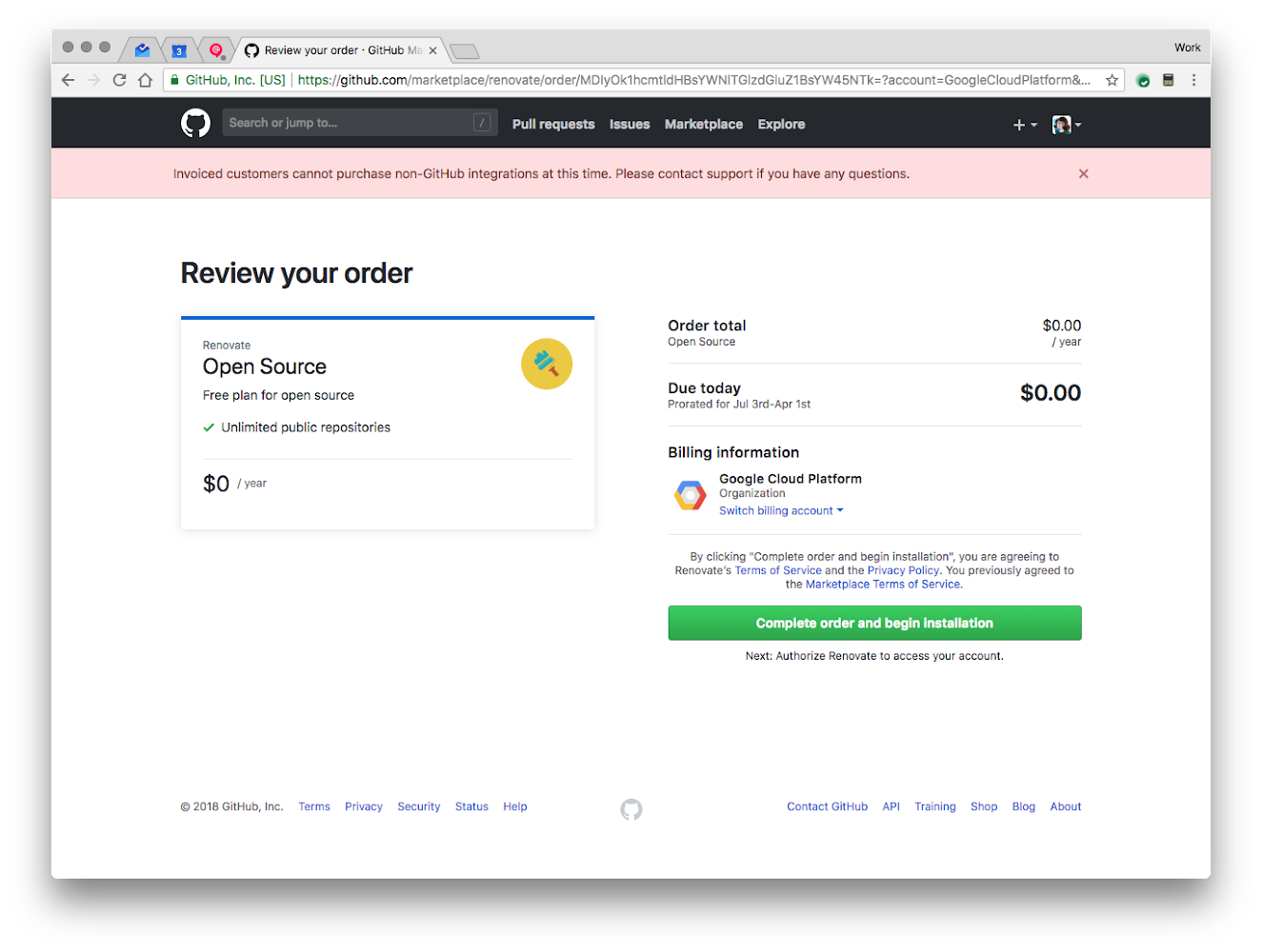
We can't seem to figure out a way to activate the service for invoiced orgs :( Any guidance? We're really enjoying renovate in our other open source orgs.
Thanks!
 JustinBeckwith
All 9 comments
cc @theacodes @ofrobots
JustinBeckwith
on 12 Jul 2018
Bad news is that this is a GitHub billing system limitation that I don't expect they will address due to the acquisition. It would require technical and human work to generate extra invoices that I don't think they want to do.
Good news is that selecting the "Open Source" plan for Renovate is actually not required anyway. If the app is already installed via https://github.com/apps/renovate then there's nothing more to do and there is no plan "enforcement" for public repositories. The Open Source plan is just there for people who browse via the Marketplace and wonder if there's a free "plan" and for anyone not already signed up it then triggers the app installation afterwards. I think in your case the "GoogleCloudPlatform" account is already installed directly via the app so nothing more to do.
If you ever have private repositories that you need added, then a plan is required and this does cause a problem for Invoiced organisations. In that case we support direct payment via credit card or invoice/bank transfer.
 rarkins
on 12 Jul 2018
rarkins
on 12 Jul 2018
@JustinBeckwith I’m curious about what led you to try enabling a plan - were you just trying to configure which repositories are enabled, or something else prompted you? GitHub’s UI can be a bit frustrating and I’ve asked them previously to provide helpful error messages for invoiced customers in particular but so far I haven’t noticed any changes.
rarkins
on 12 Jul 2018
@theacodes @tswast @juliaferraioli - I am having a little trouble here :) We would very much like to get renovate enabled in the org for our node.js repositories. Can someone take a look?
JustinBeckwith
on 16 Jul 2018
cc @ofrobots
JustinBeckwith
on 16 Jul 2018
Looks like it is installed on the GCP org, so we should be good to go. We just need to select which repositories you want to enable it on.
 tswast
on 16 Jul 2018
tswast
on 16 Jul 2018
Go to https://github.com/apps/renovate
Click on Configure:

Look for the relevant org on the next page, e.g. here you see my personal account + an org account "renovate-mirrors":

If you don't see the relevant org account here, I'm pretty sure it means you don't have the permissions necessary and someone else needs to do it. That's a GitHub thing, not a Renovate thing.
Click on the Org you want to Configure. If it's not installed yet at all, you should see it offer the "Install" option instead of "Configure".
You will then get to a page like https://github.com/organizations/<your-org>/settings/installations/999999. Scroll to the bottom.
Now you should see something like this:
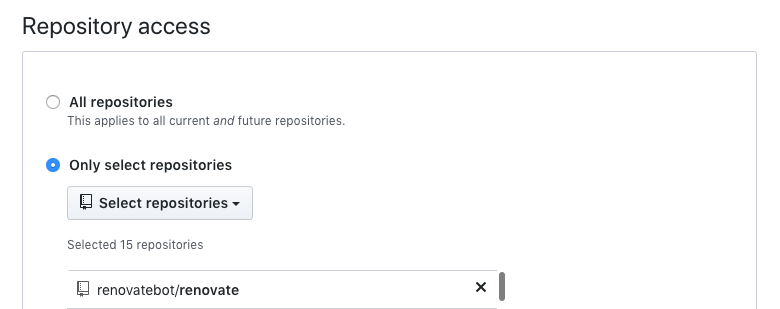
Click on "Select repositories" and add the ones you want. Or go nuts and click "All repositories".
rarkins
on 16 Jul 2018
In that case we support direct payment via credit card or invoice/bank transfer.
By direct, do you mean, directly through renovate? How can we do that?
 MiguelMadero
on 21 Jun 2019
MiguelMadero
on 21 Jun 2019
Please email [email protected] with your details and we’ll let you know next steps
rarkins
on 21 Jun 2019
Related issues
 Siilwyn
·
4Comments
Siilwyn
·
4Comments
 ZauberNerd
·
4Comments
ZauberNerd
·
4Comments
 jeromelachaud
·
3Comments
jeromelachaud
·
3Comments
 OmgImAlexis
·
4Comments
OmgImAlexis
·
4Comments
 ikatyang
·
4Comments
ikatyang
·
4Comments
Most helpful comment
Go to https://github.com/apps/renovate
Click on Configure:

Look for the relevant org on the next page, e.g. here you see my personal account + an org account "renovate-mirrors":

If you don't see the relevant org account here, I'm pretty sure it means you don't have the permissions necessary and someone else needs to do it. That's a GitHub thing, not a Renovate thing.
Click on the Org you want to Configure. If it's not installed yet at all, you should see it offer the "Install" option instead of "Configure".
You will then get to a page like
https://github.com/organizations/<your-org>/settings/installations/999999. Scroll to the bottom.Now you should see something like this:

Click on "Select repositories" and add the ones you want. Or go nuts and click "All repositories".