Refined-github: Keyboard shortcut for submitting the review changes on a PR
Edit by @fregante: this issue can be solved by following https://github.com/sindresorhus/refined-github/issues/3095
Given I'm on a PR and review the files I'd like to hit a keyboard shortcut to let me review the changes. Possibly, r could be used.
Then for accepting, rejecting, or commenting we could use a, r and c.
Shortcuts for immediately accepting / rejecting / commenting from the PR file page itself would also be nice. Maybe something like
r + a => accept
r + r => reject
r + c => comment
 vanniktech
All 17 comments
I think these would make sense as shortcuts in the review popup, but if you're in there chances are you're typing the comment, so simply r+* wouldn't work, it needs a modifier key.
 fregante
on 6 Feb 2018
fregante
on 6 Feb 2018
Is there any preference regarding a designated modifier key?
vanniktech
on 6 Feb 2018
Probably metaKey since metaKey+enter is what works to submit comments.
fregante
on 5 Mar 2018
r is already a shortcut provided by GitHub - it quotes selected text and replies to a conversation in a new comment.
meta + r is Reload in most browsers.
I'd like that to work on the Conversation view as well. There's a link in the footer which opens the Files changed tab with a review panel opened.
 hkdobrev
on 6 Mar 2018
hkdobrev
on 6 Mar 2018
meta + r is Reload in most browsers.
You're right, all of those have a meaning with metakey (select all, reload, copy), so it might have to be meta+alt+letter
There's a link in the footer which opens the Files changed tab with a review panel opened.
hmm which one? Screenshot?
fregante
on 6 Mar 2018
Hmm, it seems it shows only when you've requested changes, GitHub shows a shortcut "Approve changes" in the review status section at the bottom.
hkdobrev
on 6 Mar 2018
Are you talking about this? If not, screenshot please

If yes, that's a one-click approval, it doesn't open the Files tab. Maybe it shouldn't have a shortcut
fregante
on 6 Mar 2018
Yes, I couldn't find it on my PRs at the moment.
Also, there's another button in a yellow bar when you first see a PR after a review was requested and you haven't added review comments. That button opens the Files changed tab with the review panel open. However, I can't find such an example either. I'll screenshot it when I see it.
hkdobrev
on 6 Mar 2018
Those approve changes and dismiss review buttons I'd not include in the initial version of the shorcuts. Instead I'd just include these:
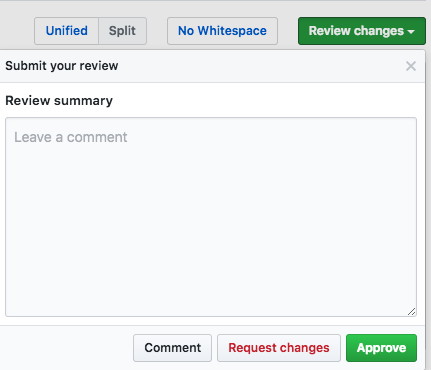
vanniktech
on 6 Mar 2018
@vanniktech sounds good! Keep in mind that comment already has a shortcut: meta+enter. I don't particularly like it, but it might be a hassle to prevent that. So let's just focus on the two buttons and add aria-label on them
fregante
on 6 Mar 2018
That's the link for opening Files changed tab with review panel open:
hkdobrev
on 8 Mar 2018
I don't think it needs a distinct shortcut for comment, reject and approve. Just a shortcut to open and highlight the form after completing all inline-code comments. Once the form is focused, you can enter a message and tab to the relevant submission button.
 ProLoser
on 9 Mar 2018
ProLoser
on 9 Mar 2018
👍 I think the textarea should be focused by default when the review form is opened. You can always use Cmd+Enter or Tab. Not focused textarea doesn't give you focused buttons anyway.
hkdobrev
on 9 Mar 2018
PR welcome :)
For anyone that wants this, please also send this feature request to GitHub: [email protected]
 sindresorhus
on 7 Nov 2018
sindresorhus
on 7 Nov 2018
This seems easy:
select('.js-reviews-toggle')!.dataHotkey = 'g r';
delegate(',js-dropdown-details > details', 'toggle', ({delegateTarget}) => {
    if (delegateTarget.open) {
        select('textarea', delegateTarget)!.focus();
    }
}, true);
Anyone who wants it just needs to ensure this works, add this to quick-review-buttons and add documentation for it. Follow contribute.md
fregante
on 7 Sep 2019
Unlocking this to discuss an alternative shortcut since g r is used by releases-tab
fregante
on 29 May 2020
I also don't like v as a shortcut for "Review" particularly much, but other options were already taken:
- r: Reply (quoting selected text) (native GitHub)
- g r: Go to Releases (RGH's
releases-tab) - c (for "review changes"): Create issue (native GitHub)
- g c: Go to Code (native GitHub)
g 5 would fit well alongside these (from RGH's pull-request-hotkey), but would wrongly imply that review was a separate tab:

So I settled with v for "review".
 FloEdelmann
on 30 May 2020
FloEdelmann
on 30 May 2020
Related issues
hkdobrev
·
3Comments
vanniktech
·
3Comments
 mareksuscak
·
3Comments
fregante
·
3Comments
mareksuscak
·
3Comments
fregante
·
3Comments
 olso
·
3Comments
olso
·
3Comments
Most helpful comment
I don't think it needs a distinct shortcut for comment, reject and approve. Just a shortcut to open and highlight the form after completing all inline-code comments. Once the form is focused, you can enter a message and tab to the relevant submission button.