Refined-github: Not working on GitHub Enterprise on Firefox
Hello,
I came across this add-on while looking for a way to expand all in a PR. I installed the Firefox Plugin (on Firefox Quantum 57.0.1 (64-bit) on macOS Sierra 10.12.6).
I then went to my GitHub site and right clicked the add-on icon in the toolbar and selected "Enable Refined GitHub on this domain" and then got a Console error:
Content Security Policy: Directive ‘frame-src’ has been deprecated. Please use directive ‘child-src’ instead.  (unknown)
Content Security Policy: The page’s settings blocked the loading of a resource at self (“style-src https://addons-amo.cdn.mozilla.net 'sha256-DiZjxuHvKi7pvUQCxCVyk1kAFJEUWe+jf6HWMI5agj4='”). Source: height:0;. refined-github-
Content Security Policy: The page’s settings blocked the loading of a resource at self (“style-src https://addons-amo.cdn.mozilla.net 'sha256-DiZjxuHvKi7pvUQCxCVyk1kAFJEUWe+jf6HWMI5agj4='”). refined-github-
Use of getAttributeNode() is deprecated. Use getAttribute() instead. amo-f054c6afa6f806bf24d3.js:1:758581
Content Security Policy: The page’s settings blocked the loading of a resource at self (“style-src https://addons-amo.cdn.mozilla.net 'sha256-DiZjxuHvKi7pvUQCxCVyk1kAFJEUWe+jf6HWMI5agj4='”). refined-github-:1
Use of getAttributeNode() is deprecated. Use getAttribute() instead. amo-f054c6afa6f806bf24d3.js:1:758581
1512639719416   addons.webextension.<unknown>   WARN    Loading extension 'null': Reading manifest: Error processing background.persistent: Event pages are not currently supported. This will run as a persistent background page.
1512639719435   addons.xpi  WARN    Please specify whether you want browser_style or not in your options_ui options.
Unparseable host permission moz-extension://98fb463d-81f7-4b41-a35b-70f593e91649/*  Extension.jsm:840
Use of getAttributeNode() is deprecated. Use getAttribute() instead. amo-f054c6afa6f806bf24d3.js:1:758581
1512639720452   addons.webextension.{a4c4eda4-fb84-4a84-b4a1-f7c1cbf2a1ad}  WARN    Loading extension '{a4c4eda4-fb84-4a84-b4a1-f7c1cbf2a1ad}': Reading manifest: Error processing background.persistent: Event pages are not currently supported. This will run as a persistent background page.
Use of getAttributeNode() is deprecated. Use getAttribute() instead. amo-f054c6afa6f806bf24d3.js:1:758581
Existing options: Object { hideStarsOwnRepos: true }  background.js:43:5
Running 1 migrations  background.js:43:80
win.PopupNotifications is undefined  ExtensionsUI.jsm:343
Error: An unexpected error occurred  background.js:159:35
alert() is not supported in background windows; please use console.log instead.  ext-c-toolkit.js:25:7
Error: An unexpected error occurred  ext-c-toolkit.js:30:5
file:///Users/danicast/Library/Application%20Support/Firefox/Profiles/rpssnhlh.default/lwtheme/lightweighttheme-header-1920x1200?64912;0
OpenGL compositor Initialized Succesfully.
Version: 2.1 INTEL-10.25.17
Vendor: Intel Inc.
Renderer: Intel Iris Pro OpenGL Engine
FBO Texture Target: TEXTURE_2D
GET
XHR
https://aus5.mozilla.org/update/3/GMP/57.0.1/20171128222554/Darwin_x86_64-gcc3/en-US/release/Darwin%2016.7.0/default/default/update.xml
[HTTP/1.1 200 OK 1249ms]
POST
http://ocsp.digicert.com/
[HTTP/1.1 200 OK 44ms]
file:///Users/danicast/Library/Application%20Support/Firefox/Profiles/rpssnhlh.default/lwtheme/lightweighttheme-header-1920x1200?64912;0
file:///Users/danicast/Library/Application%20Support/Firefox/Profiles/rpssnhlh.default/lwtheme/lightweighttheme-header-1920x1200?64912;0
file:///Users/danicast/Library/Application%20Support/Firefox/Profiles/rpssnhlh.default/lwtheme/lightweighttheme-header-1920x1200?64912;0
file:///Users/danicast/Library/Application%20Support/Firefox/Profiles/rpssnhlh.default/lwtheme/lightweighttheme-header-1920x1200?64912;0
file:///Users/danicast/Library/Application%20Support/Firefox/Profiles/rpssnhlh.default/lwtheme/lightweighttheme-header-1920x1200?64912;0
Set option hideStarsOwnRepos to true  options.js:75:25
file:///Users/danicast/Library/Application%20Support/Firefox/Profiles/rpssnhlh.default/lwtheme/lightweighttheme-header-1920x1200?64912;0
file:///Users/danicast/Library/Application%20Support/Firefox/Profiles/rpssnhlh.default/lwtheme/lightweighttheme-header-1920x1200?64912;0
POST
http://ocsp.godaddy.com/
[HTTP/1.1 200 OK 204ms]
file:///Users/danicast/Library/Application%20Support/Firefox/Profiles/rpssnhlh.default/lwtheme/lightweighttheme-header-1920x1200?64912;0
OpenGL compositor Initialized Succesfully.
Version: 2.1 INTEL-10.25.17
Vendor: Intel Inc.
Renderer: Intel Iris Pro OpenGL Engine
FBO Texture Target: TEXTURE_2D
Is this a known issue?
Thanks!
 LunaticoCR
All 23 comments
Sadly, Firefox doesn't fully support permissions request, see https://bugzilla.mozilla.org/show_bug.cgi?id=1382953
More details https://github.com/sindresorhus/refined-github/pull/819#issuecomment-344918525
 fregante
on 7 Dec 2017
fregante
on 7 Dec 2017
Thanks for your quick reply! That's a pity...
Any workarounds? Hardcode the url to my enterprise GitHub and build locally? Or does the url exist on a file I can easily modify in my already installed Firefox addon?
LunaticoCR
on 7 Dec 2017
Update these lines in manifest.json:
 busches
on 7 Dec 2017
busches
on 7 Dec 2017
Thanks for the tip @busches
I downloaded the xpi file, changed the file extension to zip and extracted it
I then modified the manifest.json file like you suggested, and finally zipped everything up and renamed to .xpi again.
When I try to install in Firefox from file, I get an error from Firefox saying the addon must be corrupted.
Is there some sort of package signature here that might be causing this?
LunaticoCR
on 8 Dec 2017
Probably because the xpi is not a regular zip file so Firefox can't find the extra info in it, telling you it's corrupted. I don't think you need to use xpi at all. How are you trying to install it?
fregante
on 8 Dec 2017
I thought a xpi is just a zip with a different file extension?
http://kb.mozillazine.org/Editing_an_add-on_to_change_its_compatibility
https://www.techgainer.com/view-source-code-firefox-addon/
LunaticoCR
on 12 Dec 2017
@LunaticoCR Firefox has tightened security around addons and each addon now has a signature to ensure bad stuff can't modify the addon scripts.
If you need it then you could use Firefox "Developer edition" (bs marketing naming). See more here: https://stackoverflow.com/questions/31952727/how-can-i-disable-signature-checking-for-firefox-add-ons
 jespersh
on 1 Feb 2018
jespersh
on 1 Feb 2018
The underlying bug seems to have been fixed. This should work in Firefox 61.
fregante
on 11 Apr 2018
@LunaticoCR Could you please try it out on latest Firefox with GH Enterprise and report back if you have any problems? Thanks!
 hkdobrev
on 11 Apr 2018
hkdobrev
on 11 Apr 2018
That bug was just closed, so it’s probably not in the betas yet
fregante
on 12 Apr 2018
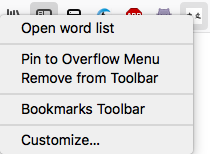
FWIW I'm using Firefox nightly, which I'm pretty sure gets updates within 24 hours, and I'm not able to right-click the icon at all, not sure if it's something to do with my configuration.
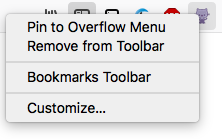
However if I right-click on a different extension, I do get an extension-specific context menu option among the generic ones:
 gibfahn
on 12 Apr 2018
gibfahn
on 12 Apr 2018
This is how it's added: https://github.com/bfred-it/webext-domain-permission-toggle/blob/master/webext-domain-permission-toggle.js#L16-L24
Do you see any issues in that?
fregante
on 12 Apr 2018
Actually the right-click option shows up fine in a clean version of Firefox Nightly, so it might be something about my configuration:
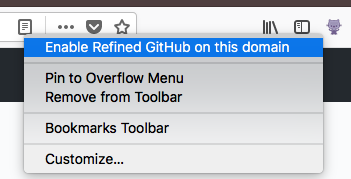
Still doesn't work with the latest nightly for me, might just need to wait a few days though.
gibfahn
on 12 Apr 2018
This landed in Firefox 61 https://bugzilla.mozilla.org/show_bug.cgi?id=1382953
fregante
on 29 Jun 2018
This is working fine for me in the firefox after new update version 61.0.1 .
 pyus13
on 18 Jul 2018
pyus13
on 18 Jul 2018
FWIW I'm on FF 62 and the notice about RGH:E not being supported in FF is still showing.
Intentional?
 Qix-
on 21 Oct 2018
Qix-
on 21 Oct 2018
Ergh that should probably be fixed in the code. PR welcome
fregante
on 22 Oct 2018
Does it work in FF for GHE? If so, it's an issue.😀
busches
on 22 Oct 2018
@busches https://github.com/sindresorhus/refined-github/issues/840#issuecomment-405752198
Perhaps some more confirmations are in order. But nobody has complained since July it seems.
Qix-
on 22 Oct 2018
FWIW I'm on FF 62 and the notice about RGH:E not being supported in FF is still showing.
Should be a quick PR, anyone working on it as of now?
 notlmn
on 22 Oct 2018
notlmn
on 22 Oct 2018
FYI, the extension-specific dialog does not show for Firefox Quantum 64.0 running on MacOS High Sierra v10.13.6 when running on full-screen mode. You first need to exit such mode and only then you will get the expected dialog. I tried to provide evidence of this via screenshots but it looks like all the screenshot apps I tried aren't capable of recording dialogs when running windows on full screen mode 😞.
 yaitorr
on 8 Jan 2019
yaitorr
on 8 Jan 2019
Firefox Quantum 68.0.1 (64-bit) doesn't have an option in the right click menu for enabling a GitHub Enterprise domain. Refined GitHub worked fine with my GitHub Enterprise domain until a recent Firefox update. Now it doesn't function and I can't re-enable it (tried uninstalling and reinstalling the extension and the problem still persisted).
Edit: And now the menu option is back...? Firefox didn't update so maybe a new version of the plugin was pushed? Unless me using a VPN today somehow made it function.
 jessemillar
on 9 Aug 2019
jessemillar
on 9 Aug 2019
And now the menu option is back...?
Glad to hear it's back, I'm also on the same version.
I think the bug was https://github.com/sourcegraph/sourcegraph/issues/3204 and it was fixed in the very last version, 19.8.11, via https://github.com/sindresorhus/refined-github/commit/093afa195cb594494ead20b103e85963ce4cd1e0
fregante
on 12 Aug 2019
Related issues
 sindresorhus
·
3Comments
sindresorhus
·
3Comments
 shivapoudel
·
3Comments
shivapoudel
·
3Comments
 olso
·
3Comments
olso
·
3Comments
 MilesBHuff
·
3Comments
MilesBHuff
·
3Comments
 vanniktech
·
3Comments
vanniktech
·
3Comments
Most helpful comment
Update these lines in
manifest.json:https://github.com/sindresorhus/refined-github/blob/87b2f4fa2bdd89a48f3137692e1f082b106ccdd9/source/manifest.json#L46-L49