Refined-github: #751 introduced the inability to post multiline comment
Because it assumes I am only intend on submitting a single line comment....
on windows Shift+Enter is reserved for making single new line.
However enter on Github is new line yes, but I cannot change my habit cause I always assume Enter is for submitting. That's why shift enter is my gotoguy for new line.
 jetersen
All 7 comments
Because it assumes I am only intend on submitting a single line comment....
on windows Shift+Enter is reserved for making single new line.However enter on Github is new line yes, but I cannot change my habit cause I always assume Enter is for submitting. That's why shift enter is my gotoguy for new line.
shift+enter is used to make new lines on Mac too — when the standard enter is mapped to “new paragraph”. As far as I know this only happens in word processing software. Code editors don’t have the concept of “paragraph” so shift just doesn't change the result, usually.
Browsers' <textarea> also ignore the shift. Since enter is easier to press than shift+enter, people just use the former.
 fregante
on 3 Nov 2017
fregante
on 3 Nov 2017
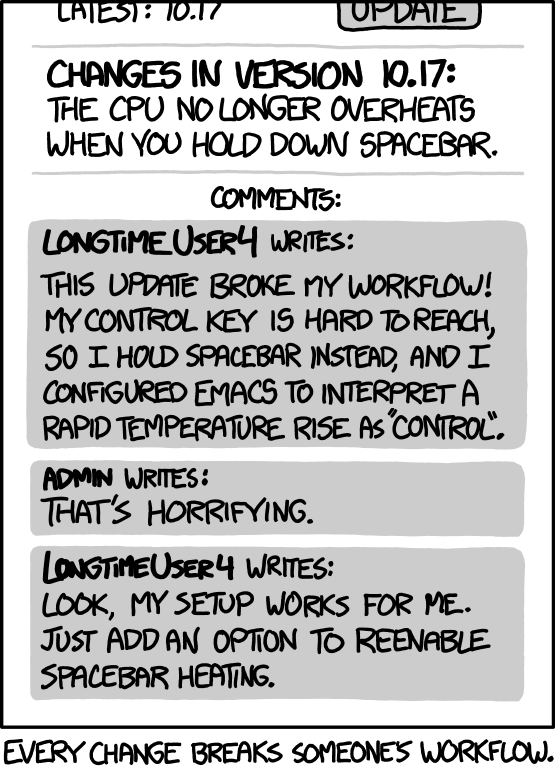
Reminds me of:
fregante
on 3 Nov 2017
I hate changes that break muscle memory, too. But shiftenter seemed like the least-bad option for the shortcut, since ctrlshiftenter triggers the full review as well.
 fwextensions
on 4 Nov 2017
fwextensions
on 4 Nov 2017
Closing as it's working as intended.
 sindresorhus
on 6 Nov 2017
sindresorhus
on 6 Nov 2017
Is it possible to disable shift + enter for single line comment, I would like to keep the default behaviour of new line? What do I enter in the "Disable Features" box to disable it? I have enabled logging, but my console is still empty. I might need to restart my browser - but way too many tabs opened to do that right now. :)
 saurabhshri
on 14 Jan 2018
saurabhshri
on 14 Jan 2018
I have enabled logging, but my console is still empty.
You probably just have to reload GitHub's tab
What do I enter in the "Disable Features" box to disable it?
@bfred-it Thanks! :) Looks like it disables everything in that file. I'll edit that part of code and prepare my own extension - because I am happy with the remaining ones. Thanks!
You probably just have to reload GitHub's tab
Yep :)
saurabhshri
on 14 Jan 2018
Related issues
 olso
·
3Comments
olso
·
3Comments
 sompylasar
·
3Comments
sompylasar
·
3Comments
 hkdobrev
·
3Comments
fregante
·
3Comments
hkdobrev
·
3Comments
fregante
·
3Comments
 durka
·
3Comments
durka
·
3Comments
Most helpful comment
Reminds me of: