React: Element type is invalid: expected a string (for built-in components) or a class/function (for composite components) but got: undefined
I'm dealing with a JSON response in React Native that's coming from the WordPress REST API, containing pages with each an (profile page) ID, title and featured image.
Using a FlatList, I have created a screen with featured images and titles for each (Artist) page. I want to add the functionality to navigate to each individual page by clicking on an item in the FlatList, and passing the title, featured image and (later) the content of the regarding page to the next screen to display this information (probably based on the ID).
LinksScreen.js
import React, {Component} from 'react';
import PropTypes from 'prop-types';
import Artist from './Artist';
import { createStackNavigator } from 'react-navigation';
import {
  ScrollView,
  StyleSheet,
  View,
  Text,
  Image,
  FlatList,
  ActivityIndicator,
  TouchableHighlight,
} from 'react-native';

export default class LinksScreen extends React.Component {

constructor(props) {
        super(props);
        this._onAlertTypePressed = this._onAlertTypePressed.bind(this);
        this.state = {
            data: [],
        }
    }

  _onAlertTypePressed(typeId: any, typeName: any, imageUrl: any){

        this.props.navigator.push({
            screen: 'Artist',
            title: 'Artist',
            passProps: {
                alertId: typeId,
                alertName: typeName,
                alertImage: imageUrl,
            }
        });
    }

    _renderListItem = ({ item }) => (
        <Artist
            itemName={ item.title.rendered }
            itemId={ item.id }
            itemImageUrl={ item.better_featured_image.source_url}
            onPressItem={ this._onAlertTypePressed }
        />
    );

  static navigationOptions = {
    title: 'Links',
  };

  state = {
    data: [],
    isLoading: true,
    isError: false,
  };

  static propTypes = {
    navigation: PropTypes.shape({
      navigate: PropTypes.func.isRequired,
    }).isRequired,
  }

  componentWillMount() {
    fetch('http://54.168.73.151/wp-json/wp/v2/pages?parent=38&per_page=100')
      .then(response => response.json())
      .then((responseJson) => {
        responseJson.sort((a, b) => a.title.rendered < b.title.rendered ? -1 : 1);
        this.setState({
          data: responseJson,
          isLoading: false,
          isError: false,
        });
      })
      .catch(error => {
        this.setState({
          isLoading: false,
          isError: true,
        });
        console.error(error);
      });
  }

  renderRow = item => (
    <View style={styles.grid}>
      <Image
        style={styles.thumb}
        source={{
          uri: item.better_featured_image
            ? item.better_featured_image.source_url
            : 'http://54.168.73.151/wp-content/uploads/2018/04/brand-logo.jpg',
        }}
      />
      <Text style={styles.title}>{item.title.rendered}</Text>
    </View>
  );

  getKey = item => String(item.id);

  renderComponent() {
    if (this.state.isLoading) {
      return <ActivityIndicator />;
    } else if (this.state.isError) {
      return <Text>Error loading data</Text>;
    } else {
      return (
        <FlatList
          numColumns={3}
          contentContainerStyle={styles.elementsContainer}
          data={this.state.data}
          renderItem={({ item }) => this._renderListItem}
          keyExtractor={this.getKey}
        />
      );
    }
  }

  render() {
    return (
      <View style={styles.container}>
        <Text
          style={{
            fontSize: 20,
            color: '#FFFFFF',
            marginLeft: 4,
            marginTop: 10,
          }}>
          RESIDENTS
        </Text>
        {this.renderComponent()}
      </View>
    );
  }
}

const styles = StyleSheet.create({
  container: {
    flex: 1,
    backgroundColor: '#000000',
  },
  elementsContainer: {
    backgroundColor: '#000000',
  },
  grid: {
    marginTop: 15,
    marginBottom: 15,
    marginLeft: 5,
    height: 125,
    width: 115,
    borderBottomWidth: 1,
    borderBottomColor: '#191970',
  },
  title: {
    color: '#FFFFFF',
    textAlign: 'left',
    fontSize: 12,
  },
  thumb: {
    height: 110,
    width: 110,
    resizeMode: 'cover',
  },
});
Artist.js
import React, { Component } from 'react';
import { createStackNavigator } from 'react-navigation';
import {
  ScrollView,
  StyleSheet,
  View,
  Text,
  TouchableOpacity,
  Image,
} from 'react-native';

export class Artist extends React.PureComponent {
  constructor(props) {
    super(props);
  }

  _onPress = () => {
    this.props.onPressItem(
      String(this.props.itemId),
      String(this.props.itemName),
      String(this.props.itemImageUrl)
    );
  };

  static navigationOptions = {
    title: 'Artist',
  };

  render() {
    // const artist = this.props.navigation.state.params.artist;
    return (
      <TouchableOpacity
        {...this.props}
        style={styles.container}
        onPress={this._onPress}>
        <Image
          style={styles.image}
          source={{
            uri: this.props.itemImageUrl
              ? this.props.itemImageUrl
              : 'http://54.168.73.151/wp-content/uploads/2018/04/brand-logo.jpg',
          }}
        />
        <Text style={styles.title}>{this.props.itemName}</Text>
      </TouchableOpacity>
    );
  }
}

const styles = StyleSheet.create({
  container: {
    backgroundColor: '#000000',
  },
  title: {
    color: '#FFFFFF',
    textAlign: 'left',
    fontSize: 12,
  },
  image: {
    height: 350,
    width: 350,
    resizeMode: 'cover',
  },
});
I'm getting an error at the moment - saying that the a string is expected, but an undefined type was found. I used to do it in a different way, but I'm unable to pass the ID (which should be the identifier to pass the data to the next screen) to open a specific generated screen for each artist.
Error:

Here is the edible code:
https://snack.expo.io/@jvdl2711/artist-navigation
It used to be like this:
https://snack.expo.io/@jvdl2711/artists (working grid version, but no navigation functionality. I'm sure it gives a good indication of how it's supposed to work.)
Notes
Please, don't mind the titles at the moment. I still have a small unsolved issue regarding unicodes, but I think this won't matter when passing the titles to another screen.
 thaprozz
All 7 comments
This is a default import:
import Artist from './Artist';
This is a named export:
export class Artist extends React.PureComponent {
This won't work.
 gaearon
on 25 Sep 2018
gaearon
on 25 Sep 2018
Thanks for letting me know :) Unfortunately it doesn't solve my issue and it still gives me the same error (after import { Artist } from './Artist';)
thaprozz
on 25 Sep 2018
Try removing <Artist />. If it still breaks you know the issue is with something else. Keep removing until you find which JSX element has a broken type. Then figure out why type is undefined.
gaearon
on 25 Sep 2018
@gaearon The issue doesn't occur anymore after I removed the following:
_renderListItem = ({ item }) => (
        <Artist
            itemName={ item.title.rendered }
            itemId={ "item.id" }
            itemImageUrl={ item.better_featured_image.source_url ? "lol" : "lol" }
            onPressItem={ this._onAlertTypePressed }
        />
    );
In Artist.js, there seems to be an error here:

It's very unclear where the error is happening exactly, but of course I need the Artist object to fill it with data before pushing it to another screen. Do you have any tips, please? Unfortunately I've been stuck on it for days and I don't seem to be able to solve it.
thaprozz
on 25 Sep 2018
The error location is clearly wrong.
When you write
<Something />
it becomes
React.createElement(Something)
The error you're seeing happens when createElement() receives undefined as first argument.
Maybe you're making a similar mistake inside of Artist, rendering something that wasn't imported correctly.
Do you have any tips, please? Unfortunately I've been stuck on it for days and I don't seem to be able to solve it.
If you're stuck on it for days you need to re-examine how you approach debugging issues. Don't try to randomly guess why it happens. Cut parts of the code out until you see what's causing it, find the bad callsite and fix it. I explained above what the error means precisely so I hope it helps.
gaearon
on 25 Sep 2018
You put me in the right direction and I managed to resolve the error. I'm slowly getting somewhere now :D Thanks a lot!
thaprozz
on 25 Sep 2018
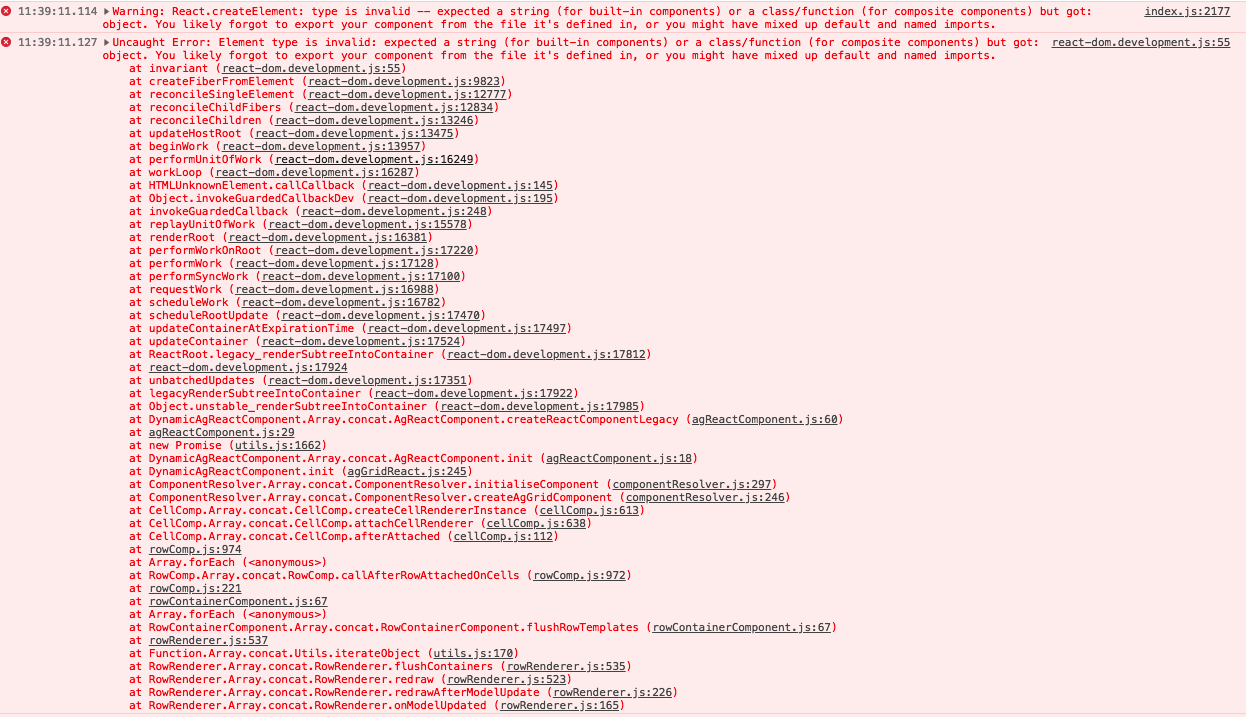
Encounter the same problem, the cause is import a blank component to another component to render, for other's reference. Thanks gaearon about debugging method.
 perry2008084
on 26 Sep 2018
perry2008084
on 26 Sep 2018
Related issues
 MoOx
·
3Comments
MoOx
·
3Comments
 hnordt
·
3Comments
hnordt
·
3Comments
 framerate
·
3Comments
framerate
·
3Comments
 tleunen
·
3Comments
tleunen
·
3Comments
 h1orz
·
3Comments
h1orz
·
3Comments
Most helpful comment
The error location is clearly wrong.
When you write
it becomes
The error you're seeing happens when
createElement()receivesundefinedas first argument.Maybe you're making a similar mistake inside of
Artist, rendering something that wasn't imported correctly.If you're stuck on it for days you need to re-examine how you approach debugging issues. Don't try to randomly guess why it happens. Cut parts of the code out until you see what's causing it, find the bad callsite and fix it. I explained above what the error means precisely so I hope it helps.