React-sketchapp: SVG Pattern in SVG supported by react-sketchapp ?
Proposal/Feature-request:
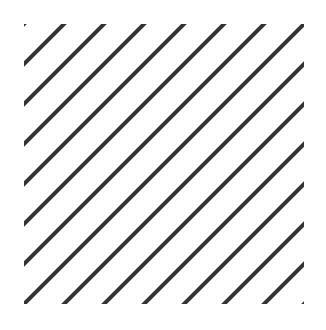
Like this.
<svg width="140" height="140">
  <defs>
   <pattern id="toto" patternUnits="userSpaceOnUse" width="20" height="20">
     <path d="M 0,20 l 20,-20 M -5,5 l 10,-10 M 15,25 l 10,-10" stroke-width="2" shape-rendering="auto" stroke="#343434" stroke-linecap="square">
     </path>
   </pattern>
  </defs>
  <path d="M 0 0 L 0 140 L 140 140 L 140 0 Z" fill="url(#toto)"></path>
</svg>
To get this:
 thierryc
All 5 comments
it's Sketch itself that doesn't support it (try to import that SVG in Sketch and it will fail)
I believe we (Sketch) already have a fix for it. As soon as it will get released, that will work
 mathieudutour
on 19 Feb 2018
mathieudutour
on 19 Feb 2018
@mathieudutour Just wondering if this ever got updated to work? And if not, any estimated date this might happen?
 AmyScript
on 12 Mar 2019
AmyScript
on 12 Mar 2019
not sure, did you try?
mathieudutour
on 12 Mar 2019
@mathieudutour I just tried this one in Sketch v 53.2 and got the same stripey lines. Is it my pattern or is it sketch? Renders fine in chrome browser.
<?xml version="1.0" encoding="UTF-8" standalone="no" ?>
<!DOCTYPE svg PUBLIC "-//W3C//DTD SVG 1.1//EN" "http://www.w3.org/Graphics/SVG/1.1/DTD/svg11.dtd">
<svg xmlns="http://www.w3.org/2000/svg" xmlns:xlink="http://www.w3.org/1999/xlink" version="1.1" width="405" height="209" viewBox="0 0 405 209" xml:space="preserve">


            <defs>


                <pattern id="ZigZag2" x="0" y="0" width="100" height="97" patternUnits="userSpaceOnUse" patternContentUnits="userSpaceOnUse">
                     <g stroke="none" strokeWidth="1" fill="none" fillRule="evenodd">
                    <g fillRule="nonzero">
                        <rect fill="red" x="0" y="0" width="100" height="97"></rect>
                        <polygon fill="yellow" points="2.61971784 0 50.7002173 46.0562857 98.7807167 0 100 0 100 33.0629252 51 80 7.10542736e-15 31.1471262 0 0"></polygon>
                    </g>
                </g>

                </pattern>
            </defs>
            <rect fill="url(#ZigZag2)" width="1000" height="1000" />
        </svg>
 jfo8000
on 3 Jun 2019
jfo8000
on 3 Jun 2019
Seems that Sketch still doesn't support spec-compliant SVG patterns. This can be fixed by using a base64 jpg/png image in the pattern, instead of svg elements.
A SVG to base64 png/jpg conversion step would solve this, whether that be bundled inside of react-sketchapp (bundle size increase probably not worth it), or as an additional layer in a third party package. Could inject this conversion process into the <Svg.Defs> component with a Webpack override too, to keep it inline.
Worth keeping in mind that while this will render fine in Sketch, the pattern is no longer a vector (due to Sketch limitations), so you wouldn't want to use the result Svg as a source-of-truth (e.g. for developer handoff) for your code.
Example of a working SVG pattern based on your example:
<Svg
  width="606px"
  height="206px"
  viewBox="0 0 606 206"
  version="1.1"
  xmlns="http://www.w3.org/2000/svg"
>
  <Svg.Defs>
    <Svg.Pattern
      id="pattern-1"
      width="50"
      height="50"
      x="-50"
      y="-50"
      patternUnits="userSpaceOnUse"
    >
      <Svg.Use href="#image-2" />
    </Svg.Pattern>
    <Svg.Image
      id="image-2"
      width="50"
      height="50"
      href="data:image/png;base64,iVBORw0KGgoAAAANSUhEUgAAAIwAAACMCAYAAACuwEE+AAAEqUlEQVR4Ae3dUY7USAwA0FwCxClGGilz/zvAB8cBpUVQlLKrqkmQGvz2g+52ZSPifnFcO4Zd1nX99vb29nm58M/272/nWdf1h/M9n8h/KX8LLM99wf/Sl/s3bt7nsnU6+v39/dO6rl9/VZbvHx8fX06HPPXR+f7j/Ply/+Mvd1mWW7/f6mXZY/yJBwcsNgjTXGCBZRrLrc+0u5+RzvdaGw5YNLgqS5IBN8eFm0PyLiSv2mMSFliSItyGYYGlVZFEbJ1tnRMabRgWWFoVSQQWWBIabVjPomdpVSQRWGBJaMRhk3JxXmaiFR/ji7HKGRrtMRWxbMVlA2Omt/XQjVTFshUXM71dGu1iZSyPCtOmZD6iYdYwT2uBBZZpLNXL8nb908kKDiyVv1IXuyyPHs9/egjUz4RgUVlmnDyO0bPoWWBJMuDmuHBzSN6F5BnTlLykKIXhUjdbqYutVgnuvl5YVNKwZEZBW2db58hFGIMFlhBGFIQFlshFGNOz6FlCGFEQFlgiF2nMD9bS1AwXKj7GzfQOWcQHVMTymLjbftkuPk7LXLRq8ioO0Jvpnbsnfh9V/eb4nYg/eaNh1jBPu4EFlmks1cuynm+aihlXWGBJM6CSXtg961n0LOmddV6ABZazifQzLLCkOM4LsMByNpF+hgWWFMd5ARZYzibSz7aSF7aS1f4sNiywpJXkvAALLGcT6Wc9i54lxXFegAWWs4nuZzO93fR0Fys+xs30dknkixWxmOnNPXRXqmLx9/R2WcSLlbE8KkyclrmohlnDPCfl7r9fxPle6/87fff3Ub0sb9c/fWcFB5bKX6mLrfazobuvFxaVJSiYcUiDq8GNZQRRWGAJWMQhWGCJZQRRWGAJWMQhWGCJZQRRWGAJWMQhW2db51hGEIUFloBFHIIFllhGENWz6FkCFnEIFlhiGUnUTG+SmIlwxce4md4JGNEhFbGY6Y0kTMSqYjHTO4HjfEhlLGZ6zxoGn20QLmwQJO9C8u6emX3181Uvy9v1D4pRd7lU/kpd7N0zrtXOB4vK0i2dx0U9i57l6KH7HhZYukCOi7DAcvTQfQ8LLF0gx0VYYDl66L6HBZYukOOirbOt89FD9z0ssHSBHBdhgeXooftez6Jn6QI5LsICy9HD8L2Z3mGK0gMqPsbN9KYc+gsVsZjp7ZtIV6tiMdObksgXKmMx05u7CFdsEC5sECTvQvJefQb37t9f9bK8XX9YgiaDpfJX6mKrzeDefb2wqCyTRXRZ9Cx6FliSDLg5LtwckncheXfvNl79fLDAkhThNgwLLK2KJAILLAmNNmzrbOvcqkgisMCS0GjDsMDSqkgiehY9S0KjDcMCS6uiEzHT20nOYKniY9xM7wBFtlwRi5neTMMgXhWLmd4BjGi5MhYzvZGITswG4cIGQfIuJO/Vf+p89++velnerr9TiIZLpfJX6mLvnnGtdj5YVJZh+dwP0LPoWXYLw1dYYBki2Q+ABZbdwvAVFliGSPYDYIFltzB8hQWWIZL9AFtnW+fdwvAVFliGSPYDYIFltzB81bPoWYZI9gNggWW3MPVqpncqTeFBFR/jZnpDCuNgRSxbcfkJUkMqk15+Wx4AAAAASUVORK5CYII="
    />
  </Svg.Defs>
  <Svg.G
    id="App"
    stroke="none"
    stroke-width="1"
    fill="none"
    fill-rule="evenodd"
  >
    <Svg.G
      id="Group"
      transform="translate(3.000000, 3.000000)"
      fill="url(#pattern-1)"
      fill-rule="nonzero"
      stroke="blue"
      stroke-width="5"
    >
      <Svg.Rect id="Rectangle" x="0" y="0" width="200" height="200" />
    </Svg.G>
  </Svg.G>
</Svg>
 macintoshhelper
on 6 May 2020
macintoshhelper
on 6 May 2020
Related issues
 jongold
·
8Comments
jongold
·
8Comments
 apexskier
·
3Comments
apexskier
·
3Comments
 0x77dev
·
5Comments
0x77dev
·
5Comments
 varya
·
5Comments
varya
·
5Comments
 tafelito
·
4Comments
tafelito
·
4Comments
Most helpful comment
it's Sketch itself that doesn't support it (try to import that SVG in Sketch and it will fail)
I believe we (Sketch) already have a fix for it. As soon as it will get released, that will work