React-native-vector-icons: [4.4.0] Unwanted ~40px marginTop with Feather icons
Before with FontAwesome (middle icon):
<Icon name="arrows-alt" size={17} color={iconColor} /> Browser

After with Feather (middle icon):
<FeatherIcon name="globe" size={17} color={iconColor} /> Browser
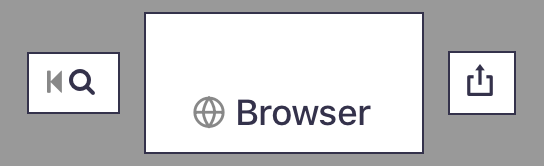
I tried adding style={{padding: 0, margin: 0}} prop to <FeatherIcon>, no difference.
It seems all Feather icons add this 40px or so additional margin on top of the icons. (I tried 2 icons besides "globe")
I upgraded RN-vector-icons from 4.3.0 to 4.4.0.
 fungilation
All 12 comments
Think this might be due to the fontcustom transformation. Since you added this icon set, does it work for you @kleiram?
 oblador
on 17 Sep 2017
oblador
on 17 Sep 2017
Looking at the outputted icons they also seem to suffer the stroke vs fill issue. Did you look at the link I sent you @kleiram in the PR? This was prematurely merged :-/
oblador
on 17 Sep 2017
yes, I meet it yet! the last one is feather icon

 violetbobo
on 18 Sep 2017
violetbobo
on 18 Sep 2017
@oblador
violetbobo
on 18 Sep 2017
@oblador I'm going to check, it used to work for me, since I ran the package from my own repository for a while. Let me get back to you!
 kleiram
on 22 Sep 2017
kleiram
on 22 Sep 2017
Any news on this @kleiram ? I'm having trouble with it too :-(
 tpedersen123
on 24 Sep 2017
tpedersen123
on 24 Sep 2017
+1
 faahmad
on 24 Sep 2017
faahmad
on 24 Sep 2017
@tpedersen123 Not yet unfortunately! I really don't understand what's happening to be honest. Perhaps the font is messed up.
kleiram
on 29 Sep 2017
Alright, so, I've been investigating further, and it seems the fontcustom command adds an extra margin to the top of the generated font.
@oblador Do you have any experience with this? It looks to be related to fontcustom/fontcustom#134
kleiram
on 29 Sep 2017
@oblador I think it might be best to revert the merge, release a version 4.4.1 and return to work for now.
kleiram
on 29 Sep 2017
I went with generating them by hand via icomoon instead. Not what I wanted, but maybe you can maintain them @kleiram? I've documented steps needed in the repo.
Fix released in 4.4.1.
oblador
on 7 Oct 2017
Works for me!
fungilation
on 7 Oct 2017
Related issues
 amitanmol
·
21Comments
amitanmol
·
21Comments
 Noitidart
·
37Comments
Noitidart
·
37Comments
 mrousavy
·
29Comments
mrousavy
·
29Comments
 amang8662
·
92Comments
amang8662
·
92Comments
 hepu-appmeup
·
33Comments
hepu-appmeup
·
33Comments
Most helpful comment
Any news on this @kleiram ? I'm having trouble with it too :-(