React-native-vector-icons: Unable to resolve module 'react-native-vector-icons/FontAwesome'
I am facing following issue when import this:
import Icon from 'react-native-vector-icons/FontAwesome';
Error:
Unable to resolve module 'react-native-vector-icons/FontAwesome' .....
I have attached screenshots for reference. I have followed given resolution steps in error also but no luck. Please have a look and help.
Thanks

 amitanmol
All 21 comments
Hi, make sure that you've installed the package with yarn add react-native-vector-icons and then reset packager cache with react-native start --reset-cache
 oblador
on 9 Sep 2017
oblador
on 9 Sep 2017
@oblador Thanks for your reply. I have followed the steps given in error to resolve and it worked.
Can you please also tell me where I can see list of icons and names which I can use.
amitanmol
on 18 Sep 2017
You can see a list of available icons here: https://oblador.github.io/react-native-vector-icons/
oblador
on 7 Oct 2017
Try this
rm ./node_modules/react-native/local-cli/core/__fixtures__/files/package.json
 faheem0512
on 14 Jan 2018
faheem0512
on 14 Jan 2018
@oblador,
After moving to react-native 0.52 and react-native-vector-icons 4.5.0 facing this issue the Haste package 'react-native-vector-icons' #630
For now going with following solution,
rm ./node_modules/react-native/local-cli/core/fixtures/files/package.json
is it good practice or permanent solution to this issue? Will be there be any further conflicts if proceed to do so?
 Yandamuri
on 30 Jan 2018
Yandamuri
on 30 Jan 2018
For latest react-native v0.53
rm node_modules/react-native/local-cli/core/__fixtures__/files/package.json
 ankibalyan
on 22 Feb 2018
ankibalyan
on 22 Feb 2018
@ankibalyan thanks, This solved for me.
 leandrodavimg
on 25 Feb 2018
leandrodavimg
on 25 Feb 2018
None of these solutions are working for me. I suddenly cannot make any progress on my current progress because of this issue. Anyone have solutions other than removing the cache or removing that package.json folder?
 timgcarlson
on 4 Apr 2018
timgcarlson
on 4 Apr 2018
Above issue does not resolved form me also.
 nihp
on 21 May 2018
nihp
on 21 May 2018
I just solved this problem for myself by using:
import Icon from 'react-native-vector-icons/FontAwesome';
Instead of:
import Icon from 'react-native-vector-icons/dist/FontAwesome';
 vjsingh
on 28 Jun 2018
vjsingh
on 28 Jun 2018
Still having this error.
import Icon from 'react-native-vector-icons/Entypo';
const phoneicon = (<Icon style={styles.label} name="phone" size={15}/>)
Gives error Error:
Unable to resolve module `@expo/vector-icons/Entypo` from `/Volumes/Untitled/projects/kono-org/app-kono/src/components/PersonView.js`: Module `@expo/vector-icons/Entypo` does not exist in the Haste module map

This might be related to https://github.com/facebook/react-native/issues/4968
I dont want to use any expo in my package. I tried using from 4.0.1 till latest and the problem stays.
 thevikas
on 18 Jan 2019
thevikas
on 18 Jan 2019
I have installed react-native-vector-icons package. TO rebuild project i ran react-native link command, but that is not working.. I have also ran npm run android command but still no progress. Response of npm run android is
"npm ERR! missing script: android"
Response of react-native link is
Running react-native link without package name is deprecated and will be removed in next release. If you use this command to link your project assets, please let us know about your use case here: https://goo.gl/RKTeoc
 nisar593
on 7 May 2019
nisar593
on 7 May 2019
remove the libraries
"react-native-linear-gradient": "^2.5.6",
"react-native-vector-icons": "^4.5.0",
and then Reload (cmd+R) the app
 iosmbe
on 1 Nov 2019
iosmbe
on 1 Nov 2019
`
import React from 'react';
import {View, TouchableOpacity, StyleSheet, Text} from 'react-native';
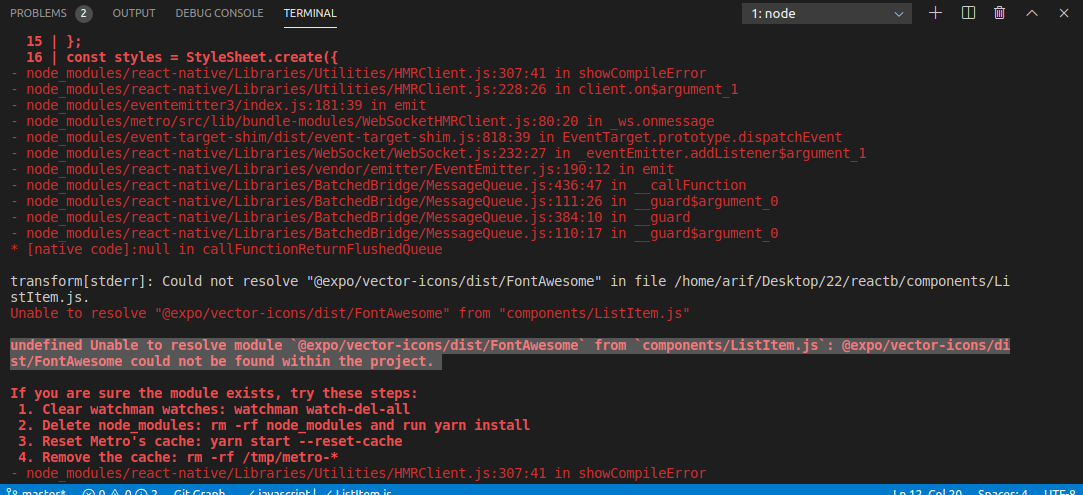
import Icon from 'react-native-vector-icons/dist/FontAwesome';
const ListItem = ({item}) => {
return(
);
};
const styles = StyleSheet.create({
ListItem: {
padding: 15,
backgroundColor: '#f8f8f8',
borderBottomWidth: 1,
borderColor: '#eee',
},
listItemView: {
flexDirection: 'row',
justifyContent: 'space-between',
alignItems: 'center',
},
listItemText: {
fontSize: 18,
}
});
export default ListItem;``
 rahimiarifhussain
on 21 Feb 2020
rahimiarifhussain
on 21 Feb 2020
I just solved this problem for myself by using:
import Icon from 'react-native-vector-icons/FontAwesome';Instead of:
import Icon from 'react-native-vector-icons/dist/FontAwesome';
This was my issue as well. @rahimiarifhussain, and anyone else taking Brad's course, remove the 'dist' from the path.
 StillOnMyWay
on 5 Apr 2020
StillOnMyWay
on 5 Apr 2020
Same on 7.0.0, but "fixed" after a downgrade to 6.7.0
 moahmed123
on 10 Aug 2020
moahmed123
on 10 Aug 2020
@oblador facing the same problem with 7.0.0
 kikusourabh
on 22 Aug 2020
kikusourabh
on 22 Aug 2020
This is not working
 Timon0305
on 23 Oct 2020
Timon0305
on 23 Oct 2020
@oblador Its working 100% to me... thanks a lot.....
i run the following commands as per your instructions:
npm add react-native-vector-icons
npm --reset-cache
and then run for npm start:
npm run android-windows
 shahzaibarshad313
on 1 Nov 2020
shahzaibarshad313
on 1 Nov 2020
Hi, make sure that you've installed the package with
yarn add react-native-vector-iconsand then reset packager cache withreact-native start --reset-cache
I've used this solution but it was stuck still so I've done cd android then ./gradlew clean and it worked again.
 95Rawan
on 23 Nov 2020
95Rawan
on 23 Nov 2020
Good News Thanks
Sent from Mailhttps://go.microsoft.com/fwlink/?LinkId=550986 for Windows 10
From: Rawan Al-Rajabinotifications@github.com
Sent: 24 November 2020 00:19
To: oblador/react-native-vector-iconsreact-native-vector-icons@noreply.github.com
Cc: Timon0305timon0305@outlook.com; Commentcomment@noreply.github.com
Subject: Re: [oblador/react-native-vector-icons] Unable to resolve module 'react-native-vector-icons/FontAwesome' (#544)
I've done
Hi, make sure that you've installed the package with yarn add react-native-vector-icons and then reset packager cache with react-native start --reset-cache
I've used this solution but it was stuck still so I've done cd android then ./gradlew clean and it worked again.
—
You are receiving this because you commented.
Reply to this email directly, view it on GitHubhttps://github.com/oblador/react-native-vector-icons/issues/544#issuecomment-732266294, or unsubscribehttps://github.com/notifications/unsubscribe-auth/AOFUW7BWUN7AX27GY67JBQTSRKDPJANCNFSM4DZP54NQ.
Timon0305
on 23 Nov 2020
Related issues
 facuescobar
·
3Comments
facuescobar
·
3Comments
 elnygren
·
3Comments
elnygren
·
3Comments
 emretekince
·
4Comments
emretekince
·
4Comments
 AbhayVarshney
·
3Comments
AbhayVarshney
·
3Comments
 obykoo
·
3Comments
obykoo
·
3Comments
Most helpful comment
Hi, make sure that you've installed the package with
yarn add react-native-vector-iconsand then reset packager cache withreact-native start --reset-cache