React-native-vector-icons: Icons are not showing up
I am using react native 0.52 and react-native-vector-icon 4.5.0 on Android device . I tried to display icons on my screen but It isn't showing me any icon but a X box icon every time. I even tried other keys but still no solution. I also ran command react-native link.
My android/app/src/main/assets/fonts contains all the fonts.
import Icon from 'react-native-vector-icons/FontAwesome';
 ... return <Icon name='rocket' size={30} color='#900' />

 amang8662
All 92 comments
Did you re-run-android? Otherwise fonts are not in the bundle, which lead to this problem...
 MoOx
on 23 Feb 2018
MoOx
on 23 Feb 2018
Yeah I deleted old build files and re-run android.
I also got this error which I resolved earlier #627 . Does this have to do something regarding the display of icons??
amang8662
on 23 Feb 2018
+1 on this. I encountered pretty much the same problem on
"react-native": "0.53.3"
and
"react-native-vector-icons": "4.5.0"
 PeterKottas
on 23 Feb 2018
PeterKottas
on 23 Feb 2018
Ok this is weird, it apparently got linked twice ... I had to manually fix some stuff and then clean and rebuild the project. Works for me now though.
PeterKottas
on 23 Feb 2018
@PeterKottas how did you fix it?
amang8662
on 23 Feb 2018
I searched the whole solution for react-native-vector-icons (without dashes as well) and found a few places where it was added twice. Not sure how that happened. Some problem with linking I assume
PeterKottas
on 23 Feb 2018
Can you provide me some reference as to where should I look for??
amang8662
on 23 Feb 2018
See https://github.com/oblador/react-native-vector-icons#android
Please reopen if you have a way to reproduce in a project we can see.
MoOx
on 23 Feb 2018
Finally started working. I had to re-run the app once using USB cable rather than on wifi.
amang8662
on 23 Feb 2018
Yep that's mobile dev for you. Problems are solved by restarting everything half of the time.
PeterKottas
on 24 Feb 2018
@amang8662 I have the same problem. can you help me ?!
 Hideer
on 19 Mar 2018
Hideer
on 19 Mar 2018
@Hideer sorry for the delay. Exactly What problem are you facing??
amang8662
on 28 Mar 2018
I solved my issue adding on /app/build.gradle
apply from: "../../node_modules/react-native-vector-icons/fonts.gradle"
and then I uninstall the app from my phone and reinstall again.
 MiguelApp
on 4 Apr 2018
MiguelApp
on 4 Apr 2018
apply from: "../../node_modules/react-native-vector-icons/fonts.gradle" 👍👍👍 is found
 flodu25
on 19 Jun 2018
flodu25
on 19 Jun 2018
@MiguelApp how about for iOS?
 hpelitebook745G2
on 6 Jul 2018
hpelitebook745G2
on 6 Jul 2018
@hpelitebook745G2 try to relink it with react-native link react-native-vector-icons, it worked for me.
 hanssonfredrik
on 12 Jul 2018
hanssonfredrik
on 12 Jul 2018
For IOS there are two steps:-
- Drag the folder Fonts from "node_modules/react-native-vector-icons" and paste it into Xcode project root also make sure your app is checked under "Add to targets" and that "Create groups" is checked if you add the whole folder.
- Edit Info.plist(which is under \
) and add a property called Fonts provided by application and type in the files you just added. (in items column )
E.g:- Ionicons.ttf
 suprabhasupi
on 12 Jul 2018
suprabhasupi
on 12 Jul 2018
I cannot make the icomoon generated icon on android too, Im starting to get depressed
 radjivF
on 16 Jul 2018
radjivF
on 16 Jul 2018
Confirming there are _duplicate .ttf in XCode project_, causing some icon not displaying... Suprabhasupi suggestion helps fixed my problem for iOS
 dklt
on 16 Jul 2018
dklt
on 16 Jul 2018
Update gradle in android... it will works..
 ergb
on 17 Jul 2018
ergb
on 17 Jul 2018
@ergb hey mate, I have updated gradle to 4.4+, but still no icons
radjivF
on 18 Jul 2018
After update use MaterialIcon.. It works for me.. Do 1 more thing.. Open project in android studio.. Then check if any error is there.. If not then try to build and check
ergb
on 18 Jul 2018
@ergb Im using customIcon with Icomoon not material :'(
radjivF
on 18 Jul 2018
In my case there was no problem, i didn't read the documentation properly and thought that it will work like <Icon name="newIconName"></Icon> but it is mentioned that to use icons we need to do like this :
import Icon from 'react-native-vector-icons/FontAwesome';
const myIcon = (<Icon name="rocket" size={30} color="#900" />)
 webdevfarhan
on 1 Oct 2018
webdevfarhan
on 1 Oct 2018
I solve issue using apply from: "../../node_modules/react-native-vector-icons/fonts.gradle" this line paste into android/app/build.gradle(app). then re-run android.
 atultiwari1996
on 6 Oct 2018
atultiwari1996
on 6 Oct 2018
Those still facing the problem,
1. Connect the device with USB (if you were debugging with wifi)
2. Rebuild with run-android
It took me 2 days to get over this one.
 SalmanCorleone
on 16 Oct 2018
SalmanCorleone
on 16 Oct 2018
apply from: "../../node_modules/react-native-vector-icons/fonts.gradle"
somehow did not work for me ... I copied the contents in the Fonts folder to android/app/src/main/assets/fonts (note lowercase font folder) manually.
 dennisschneider
on 9 Nov 2018
dennisschneider
on 9 Nov 2018
After following all the instruction in the github the icons was still like a box. I solved the problem by executing react-native link.
 bbb159
on 19 Nov 2018
bbb159
on 19 Nov 2018
The recommended approach is to use the gradle way.
I followed the steps as mentioned:
1) installed npm with --save
2) copied the _apply from_ line in android/build.gradle
3) Used it by referencing as mentioned
It showed me a [X] icon for Android (iOS works fine).
Then I tried react-native link command. It solves the issue but it contradicts the recommendation itself. What it does is, it copies the font in the asset folder. But isn't that what document says as less preferred option (so that npm updates ensure font in sync).
Infact, at the bottom, the solution to solve [X] problem mentioned is to copy the font manually.
Q. Why does apply from works for some anod not for others?
 deepakaggarwal7
on 28 Nov 2018
deepakaggarwal7
on 28 Nov 2018
I still have [X] icon for Android. I using
 anvt96
on 30 Nov 2018
anvt96
on 30 Nov 2018
I still have [X] icon for Android. I using
Check if you are missing anything :
check install instructions. Then use it like this :
import EntypoIcon from 'react-native-vector-icons/Entypo';
Similarly import FontAwesomeIcon from 'react-native-vector-icons/FontAwesome';
const FacebookIcon = <EntypoIcon name="facebook" size={30} color="#3B5998" />;
then in render method use it like this : {FacebookIcon}
Also before checking run react-native link and react-native run-android
webdevfarhan
on 30 Nov 2018
I still have [X] icon for Android. I using
Check if you are missing anything :
check install instructions. Then use it like this :
import EntypoIcon from 'react-native-vector-icons/Entypo';
Similarlyimport FontAwesomeIcon from 'react-native-vector-icons/FontAwesome';
const FacebookIcon = <EntypoIcon name="facebook" size={30} color="#3B5998" />;
then in render method use it like this : {FacebookIcon}
Also before checking runreact-native linkandreact-native run-android
I can't change code, that's code of company, just solution is add library or fonts :( so I can't do that. If possible, you can using teamview with me
anvt96
on 30 Nov 2018
I still have [X] icon for Android. I using
Check if you are missing anything :
check install instructions. Then use it like this :
import EntypoIcon from 'react-native-vector-icons/Entypo';
Similarlyimport FontAwesomeIcon from 'react-native-vector-icons/FontAwesome';
const FacebookIcon = <EntypoIcon name="facebook" size={30} color="#3B5998" />;
then in render method use it like this : {FacebookIcon}
Also before checking runreact-native linkandreact-native run-androidI can't change code, that's code of company, just solution is add library or fonts :( so I can't do that. If possible, you can using teamview with me
Sorry mate, i am also working so i can't help you with teamviewer, if you cannot change code then i suggest you to create a new react native project and try to make those icons work there then you will understand the problem and its solution.
webdevfarhan
on 30 Nov 2018
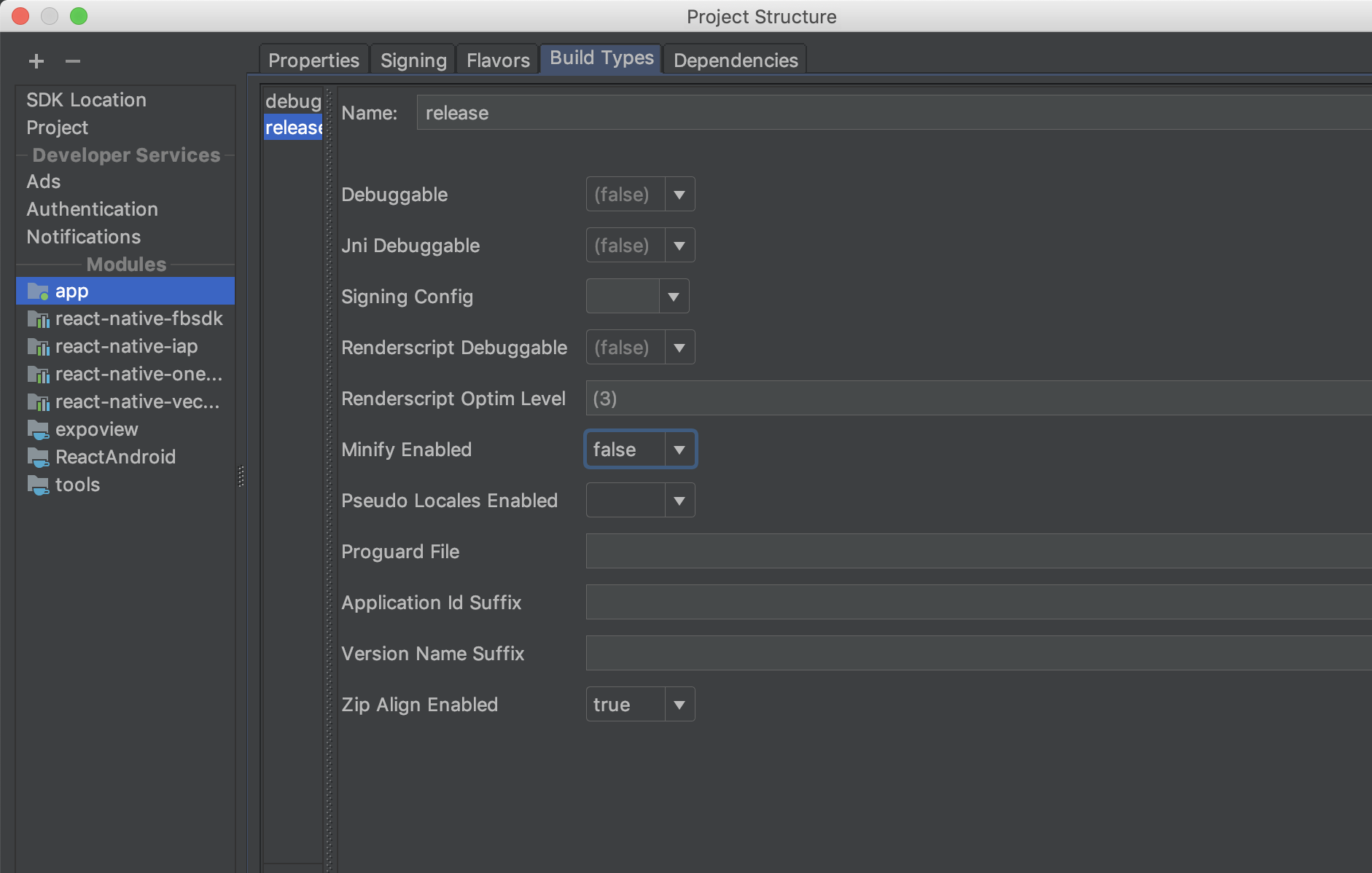
In my case what helped is setting Minify flag in Android for "false":
 Symyon
on 30 Nov 2018
Symyon
on 30 Nov 2018
After following all the instruction in the github the icons was still like a box. I solved the problem by executing react-native link.
You saved my day, thank you!
 rfenzo
on 17 Dec 2018
rfenzo
on 17 Dec 2018
For some reason apply from: "../../node_modules/react-native-vector-icons/fonts.gradle" didn't work for me, but copying fonts manually worked...
 iksent
on 1 Jan 2019
iksent
on 1 Jan 2019
Just submitted #923 to fix this issue
 chrisbianca
on 4 Jan 2019
chrisbianca
on 4 Jan 2019
Icons are not showing when using icomoon :(
 german970814
on 6 Mar 2019
german970814
on 6 Mar 2019
Icon are not showing when using drawer Icon,
static navigatonOptions = {
  drawerIcon: ({tintColor}) => (
      <Icon name="home" style={{fontSize:24, color: tintColor}} />
    )
}
 emmaroland32
on 17 Mar 2019
emmaroland32
on 17 Mar 2019
@MoOx thanks, this worked for me.

 Roshwin
on 17 Mar 2019
Roshwin
on 17 Mar 2019
fixed for me: yarn upgrade react-native-vector-icons
 martnst
on 28 Jun 2019
martnst
on 28 Jun 2019
How to use react native vector icons without linking in react native 0.60. I Installed version 6.6.0 and executed without linking but Icons did not show up.
 YajanaRao
on 11 Jul 2019
YajanaRao
on 11 Jul 2019
At this moment, auto linking for react-native-vector-icons in react native 0.60 isn't working. You can move the fonts manually or here's another solution that worked for me:
1.) Uninstall react-native-vector-icons using npm or yarn
npm uninstall react-native-vector-icons --save
2.) cd into your ios folder and rerun pod install
cd ios
pod install
cd ../
3.) Reinstall react-native-vector-icons using npm or yarn and link the icons manually
npm install react-native-vector-icons --save
react-native link react-native-vector-icons
4.) Restart your simulators for good measure and rerun your app
react-native run-ios
react-native run-android
 tomchomiak
on 3 Aug 2019
tomchomiak
on 3 Aug 2019
After following all the instruction in the github the icons was still like a box. I solved the problem by executing react-native link.
|Thankyou @bbb159 it worked.
 anfalch6
on 20 Aug 2019
anfalch6
on 20 Aug 2019
If you are using registerComponent instead of registerRootComponent in Expo then here https://github.com/expo/vector-icons/issues/89#issuecomment-475217923 is the solution.
 nadernt
on 12 Sep 2019
nadernt
on 12 Sep 2019
apply from: "../../node_modules/react-native-vector-icons/fonts.gradle"
apply from: file("../../node_modules/react-native-vector-icons/fonts.gradle")
for react 60
 libertron
on 30 Sep 2019
libertron
on 30 Sep 2019
I solved my issue adding on /app/build.gradle
apply from: "../../node_modules/react-native-vector-icons/fonts.gradle"
and then I uninstall the app from my phone and reinstall again.
It's works in "react-native": "0.61.2"
 Deboracgs
on 16 Oct 2019
Deboracgs
on 16 Oct 2019
worked for me doing:
react-native link react-native-vector-icons
 eugenioduarte
on 23 Oct 2019
eugenioduarte
on 23 Oct 2019
@hpelitebook745G2 try to relink it with react-native link react-native-vector-icons, it worked for me.
Thanks, WORKED FOR ME.
 orsospatrick
on 2 Nov 2019
orsospatrick
on 2 Nov 2019
@hpelitebook745G2 try to relink it with react-native link react-native-vector-icons, it worked for me.
This worked for me, Unlinked & then Linked the package again.
 aqeebimtiaz
on 7 Nov 2019
aqeebimtiaz
on 7 Nov 2019
worked this:
react-native link react-native-vector-icons
 diogopereira5
on 22 Nov 2019
diogopereira5
on 22 Nov 2019
yarn remove react-native-vector-icons
then in android/app/build.gradle add code below code
apply from: file("../../node_modules/react-native-vector-icons/fonts.gradle");
above other 'apply' line code
and then reinstall app by using USB.
 haratmalli
on 27 Nov 2019
haratmalli
on 27 Nov 2019
yarn remove react-native-vector-icons
then in android/app/build.gradle add code below code
apply from: file("../../node_modules/react-native-vector-icons/fonts.gradle");
above other 'apply' line code
and then reinstall app by using USB.
This worked for me, thanks
 beniman8
on 13 Dec 2019
beniman8
on 13 Dec 2019
I solved my issue adding on /app/build.gradle
apply from: "../../node_modules/react-native-vector-icons/fonts.gradle"
and then I uninstall the app from my phone and reinstall again.
it work's for me also
 sonivipul89
on 24 Dec 2019
sonivipul89
on 24 Dec 2019
Hi,
The proposed solution above works for me for react-native 0.61+ on Android device here are the steps:
- npm install react-native-vector-icons --save-dev
- import Icon from 'react-native-vector-icons/Ionicons'; in App.js
- Paste below line
<Icon
        name="md-menu"
        size={30}
      />
somewhere in your code
- Open dir "android/app/build.gradle" -> Paste following line somewhere in your file: apply from: file("../../node_modules/react-native-vector-icons/fonts.gradle");
5 npm run android
Br,
Zhi
 zhnedyalkow
on 21 Jan 2020
zhnedyalkow
on 21 Jan 2020
Once after installing the module, link it to the project.
react-native link react-native-vector-icons
 VidyaCKabber
on 30 Jan 2020
VidyaCKabber
on 30 Jan 2020
Hi,
There isn't necessary to link the library because of the new version.
Br,
Zhi
 zhitomir-oreshenski-mm
on 1 Feb 2020
zhitomir-oreshenski-mm
on 1 Feb 2020
Yes. You need to. Even I am using the new version only. I faced the same issue. By linking the module to the project, the issue got resolved.
VidyaCKabber
on 3 Feb 2020
Hi,
I'm using react-native version 0.61.5, and yet I found that running react-native link react-native-vector-icons sovles the problem.
 marvinIsSacul
on 3 Feb 2020
marvinIsSacul
on 3 Feb 2020
add apply from: file("../../node_modules/react-native-vector-icons/fonts.gradle");
bottom of the android/app/build.gradle . No need to delete the package. Only clean build and run.
 cyb3rsalih
on 11 Feb 2020
cyb3rsalih
on 11 Feb 2020
@MoOx thanks, this worked for me.
This worked for me but make sure to rerun your simulator or phone after doing that. Thank ya all !!!
 augini
on 20 Feb 2020
augini
on 20 Feb 2020
I have a similar issue in RN v0.61.5 & react-native-vector-icons v6.6.0.
 Pei116
on 25 Mar 2020
Pei116
on 25 Mar 2020
In my case, I found that the icon didn't show up when I reference it (using import) that reference to node_modules folder like:
import Ionicons from 'react-native-vector-icons/Ionicons';
however it did work when I reference it using relative path.
import Ionicons from '../node_modules/react-native-vector-icons/Ionicons';
 gie3d
on 26 Mar 2020
gie3d
on 26 Mar 2020
Finally got it working properly by setting org.gradle.configureondemand=false in gradle.properties of my android project.
It's because font.gradle doesn't work properly with configuration on demand in gradle.
The problem is described in here
Pei116
on 26 Mar 2020
finally i solved the this icon problem steps: are given below
make sure you ran the command "npm i react-native-vector-icons"
paste the below line inside your android/app/build.gradle
apply from: "../../node_modules/react-native-vector-icons/fonts.gradle"
create a file with the name of "react-native.config.js" into your project root folder and add the following lines in it and save
module.exports = {
assets: ['./assets/fonts/'],
};
 sunny-sk
on 30 Mar 2020
sunny-sk
on 30 Mar 2020
Resolvi seguindo o método:
Adicionar no final do arquivo \android\app\build.gradle
apply from: "../../node_modules/react-native-vector-icons/fonts.gradle"
rodar novamente o simulador
 cerqs
on 5 Apr 2020
cerqs
on 5 Apr 2020
i am simply hit yarn react-native link.... and restart the project..after that it's working
 sanjeevdev007
on 18 Apr 2020
sanjeevdev007
on 18 Apr 2020
I was trying to add a new font from Icomoon and the new icons are not appearing, to solve this I run .\gradlew clean inside the android folder and re-run the project with npx react-native run-android and it works :D
 linconkusunoki
on 27 Apr 2020
linconkusunoki
on 27 Apr 2020
For me, some FontAwesome5Pro icons are showing up, and some aren't.
And even after uninstalling, re-installing, re-linking, modifying build.gradle file, Icons just don't show up. I know the icon name that I am passing is correct because for other incorrect icon names I get a YellowBox warning.
 kckunal2612
on 4 May 2020
kckunal2612
on 4 May 2020
react-native link and rerun android worked for me
 Emehado
on 12 May 2020
Emehado
on 12 May 2020
I solved my issue adding on /app/build.gradle
apply from: "../../node_modules/react-native-vector-icons/fonts.gradle"
and then I uninstall the app from my phone and reinstall again.
This is the right answer, Thanks a ton
 xi1494-jaswantdhayal
on 26 May 2020
xi1494-jaswantdhayal
on 26 May 2020
In my case, I found that the icon didn't show up when I reference it (using import) that reference to node_modules folder like:
import Ionicons from 'react-native-vector-icons/Ionicons';however it did work when I reference it using relative path.
import Ionicons from '../node_modules/react-native-vector-icons/Ionicons';
That worked for me using 0.61.4
 AdeelShoukatAli
on 15 Jun 2020
AdeelShoukatAli
on 15 Jun 2020
apply from: "../../node_modules/react-native-vector-icons/fonts.gradle"
Thanks for this solution.
 anirban-hazra
on 17 Jun 2020
anirban-hazra
on 17 Jun 2020
I have also faced this problem, this is how I solved this
npm cache clean --force
cd android & gradlew clean
then
yarn react-native link
Then again restart your app, make sure uninstall the app.
Also make sure you have added apply from: "../../node_modules/react-native-vector-icons/fonts.gradle" in app/build.gradle file.
 hackrx
on 13 Jul 2020
hackrx
on 13 Jul 2020
I solved my issue adding on /app/build.gradle
apply from: "../../node_modules/react-native-vector-icons/fonts.gradle"
and then I uninstall the app from my phone and reinstall again.
it also worked for me .Thanks
 NamanPanchal
on 14 Jul 2020
NamanPanchal
on 14 Jul 2020
Yes it worked.Thanks
NamanPanchal
on 14 Jul 2020
The react-native-vector-icons isn't linking automatically. You have to link it manually by running the following command.
react-native link react-native-vector-icons
After doing this my icons started showing.
 muhammadtaha1998
on 22 Jul 2020
muhammadtaha1998
on 22 Jul 2020
@muhammadtaha1998 is it a current issue from the repo, or from your project? Yesterday, I re-run my app with the vector-icons, that was working normaly with it. However, when I run it today again, the icons just disappear. I did not re-run and auto-link yet, just to be sure. If it was something around the repo. Could someone answer this?
 dheysonalves
on 23 Jul 2020
dheysonalves
on 23 Jul 2020
@muhammadtaha1998 is it a current issue from the repo, or from your project? Yesterday, I re-run my app with the vector-icons, that was working normaly with it. However, when I run it today again, the icons just disappear. I did not re-run and auto-link yet, just to be sure. If it was something around the repo. Could someone answer this?
You can try one thing delete node modules folder then again run npm install and react-native link and please refer link.
I hope this will help you
hackrx
on 23 Jul 2020
Edit android/app/build.gradle ( NOT android/build.gradle ) and add the following:
apply from: "../../node_modules/react-native-vector-icons/fonts.gradle"
Then run:
npx react-native link react-native-vector-icons
yarn run android
This worked for me, even the documentation telling to not use react-native link.
 iaurg
on 31 Jul 2020
iaurg
on 31 Jul 2020
In my case, MaterialIcons.ttf was missing from android/app/src/main/assets/fonts/
 xlcrr
on 2 Aug 2020
xlcrr
on 2 Aug 2020
Finally got it working properly by setting
org.gradle.configureondemand=falseingradle.propertiesof my android project.
It's becausefont.gradledoesn't work properly with configuration on demand in gradle.
The problem is described in here
This worked for me
 iAmShakil
on 19 Aug 2020
iAmShakil
on 19 Aug 2020
react-native link react-native-vector-icons
Though I am using react-native 0.63.1, Manually linking vector icons library worked for me
 prajna-h
on 22 Sep 2020
prajna-h
on 22 Sep 2020
apply from: "../../node_modules/react-native-vector-icons/fonts.gradle" This Worked Perfectly
 Belgin-Android
on 4 Oct 2020
Belgin-Android
on 4 Oct 2020
apply from: "../../node_modules/react-native-vector-icons/fonts.gradle"
somehow did not work for me ... I copied the contents in the Fonts folder to android/app/src/main/assets/fonts (note lowercase font folder) manually.
Same for me. Even two years later, with RN v 0.61 & rnvi v7.1.0
Had to execute cp node_modules/react-native-vector-icons/Fonts/* android/app/src/main/assets/fonts/ to make it run.
:crying_cat_face:
I have to say that this happened after I removed react-native-maps from my dependencies. Maybe this is not linked at all either.
 dragma
on 6 Oct 2020
dragma
on 6 Oct 2020
In my case, MaterialIcons.ttf was missing from
android/app/src/main/assets/fonts/
I tried all replies. Only this one worked for me.
 fabiocberg
on 19 Oct 2020
fabiocberg
on 19 Oct 2020
apply from: "../../node_modules/react-native-vector-icons/fonts.gradle" it worked
 mateusSchwade
on 28 Oct 2020
mateusSchwade
on 28 Oct 2020
the app was working perfe3ct. after running the command gradlew clean. now icons are not working. I did the following
delete the node modules.
restart the system. uninstall the app.
npm cache clean
nothing worked.
 aftabaminzoobiapps
on 9 Nov 2020
aftabaminzoobiapps
on 9 Nov 2020
@dragma same here I have to copy the files manually, I have updated my android/app/build.gradle and added
apply from: "../../node_modules/react-native-vector-icons/fonts.gradle"
to the bottom
 export-mike
on 11 Nov 2020
export-mike
on 11 Nov 2020
I have also faced this problem, this is how I solved this
npm cache clean --force
cd android & gradlew clean
then
yarn react-native link
Then again restart your app, make sure uninstall the app.
Also make sure you have addedapply from: "../../node_modules/react-native-vector-icons/fonts.gradle"inapp/build.gradlefile.
This one worked perfectly for me! Thanks.
 abhinav-vk-gupta
on 22 Nov 2020
abhinav-vk-gupta
on 22 Nov 2020
Edit
android/app/build.gradle( NOT android/build.gradle ) and add the following:
This worked for me 💃💃💃
Thank you so much for this note "Edit android/app/build.gradle ( NOT android/build.gradle ) and add the following". I kept searching for the file and couldn't find it until I was your note, because there are two of them. Thank you, much appreciated 🙌
 95Rawan
on 24 Nov 2020
95Rawan
on 24 Nov 2020
@hpelitebook745G2 try to relink it with react-native link react-native-vector-icons, it worked for me.
Worked for me! Thanks
 hotheadhacker
on 13 Dec 2020
hotheadhacker
on 13 Dec 2020
Related issues
 AbhayVarshney
·
3Comments
AbhayVarshney
·
3Comments
 obykoo
·
3Comments
obykoo
·
3Comments
 peacechen
·
3Comments
peacechen
·
3Comments
 afilp
·
4Comments
afilp
·
4Comments
 arjs1000
·
3Comments
arjs1000
·
3Comments
Most helpful comment
I solved my issue adding on /app/build.gradle
apply from: "../../node_modules/react-native-vector-icons/fonts.gradle"
and then I uninstall the app from my phone and reinstall again.