React-native-svg: SVG inside Touchable causes unpredictable behavior on iOS 12
RN: 0.55.4
iOS: 12.0
If you wrap a SVG icon in any Touchable element, taps on the Touchable element are unpredictable on iOS 12.
If you have multiple SVG wrapped in Touchables contained in a row, taps on the elements will either: not work, sometimes work, or it may trigger taps on the wrong touchable.
 dsherida
All 34 comments
I am having the same issue.
It seems like it's coming from open Path and Polyline.
I tested on Polylines and Path both open and closed. Closed paths are working for me even with multile items.
P.S. Svgs were made from Sketch App.
 prakattuladhar
on 3 Oct 2018
prakattuladhar
on 3 Oct 2018
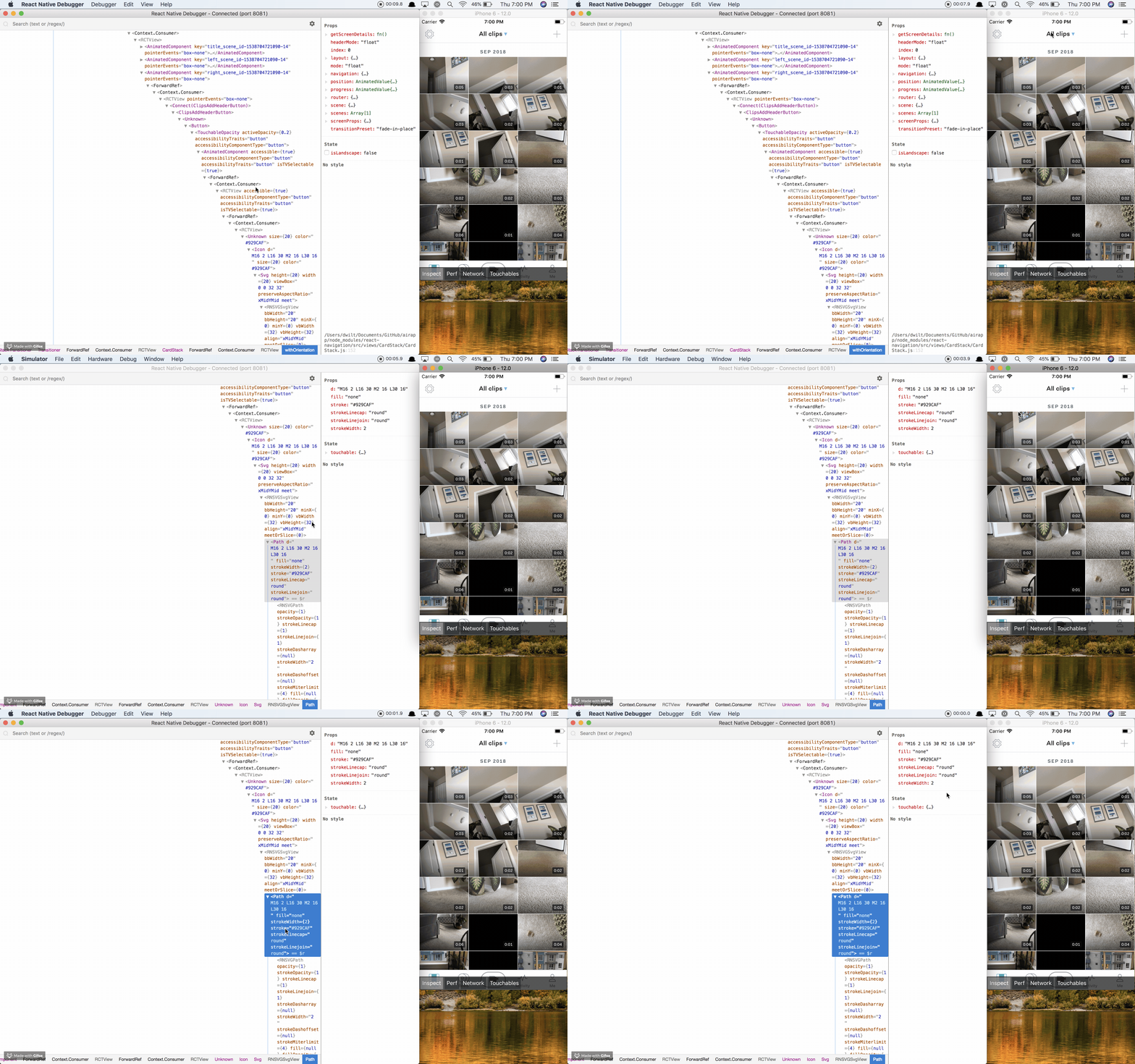
This is happening to us as well. Here is a gif of it being reproduced:

As you can see, I'm trying to tap on a TouchableOpacity far to the left and it's tapping on the TouchableOpacity for the plus button on the far right. If I inspect with the Inspector and click center title, it jumps me to the Path as @prakattuladhar suggested:
"react-native-svg": "^6.0.1-rc.1",
"react-native": "0.56.0",
 dwilt
on 5 Oct 2018
dwilt
on 5 Oct 2018
I've figured out a workaround for the time being. All of our icons inherit a base Icon component and I wrapped the SVG in a View and gave it pointerEvents='none'
const Icon = ({ size = 32, d, fill = 'none', color = '#000', strokeWidth = 2 }) => (
  <View pointerEvents="none">
    <Svg height={size} width={size} viewBox="0 0 32 32">
      <Path d={d} fill={fill} strokeWidth={strokeWidth} stroke={color} strokeLinecap="round" strokeLinejoin="round" />
    </Svg>
  </View>
);
We're also experiencing this issue. Will try @dwilt 's workaround.
 mjtpena
on 15 Oct 2018
mjtpena
on 15 Oct 2018
@dwilt your quickfix worked for us, Thanks !
 jvolonda42
on 15 Oct 2018
jvolonda42
on 15 Oct 2018
A full reproduction would be helpful in analysing this, could someone provide one please?
 msand
on 15 Oct 2018
msand
on 15 Oct 2018
A full reproduction would be helpful in analysing this, could someone provide one please?
Try something like this:
<View style={flexDirection: 'row'}>
    <TouchableOpacity style={flex: 1}>
        <Svg />
    </TouchableOpacity>
    <TouchableOpacity style={flex: 1}>
        <Svg />
    </TouchableOpacity>
    <TouchableOpacity style={flex: 1}>
        <Svg />
    </TouchableOpacity>
</View>
@dwilt tried your approach and it works. Thanks.
mjtpena
on 17 Oct 2018
This seems to work fine:
import React, { Component } from "react";
import Svg, { Rect } from "react-native-svg";
import { View, StyleSheet, TouchableOpacity } from "react-native";

const styles = StyleSheet.create({
  touch: {
    flex: 1,
    alignItems: "center",
    justifyContent: "center",
  },
});

function TouchTest({ i, size = 64 }) {
  return (
    <View style={styles.touch}>
      <Svg
        height={size}
        width={size}
        viewBox="0 0 32 32"
        onPress={() => {
          console.log(i);
        }}
      >
        <Rect x={0} y={0} width={32} height={32} fill="#000" stroke="#f00" />
      </Svg>
    </View>
  );
}

export default class App extends Component {
  render() {
    return (
      <View style={[styles.touch, { flexDirection: "row" }]}>
        {Array.from({ length: 3 }).map((_, i) => <TouchTest key={i} i={i} />)}
      </View>
    );
  }
}
And this:
import React, { Component } from "react";
import Svg, { Rect } from "react-native-svg";
import { View, StyleSheet, TouchableOpacity } from "react-native";

const styles = StyleSheet.create({
  touch: {
    flex: 1,
    alignItems: "center",
    justifyContent: "center",
  },
});

function TouchTest({ i, size = 64 }) {
  return (
    <TouchableOpacity
      style={styles.touch}
      onPress={() => {
        console.log(i);
      }}
    >
      <Svg height={size} width={size} viewBox="0 0 32 32">
        <Rect x={0} y={0} width={32} height={32} fill="#000" stroke="#f00" />
      </Svg>
    </TouchableOpacity>
  );
}

export default class App extends Component {
  render() {
    return (
      <View style={[styles.touch, { flexDirection: "row" }]}>
        {Array.from({ length: 3 }).map((_, i) => <TouchTest key={i} i={i} />)}
      </View>
    );
  }
}
How about a reproduction which is actually broken? And which can just be copy-pasted, without further assumptions/modifications required to trigger the issue.
msand
on 17 Oct 2018
And as a sanity check, what versions are you using?
msand
on 17 Oct 2018
@msand I'll try and put one together next week. I'm in the middle of a feature release. Quickly glancing at your code.. I notice you're using <Rect /> and not <Path />. Maybe try a <Path d='asdfasdf'> instead?
dwilt
on 17 Oct 2018
"react": "16.4.1",
"react-native": "0.56.0",
"react-native-svg": "^6.0.1-rc.1",
Oh, that is quite an old release candidate, please upgrade to the latest v6 or v7 of the library
msand
on 17 Oct 2018
I've fixed some edge-cases in the plain-views branch, could you please test it, seems to work correctly with both fillRule options and stroke now: https://github.com/react-native-community/react-native-svg/commit/d93de53cedccdb7454096e8b0a14161882ede62c
Here's what I used now:
import React, { Component } from "react";
import Svg, { Path, G } from "react-native-svg";
import { View, StyleSheet, TouchableOpacity, Dimensions } from "react-native";

const { width } = Dimensions.get("window");

const styles = StyleSheet.create({
  touch: {
    flex: 1,
    alignItems: "center",
    justifyContent: "center",
  },
});

function TouchTest({ i, size = 128 }) {
  return (
    <View style={styles.touch}>
      <Svg height={size} width={size} viewBox="-10 -10 320 220">
        <Path
          d="M0,0 h32 L0,32 h32 L16,0"
          fill="#000"
          fillRule="nonzero"
          stroke="#f00"
          strokeWidth={5}
          onPress={() => {
            console.log(i);
          }}
        />
        <Path
          fillRule="nonzero"
          stroke="red"
          d="M110,0  h90 v90 h-90 z
           M130,20 h50 v50 h-50 z"
          onPress={() => {
            console.log(i);
          }}
        />
        <Path
          fillRule="nonzero"
          stroke="red"
          d="M210,0  h90 v90 h-90 z
           M230,20 v50 h50 v-50 z"
          onPress={() => {
            console.log(i);
          }}
        />
        <G transform={"translate(0,100)"}>
          <Path
            fillRule="evenodd"
            stroke="red"
            d="M110,0  h90 v90 h-90 z
           M130,20 h50 v50 h-50 z"
            onPress={() => {
              console.log(i);
            }}
          />
          <Path
            fillRule="nonzero"
            stroke="red"
            d="M210,0  h90 v90 h-90 z
           M230,20 v50 h50 v-50 z"
            onPress={() => {
              console.log(i);
            }}
          />
        </G>
      </Svg>
    </View>
  );
}

export default class App extends Component {
  render() {
    return (
      <View style={[styles.touch, { flexDirection: "column" }]}>
        <View style={[styles.touch, { flexDirection: "row" }]}>
          {Array.from({ length: 3 }).map((_, i) => <TouchTest key={i} i={i} />)}
        </View>
        <TouchTest i={4} size={width} />
      </View>
    );
  }
}
This also seems to work fine:
import React, { Component } from "react";
import Svg, { Path, G } from "react-native-svg";
import { View, StyleSheet, TouchableOpacity, Dimensions } from "react-native";

const { width } = Dimensions.get("window");

const styles = StyleSheet.create({
  touch: {
    flex: 1,
    alignItems: "center",
    justifyContent: "center",
  },
});

function TouchTest({ i, size = 128 }) {
  return (
    <TouchableOpacity
      style={styles.touch}
      onPress={() => {
        console.log(i);
      }}
    >
      <Svg height={size} width={size} viewBox="-10 -10 320 220">
        <Path
          d="M0,0 h32 L0,32 h32 L16,0"
          fill="#000"
          fillRule="nonzero"
          stroke="#f00"
          strokeWidth={5}
        />
        <Path
          fillRule="nonzero"
          stroke="red"
          d="M110,0  h90 v90 h-90 z
           M130,20 h50 v50 h-50 z"
        />
        <Path
          fillRule="nonzero"
          stroke="red"
          d="M210,0  h90 v90 h-90 z
           M230,20 v50 h50 v-50 z"
        />
        <G transform={"translate(0,100)"}>
          <Path
            fillRule="evenodd"
            stroke="red"
            d="M110,0  h90 v90 h-90 z
           M130,20 h50 v50 h-50 z"
          />
          <Path
            fillRule="nonzero"
            stroke="red"
            d="M210,0  h90 v90 h-90 z
           M230,20 v50 h50 v-50 z"
          />
        </G>
      </Svg>
    </TouchableOpacity>
  );
}

export default class App extends Component {
  render() {
    return (
      <View style={[styles.touch, { flexDirection: "column" }]}>
        <View style={[styles.touch, { flexDirection: "row" }]}>
          {Array.from({ length: 3 }).map((_, i) => <TouchTest key={i} i={i} />)}
        </View>
        <TouchableOpacity
          style={styles.touch}
          onPress={() => {
            console.log(4);
          }}
        >
          <TouchTest i={4} size={width} />
        </TouchableOpacity>
      </View>
    );
  }
}
So, please try with the plain-views branch, and if it works for you I'll release a new version.
msand
on 17 Oct 2018
I'm experiencing the same issue after upgrading to Expo SDK v31 which uses "react-native-svg": "8.0.8".
Tested on iOS 12.1
The suggested workaround helped.
 tal2
on 4 Nov 2018
tal2
on 4 Nov 2018
I solved this problem by adding overflow:'hidden'; to a wrapping view inside the touchelement. The SVG seems to have overflow the button and collected touch events all over the app.
 folofse
on 7 Nov 2018
folofse
on 7 Nov 2018
@folofse Very interesting, I wonder if that has been the root cause to several other issues people have reported. Could you provide a replication which demonstrates that effect? Would be very useful in eliminating the issue.
msand
on 8 Nov 2018
Also ran into this issue. Ended up writing a component to handle all my icons going forward that still allows an onPress event
import { TouchableOpacity, View } from 'react-native';
import React from 'react';

const Icon = ({ icon: Icon, onPress, ...props }) => {
    if (onPress) {
        return (
            <TouchableOpacity onPress={onPress}>
                <View style={{ overflow: 'hidden' }}>
                    <Icon {...props} />
                </View>
            </TouchableOpacity>
        );
    }

    return (
        <View style={{ overflow: 'hidden' }}>
            <Icon {...props} />
        </View>
    );
};

export default Icon;
 Prefinem
on 11 Nov 2018
Prefinem
on 11 Nov 2018
@Prefinem What width and height values are you giving your Svg root element? I suspect they might be bigger than supposed to be, causing unnecessary memory use, slower rendering and these touch issues. Could you provide a replication?
msand
on 11 Nov 2018
@msand The values are smaller. Generally 20 or 26. They do render correctly and the Icon component above works.
What would you need for a replication? Would a standalone expo app work or just a single all inclusive component?
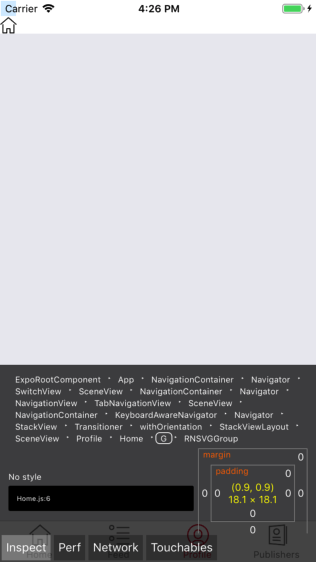
Also, using the react native inspector, when I click on the icon, the highlighted area of the icon is definitely not in place.
Prefinem
on 11 Nov 2018
Can you try? https://github.com/react-native-community/react-native-svg/commit/2f513504d21a8138ac851784b3b110ccb8cceb3a
It seems to have the touchable highlights in the inspector showing correctly.
msand
on 8 Dec 2018
I think I have (gesture) interactions between native animated transforms and normal svg transforms working correctly now as well: https://github.com/react-native-community/react-native-svg/commit/8c05da043dea3f8d04420c2d7c9c11733e22258b
msand
on 9 Dec 2018
like @folofse overflow:'hidden' is work, but i can't find reasons, maybe it solves my problem, My svg icon just wants it to display, I don't want it to have click events;
 gcloudspider
on 11 Dec 2018
gcloudspider
on 11 Dec 2018
Published a new version (v8.0.10) with fixes for press and gesture / pan handling for both iOS and Android.
msand
on 11 Dec 2018
- Is a repro still needed?
- I am using Expo
31.0.2, can I somehow upgradereact-native-svgto8.0.10?
 alamothe
on 26 Dec 2018
alamothe
on 26 Dec 2018
If you have a repro showing unexpected behavior with the latest version then that is much appreciated. Can't really upgrade native dependencies in expo without ejecting, by design of expo.
msand
on 26 Dec 2018
@dwilt I'm noticing the same issue and it also happens to be the right-most SVG element that appears to be collecting the other touch events. The suggested wrapper View with overflow: hidden solves the issue.
 taylorkearns
on 21 Jan 2019
taylorkearns
on 21 Jan 2019
+1 on @dwilt solution with View and overflow: hidden - glad I found this after upgrading from Expo 30.0.0 to 32.0.0
 hesselberg
on 22 Jan 2019
hesselberg
on 22 Jan 2019
I have been watching this issue since the very first day. The overflow: hidden solution cannot fix my app because I have a rather complex SVG consists of different callbacks for each inner <G> elements. I have no choice but to find the solution myself tonight.
In the past few hours, I constantly compare the hitTest:withEvent: result between iOS 10 and 12. I found that in iOS 12, one of the RNSVGGroup incorrectly returns itself during the hitTest:withEvent: so that the callback in onPressIn is invoked even when the click is out of bound.
Eventually, I found the bug actually is from Apple which is also discovered by the community here:
https://stackoverflow.com/questions/54026261/cgpathcontainspoint-broken-in-ios-12-is-a-workaround-possible
The problem is that after all the checking in the subviews of the RNSVGGroup, it further checks itself with all the path of its subviews combined using CGPathContainsPoint() in RNSVGRenderabl*. At that point, even though all the subviews return nil in hit testing (i.e., the point is out of the bounding box of all path combined inside the group), the combined CGPath will then hit the bug of CGPathContainsPoint() that it would return TRUE and hence some RNSVGGroup incorrectly passed the hit testing.
I tried to follow the solution in SO (duplicating the move point) but seems no luck.
The temporary solution is to comment out the self-checking part in RNSVGGroup.m near line 201 inside hitTest:withEvent::
//    UIView *hitSelf = [super hitTest:transformed withEvent:event];
//    if (hitSelf) {
//        return hitSelf;
//    }
This may introduce a performance impact but this temporary solution may fix the touch behaviour of listening to multiple elements inside your SVG. Ultimately, it is better to find the workaround to the bug of CGPathContainsPoint().
Here is the SVG Example that works perfectly in iOS 11 or before since very early version and I cannot fix it by simply applying overflow: hidden in iOS 12: (p3 and p2 are different callbacks)
      <Svg viewBox="0 0 840 450" preserveAspectRatio="xMidYMid" height="315" width="580">
        <G id="court-group">
          <Rect delayPressIn={0} onPressIn={p3} id="court" x="0.1" y="-0.2" fill="#BA7300" stroke="black" strokeWidth="3" width="840" height="450" />
          <Path delayPressIn={0} onPressIn={p3} id="path6321" fill="#BA7300" stroke="black" strokeWidth="6" d="M420,279c-29.8,0-54-24.2-54-54s24.2-54,54-54c0,0,0,0,0,0c29.8,0,54,24.2,54,54
            S449.8,279,420,279C420,279,420,279,420,279z"/>
          <Path delayPressIn={0} onPressIn={p3} id="path8093" fill="none" stroke="black" strokeWidth="3" d="M420-4.5c0,459,0,459,0,459" />
        </G>
        <G id="left-circle-group">
          <Path delayPressIn={0} onPressIn={p2} id="left-circle" fill="#BA7300" stroke="black" strokeWidth="3" d="M0,412.5v-375c0,0,0,0,48,0c103.5,0,187.5,84,187.5,187.5S151.5,412.5,48,412.5
            C0,412.5,0,412.5,0,412.5" />
          <Path delayPressIn={0} onPressIn={p2} id="path2770" fill="none" stroke="black" strokeWidth="3" d="M-0.5,135c0,0,0,0,174.5,36c0,108,0,108,0,108C0.5,315,0.5,315,0.5,315" />
          <Path delayPressIn={0} onPressIn={p2} id="path3664" fill="none" stroke="black" strokeWidth="6" d="M174.5,171c29.8,0,54,24.2,54,54s-24.2,54-54,54" />
          <G id="g19662" transform="translate(5.99996,4)">
            <Path delayPressIn={0} onPressIn={p2} id="path14344" fill="none" stroke="white" strokeWidth="20" d="M40.5,226.5c-3,0-5.5-2.5-5.5-5.5c0-3,2.5-5.5,5.5-5.5S46,218,46,221
              C46,224,43.5,226.5,40.5,226.5z"/>
            <Path delayPressIn={0} onPressIn={p2}  id="path17888" fill="none" stroke="white" strokeWidth="3" d="M30,247c0-52,0-52,0-52" />
            <Path delayPressIn={0} onPressIn={p2}  id="path18775" fill="none" stroke="white" strokeWidth="3" d="M36,221c-5,0-5,0-5,0" />
          </G>
          <Path delayPressIn={0} onPressIn={p2} id="path19675" fill="none" stroke="black" strokeWidth="6" strokeDasharray={[10, 10]} d="M172.5,171c-29.8,0-54,24.2-54,54s24.2,54,54,54" />
          <Path delayPressIn={0} onPressIn={p2} id="path22334" fill="none" stroke="black" strokeWidth="3" d="M51,305.5c1,3,1,3,1,3" />
          <Path delayPressIn={0} onPressIn={p2} id="path22342" fill="none" stroke="black" strokeWidth="3" d="M89.1,299.5c-12.1,2.4-12.1,2.4-12.1,2.4" />
          <Path delayPressIn={0} onPressIn={p2} id="path23233" fill="none" stroke="black" strokeWidth="3" d="M111.5,293.5c1,3,1,3,1,3" />
          <Path delayPressIn={0} onPressIn={p2} id="path23235" fill="none" stroke="black" strokeWidth="3" d="M136.5,288.5c1,3,1,3,1,3" />
          <Path delayPressIn={0} onPressIn={p2} id="path24134" fill="none" stroke="black" strokeWidth="3" d="M51,144.5c1-3,1-3,1-3" />
          <Path delayPressIn={0} onPressIn={p2} id="path24136" fill="none" stroke="black" strokeWidth="3" d="M89.1,150.9c-12.1-2.4-12.1-2.4-12.1-2.4" />
          <Path delayPressIn={0} onPressIn={p2} id="path24138" fill="none" stroke="black" strokeWidth="3" d="M111.5,156.5c1-3,1-3,1-3" />
          <Path delayPressIn={0} onPressIn={p2} id="path24140" fill="none" stroke="black" strokeWidth="3" d="M136.5,162c1-3,1-3,1-3" />
        </G>
        <G id="right-circle-group">
          <Path delayPressIn={0} onPressIn={p2} id="right-circle" fill="#BA7300" stroke="black" strokeWidth="3" d="M840,412.5v-375c0,0,0,0-48,0c-103.5,0-187.5,84-187.5,187.5s84,187.5,187.5,187.5
            C840,412.5,840,412.5,840,412.5" />
          <Path delayPressIn={0} onPressIn={p2} id="path24184" fill="none" stroke="black" strokeWidth="3" d="M840.5,135c0,0,0,0-174.5,36c0,108,0,108,0,108c173.5,36,173.5,36,173.5,36" />
          <Path delayPressIn={0} onPressIn={p2} id="path24186" fill="none" stroke="black" strokeWidth="6" d="M665.5,171c-29.8,0-54,24.2-54,54s24.2,54,54,54" />
          <G id="g24188" transform="matrix(1,0,0,-1,5.99996,840)">
            <Path delayPressIn={0} onPressIn={p2} id="path24190" fill="none" stroke="white" strokeWidth="20" d="M787.5,609.5c3,0,5.5,2.5,5.5,5.5c0,3-2.5,5.5-5.5,5.5c-3,0-5.5-2.5-5.5-5.5
              C782,612,784.5,609.5,787.5,609.5z"/>
            <Path delayPressIn={0} onPressIn={p2} id="path24192" fill="none" stroke="white" strokeWidth="3" d="M798,589c0,52,0,52,0,52" />
            <Path delayPressIn={0} onPressIn={p2} id="path24194" fill="none" stroke="white" strokeWidth="3" d="M792,615c5,0,5,0,5,0" />
          </G>
          <Path delayPressIn={0} onPressIn={p2} id="path24196" fill="none" stroke="black" strokeWidth="6" strokeDasharray={[10, 10]} d="M667.5,171c29.8,0,54,24.2,54,54s-24.2,54-54,54" />
          <Path delayPressIn={0} onPressIn={p2} id="path24198" fill="none" stroke="black" strokeWidth="3" d="M789,305.5c-1,3-1,3-1,3" />
          <Path delayPressIn={0} onPressIn={p2} id="path24200" fill="none" stroke="black" strokeWidth="3" d="M750.9,299.5c12.1,2.4,12.1,2.4,12.1,2.4" />
          <Path delayPressIn={0} onPressIn={p2} id="path24202" fill="none" stroke="black" strokeWidth="3" d="M728.5,293.5c-1,3-1,3-1,3" />
          <Path delayPressIn={0} onPressIn={p2} id="path24204" fill="none" stroke="black" strokeWidth="3" d="M703.5,288.5c-1,3-1,3-1,3" />
          <Path delayPressIn={0} onPressIn={p2} id="path24206" fill="none" stroke="black" strokeWidth="3" d="M789,144.5c-1-3-1-3-1-3" />
          <Path delayPressIn={0} onPressIn={p2} id="path24208" fill="none" stroke="black" strokeWidth="3" d="M750.9,150.9c12.1-2.4,12.1-2.4,12.1-2.4" />
          <Path delayPressIn={0} onPressIn={p2} id="path24210" fill="none" stroke="black" strokeWidth="3" d="M728.5,156.5c-1-3-1-3-1-3" />
          <Path delayPressIn={0} onPressIn={p2} id="path24212" fill="none" stroke="black" strokeWidth="3" d="M703.5,162c-1-3-1-3-1-3" />
        </G>
      </Svg>
I put the fix to a branch of a forked repo: https://github.com/alexlau811/react-native-svg/tree/fix-ios12-touch-bug
 alexlau811
on 7 Feb 2019
alexlau811
on 7 Feb 2019
@alexlau811 Great work! So, it seems it would be enough to calculate the bounding box in the setHitArea method, and use that as an early condition to return false in the hitTest. As the bounding box calculation seems to work where CGPathContainsPoint has bugs. This should also speed up the cases where the touch events aren't even intersecting the bounds. I suspect your current workaround probably breaks touch handlers on G elements.
msand
on 7 Feb 2019
@alexlau811 Can you try this fix? https://github.com/react-native-community/react-native-svg/commit/fa07f6ef8a340f855a5db720c70ce0bd5d10839d
msand
on 8 Feb 2019
@msand Amazing! This perfectly fixes the bug. The touch works perfectly with my SVG on iOS 12 with your fix. 👏🏻👏🏻👏🏻 Thanks a lot!
alexlau811
on 8 Feb 2019
Published v9.2.4 with the fixes. Thanks for your help!
msand
on 9 Feb 2019
Related issues
 tavrez
·
34Comments
tavrez
·
34Comments
 ryanhomer
·
35Comments
ryanhomer
·
35Comments
 prashantchothani
·
33Comments
prashantchothani
·
33Comments
 marzolfb
·
58Comments
marzolfb
·
58Comments
 jskidd3
·
33Comments
jskidd3
·
33Comments
Most helpful comment
I've figured out a workaround for the time being. All of our icons inherit a base
Iconcomponent and I wrapped theSVGin aViewand gave it pointerEvents='none'