React-native-permissions: iOS 14: LOCATION_WHEN_IN_USE and LOCATION_ALWAYS not working
Bug report
Summary
In iOS 14, LOCATION_WHEN_IN_USE and LOCATION_ALWAYS permission not working properly. It can requestable but nothing comes back from the permission side. I cannot check whether or not permission is given.
Environment info
react-native info output:
System:
    OS: macOS 10.15.6
    CPU: (12) x64 Intel(R) Core(TM) i7-8850H CPU @ 2.60GHz
    Memory: 64.89 MB / 16.00 GB
    Shell: 5.7.1 - /bin/zsh
  Binaries:
    Node: 10.15.3 - /usr/local/bin/node
    Yarn: 1.22.5 - /usr/local/bin/yarn
    npm: 6.14.7 - /usr/local/bin/npm
    Watchman: 4.9.0 - /usr/local/bin/watchman
  SDKs:
    iOS SDK:
      Platforms: iOS 14.0, DriverKit 19.0, macOS 10.15, tvOS 14.0, watchOS 7.0
    Android SDK:
      Android NDK: 20.1.5948944
  IDEs:
    Android Studio: 3.5 AI-191.8026.42.35.6010548
    Xcode: 12.0/12A7209 - /usr/bin/xcodebuild
  npmPackages:
    react: 16.12.0 => 16.12.0
    react-native: 0.61.5 => 0.61.5
  npmGlobalPackages:
    react-native-asset: 2.0.0
    react-native-create-library: 3.1.2
    react-native-git-upgrade: 0.2.7
    react-native-rename: 2.4.1
    react-native: 0.59.10
Library version: 2.2.0
Steps to reproduce
Simpy run the code segment:
 request(PERMISSIONS.IOS.LOCATION_WHEN_IN_USE).then((result) => {
    if (result === RESULTS.BLOCKED) showSettingsAlert(type);
    return result;
  });
Describe what you expected to happen:
- Get the permission is granted or not.
 WrathChaos
All 25 comments
Tested on iOS 14 right now without any issue:

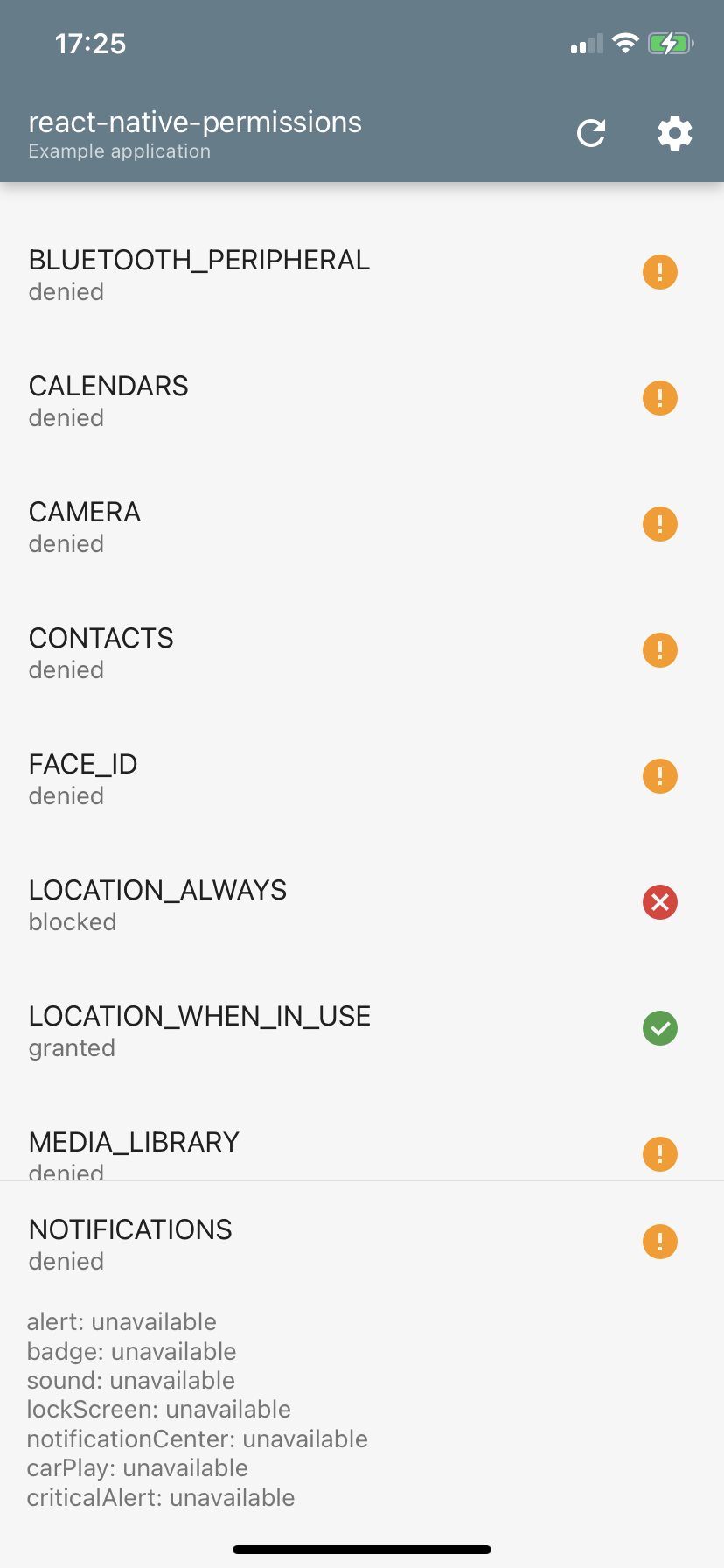
Are you tried to cleanup your build artifacts before recompiling for iOS 14?
 zoontek
on 21 Sep 2020
zoontek
on 21 Sep 2020
Tested on iOS 14 right now without any issue:
Are you tried to cleanup your build artifacts before recompiling for iOS 14?
I will cleanup and re-try. If it still not works, I will share a minimal repo with you. Thank you so much for the quick reply. Really need this to work :)
WrathChaos
on 21 Sep 2020
@zoontek,
It works great on real devices but on the iOS 14 with the latest XCode (Currently 12.0) not working well. The request modal closes extremely fast therefore, it cannot be pressable. I was able to press it one or two times within so many trials.
I just closed the issue but there is a problem on the Simulator tho. (Only on Location requests)
Thank you for the support @zoontek :)
WrathChaos
on 22 Sep 2020
@zoontek, Actually it really kills the development process when the location permission cannot be accepted or even rejected. Can you test it out on your side in the latest simulator? @zoontek
WrathChaos
on 22 Sep 2020
@WrathChaos I didn't tried the latest simulator, but barely use it because of all the quirks it currently have.
zoontek
on 22 Sep 2020
I have tested on both Simulator and real device with iOS 14 and I can confirm that is not working 😢
 IronTony
on 22 Sep 2020
IronTony
on 22 Sep 2020
I have tested on both Simulator and real device with iOS 14 and I can confirm that is not working 😢
It works on the real device from my side but completely not working on simulator :(
WrathChaos
on 22 Sep 2020
@WrathChaos can you please post your configuration or similar? I cannot set ALWAYS using the package
IronTony
on 22 Sep 2020
@IronTony Did you tried the example project?
zoontek
on 22 Sep 2020
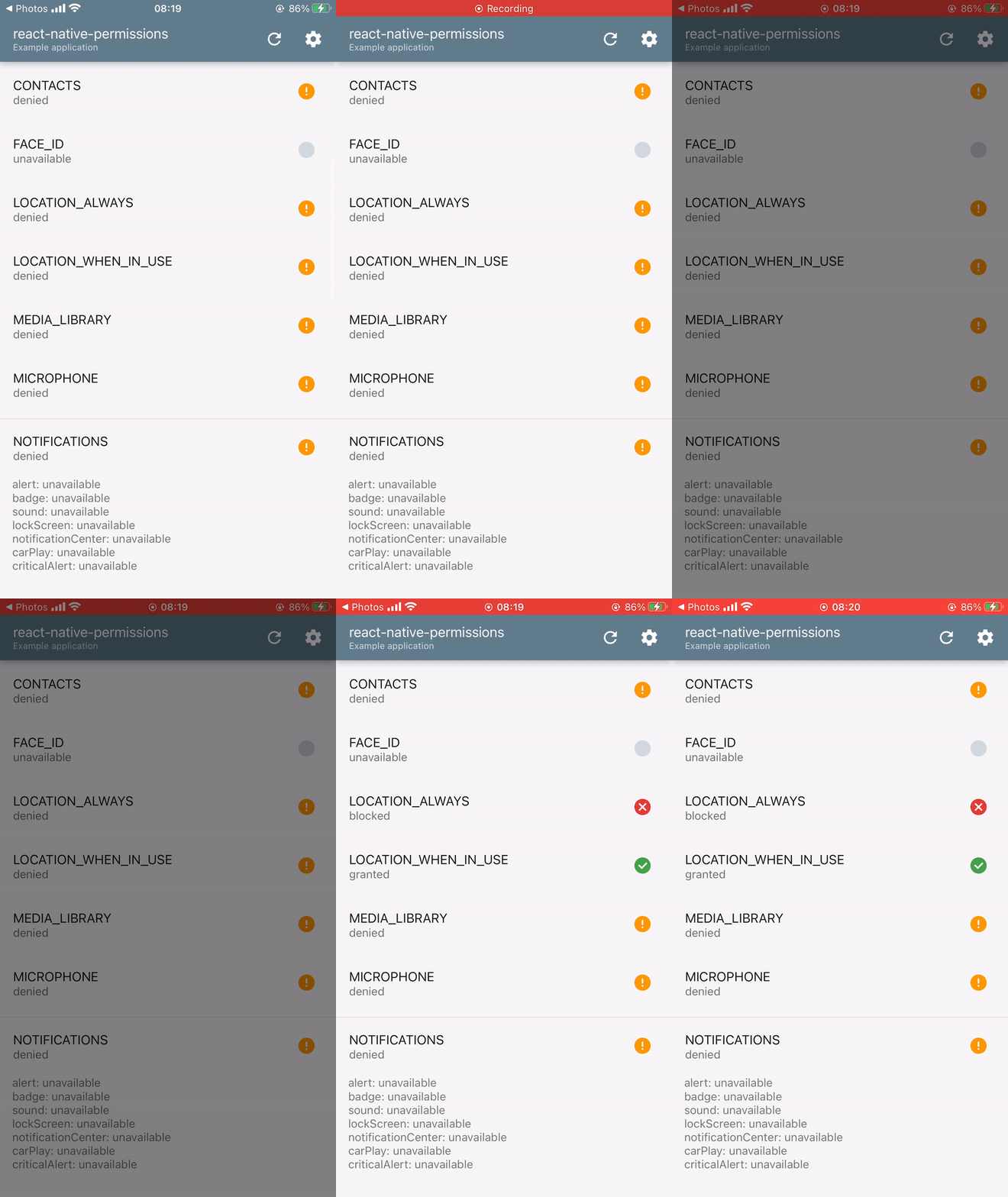
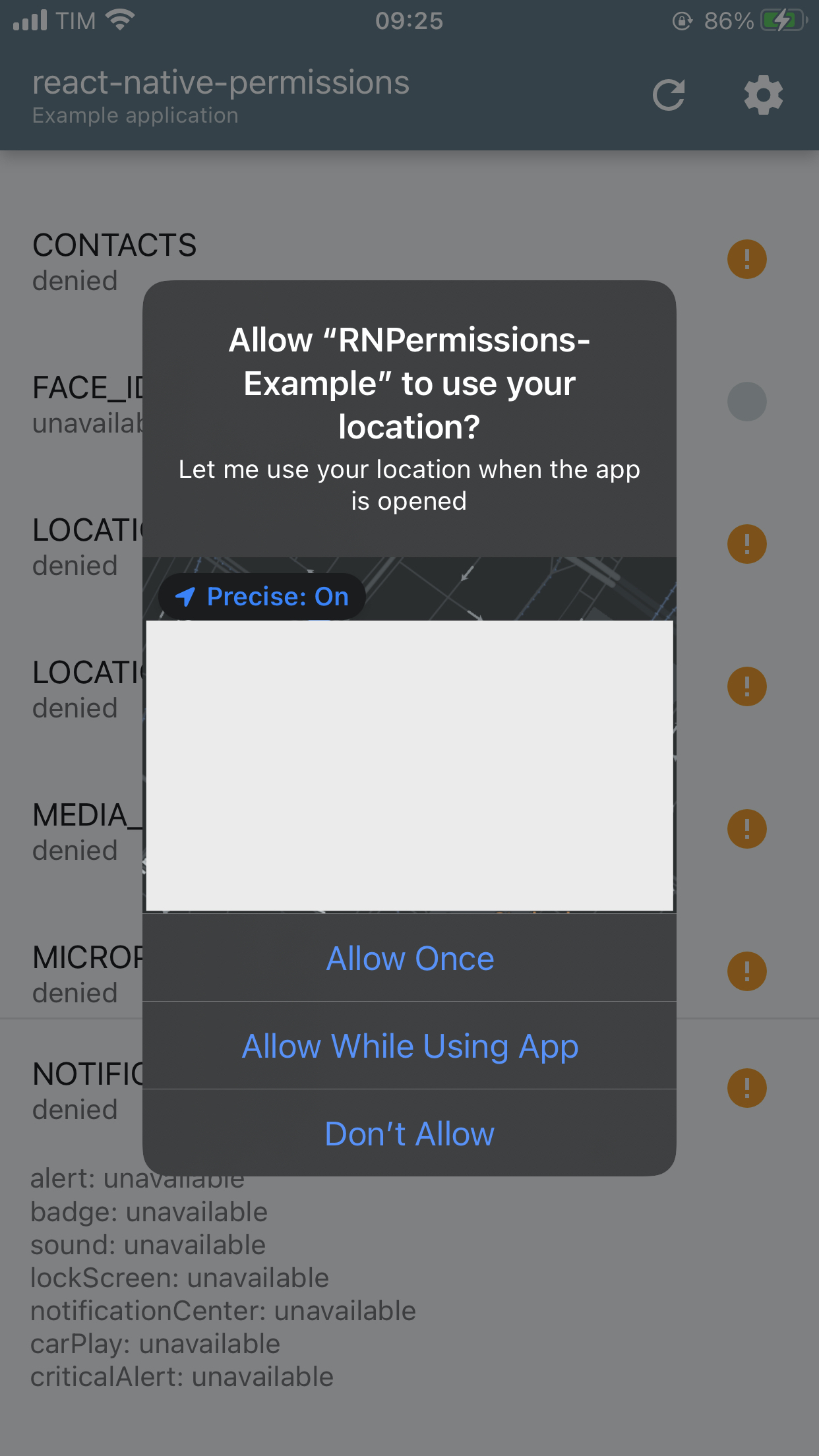
@zoontek Yes on a real device. Unfortunately it doesn't ask for "Always" in the location, as you can see (unfortunately it doesn't record the popup).
Small clip:
In the popup I can see this:
IronTony
on 23 Sep 2020
@WrathChaos can you please post your configuration or similar? I cannot set ALWAYS using the package
Yep it does not even work for ALWAYS one but it does work with WHEN_IN_USE on real device.
WrathChaos
on 23 Sep 2020
@zoontek I found something strange while debugging on real iOS14 device.
I am asking these permissions:
[PERMISSIONS.IOS.LOCATION_ALWAYS, PERMISSIONS.IOS.LOCATION_WHEN_IN_USE, PERMISSIONS.IOS.MOTION]
The package opens this
And if I press Allow While Using App (because there is no Always) I see these permissions from debugger:
{ios.permission.LOCATION_ALWAYS: "granted", ios.permission.LOCATION_WHEN_IN_USE: "unavailable", ios.permission.MOTION: "granted"}
but my settings on the iPhone tells me something different:

IronTony
on 24 Sep 2020
@IronTony First, you don't need to ask for PERMISSIONS.IOS.LOCATION_ALWAYS and PERMISSIONS.IOS.LOCATION_WHEN_IN_USE, only one of them.
Secondly, this behavior is "normal" on iOS (that might sound silly 😅). Check some Apple docs:
When you request an always permission, iOS will display Allow While Using App / Allow Once / Don’t Allow
👉 If you choose Allow While Using App, a Provisional Always permission will be granted. Programmatically, we receive CLAuthorizationStatus.authorizedAlways. The user will see "While Using" in settings, and later will be prompted that your app is using his location in background:

👉 If you choose Allow Once, a When in use permission will be granted. If you restart the app, the permission will be requestable again.
zoontek
on 26 Sep 2020
Regarding the issue, I did a massive Xcode cleanup (trashed the DerivedData directory), and I am unable to reproduce the immediately closing permission popup after that, on device and on simulator.
Everything seems to works correctly (even if the notion of correctness given by Apple is super weird)

zoontek
on 26 Sep 2020
Regarding the issue, I did a massive Xcode cleanup (trashed the
DerivedDatadirectory), and I am unable to reproduce the immediately closing permission popup after that, on device and on simulator.
Everything seems to works correctly (even if the notion of correctness given by Apple is super weird)
I will make a reproducible example for you this weekend.
WrathChaos
on 26 Sep 2020
@zoontek thank you so much for the explanation and sorry if I didn't write suddenly. I read the Apple Docs yesterday and yes it is silly.
Really appreciated your explanation.
Thank you so much also for the hint about the requests permissions
IronTony
on 26 Sep 2020
@zoontek, I've found the problem. It's all my fault. My business logic breaks the react-native-permissions. I was also using react-native-gps-state for better handling but it breaks the request modal. I removed the gps-state logic and it works like a charm!
Thank you so much @zoontek. Awesome work!
WrathChaos
on 29 Sep 2020
@IronTony First, you don't need to ask for
PERMISSIONS.IOS.LOCATION_ALWAYSandPERMISSIONS.IOS.LOCATION_WHEN_IN_USE, only one of them.Secondly, this behavior is "normal" on iOS (that might sound silly 😅). Check some Apple docs:
* https://developer.apple.com/documentation/corelocation/cllocationmanager/1620551-requestalwaysauthorization#3578736When you request an
alwayspermission, iOS will displayAllow While Using App/Allow Once/Don’t Allow👉 If you choose
Allow While Using App, aProvisional Alwayspermission will be granted. Programmatically, we receiveCLAuthorizationStatus.authorizedAlways. The user will see "While Using" in settings, and later will be prompted that your app is using his location in background:
👉 If you choose
Allow Once, aWhen in usepermission will be granted. If you restart the app, the permission will be requestable again.
This, this should really stand somewhere in the docs. That could have saved me some complicated logic and headache how to handle these two requests ;)
 Stophface
on 11 Feb 2021
Stophface
on 11 Feb 2021
@Stophface in "open source" the word "should" is best re-written as "here's a link to the PR" :-), the documents are open source and you could propose a change to them using the github web flow easily, exactly where developers need to see them since you just went through the process you probably have a perfect perspective on that
 mikehardy
on 11 Feb 2021
mikehardy
on 11 Feb 2021
@mikehardy Working on it
Stophface
on 11 Feb 2021
@zoontek I have edited the README according to this #566. I cloned the project, made a new branch. But I am not allowed to push to your repository. I also have the updated README in a clone of the repository in my git https://github.com/Stophface/react-native-permissions. Do you want to include it?
Stophface
on 11 Feb 2021
@Stophface you can open a new Pull Request from your cloned repo then @zoontek can review and push it on official repo.
WrathChaos
on 12 Feb 2021
@WrathChaos I am not sure how to open a Pull Request from my Repo. I cannot choose this Repo..
Stophface
on 12 Feb 2021
@Stophface

Fork the project, make the difference, commit and push the code on your forked repo and then come to this screen. You should see your repo/branch in this part.
WrathChaos
on 12 Feb 2021
@WrathChaos I have not worked with Github in quite a while and did not find the fork button.
https://github.com/zoontek/react-native-permissions/pull/568
Stophface
on 12 Feb 2021
Related issues
 jessiealbarian
·
43Comments
jessiealbarian
·
43Comments
 al-shivani
·
25Comments
al-shivani
·
25Comments
 roaringUnicorn
·
17Comments
roaringUnicorn
·
17Comments
 tallpants
·
26Comments
tallpants
·
26Comments
 Daavidaviid
·
18Comments
Daavidaviid
·
18Comments
Most helpful comment
@IronTony First, you don't need to ask for
PERMISSIONS.IOS.LOCATION_ALWAYSandPERMISSIONS.IOS.LOCATION_WHEN_IN_USE, only one of them.Secondly, this behavior is "normal" on iOS (that might sound silly 😅). Check some Apple docs:
When you request an
alwayspermission, iOS will displayAllow While Using App/Allow Once/Don’t Allow👉 If you choose
Allow While Using App, aProvisional Alwayspermission will be granted. Programmatically, we receiveCLAuthorizationStatus.authorizedAlways. The user will see "While Using" in settings, and later will be prompted that your app is using his location in background:👉 If you choose
Allow Once, aWhen in usepermission will be granted. If you restart the app, the permission will be requestable again.